
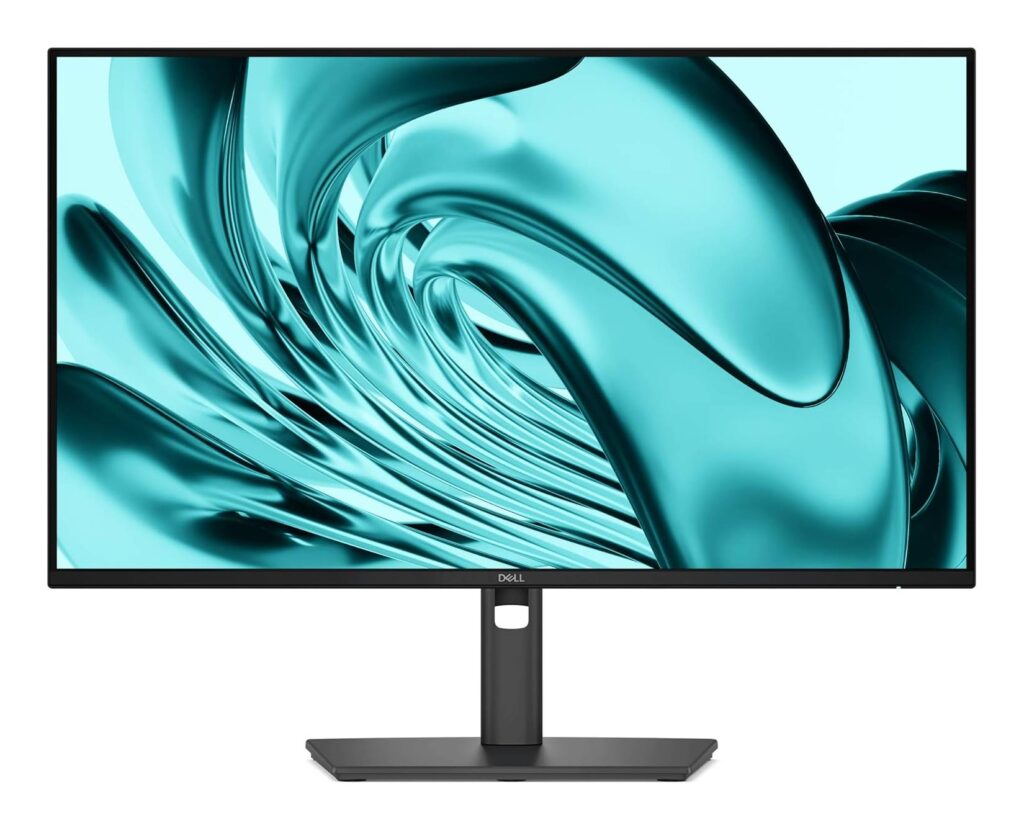
Dell Pro P 24 P2426H: Specs, Price, Pros & Cons
Dell's office monitors change slowly, and the P2426H shows how: nothing about its purpose is new, but almost every small figure on the sheet moved in the right direction, and one decision about where the ports go changes how it lives on a desk.
It is a Full HD IPS monitor from the Pro P line, the renamed successor to the long-running P series that fills corporate floors by the pallet. Its predecessor on our site is the Dell P2425H, and from the front the two are nearly indistinguishable. If you are buying today this is the one to look at, because Dell tidied the refresh rate, the brightness and the DisplayPort revision and left the rest alone.
The interesting change is on the bottom bezel. Two USB-C ports sit under the screen, facing the user, where a phone cable or a USB stick goes in without anyone reaching behind the stand. They are hub ports that top up small devices, not a way to connect a laptop, and that distinction is the one most likely to catch out a buyer who sees USB-C on the box.
The other limitation is resolution. Full HD at this size is perfectly readable for email, documents and web apps, but people who live in wide spreadsheets or keep two documents side by side will find far more room on a 1440p panel of the same size.
It sits in the price band where office monitors are bought in fives and tens, and its real selling points, a stand that adjusts every way, eye-comfort certification and Dell's exchange warranty, matter more to whoever runs the IT budget than to anyone looking for a gaming screen.
Category strengths
Where the Dell Pro P 24 P2426H trails the median
- No USB-C ?
- A lower pixel density ?93 ppi vs 140 ppi (median)
- Lower peak brightness ?300 nits vs 375 nits (median)
- A lower contrast ratio ?1500:1 vs 2000:1 (median)
- A smaller screen ?23.8" (60.45 cm) vs 27" (68.58 cm) (median)
- A lower color depth ?8 bit vs 10 bit (median)
How this VS Score was computed
Score 37: each known spec is measured against the median of IPS office monitors (14 products), then weighted; 50 means level with that median. In classes of six or more, a value beyond the class’s 10th–90th percentile range counts as that limit, so one extreme product cannot set the scale. 50% of the scoreable weight could be used; unknown values, features not applicable to this class and proxies (battery capacity where a rated life exists) add or remove nothing.
| Specification | This product | Cohort median | Score weight | Points moved |
|---|---|---|---|---|
| Resolution | 1080p | 4K | 1.2 | −30.0 |
| USB-C | No | 64% of the class have it | 0.5 | −24.0 |
| Ethernet | No | 42% of the class have it | 0.2 | −9.6 |
| Pixel density | 93 | 140 | 0.5 | −8.5 |
| Peak brightness | 300 | 375 | 0.8 | −8.0 |
| Screen size | 23.8 | 27 | 1.2 | −7.2 |
| Contrast ratio | 1,500 | 2,000 | 0.6 | −7.2 |
| Color depth | 8 | 10 | 0.3 | −3.0 |
| Panel type | IPS | IPS | 0.8 | +0.0 |
| Refresh rate | 120 | 120 | 0.6 | +0.0 |
| Response time | 5 | 5 | 0.24 | +0.0 |
| HDMI ports | 1 | 1 | 0.4 | +0.0 |
| DisplayPort inputs | 1 | 1 | 0.4 | +0.0 |
Not scored: DCI-P3 coverage (unknown: not scored); HDR (unknown: not scored); Local dimming (unknown: not scored); Local dimming zones (unknown: not scored); Adaptive sync (unknown: not scored); Variable refresh rate (unknown: not scored); Motion blur reduction (unknown: not scored); Input lag (unknown: not scored); Height adjustment (standard for the class (93% have it)); Tilt (standard for the class (100% have it)); Swivel (standard for the class (86% have it)); Pivot (standard for the class (83% have it)); USB-C power delivery (unknown: not scored); USB hub (standard for the class (86% have it)); Built-in speakers (unknown: not scored); Headphone output (unknown: not scored); KVM switch (unknown: not scored); Webcam (not applicable: only 10% of this class have it); Microphone (unknown: not scored); Picture-by-picture (unknown: not scored).
Editor’s note
On paper this is the dullest monitor category there is: the P2426H is built to be set up once and forgotten, and most of what makes it good is invisible in a product photo.
The stand is the first thing I would point to. Height, tilt, swivel and pivot are all there, which is still not a given at this price, and it is what makes a screen comfortable for a full working day without a stack of books under it. The panel is a sensible matte IPS, and the move to 120 Hz is not about gaming. It makes scrolling long documents and dragging windows visibly smoother than on the 60 Hz office screens many companies still run.
The compromises are worth knowing. The panel is 6-bit with FRC rather than native 8-bit, which is irrelevant for office work and a reason photo editors should look elsewhere. Brightness is rated at 300 nits, fine under office lighting and unremarkable beside a sunny window. The HDMI input is version 1.4, which Dell says still reaches the full refresh rate at this resolution, so it is a spec-sheet oddity with no practical cost. And the front USB-C ports charge at 15 W: enough for a phone or earbuds, nowhere near a laptop.
For me the decision comes down to cabling. If you plug a laptop in and out several times a day, a monitor that carries video and power over one USB-C cable is worth paying more for, and this is not that monitor. If it hangs off a desktop PC or a dock, the P2426H is the tidier, newer choice, and Dell's three-year Advanced Exchange warranty is a real advantage over cheaper brands on the day a panel fails.
Specifications
Quality bars show where each figure sits between the lowest and highest of the 14 IPS office monitors this VS Score is measured against.
Picture
Gaming
Ergonomics & design
Connectivity
Features
Sources and verification
Where the specifications come from
- Official product pagedell.com
- Retailer listing (cross-check)amazon.com
Verification
- First published
- Specifications last checked
- Sheet completeness
- 26 of 42 specifications verified; the rest show as Unknown and are never estimated or scored
- Page type
- Product specification page — Compiled from the manufacturer’s published specifications and the cited sources; this is not a hands-on test.
- Basis
- Research-based: specifications and editorial text were compiled from the documents listed here and the manufacturer’s published data. We have not tested this unit ourselves; where independent measurements are mentioned they belong to the linked publication.
Where to buy
Prices and availability may change. Check the retailer before buying. We may earn a commission on purchases.
Price history
Monitors with similar specs to the Dell Pro P 24 P2426H

Ratings & reviews
No reviews yet. Be the first to share your experience.
The bottom line
The Dell Pro P 24 P2426H earns a VS Score of 37, below the median of the 14 IPS office monitors it is measured against (a score of 50 is level with that median).
- Who it’s for
- Offices and home workers running a desktop PC or a dock who want a fully adjustable, low-fuss Full HD screen with a couple of front-facing ports for a phone or a USB stick.
- Who should look elsewhere
- Laptop owners hoping for one-cable video and charging, since there is no USB-C input, and anyone who works in very wide spreadsheets or edits photos, who needs a sharper, better-calibrated panel.
- The trade-off that matters
- It keeps the cabling of an older office monitor: the convenient front ports serve accessories only, so a laptop still needs a video cable plus an upstream USB cable before those ports do anything.
- The main alternative
- Dell P2425H: the model it replaces. On clearance for noticeably less, it does the same office job with a slower refresh and no front USB-C ports.
The VS Score is calculated from the weighted specifications above, each measured against the median of comparable IPS office monitors — a shortlisting guide, not a substitute for your own priorities. See how we score.




