Brother HL-L3280CDW: Specs, Features, Pros & Cons
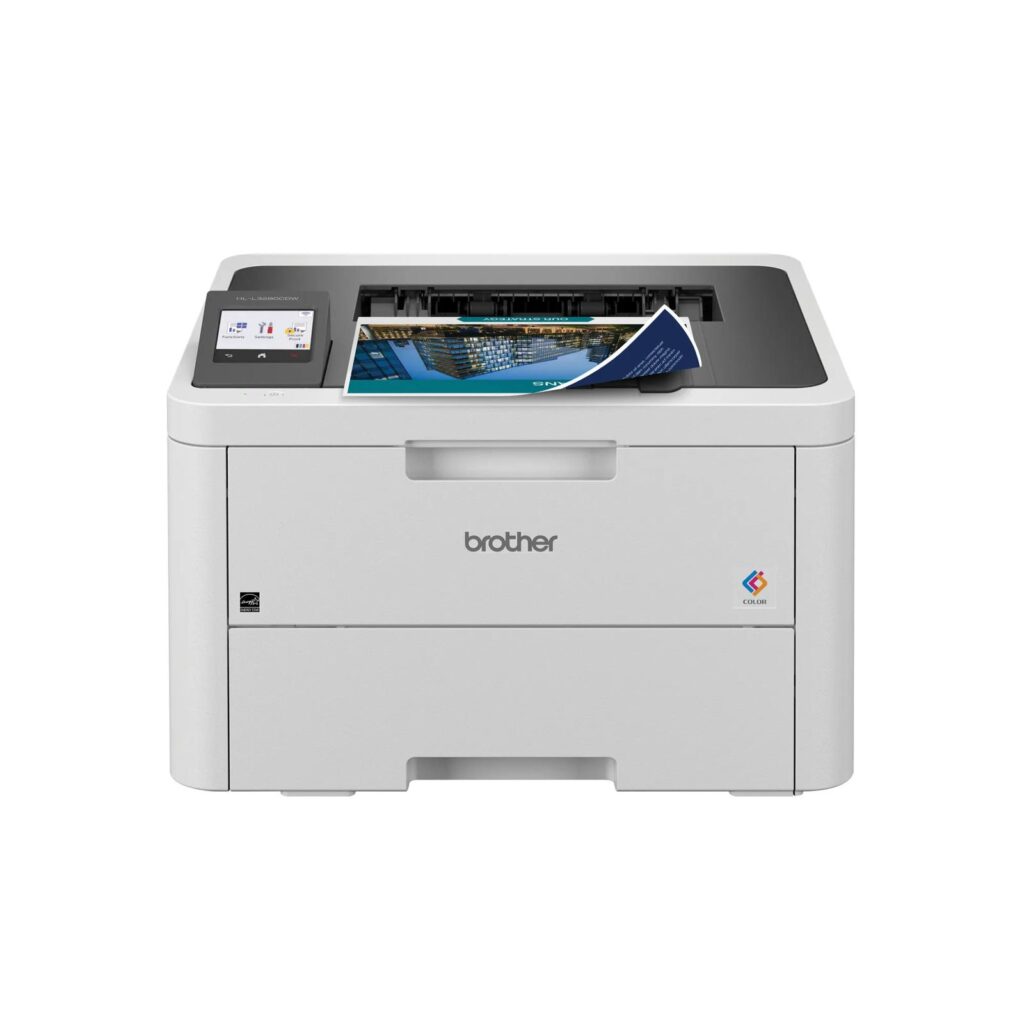
Most color lasers this size are all-in-ones, so the first thing to understand about the HL-L3280CDW is what it deliberately leaves out. There is no scanner, no copier and no fax, just printing. If you already have a scanner, or never scan, that omission buys you a smaller and simpler machine than the equivalent multifunction.
What it does do, it does at one consistent speed. Color and black pages both come out at the same rated pace, which is not true of every printer in this bracket and is the single most useful thing on the sheet for anyone printing mixed documents. Automatic duplexing is standard, the resolution is the usual 2400 by 600 class, and the paper tray holds 250 sheets against a 150-sheet output tray, a mismatch worth knowing about if you print long jobs unattended.
Connectivity is unusually complete for a printer at this level. Gigabit ethernet, where a 100-megabit port often appears at this level, dual-band Wi-Fi covering both 2.4 and 5 GHz, Wi-Fi Direct, USB, and AirPrint and Mopria for phones. A 2.7-inch color touchscreen handles setup, which is a real convenience on a device with no computer attached.
The stated monthly ceiling is high for a machine of this size, though the recommended volume is a small fraction of it, and that gap is the honest measure of what it is built for.
The thing to check before buying is running cost, which this page cannot show. Color laser consumables are bought in fours, and the starter cartridges that ship in the box yield considerably less than the replacements do. The purchase price is not the number that will matter after the first year.
Category strengths
Where the Brother HL-L3280CDW beats the median
- A much higher print resolution ?2,400 dpi vs 1,200 dpi (median)
- Has touchscreen display ?
- A much higher output tray capacity ?150 sheets vs 100 sheets (median)
How this VS Score was computed
Score 59: each known spec is measured against the median of laser printers (5 products), then weighted. 49% of the scoreable weight could be used. See how we score
| Specification | This product | Cohort median | Score weight | Points moved |
|---|---|---|---|---|
| Color printing | Yes — held to half its range (fewer than six products in this class list it) | 60% of the class have it | 1.5 | +37.5 |
| Print resolution | 2,400 — held to half its range (fewer than six products in this class list it) | 1,200 | 0.5 | +12.5 |
| Touchscreen display | Yes — held to half its range (fewer than six products in this class list it) | 40% of the class have it | 0.5 | +12.5 |
| Output tray capacity | 150 | 100 | 0.3 | +7.5 |
| Print speed (black) | 27 | 27 | 2 | +0.0 |
| Print speed (color) | 27 | 27 | 1 | +0.0 |
| Monthly duty cycle | 40,000 | 40,000 | 0.3 | +0.0 |
| Input tray capacity | 250 | 250 | 1 | +0.0 |
| Weight | 15.4 | 15.4 | 0.3 | +0.0 |
Not scored: Automatic duplex printing (standard for the class (80% have it)); Supertank / refillable ink (not applicable: only 0% of this class have it); All-in-one (not scored for this class of product); Automatic document feeder (not scored for this class of product); ADF capacity (unknown: not scored); Duplex scanning (not scored for this class of product); Fax (not scored for this class of product); Wi-Fi (standard for the class (100% have it)); Wi-Fi Direct (standard for the class (100% have it)); Ethernet (standard for the class (80% have it)); USB (standard for the class (100% have it)); Apple AirPrint (standard for the class (80% have it)); Mobile app printing (standard for the class (100% have it)).
Editor’s note
Print-only color lasers occupy an odd niche, and I think this one earns it more clearly than most. The case for it is straightforward: if you do not need a scanner, buying a multifunction means paying for a mechanism you will not use, giving up desk space, and adding a component that can fail. A machine that only prints is a machine with less to go wrong.
The consistent color and mono speed is what I would value day to day. Plenty of color printers slow down noticeably when color appears on the page, which makes mixed documents unpredictable. This one does not, and for anyone producing reports or presentations that consistency is worth more than a higher headline figure would be.
My reservation is the output tray. Holding 150 sheets against a 250-sheet input means a full tray printed in one run will overflow, and duplexed jobs make that easier to hit than you would think. It is a small design meanness on an otherwise sensible machine.
Running costs deserve skepticism. The bundled toner is starter capacity, the drum, belt and waste toner box are all separately replaceable consumables with their own lifespans, and a four-color laser reaches a point where replacing everything approaches the value of the printer. Someone printing a few pages a week will do better with an ink tank model. The economics here only work if the machine gets steady use.
For a home office that prints steadily, needs color to look professional rather than photographic, and already owns a scanner, this is an easy recommendation. Against Brother's own MFC-L3780CDW, the only real question is whether you want the scanner. The printing side is much the same.
Specifications
Printing
Scanning & copying
Paper handling
Connectivity
Design
Sources and verification
Where the specifications come from
- Official product pagebrother-usa.com
Verification
- First published
- Specifications last checked
- Sheet completeness
- 23 of 24 specifications verified; the rest show as Unknown and are never estimated or scored
- Page type
- Product specification page — Compiled from the manufacturer’s published specifications and the cited sources; this is not a hands-on test.
- Basis
- Research-based: specifications and editorial text were compiled from the documents listed here and the manufacturer’s published data. We have not tested this unit ourselves; where independent measurements are mentioned they belong to the linked publication.
Printers with similar specs to the Brother HL-L3280CDW


Ratings & reviews
No reviews yet. Be the first to share your experience.
The bottom line
The Brother HL-L3280CDW earns a VS Score of 59, above the median of the 5 laser printers it is measured against (a score of 50 is level with that median).
- Who it’s for
- A home or small office that prints color documents regularly, already has a scanner, and will pay for gigabit ethernet and a touchscreen over the cheapest possible laser.
- Who should look elsewhere
- Anyone printing a handful of pages a month, or anyone who needs to scan. At that volume an ink tank machine costs less, and there is no scanner here at any price.
- The trade-off that matters
- Dropping the scanner buys a simpler, smaller and more reliable machine, but it also means this is a device you must pair with something else the moment a document needs digitizing.
- The main alternative
- Brother MFC-L3780CDW: essentially this printer with a scanner and document feeder added, and the obvious choice if you cannot guarantee you will never need to scan.
This page was created with the help of AI. How we work