
Xerox C240: Specs, Price, Pros & Cons
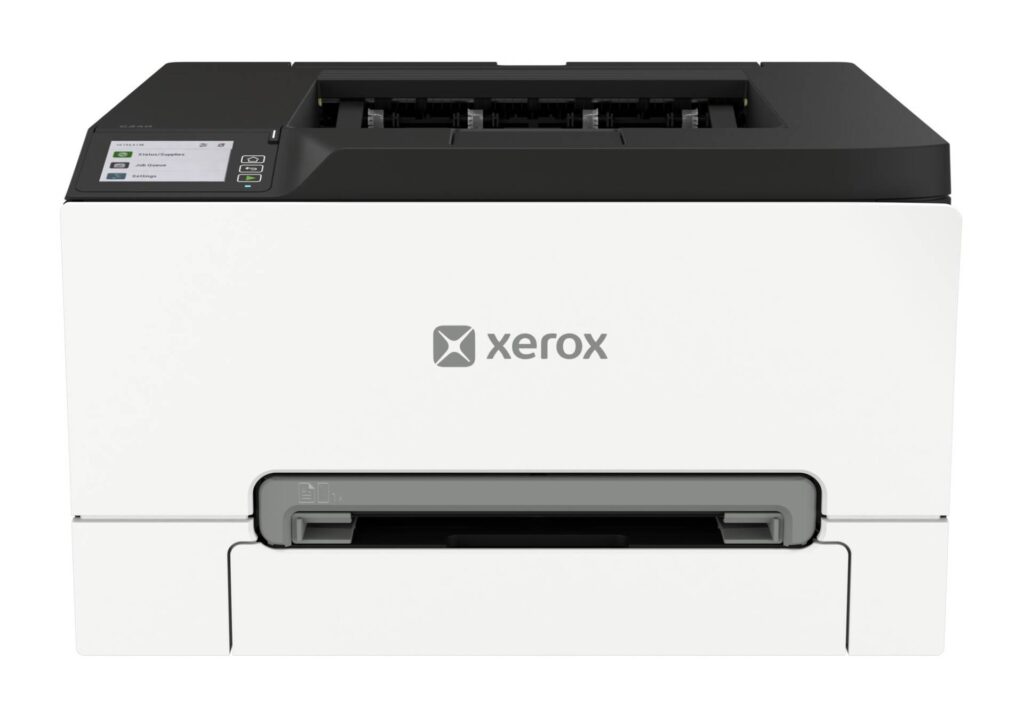
Print-only color lasers have become rare. Almost everything at this price is a multifunction unit with a scanner lid on top, because manufacturers assume a small office wants one box that does everything. The C240 is Xerox declining that assumption, and whether it is the right call depends almost entirely on whether you already own a scanner.
What the omission buys is footprint and focus. With no scanner assembly or document feeder stacked above it, the machine stays a squat rectangle that sits on a desk or a shelf without needing furniture of its own, and everything inside it is devoted to putting toner on paper.
The engine underneath is built for a small office. Color and black run at the same rated speed, which is unusual and matters a great deal if your work is mostly color. Duplexing is automatic, and the rated monthly volume is far beyond anything a household would approach. Connectivity covers wired and wireless networking alongside the mobile printing standards, so it joins a mixed office of Windows, Mac and Chromebook machines without a driver hunt.
Two things should temper expectations before you reach the table below. The print resolution is a document resolution: text, charts and diagrams come out crisp, while photographs look like laser prints. And the cartridges supplied in the box are starter units carrying a fraction of the yield of the replacements, so the true running cost arrives at the first reorder. Work that out before you compare it against a cheaper machine, because it changes the arithmetic considerably.
Category strengths
Where the Xerox C240 beats the median
- A much higher print speed (color) ?26 ppm vs 9 ppm (median)
- A much higher print speed (black) ?26 ppm vs 16 ppm (median)
- A much higher monthly duty cycle ?50,000 pages vs 10,000 pages (median)
- A much higher input tray capacity ?250 sheets vs 150 sheets (median)
- A much higher output tray capacity ?100 sheets vs 67.5 sheets (median)
Where the Xerox C240 trails the median
- No all-in-one ?
- No automatic document feeder ?
- A much lower print resolution ?600 dpi vs 4,800 dpi (median)
- A much heavier build ?16.3 kg vs 7.98 kg (median)
How this VS Score was computed
Score 54: each known spec is measured against the median of all printers (65 products), then weighted; 50 means level with that median. In classes of six or more, a value beyond the class’s 10th–90th percentile range counts as that limit, so one extreme product cannot set the scale. 70% of the scoreable weight could be used; unknown values, features not applicable to this class and proxies (battery capacity where a rated life exists) add or remove nothing.
| Specification | This product | Cohort median | Score weight | Points moved |
|---|---|---|---|---|
| Print speed (black) | 26 | 16 | 2 | +62.0 |
| Print speed (color) | 26 | 9 | 1 | +50.0 |
| Automatic duplex printing | Yes | 73% of the class have it | 1 | +50.0 |
| All-in-one | No | 85% of the class have it | 1 | −48.0 |
| Automatic document feeder | No | 55% of the class have it | 1 | −48.0 |
| Input tray capacity | 250 | 150 | 1 | +33.0 |
| Ethernet | Yes | 54% of the class have it | 0.5 | +25.0 |
| Supertank / refillable ink | No | 30% of the class have it | 0.5 | −24.0 |
| Duplex scanning | No | 23% of the class have it | 0.5 | −24.0 |
| Touchscreen display | No | 45% of the class have it | 0.5 | −24.0 |
| Print resolution | 600 — capped at the class’s lower range (1,200) | 4,800 | 0.5 | −18.5 |
| Monthly duty cycle | 50,000 | 10,000 | 0.3 | +15.0 |
| Fax | No | 35% of the class have it | 0.2 | −9.6 |
| Weight | 16.3 | 7.98 | 0.3 | −7.8 |
| Output tray capacity | 100 | 67.5 | 0.3 | +7.2 |
Not scored: Color printing (standard for the class (88% have it)); ADF capacity (unknown: not scored); Wi-Fi (standard for the class (97% have it)); Wi-Fi Direct (standard for the class (90% have it)); USB (standard for the class (100% have it)); Apple AirPrint (standard for the class (97% have it)); Mobile app printing (standard for the class (100% have it)).
Editor’s note
The C240 is a color laser that only prints. No scanner, no copier, no fax, no document feeder. That sounds like a limitation, and for a lot of buyers it is, but it is also the reason the machine is a compact 411 by 400 mm box at 16.3 kg, where the multifunction units that dominate this price range stand tall. If you already have a scanner, or never scan, you are paying for exactly what you use.
What you get is a proper small-office engine: 26 pages per minute in both color and black, automatic duplexing, a 250-sheet main tray with a single-sheet manual slot, and a 50,000-page monthly duty cycle, with Xerox recommending up to 2,500 pages a month. Paper handling goes up to legal size. Connectivity covers gigabit Ethernet, Wi-Fi, Wi-Fi Direct and USB, and Xerox supports AirPrint, Mopria and Chromebook printing, so it slots into a mixed-platform office without driver drama.
The two things I would weigh before buying. Print resolution is 600 by 600 dpi, with Xerox quoting a 4800 color-quality figure that is an enhancement mode rather than native resolution. For documents and charts that is fine, and for photo-grade output it is the wrong tool. And the starter cartridges are small (Xerox states 500 pages for each color and 750 for black), so budget for a full set of toner sooner than the purchase price suggests. There is no touchscreen, just a simple display and keys, which is appropriate for a printer that takes its jobs from a computer.
At Xerox's own list price, this is a sensible buy for a small office that prints color documents in volume and does not need the scanner. If you do need to scan, the C255a multifunction sibling exists, and the price gap between them is the price of that scanner.
Specifications
Quality bars show where each figure sits between the lowest and highest of the 65 printers this VS Score is measured against.
Printing
Scanning & copying
Paper handling
Connectivity
Design
Sources and verification
Where the specifications come from
- Official product pagexerox.com
- Datasheet or manualdownload.support.xerox.com
- Retailer listing (cross-check)amazon.com
Verification
- First published
- Specifications last checked
- Sheet completeness
- 23 of 24 specifications verified; the rest show as Unknown and are never estimated or scored
- Page type
- Product specification page — Compiled from the manufacturer’s published specifications and the cited sources; this is not a hands-on test.
- Basis
- Research-based: specifications and editorial text were compiled from the documents listed here and the manufacturer’s published data. We have not tested this unit ourselves; where independent measurements are mentioned they belong to the linked publication.
Where to buy
Prices and availability may change. Check the retailer before buying. We may earn a commission on purchases.
Price history
Printers with similar specs to the Xerox C240


Ratings & reviews
No reviews yet. Be the first to share your experience.
The bottom line
The Xerox C240 earns a VS Score of 54, above the median of the 65 printers it is measured against (a score of 50 is level with that median).
- Who it’s for
- Small offices and home workers who print color documents in real volume and either already own a scanner or never scan. The tray capacity, duty cycle and automatic duplex are small-office specifications in a desk-sized box.
- Who should look elsewhere
- Anyone who needs an all-in-one. There is no scanner, copier, fax or document feeder here, and no touchscreen either. It is also the wrong machine for photo printing. This is a document engine and its resolution says so.
- The trade-off that matters
- Engine capacity against feature breadth: full-speed color, automatic duplex and wired networking in a compact chassis, bought by giving up every function except printing.
- The main alternative
- HP Color LaserJet Pro MFP 3301fdw: if you need the scanner, copier and fax the C240 leaves out. It is a larger and pricier all-in-one color laser from the same office tier.
The VS Score is calculated from the weighted specifications above, each measured against the median of comparable printers — a shortlisting guide, not a substitute for your own priorities. See how we score.



