
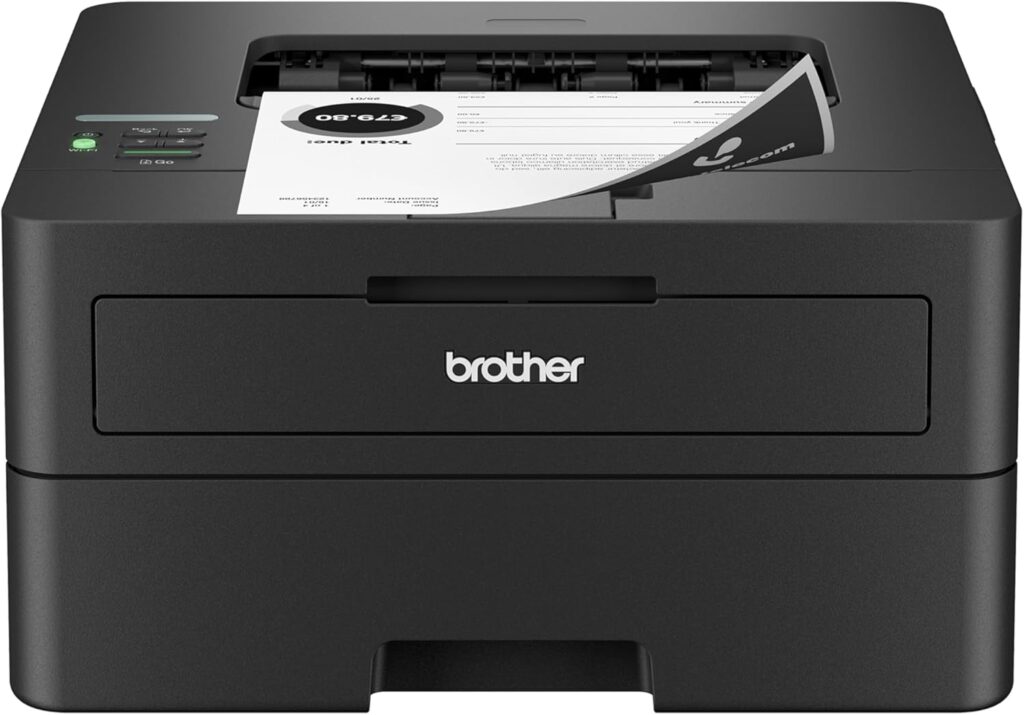
Brother HL-L2460DW: Specs, Price, Pros & Cons
The HL-L2460DW has no scanner lid, no document feeder and no fax line. It takes paper in, prints black text at laser speed and sends it out. It is the print-only member of a Brother family whose all-in-one sibling, the MFC-L2820DW, adds everything this model leaves out, while this one stays physically smaller.
Speed and stamina are its credentials. It is the fastest printer in its group, and its monthly duty cycle is rated for an office that prints every day even if a household never gets near it. Automatic two-sided printing is standard, and output resolution is 1,200 dpi, plenty for text and simple graphics.
Connections cover every desk. There is wired Ethernet for a fixed spot on a network, Wi-Fi for everywhere else, AirPrint for Apple phones and Brother's own app for other phones. The control panel is a small button-driven display with no touchscreen, which suits a printer that is set up once and left alone.
What it gives up is permanent. There is no color, no copying and no scanning, and none of it can be added later. A phone camera or a separate scanner has to cover every original that needs to become a file. The input and output trays both hold more paper than most home printers, so reloading paper and emptying the output are rare jobs.
The home it fits prints letters, forms and school work in black, scans the occasional page with a phone and wants a printer that stays out of the way. A household that copies documents, even a few times a year, starts with the all-in-one version instead.
Category strengths
Where the Brother HL-L2460DW beats the median
- A much higher print speed (black) ?36 ppm vs 16 ppm (median)
- A much higher monthly duty cycle ?35,000 pages vs 10,000 pages (median)
- A much higher input tray capacity ?250 sheets vs 150 sheets (median)
- A much higher output tray capacity ?100 sheets vs 67.5 sheets (median)
- A lighter build ?7.1 kg vs 7.98 kg (median)
Where the Brother HL-L2460DW trails the median
- No color printing ?
- No all-in-one ?
- No automatic document feeder ?
- A much lower print resolution ?1,200 dpi vs 4,800 dpi (median)
How this VS Score was computed
Score 47: each known spec is measured against the median of all printers (65 products), then weighted; 50 means level with that median. In classes of six or more, a value beyond the class’s 10th–90th percentile range counts as that limit, so one extreme product cannot set the scale. 73% of the scoreable weight could be used; unknown values, features not applicable to this class and proxies (battery capacity where a rated life exists) add or remove nothing.
| Specification | This product | Cohort median | Score weight | Points moved |
|---|---|---|---|---|
| Print speed (black) | 36 — capped at the class’s upper range (32) | 16 | 2 | +100.0 |
| Color printing | No | 88% of the class have it | 1.5 | −72.0 |
| Automatic duplex printing | Yes | 73% of the class have it | 1 | +50.0 |
| All-in-one | No | 85% of the class have it | 1 | −48.0 |
| Automatic document feeder | No | 55% of the class have it | 1 | −48.0 |
| Input tray capacity | 250 | 150 | 1 | +33.0 |
| Ethernet | Yes | 54% of the class have it | 0.5 | +25.0 |
| Supertank / refillable ink | No | 30% of the class have it | 0.5 | −24.0 |
| Duplex scanning | No | 23% of the class have it | 0.5 | −24.0 |
| Touchscreen display | No | 45% of the class have it | 0.5 | −24.0 |
| Print resolution | 1,200 | 4,800 | 0.5 | −18.5 |
| Monthly duty cycle | 35,000 | 10,000 | 0.3 | +15.0 |
| Fax | No | 35% of the class have it | 0.2 | −9.6 |
| Output tray capacity | 100 | 67.5 | 0.3 | +7.2 |
| Weight | 7.1 | 7.98 | 0.3 | +1.8 |
Not scored: Print speed (color) (unknown: not scored); ADF capacity (unknown: not scored); Wi-Fi (standard for the class (97% have it)); Wi-Fi Direct (standard for the class (90% have it)); USB (standard for the class (100% have it)); Apple AirPrint (standard for the class (97% have it)); Mobile app printing (standard for the class (100% have it)).
Editor’s note
There is a specific kind of buyer this suits, and if you are that buyer it is close to ideal. It prints at up to 36 ppm. It does not scan, copy or fax. The body weighs 15.6 pounds, and it has both Ethernet and dual-band Wi-Fi, prints automatically on both sides, and takes 250 sheets.
The case for a print-only machine is stronger than it sounds. Phone cameras and scanning apps have quietly replaced the flatbed for most household document capture, and a machine with no scanner has no scanner to break, no feeder to jam and no lid left open. It is also physically much smaller than the all-in-ones sitting near it on the shelf.
The case against is simple and permanent. If you later discover you need to copy something, there is no upgrade path, and you buy another machine. Anyone who scans even occasionally should spend the extra on the MFC-L2820DW instead, which is a close sibling with the rest of an office attached.
Running costs follow Brother's usual mono pattern: TN830 or high-yield TN830XL toner plus a separate DR830 drum good for around 15,000 pages. Supplies are shared with the L2820DW family, so they are easy to find. The toner in the box is a 700-page starter, so budget for a replacement sooner than the marketing page count suggests.
The control panel is minimal rather than a touchscreen, and Brother lists PCL6 emulation but no PostScript, which only matters in specific professional workflows.
I would happily put this on a shelf in a house that prints a few hundred pages a month and scans with a phone. It should be boring to own, which is the highest compliment a laser printer gets.
Specifications
Quality bars show where each figure sits between the lowest and highest of the 65 printers this VS Score is measured against.
Printing
Scanning & copying
Paper handling
Connectivity
Design
Sources and verification
Where the specifications come from
- Official product pagebrother-usa.com
- Independent testingrtings.com
Verification
- First published
- Specifications last checked
- Sheet completeness
- 22 of 24 specifications verified; the rest show as Unknown and are never estimated or scored
- Page type
- Product specification page — Compiled from the manufacturer’s published specifications and the cited sources; this is not a hands-on test.
- Basis
- Research-based: specifications and editorial text were compiled from the documents listed here and the manufacturer’s published data. We have not tested this unit ourselves; where independent measurements are mentioned they belong to the linked publication.
Where to buy
Prices and availability may change. Check the retailer before buying. We may earn a commission on purchases.
Price history
Printers with similar specs to the Brother HL-L2460DW


Ratings & reviews
No reviews yet. Be the first to share your experience.
The bottom line
The Brother HL-L2460DW earns a VS Score of 47, below the median of the 65 printers it is measured against (a score of 50 is level with that median).
- Who it’s for
- People who already scan with a phone or a separate scanner and want fast, cheap, compact mono printing with the option of a wired connection.
- Who should look elsewhere
- Anyone who copies or scans even occasionally. There is no way to add it later, and the money is better spent on an all-in-one from the start.
- The trade-off that matters
- Paying only for printing buys speed and a small machine, but it is a permanent decision: no scanner today means no scanner ever.
- The main alternative
- Brother MFC-L2820DW is the closely related mono laser with a scanner, copier, fax and touchscreen attached, and is the one to pick if there is any doubt.
The VS Score is calculated from the weighted specifications above, each measured against the median of comparable printers — a shortlisting guide, not a substitute for your own priorities. See how we score.



