
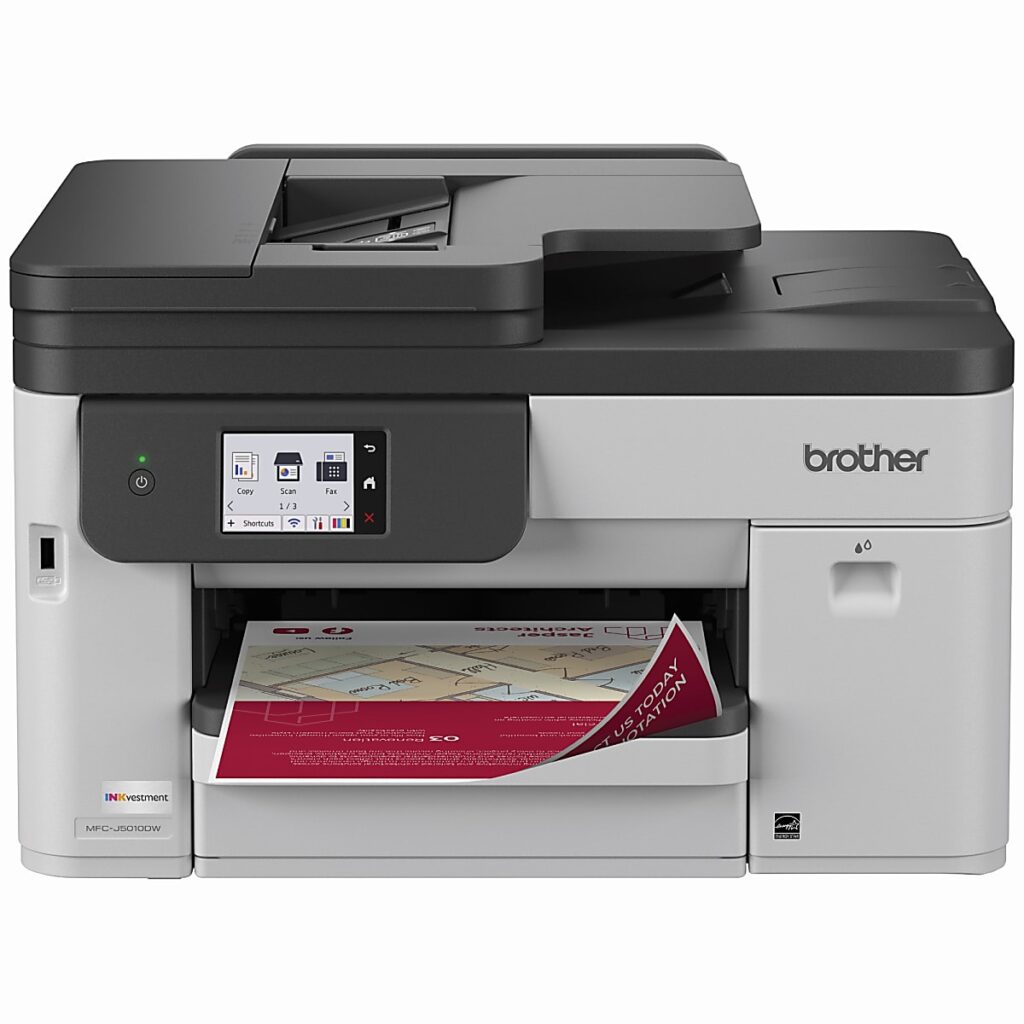
Brother MFC-J5010DW: Specs, Features, Pros & Cons
Brother built the MFC-J5010DW like office equipment and fitted it with inkjet cartridges. It is large and heavy, its main paper tray is bigger than most, and its document feeder scans both sides of a page in a single pass, a part more usually found on color lasers.
It sits above Brother's J4335DW in the INKvestment range, whose cartridges carry a large supply of ink and cost less per page than ordinary ones. This model adds the parts that turn a home all-in-one into an office one: a two-sided scanner, a larger tray, wired Ethernet, a fax and a touchscreen. Legal-size paper fits the main tray, and a front USB port prints from and scans to a memory stick. Its print resolution is 4,800 dpi, and color pages come out almost as fast as black.
Its speed is the other surprise. Black and color printing both run close enough to laser rates that a stack of invoices or a color report does not keep anyone waiting at the machine.
What it gives up is space and the lowest running costs. The body needs a permanent spot on a sturdy desk or cabinet. Cartridges, even high-yield ones, cost more per page than the bottle-fed supertanks, so a printer that runs thousands of pages a month will cost more to feed than a tank model.
It suits a paper-heavy home office that scans stacks of two-sided documents as often as it prints. In a household that prints a few pages a week, most of this printer would sit unused on a desk it fills.
Category strengths
Where the Brother MFC-J5010DW beats the median
- A much higher print speed (color) ?26 ppm vs 9 ppm (median)
- A much higher print speed (black) ?28 ppm vs 16 ppm (median)
- A much higher monthly duty cycle ?35,000 pages vs 10,000 pages (median)
- A much higher input tray capacity ?250 sheets vs 150 sheets (median)
- Has duplex scanning ?
- Has touchscreen display ?
- A much higher output tray capacity ?150 sheets vs 67.5 sheets (median)
- A higher ADF capacity ?50 sheets vs 35 sheets (median)
- Has fax ?
Where the Brother MFC-J5010DW trails the median
- A much heavier build ?14 kg vs 7.98 kg (median)
How this VS Score was computed
Score 85: each known spec is measured against the median of all printers (65 products), then weighted; 50 means level with that median. In classes of six or more, a value beyond the class’s 10th–90th percentile range counts as that limit, so one extreme product cannot set the scale. 66% of the scoreable weight could be used; unknown values, features not applicable to this class and proxies (battery capacity where a rated life exists) add or remove nothing.
| Specification | This product | Cohort median | Score weight | Points moved |
|---|---|---|---|---|
| Print speed (black) | 28 | 16 | 2 | +76.0 |
| Print speed (color) | 26 | 9 | 1 | +50.0 |
| Automatic duplex printing | Yes | 73% of the class have it | 1 | +50.0 |
| Automatic document feeder | Yes | 55% of the class have it | 1 | +50.0 |
| Input tray capacity | 250 | 150 | 1 | +33.0 |
| Duplex scanning | Yes | 23% of the class have it | 0.5 | +25.0 |
| Ethernet | Yes | 54% of the class have it | 0.5 | +25.0 |
| Touchscreen display | Yes | 45% of the class have it | 0.5 | +25.0 |
| Supertank / refillable ink | No | 30% of the class have it | 0.5 | −24.0 |
| Monthly duty cycle | 35,000 | 10,000 | 0.3 | +15.0 |
| Output tray capacity | 150 | 67.5 | 0.3 | +15.0 |
| ADF capacity | 50 | 35 | 0.5 | +10.5 |
| Fax | Yes | 35% of the class have it | 0.2 | +10.0 |
| Weight | 14 | 7.98 | 0.3 | −6.3 |
| Print resolution | 4,800 | 4,800 | 0.5 | +0.0 |
Not scored: Color printing (standard for the class (88% have it)); All-in-one (standard for the class (85% have it)); Wi-Fi (standard for the class (97% have it)); Wi-Fi Direct (standard for the class (90% have it)); USB (standard for the class (100% have it)); Apple AirPrint (standard for the class (97% have it)); Mobile app printing (standard for the class (100% have it)).
Editor’s note
The feeder is the reason to choose this printer. It takes 50 pages, and a stack of two-sided contracts goes through in one pass with both sides of every sheet scanned, unattended. Around it sit automatic duplex printing, fax, Gigabit Ethernet and a 2.7-inch touchscreen, which together make a complete small-office machine.
Brother's MaxiDrive platform is rated at 28 ISO ppm black and 26 color, near-laser territory for an inkjet at this price. The main tray holds 250 sheets.
The ink story is Brother's INKvestment system: high-yield cartridges, with an 1,800-page black and 750-page colors in the box and a Page Gauge that meters usage. Per-page costs land well below ordinary cartridges but above the bottle-fed supertanks. The trade is a lower purchase price and faster hardware.
Brother rates it for up to 35,000 pages a month and recommends 250 to 2,500, the same figures it gives the two-tray J5110DW, so the single cassette limits how often you reload paper rather than how much the engine is built to print.
Against the field, HP's bottle-fed Smart Tank wins on long-run ink costs, and Brother's cheaper J4335DW scans one side at a time. This machine's case is throughput (fast prints, two-sided stacks through the feeder, wired networking) for a paper-heavy home office that scans as much as it prints.
Specifications
Quality bars show where each figure sits between the lowest and highest of the 65 printers this VS Score is measured against.
Printing
Scanning & copying
Paper handling
Connectivity
Design
Sources and verification
Where the specifications come from
- Official product pagebrother-usa.com
- Retailer listing (cross-check)amazon.com
Verification
- First published
- Specifications last checked
- Sheet completeness
- 24 of 24 specifications verified; the rest show as Unknown and are never estimated or scored
- Page type
- Product specification page — Compiled from the manufacturer’s published specifications and the cited sources; this is not a hands-on test.
- Basis
- Research-based: specifications and editorial text were compiled from the documents listed here and the manufacturer’s published data. We have not tested this unit ourselves; where independent measurements are mentioned they belong to the linked publication.
Printers with similar specs to the Brother MFC-J5010DW


Ratings & reviews
No reviews yet. Be the first to share your experience.
The bottom line
The Brother MFC-J5010DW earns a VS Score of 85, above the median of the 65 printers it is measured against (a score of 50 is level with that median).
- Who it’s for
- Paper-heavy home offices that scan as much as they print, where the single-pass duplex feeder, near-laser print speeds and Gigabit Ethernet add up to office-grade throughput.
- Who should look elsewhere
- Maximum-volume printing, because INKvestment cartridges cost more per page than bottle-fed supertanks, and anyone who needs 11 x 17 output, since Legal is the largest size it takes.
- The trade-off that matters
- Faster hardware and true duplex scanning in exchange for cartridge economics. The more you scan, the better the deal.
- The main alternative
- HP Smart Tank 7303: wins the long-run ink math for an office that prints far more than it scans.
The VS Score is calculated from the weighted specifications above, each measured against the median of comparable printers — a shortlisting guide, not a substitute for your own priorities. See how we score.



