
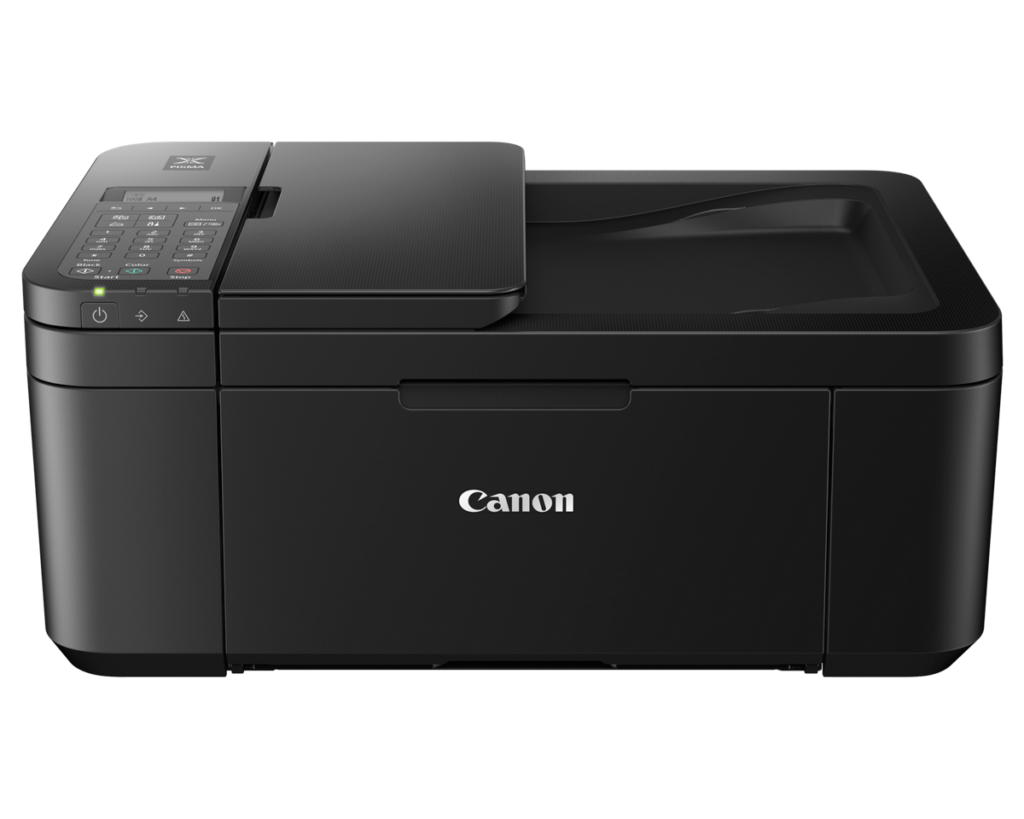
Canon PIXMA TR4720: Specs, Price, Pros & Cons
Fax has disappeared from nearly every inexpensive printer, along with document feeders and automatic duplex. The PIXMA TR4720 is one of the few budget machines that still includes all three, and that is the whole reason it appears on shortlists. It is Canon's entry-level office-style all-in-one, aimed at homes that need to print, copy, scan and occasionally fax without buying office equipment.
The buyer it fits is someone who rarely prints but wants the full set of functions available when a form, contract or tax document arrives. For that person a feeder that pulls a few pages through the scanner and automatic two-sided printing save real effort, and the compact body keeps it from dominating a desk. Wireless printing, AirPrint and Canon's app cover everyday use from phones and laptops.
What it gives up is predictable at this level. The color ink sits in a single combined cartridge, so one color running out means replacing all three, and printing is slow. The display is a small text screen rather than a touchscreen, wired networking is absent and the feeder scans one side only. None of that disqualifies it for light use, but each point becomes more irritating as monthly volume rises.
The real decision is about how much printing actually happens. At low volume, the low purchase price and broad feature list are hard to match, and Canon's optional ink subscription can make costs more predictable. Once printing becomes regular, cartridge costs quickly outweigh the savings at the till, and a refillable tank printer becomes the better long-term buy even without a feeder or fax.
Category strengths
Where the Canon PIXMA TR4720 beats the median
- Has fax ?
- A lighter build ?5.76 kg vs 7.98 kg (median)
Where the Canon PIXMA TR4720 trails the median
- A lower print speed (black) ?8.8 ppm vs 16 ppm (median)
- A much lower print speed (color) ?4.4 ppm vs 9 ppm (median)
- No ethernet ?
- A lower input tray capacity ?100 sheets vs 150 sheets (median)
- A lower ADF capacity ?20 sheets vs 35 sheets (median)
How this VS Score was computed
Score 42: each known spec is measured against the median of all printers (65 products), then weighted; 50 means level with that median. In classes of six or more, a value beyond the class’s 10th–90th percentile range counts as that limit, so one extreme product cannot set the scale. 62% of the scoreable weight could be used; unknown values, features not applicable to this class and proxies (battery capacity where a rated life exists) add or remove nothing.
| Specification | This product | Cohort median | Score weight | Points moved |
|---|---|---|---|---|
| Automatic duplex printing | Yes | 73% of the class have it | 1 | +50.0 |
| Automatic document feeder | Yes | 55% of the class have it | 1 | +50.0 |
| Print speed (black) | 8.8 | 16 | 2 | −44.0 |
| Supertank / refillable ink | No | 30% of the class have it | 0.5 | −24.0 |
| Duplex scanning | No | 23% of the class have it | 0.5 | −24.0 |
| Ethernet | No | 54% of the class have it | 0.5 | −24.0 |
| Touchscreen display | No | 45% of the class have it | 0.5 | −24.0 |
| Print speed (color) | 4.4 — capped at the class’s lower range (5) | 9 | 1 | −22.0 |
| Input tray capacity | 100 | 150 | 1 | −17.0 |
| ADF capacity | 20 | 35 | 0.5 | −10.5 |
| Fax | Yes | 35% of the class have it | 0.2 | +10.0 |
| Weight | 5.76 | 7.98 | 0.3 | +5.7 |
| Print resolution | 4,800 | 4,800 | 0.5 | +0.0 |
Not scored: Color printing (standard for the class (88% have it)); Monthly duty cycle (unknown: not scored); All-in-one (standard for the class (85% have it)); Output tray capacity (unknown: not scored); Wi-Fi (standard for the class (97% have it)); Wi-Fi Direct (standard for the class (90% have it)); USB (standard for the class (100% have it)); Apple AirPrint (standard for the class (97% have it)); Mobile app printing (standard for the class (100% have it)).
Editor’s note
The PIXMA TR4720 exists to win one argument: nothing under a hundred dollars gives you a full four-in-one. Print, copy, scan and fax, a 20-sheet document feeder, and automatic two-sided printing: at its typical street price, that combination is essentially unanswered. Canon sells the identical machine as the TR4722 through Walmart and Amazon, so treat the two names as one product and buy whichever is cheaper.
The catch, and with inkjets this cheap there is always exactly this catch, is ink. The TR4720 uses a two-cartridge system: a pigment black plus one tri-color cartridge, which means when the cyan runs dry you replace the whole color unit. Per-page costs are steep for anything beyond occasional printing. Canon's Pixma Print Plan subscription softens it, but if you print regularly, the arithmetic favors a supertank machine within months.
The rest of the compromise list is what the price predicts. It's slow: 8.8 pages a minute in black, 4.4 in color. The screen is a two-line non-touch LCD, Wi-Fi is 2.4 GHz only, there's no Ethernet, and the ADF scans one side only. None of that is a scandal at this money, but it draws the boundary clearly: this is a machine for a household that prints boarding passes, school forms and the odd tax return, not for anyone's office workload.
For that household (a few dozen pages a month, a copier and feeder on hand), I think it's the sensible default at the bottom of the market. If your monthly page count climbs into the hundreds, spend more once on an Epson EcoTank ET-2400-class tank printer and stop renting your ink back from Canon.
Specifications
Quality bars show where each figure sits between the lowest and highest of the 65 printers this VS Score is measured against.
Printing
Scanning & copying
Paper handling
Connectivity
Design
Sources and verification
Where the specifications come from
- Official product pagecanon.ca
- Independent testingrtings.com
Verification
- First published
- Specifications last checked
- Sheet completeness
- 22 of 24 specifications verified; the rest show as Unknown and are never estimated or scored
- Page type
- Product specification page — Compiled from the manufacturer’s published specifications and the cited sources; this is not a hands-on test.
- Basis
- Research-based: specifications and editorial text were compiled from the documents listed here and the manufacturer’s published data. We have not tested this unit ourselves; where independent measurements are mentioned they belong to the linked publication.
Where to buy
Prices and availability may change. Check the retailer before buying. We may earn a commission on purchases.
Price history
Printers with similar specs to the Canon PIXMA TR4720
Ratings & reviews
No reviews yet. Be the first to share your experience.
The bottom line
The Canon PIXMA TR4720 earns a VS Score of 42, below the median of the 65 printers it is measured against (a score of 50 is level with that median).
- Who it’s for
- Low-volume households that want a full 4-in-1 (copier, document feeder, fax, auto-duplex) at an entry-level price: school forms, boarding passes, the occasional tax return.
- Who should look elsewhere
- Anyone printing regularly: the tri-color cartridge system (replace all colors when one dies) makes steady volume expensive, and slow speeds with a simplex ADF rule out real office duty.
- The trade-off that matters
- Hardware generosity versus ink economics. Canon sells the features cheap and earns it back per page, which is fine if the printer sleeps most of the month and painful if it doesn't.
- The main alternative
- Epson EcoTank ET-2400: roughly triple the upfront price with no ADF or fax, but its refillable tanks end the cartridge treadmill. It is the right call once you print weekly.
The VS Score is calculated from the weighted specifications above, each measured against the median of comparable printers — a shortlisting guide, not a substitute for your own priorities. See how we score.





