
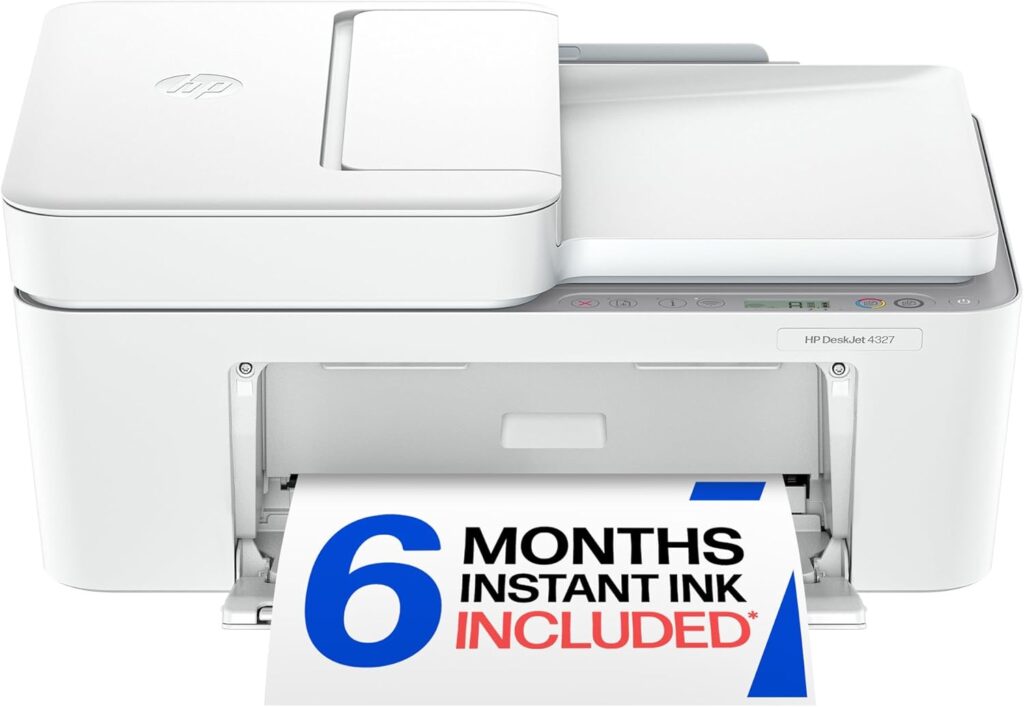
HP DeskJet 4327: Specs, Price, Pros & Cons
Lift the lid on almost any printer at this price and you find a sheet of glass and nothing else. This one has a document feeder sitting on top of it, and that single piece of hardware is what separates the DeskJet 4327 from the other small all-in-ones on the same shelf.
The rest is familiar entry-level HP. A compact plastic three-in-one that prints, scans and copies, connects over dual-band Wi-Fi and expects to be operated from a phone. Speeds are modest, the paper tray is shallow, the control panel is a handful of buttons. What the feeder changes is the kind of job you can hand it: a contract, a pile of receipts, a school form that runs to several pages, none of which require standing over the glass turning sheets by hand.
It is also worth knowing what is absent from the model number. HP sells a row of nearly identical DeskJets whose names end in a letter, and that letter marks a program tying the printer to an HP account, a permanent internet connection and the maker's own cartridges for as long as you own it. This model is not enrolled, which is a small but real freedom when most of its siblings are.
The compromises are the usual ones plus a specific one. There is no automatic two-sided printing, no wired network port and no fax, and the feeder reads only one side of each sheet. The awkward part is the two-cartridge system, one black and one tri-color, where a single exhausted color ends color printing altogether. As a scanner with a printer attached it is unusually capable for the money. As an ink commitment it wants eyes open.
Category strengths
Where the HP DeskJet 4327 beats the median
- A lighter build ?4.81 kg vs 7.98 kg (median)
Where the HP DeskJet 4327 trails the median
- No automatic duplex printing ?
- A much lower print speed (black) ?8.5 ppm vs 16 ppm (median)
- A much lower input tray capacity ?60 sheets vs 150 sheets (median)
- No ethernet ?
- A lower print speed (color) ?5.5 ppm vs 9 ppm (median)
- A much lower monthly duty cycle ?1,000 pages vs 10,000 pages (median)
- A much lower output tray capacity ?25 sheets vs 67.5 sheets (median)
How this VS Score was computed
Score 29: each known spec is measured against the median of all printers (65 products), then weighted; 50 means level with that median. In classes of six or more, a value beyond the class’s 10th–90th percentile range counts as that limit, so one extreme product cannot set the scale. 66% of the scoreable weight could be used; unknown values, features not applicable to this class and proxies (battery capacity where a rated life exists) add or remove nothing.
| Specification | This product | Cohort median | Score weight | Points moved |
|---|---|---|---|---|
| Automatic document feeder | Yes | 55% of the class have it | 1 | +50.0 |
| Automatic duplex printing | No | 73% of the class have it | 1 | −48.0 |
| Print speed (black) | 8.5 — capped at the class’s lower range (8.8) | 16 | 2 | −44.0 |
| Input tray capacity | 60 | 150 | 1 | −30.0 |
| Supertank / refillable ink | No | 30% of the class have it | 0.5 | −24.0 |
| Duplex scanning | No | 23% of the class have it | 0.5 | −24.0 |
| Ethernet | No | 54% of the class have it | 0.5 | −24.0 |
| Touchscreen display | No | 45% of the class have it | 0.5 | −24.0 |
| Print speed (color) | 5.5 | 9 | 1 | −19.0 |
| Monthly duty cycle | 1,000 | 10,000 | 0.3 | −13.5 |
| Weight | 4.81 | 7.98 | 0.3 | +9.9 |
| Fax | No | 35% of the class have it | 0.2 | −9.6 |
| Output tray capacity | 25 | 67.5 | 0.3 | −9.3 |
| Print resolution | 4,800 | 4,800 | 0.5 | +0.0 |
| ADF capacity | 35 | 35 | 0.5 | +0.0 |
Not scored: Color printing (standard for the class (88% have it)); All-in-one (standard for the class (85% have it)); Wi-Fi (standard for the class (97% have it)); Wi-Fi Direct (standard for the class (90% have it)); USB (standard for the class (100% have it)); Apple AirPrint (standard for the class (97% have it)); Mobile app printing (standard for the class (100% have it)).
Editor’s note
The most useful thing to know about the DeskJet 4327 is what it is not: it is not an HP+ printer. Every near-identical sibling with an "e" on the end (the 4155e, the 4255e) is sold under HP+, which means an HP account, a permanent internet connection and Original HP ink for the life of the machine. This one carries none of that. Its manual uses the ordinary dynamic-security wording, which still requires HP-chipped cartridges but leaves remanufactured and refilled ones on the table. If you have been avoiding HP+ on principle, that alone is the reason this model exists.
The second thing worth paying for is the 35-sheet automatic document feeder. On a printer at this price that is unusual, and it is the feature you touch: a ten-page contract or a stack of receipts goes through the scanner without lifting the lid thirty-five times. Add a 60-sheet input tray, dual-band Wi-Fi that copes with a congested 2.4 GHz house, and 8.5 ppm black on HP's ISO figure, and it covers light household work properly.
Now the cost. It takes two cartridges, HP 68 black and tri-color, and HP's own site cross-sells the twin-pack at about three quarters of what the printer sells for on offer. Tri-color means one exhausted color kills all color printing. The box ships lower-yield setup cartridges. There is no automatic duplex, no duplex scanning, no Ethernet and no fax.
So the buying rule writes itself. At its usual discount, a three-in-one with an ADF and no HP+ strings is a fair deal for someone printing a handful of pages a week. At full list it is poor value: that is 4255e money, and within reach of an entry-level EcoTank that costs a fraction to run.
Specifications
Quality bars show where each figure sits between the lowest and highest of the 65 printers this VS Score is measured against.
Printing
Scanning & copying
Paper handling
Connectivity
Design
Sources and verification
Where the specifications come from
- Official product pagesupport.hp.com
- Retailer listing (cross-check)amazon.com
Verification
- First published
- Specifications last checked
- Sheet completeness
- 24 of 24 specifications verified; the rest show as Unknown and are never estimated or scored
- Page type
- Product specification page — Compiled from the manufacturer’s published specifications and the cited sources; this is not a hands-on test.
- Basis
- Research-based: specifications and editorial text were compiled from the documents listed here and the manufacturer’s published data. We have not tested this unit ourselves; where independent measurements are mentioned they belong to the linked publication.
Where to buy
Prices and availability may change. Check the retailer before buying. We may earn a commission on purchases.
Price history
Printers with similar specs to the HP DeskJet 4327
Ratings & reviews
No reviews yet. Be the first to share your experience.
The bottom line
The HP DeskJet 4327 earns a VS Score of 29, below the median of the 65 printers it is measured against (a score of 50 is level with that median).
- Who it’s for
- Households and students printing a few pages a week who occasionally need to scan or copy a multi-page document, and specifically anyone who wants to stay off HP+ and keep the option of remanufactured cartridges.
- Who should look elsewhere
- Anyone printing more than a couple of hundred pages a month, or who needs automatic double-sided printing, duplex scanning, Ethernet or fax, since none of the four are here. Photo printing suffers from the tri-color cartridge too.
- The trade-off that matters
- An unusually good scanner for the money, attached to unusually expensive ink. The feeder is the reason to buy it, and the price of the cartridge twin-pack is the reason to think twice.
- The main alternative
- Epson EcoTank ET-2800: several times the up-front price and no document feeder, but refillable bottles instead of cartridges if running cost is what bothers you.
The VS Score is calculated from the weighted specifications above, each measured against the median of comparable printers — a shortlisting guide, not a substitute for your own priorities. See how we score.





