
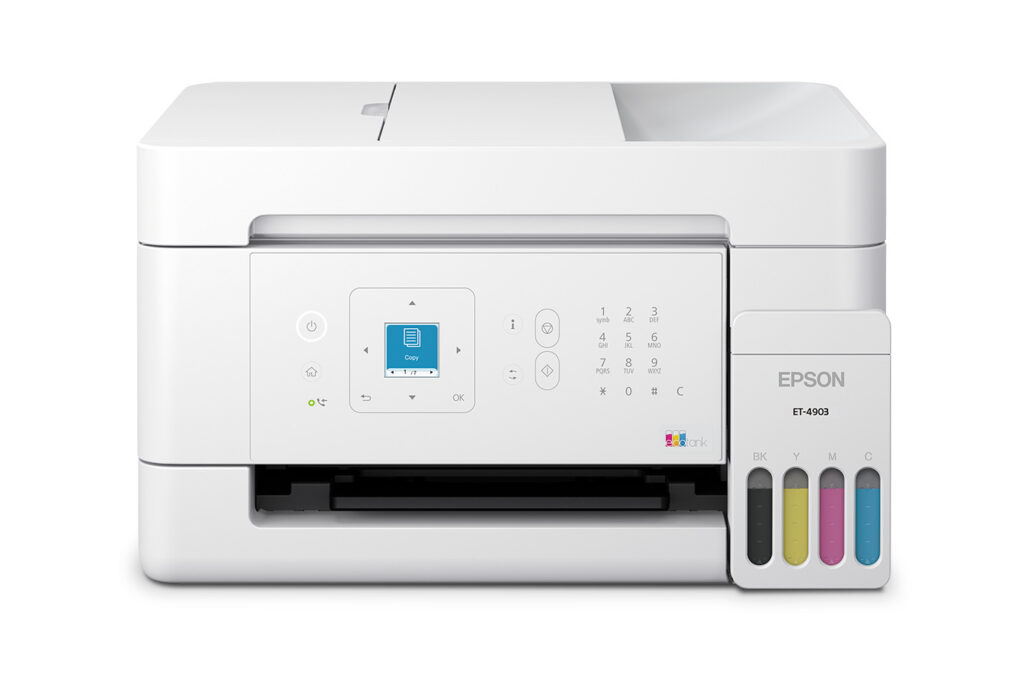
Epson EcoTank ET-4903: Specs, Price, Pros & Cons
Every tank printer is sold on a yield figure, and yield figures deserve rather more skepticism than they get. The page counts quoted for a bottle set are ISO numbers, produced on standard test documents at five percent coverage, which is roughly a page of ordinary body text with nothing else on it. Print a spreadsheet with shaded headers, a map, a school poster or anything containing a photograph and the real figure falls by a large multiple. The claim is not dishonest. It is measured on a page almost nobody prints.
That matters more here than on the cheaper EcoTanks, because this model is positioned for volume. It is the rung of the range that adds the document feeder and the fax, the parts that only earn their keep in a household running real paperwork, and it is priced accordingly. Buy it for the ink maths and you are implicitly promising to print a great deal.
The fax modem is the part that dates the design, and it is there deliberately. A working phone line is still a requirement in a small number of places (medical intake, some legal and school paperwork) and almost nowhere else, so a fax has become a feature that segments a range. If none of those requirements apply to you, you are paying for a modem you will never connect. The two siblings launched alongside this one use the same ink system without either the feeder or the modem.
There is also ambiguity in Epson's own documentation about two-sided printing and about wired networking, with the spec sheet and the marketing page disagreeing with each other. An unresolved specification is not a minor thing on a printer bought to run daily paperwork, and it belongs at the top of the list of questions to settle with the retailer before ordering.
Category strengths
Where the Epson EcoTank ET-4903 beats the median
- Has supertank / refillable ink ?
- Has fax ?
- A higher print resolution ?5,760 dpi vs 4,800 dpi (median)
- A lighter build ?5.5 kg vs 7.98 kg (median)
Where the Epson EcoTank ET-4903 trails the median
- A lower print speed (black) ?11 ppm vs 16 ppm (median)
- No ethernet ?
- A lower print speed (color) ?6 ppm vs 9 ppm (median)
- A lower input tray capacity ?100 sheets vs 150 sheets (median)
- A much lower output tray capacity ?30 sheets vs 67.5 sheets (median)
- A much lower monthly duty cycle ?5,000 pages vs 10,000 pages (median)
- A lower ADF capacity ?30 sheets vs 35 sheets (median)
How this VS Score was computed
Score 46: each known spec is measured against the median of all printers (65 products), then weighted; 50 means level with that median. In classes of six or more, a value beyond the class’s 10th–90th percentile range counts as that limit, so one extreme product cannot set the scale. 57% of the scoreable weight could be used; unknown values, features not applicable to this class and proxies (battery capacity where a rated life exists) add or remove nothing.
| Specification | This product | Cohort median | Score weight | Points moved |
|---|---|---|---|---|
| Automatic document feeder | Yes | 55% of the class have it | 1 | +50.0 |
| Print speed (black) | 11 | 16 | 2 | −32.0 |
| Supertank / refillable ink | Yes | 30% of the class have it | 0.5 | +25.0 |
| Ethernet | No | 54% of the class have it | 0.5 | −24.0 |
| Touchscreen display | No | 45% of the class have it | 0.5 | −24.0 |
| Print speed (color) | 6 | 9 | 1 | −17.0 |
| Input tray capacity | 100 | 150 | 1 | −17.0 |
| Fax | Yes | 35% of the class have it | 0.2 | +10.0 |
| Output tray capacity | 30 | 67.5 | 0.3 | −8.4 |
| Monthly duty cycle | 5,000 | 10,000 | 0.3 | −7.5 |
| Weight | 5.5 | 7.98 | 0.3 | +6.9 |
| Print resolution | 5,760 | 4,800 | 0.5 | +5.0 |
| ADF capacity | 30 | 35 | 0.5 | −3.5 |
Not scored: Color printing (standard for the class (88% have it)); Automatic duplex printing (unknown: not scored); All-in-one (standard for the class (85% have it)); Duplex scanning (unknown: not scored); Wi-Fi (standard for the class (97% have it)); Wi-Fi Direct (standard for the class (90% have it)); USB (standard for the class (100% have it)); Apple AirPrint (standard for the class (97% have it)); Mobile app printing (standard for the class (100% have it)).
Editor’s note
The ET-4903 is the newest generation of Epson's home-office EcoTank (announced July 2026) and the only one of its three launch siblings with a document feeder and fax. That makes it the volume-printing family's pick of the litter: a 30-sheet ADF, color fax, a 5,000-page monthly duty cycle, and Epson's signature economics, with about three years of ink in the box and replacement bottle sets yielding 4,700 black and 7,500 color pages, at savings Epson puts near 90 percent versus cartridges.
One naming note, since you'll see it sold only at Amazon, Walmart and Epson's own store: the ET-4903 is the retail SKU of Epson's ET-4900-series platform (the manuals carry the family code), so accessories and guides for the family apply.
Now the fine print, and this machine has some. Epson's own spec sheet lists no Ethernet, although a stray paragraph on their product page claims it. We've gone with the spec sheet and flagged the conflict. Automatic duplex printing is nowhere stated either, which at this price in 2026 is an omission worth confirming before purchase if two-sided printing is your daily habit. We've left that field unset. The display is a small 1.44-inch color panel with buttons, not a touchscreen, and paper lives in a 100-sheet rear feed with no proper cassette.
So the verdict depends on your printing life. For a household or home office that prints hundreds of pages a month and occasionally feeds a stack through the scanner, the ink math is decisive and the ADF seals it. For feature-per-dollar shoppers, Canon's MegaTank G4270 counters hard, so compare the duplex question before choosing.
Specifications
Quality bars show where each figure sits between the lowest and highest of the 65 printers this VS Score is measured against.
Printing
Scanning & copying
Paper handling
Connectivity
Design
Sources and verification
Where the specifications come from
- Official product pageepson.com
- Retailer listing (cross-check)amazon.com
Verification
- First published
- Specifications last checked
- Sheet completeness
- 22 of 24 specifications verified; the rest show as Unknown and are never estimated or scored
- Page type
- Product specification page — Compiled from the manufacturer’s published specifications and the cited sources; this is not a hands-on test.
- Basis
- Research-based: specifications and editorial text were compiled from the documents listed here and the manufacturer’s published data. We have not tested this unit ourselves; where independent measurements are mentioned they belong to the linked publication.
Where to buy
Prices and availability may change. Check the retailer before buying. We may earn a commission on purchases.
Price history
Printers with similar specs to the Epson EcoTank ET-4903

Ratings & reviews
No reviews yet. Be the first to share your experience.
The bottom line
The Epson EcoTank ET-4903 earns a VS Score of 46, below the median of the 65 printers it is measured against (a score of 50 is level with that median).
- Who it’s for
- High-volume households and home offices (hundreds of pages a month, occasional stack-scanning through the document feeder, the odd fax) where the ink included in the box decides the math by itself.
- Who should look elsewhere
- Anyone who needs confirmed automatic duplex or wired Ethernet: Epson's own spec sheet states neither, and at this price those omissions deserve a pre-purchase check.
- The trade-off that matters
- Decisive ink economics versus modest hardware: rear feed instead of a cassette, entry-level print speeds, a small button-driven panel. You're paying for the tanks and the feeder.
- The main alternative
- Canon MegaTank PIXMA G4270: the direct tank-with-ADF rival. Compare the duplex situation between them before choosing, because that's where this Epson is vaguest.
The VS Score is calculated from the weighted specifications above, each measured against the median of comparable printers — a shortlisting guide, not a substitute for your own priorities. See how we score.




