
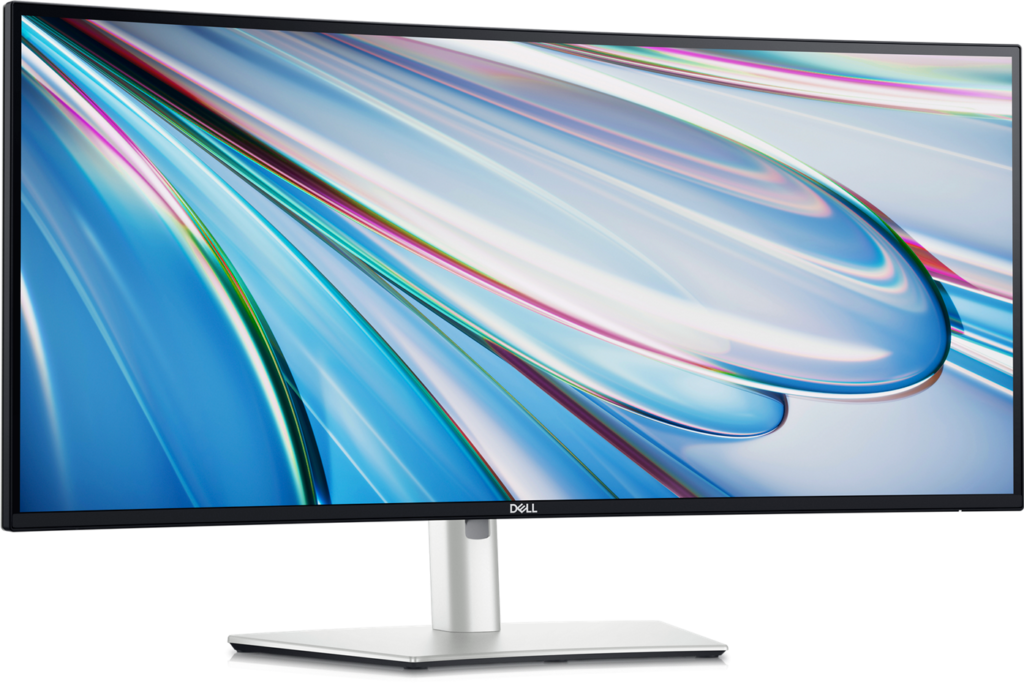
Dell U3425WE: Specs, Features, Pros & Cons
Two monitors side by side leave a pair of bezels running down the middle of the work. Dell's answer in its UltraSharp line is this curved ultrawide, which gives roughly the same width to one continuous panel and then builds the connections of an office dock into the back of it.
It belongs to the productivity end of Dell's range rather than the gaming end, and everything about it points at a particular kind of desk: a laptop that arrives every morning, often a second computer that stays put, and work that spreads sideways. Video timelines, wide spreadsheets, a code editor beside its documentation, or a call window next to the file being discussed all suit the shape. Picture-by-picture, which shows two machines at once, and built-in keyboard-and-mouse switching are the useful parts, because they replace boxes and cables that would otherwise clutter the desk.
What it gives up is sharpness per inch. The panel is only as tall, in pixels, as an ordinary QHD monitor, so stretching it this wide keeps pixel density at everyday levels: small text is clean, but it is not as crisp as on a high-resolution flat screen of similar height. It also has just one input suited to a console, which matters only on desks that double as a games corner.
The price reflects the docking hardware as much as the panel. Set against a plain ultrawide plus a separate dock and switch box, the sums come out fairly close, and the desk ends up much tidier. Buyers weighing it against gaming ultrawides at similar money are comparing different tools: those spend their budget on speed, this one on the cable at the back.
Category strengths
Where the Dell U3425WE beats the median
- A bigger screen ?34.14" (86.72 cm) vs 27" (68.58 cm) (median)
Where the Dell U3425WE trails the median
- Lower peak brightness ?300 nits vs 375 nits (median)
- Slower USB-C charging ?90 W vs 140 W (median)
- Slightly narrower DCI-P3 colour coverage ?98 % vs 99 % (median)
How this VS Score was computed
Score 53: each known spec is measured against the median of IPS office monitors (14 products), then weighted; 50 means level with that median. In classes of six or more, a value beyond the class’s 10th–90th percentile range counts as that limit, so one extreme product cannot set the scale. 49% of the scoreable weight could be used; unknown values, features not applicable to this class and proxies (battery capacity where a rated life exists) add or remove nothing.
| Specification | This product | Cohort median | Score weight | Points moved |
|---|---|---|---|---|
| USB-C | Yes | 64% of the class have it | 0.5 | +25.0 |
| Screen size | 34.14 | 27 | 1.2 | +15.6 |
| Resolution | 1440p | 4K | 1.2 | −14.4 |
| KVM switch | Yes | 58% of the class have it | 0.2 | +10.0 |
| Peak brightness | 300 | 375 | 0.8 | −8.0 |
| USB-C power delivery | 90 | 140 | 0.3 | −5.4 |
| DCI-P3 coverage | 98 | 99 | 0.6 | −0.6 |
| Panel type | IPS | IPS | 0.8 | +0.0 |
| Refresh rate | 120 | 120 | 0.6 | +0.0 |
| Contrast ratio | 2,000 | 2,000 | 0.6 | +0.0 |
| HDMI ports | 1 | 1 | 0.4 | +0.0 |
| DisplayPort inputs | 1 | 1 | 0.4 | +0.0 |
Not scored: Color depth (unknown: not scored); Response time (unknown: not scored); HDR (unknown: not scored); Pixel density (unknown: not scored); Local dimming (unknown: not scored); Local dimming zones (unknown: not scored); Adaptive sync (unknown: not scored); Variable refresh rate (unknown: not scored); Motion blur reduction (unknown: not scored); Input lag (unknown: not scored); Height adjustment (standard for the class (93% have it)); Tilt (standard for the class (100% have it)); Swivel (standard for the class (86% have it)); Pivot (unknown: not scored); USB hub (standard for the class (86% have it)); Built-in speakers (unknown: not scored); Headphone output (unknown: not scored); Webcam (unknown: not scored); Microphone (unknown: not scored); Ethernet (unknown: not scored); Picture-by-picture (standard for the class (82% have it)).
Editor’s note
The U3425WE is a docking station that happens to be a 34-inch curved ultrawide, and that framing explains the price. A single Thunderbolt 4 cable carries video, data and 90 W of power to a laptop, there is a second Thunderbolt port for daisy-chaining a further display, and a built-in KVM lets one keyboard and mouse drive two machines. If your desk has a laptop and a desktop on it, that combination replaces a pile of hardware.
The panel is IPS Black, Dell's higher-contrast IPS variant, and it reaches 2000:1 against the usual 1000:1. That is a visible improvement in a dim room, the difference between a gray black and a dark gray one, though still short of OLED. Coverage is 98% DCI-P3 with 300 nits, and the 3440×1440 panel runs at 120 Hz, which is unusually high for a productivity monitor and makes everyday window-dragging feel smooth.
The 1900R curve is gentle and suits a screen this wide. At 34 inches your eye distance to the edges would otherwise vary noticeably.
What it is not is a gaming monitor. There is no adaptive sync certification, and while the high refresh helps, the response time is not tuned for it. The single HDMI input is also a limitation if you want to attach several consoles.
Buy it if you dock a laptop daily and want one cable, deep contrast and lots of horizontal room. Skip it if you mainly game, or if you would never use the Thunderbolt hub. You would be paying for the expensive part and not using it.
Specifications
Quality bars show where each figure sits between the lowest and highest of the 14 IPS office monitors this VS Score is measured against.
Picture
Gaming
Ergonomics & design
Connectivity
Features
Sources and verification
Where the specifications come from
- Datasheet or manualdell.com
- Independent testingrtings.com
Verification
- First published
- Specifications last checked
- Sheet completeness
- 23 of 42 specifications verified; the rest show as Unknown and are never estimated or scored
- Page type
- Product specification page — Compiled from the manufacturer’s published specifications and the cited sources; this is not a hands-on test.
- Basis
- Research-based: specifications and editorial text were compiled from the documents listed here and the manufacturer’s published data. We have not tested this unit ourselves; where independent measurements are mentioned they belong to the linked publication.
Monitors with similar specs to the Dell U3425WE


Ratings & reviews
No reviews yet. Be the first to share your experience.
The bottom line
The Dell U3425WE earns a VS Score of 53, above the median of the 14 IPS office monitors it is measured against (a score of 50 is level with that median).
- Who it’s for
- A hybrid worker who docks a laptop at the same desk every day, keeps a second computer there too, and wants one wide canvas for timelines, spreadsheets or side-by-side windows.
- Who should look elsewhere
- Gamers after a fast ultrawide, and anyone whose laptop lacks a Thunderbolt or full-featured USB-C port, because without one, the docking half of the price buys nothing.
- The trade-off that matters
- Width over sharpness: the format gives generous horizontal room, but small type looks softer than on a higher-resolution screen of similar height, which people who read all day will notice.
- The main alternative
- Dell U3225QE: the same one-cable docking idea on a flat, higher-resolution panel, for buyers who value sharper text over sheer width.
The VS Score is calculated from the weighted specifications above, each measured against the median of comparable IPS office monitors — a shortlisting guide, not a substitute for your own priorities. See how we score.




