
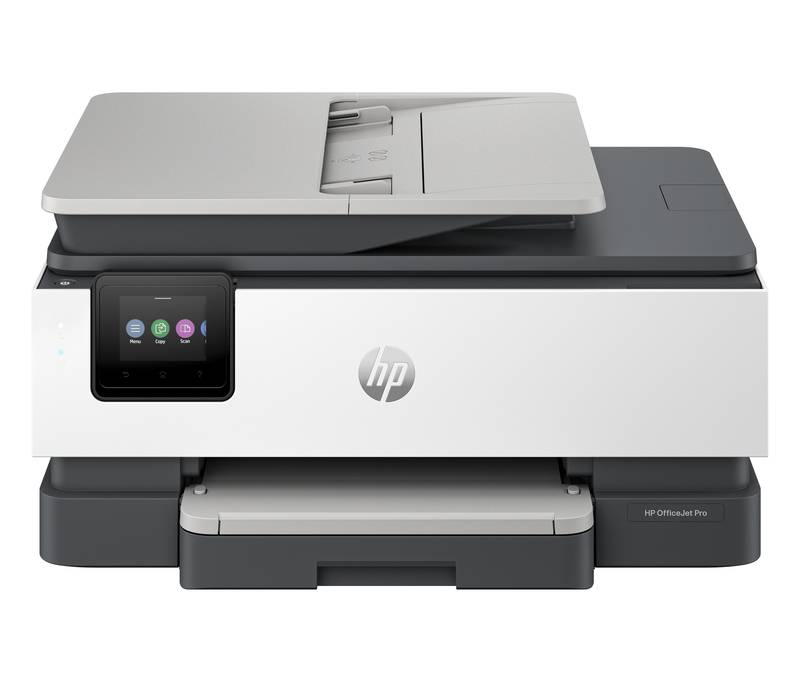
HP OfficeJet Pro 8135e: Specs, Features, Pros & Cons
There are several HP printers whose model numbers differ by a single digit, and the gaps between them are real but narrow. The 8135e sits in the middle of that group: above the Envy machines, which are household devices with office pretensions, and below the 9-series that HP aims at offices containing more than one person.
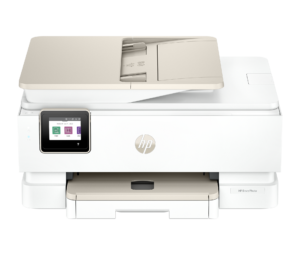
What defines the middle is a particular combination. There is a document feeder, so scanning several pages does not mean lifting a lid over and over. Two-sided printing is automatic. There is a wired network port, which sounds unglamorous until you have spent an evening trying to keep a printer reliably reachable over Wi-Fi. And there is a color touchscreen instead of a two-line display, which changes how often you need a computer to alter a setting.
The word Pro, though, has limits worth stating. It does not mean a second paper tray. It does not mean the feeder can scan both sides of a sheet in one pass. Both of those belong to the model above, and if either matters to your week, this is not the machine whatever the badge says.
Paper handling is the honest limit of the design: one tray, a modest output bin and a feeder sized for documents rather than stacks. For a one-desk office that is proportionate. In a shared office, reloading becomes the thing you notice.
The last thing to settle is the suffix. HP's trailing e denotes a commercial arrangement rather than a hardware difference, and its obligations outlast the free ink that comes with it.
Category strengths
Where the HP OfficeJet Pro 8135e beats the median
- A higher print speed (black) ?20 ppm vs 16 ppm (median)
- A much higher input tray capacity ?225 sheets vs 150 sheets (median)
- Has touchscreen display ?
- A much higher monthly duty cycle ?20,000 pages vs 10,000 pages (median)
- Has fax ?
- A higher print speed (color) ?10 ppm vs 9 ppm (median)
Where the HP OfficeJet Pro 8135e trails the median
- A lower output tray capacity ?60 sheets vs 67.5 sheets (median)
How this VS Score was computed
Score 68: each known spec is measured against the median of all printers (65 products), then weighted; 50 means level with that median. In classes of six or more, a value beyond the class’s 10th–90th percentile range counts as that limit, so one extreme product cannot set the scale. 66% of the scoreable weight could be used; unknown values, features not applicable to this class and proxies (battery capacity where a rated life exists) add or remove nothing.
| Specification | This product | Cohort median | Score weight | Points moved |
|---|---|---|---|---|
| Automatic duplex printing | Yes | 73% of the class have it | 1 | +50.0 |
| Automatic document feeder | Yes | 55% of the class have it | 1 | +50.0 |
| Print speed (black) | 20 | 16 | 2 | +26.0 |
| Input tray capacity | 225 | 150 | 1 | +25.0 |
| Ethernet | Yes | 54% of the class have it | 0.5 | +25.0 |
| Touchscreen display | Yes | 45% of the class have it | 0.5 | +25.0 |
| Supertank / refillable ink | No | 30% of the class have it | 0.5 | −24.0 |
| Duplex scanning | No | 23% of the class have it | 0.5 | −24.0 |
| Monthly duty cycle | 20,000 | 10,000 | 0.3 | +15.0 |
| Fax | Yes | 35% of the class have it | 0.2 | +10.0 |
| Print speed (color) | 10 | 9 | 1 | +6.0 |
| Output tray capacity | 60 | 67.5 | 0.3 | −1.8 |
| Print resolution | 4,800 | 4,800 | 0.5 | +0.0 |
| ADF capacity | 35 | 35 | 0.5 | +0.0 |
| Weight | 7.98 | 7.98 | 0.3 | +0.0 |
Not scored: Color printing (standard for the class (88% have it)); All-in-one (standard for the class (85% have it)); Wi-Fi (standard for the class (97% have it)); Wi-Fi Direct (standard for the class (90% have it)); USB (standard for the class (100% have it)); Apple AirPrint (standard for the class (97% have it)); Mobile app printing (standard for the class (100% have it)).
Editor’s note
The HP OfficeJet Pro 8135e is the home-office all-rounder in HP's current inkjet line, sitting a step below the 9-series and covering the full brief: print, copy, scan and fax, with an automatic document feeder and auto duplex printing. HP rates it at 20 pages per minute in black and 10 in color to ISO standards, with a first page out in about 15 seconds, quick enough that short documents do not feel like a wait. Print quality peaks at 4800 x 1200 optimized dpi on photo paper, and the 20,000-page monthly duty cycle is generous for a machine this size.
Paper handling is a single 225-sheet tray plus a 60-sheet output bin and a 35-sheet ADF that scans one side only. The step up to the 9135e buys you single-pass duplex scanning and a second tray, and that is the whole gap between them. Connectivity is complete: dual-band Wi-Fi with HP's self-healing reconnect logic, Ethernet, USB, Wi-Fi Direct, AirPrint and Mopria, all managed from a 2.7-inch color touchscreen.
The HP+ program is the part to go in clear-eyed about. The 'e' in the name means the printer wants an HP account and an internet connection at setup, in exchange for an extra year of warranty and three months of Instant Ink. Instant Ink's page-based pricing suits low-volume households, but the printer is also locked to genuine HP cartridges, so factor running costs in: a supertank machine beats it decisively on cost per page once volumes climb.
As a do-everything box for a busy household or a small home office that still faxes the occasional form, the 8135e hits the sensible middle: fast enough, complete connectivity, compact footprint at about 8 kilograms, and a street price that undercuts the 9-series by a useful margin.
Specifications
Quality bars show where each figure sits between the lowest and highest of the 65 printers this VS Score is measured against.
Printing
Scanning & copying
Paper handling
Connectivity
Design
Sources and verification
Where the specifications come from
- Official product pagehp.com
- Independent testingrtings.com
Verification
- First published
- Specifications last checked
- Sheet completeness
- 24 of 24 specifications verified; the rest show as Unknown and are never estimated or scored
- Page type
- Product specification page — Compiled from the manufacturer’s published specifications and the cited sources; this is not a hands-on test.
- Basis
- Research-based: specifications and editorial text were compiled from the documents listed here and the manufacturer’s published data. We have not tested this unit ourselves; where independent measurements are mentioned they belong to the linked publication.
Printers with similar specs to the HP OfficeJet Pro 8135e
Ratings & reviews
No reviews yet. Be the first to share your experience.
The bottom line
The HP OfficeJet Pro 8135e earns a VS Score of 68, above the median of the 65 printers it is measured against (a score of 50 is level with that median).
- Who it’s for
- Home offices that want the full print/copy/scan/fax kit with an ADF and complete connectivity at a mid-range price.
- Who should look elsewhere
- High-volume printers, because HP+ cartridge lock-in makes cost per page climb fast beyond a few hundred pages a month.
- The trade-off that matters
- You accept HP account setup and genuine-cartridge lock-in in exchange for an extra warranty year and Instant Ink convenience.
- The main alternative
- HP OfficeJet Pro 9135e
The VS Score is calculated from the weighted specifications above, each measured against the median of comparable printers — a shortlisting guide, not a substitute for your own priorities. See how we score.





