
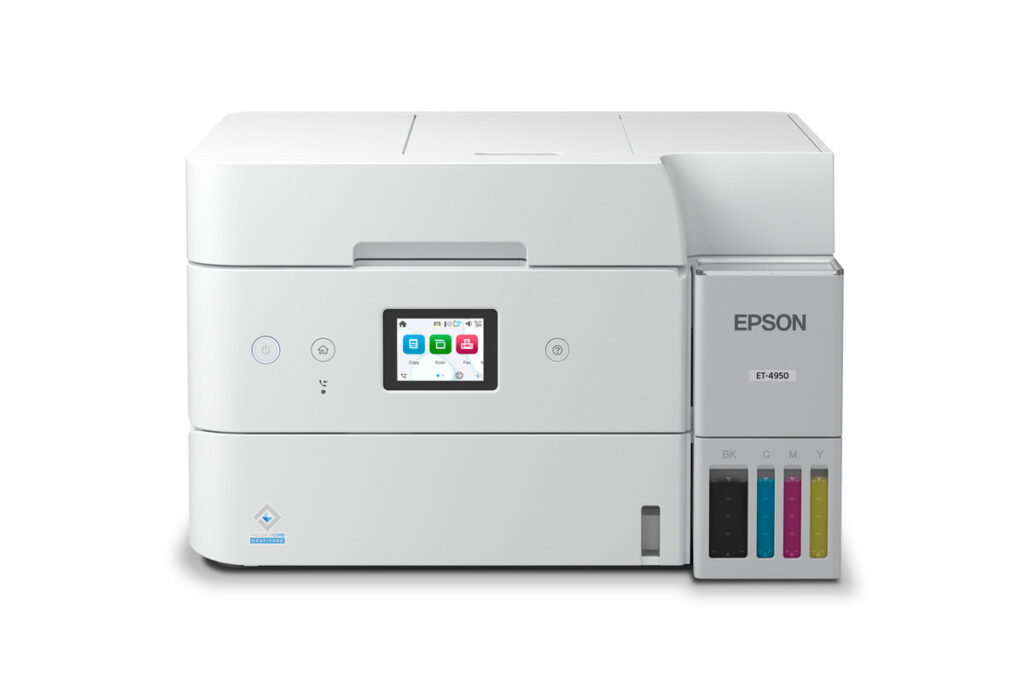
Epson EcoTank ET-4950: Specs, Price, Pros & Cons
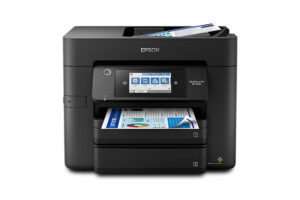
Very few households need a fax machine any more, but the ones that do tend to need it badly. Medical offices, legal work and some government paperwork still arrive by fax, and the EcoTank ET-4950 exists for the home office caught in that situation. It is the four-in-one member of Epson's mid-range EcoTank family, pairing refillable bottle ink with print, copy, scan and fax in one chassis.
Everything below the fax is shared with a cheaper sibling, and that shared base is strong: a proper paper cassette, automatic two-sided printing, a document feeder, wired and wireless networking, and ink bought in bottles rather than cartridges. The touchscreen is the other addition, which makes walk-up copying and faxing easier for anyone who does not want to start every job from a computer.
Its limits are those of a home-office machine. The output tray is small compared with the input, color pages print noticeably slower than black ones, and the feeder is modest for heavy scanning. Tank printers also cost more to buy than cartridge models, so the savings depend on printing steadily over time.
The buying decision is therefore unusually simple. The price step over the fax-free version buys fax and a better screen, not a better printer, so the ET-4950 only makes sense if faxing is a regular, unavoidable part of the work. Epson's closely named EcoTank models share much of their hardware and documentation, which makes it easy to order the wrong one, so check the exact model before buying. Anyone who wants the same bottle economics without the fax should look one model down.
Category strengths
Where the Epson EcoTank ET-4950 beats the median
- A much higher input tray capacity ?250 sheets vs 150 sheets (median)
- Has supertank / refillable ink ?
- Has touchscreen display ?
- A higher print speed (black) ?18 ppm vs 16 ppm (median)
- Has fax ?
- A slightly lighter build ?7.3 kg vs 7.98 kg (median)
Where the Epson EcoTank ET-4950 trails the median
- A much lower output tray capacity ?30 sheets vs 67.5 sheets (median)
- A lower ADF capacity ?30 sheets vs 35 sheets (median)
How this VS Score was computed
Score 69: each known spec is measured against the median of all printers (65 products), then weighted; 50 means level with that median. In classes of six or more, a value beyond the class’s 10th–90th percentile range counts as that limit, so one extreme product cannot set the scale. 66% of the scoreable weight could be used; unknown values, features not applicable to this class and proxies (battery capacity where a rated life exists) add or remove nothing.
| Specification | This product | Cohort median | Score weight | Points moved |
|---|---|---|---|---|
| Automatic duplex printing | Yes | 73% of the class have it | 1 | +50.0 |
| Automatic document feeder | Yes | 55% of the class have it | 1 | +50.0 |
| Input tray capacity | 250 | 150 | 1 | +33.0 |
| Supertank / refillable ink | Yes | 30% of the class have it | 0.5 | +25.0 |
| Ethernet | Yes | 54% of the class have it | 0.5 | +25.0 |
| Touchscreen display | Yes | 45% of the class have it | 0.5 | +25.0 |
| Duplex scanning | No | 23% of the class have it | 0.5 | −24.0 |
| Print speed (black) | 18 | 16 | 2 | +12.0 |
| Fax | Yes | 35% of the class have it | 0.2 | +10.0 |
| Output tray capacity | 30 | 67.5 | 0.3 | −8.4 |
| ADF capacity | 30 | 35 | 0.5 | −3.5 |
| Weight | 7.3 | 7.98 | 0.3 | +1.5 |
| Print speed (color) | 9 | 9 | 1 | +0.0 |
| Print resolution | 4,800 | 4,800 | 0.5 | +0.0 |
| Monthly duty cycle | 10,000 | 10,000 | 0.3 | +0.0 |
Not scored: Color printing (standard for the class (88% have it)); All-in-one (standard for the class (85% have it)); Wi-Fi (standard for the class (97% have it)); Wi-Fi Direct (standard for the class (90% have it)); USB (standard for the class (100% have it)); Apple AirPrint (standard for the class (97% have it)); Mobile app printing (standard for the class (100% have it)).
Editor’s note
The ET-4950 is the full four-in-one version of Epson's current home-office EcoTank chassis: print, copy, scan and a genuine 33.6 kbps color fax, driven from a 2.4-inch color touchscreen. Under it sit the same strong fundamentals as the fax-free ET-3950: 18 ISO ppm black, automatic duplex printing, a 250-sheet cassette, a 30-sheet document feeder, Ethernet plus Wi-Fi 5, and 502 bottles rated at 8,500 pages black. Epson quotes up to three years of ink in the box and a 10,000-page monthly duty cycle.
At its list price, the question is exactly what the extra money over the ET-3950 buys: fax and the touchscreen, nothing else. For a home office that receives faxes (medical, legal, government paperwork still generates them), that is a fair price for one integrated box. For everyone else, Epson has kindly built the same machine without those parts.
The caveats mirror the sibling's. Epson's literature is ambiguous about whether the feeder scans both sides of an original automatically ('Auto 2-Sided Scan' appears in one line, '1-Sided to 2-Sided' in another), so we have left that cell empty rather than guess. Check it in person if duplex scanning is central to your work. The 30-sheet output tray fills long before the 250-sheet cassette empties, the 30-sheet feeder is modest for an office machine, and color printing runs at 9 ISO ppm, half the black speed. The warranty is one year.
Also mind the family naming: the ET-3930, 3940, 3950 and 4950 share a chassis and a setup guide, and it is easy to order the wrong one.
Buy it for the fax. Without that requirement, the ET-3950 is the same printer with a better price.
Specifications
Quality bars show where each figure sits between the lowest and highest of the 65 printers this VS Score is measured against.
Printing
Scanning & copying
Paper handling
Connectivity
Design
Sources and verification
Where the specifications come from
- Official product pageepson.com
- Independent testingrtings.com
Verification
- First published
- Specifications last checked
- Sheet completeness
- 24 of 24 specifications verified; the rest show as Unknown and are never estimated or scored
- Page type
- Product specification page — Compiled from the manufacturer’s published specifications and the cited sources; this is not a hands-on test.
- Basis
- Research-based: specifications and editorial text were compiled from the documents listed here and the manufacturer’s published data. We have not tested this unit ourselves; where independent measurements are mentioned they belong to the linked publication.
Where to buy
Prices and availability may change. Check the retailer before buying. We may earn a commission on purchases.
Price history
Printers with similar specs to the Epson EcoTank ET-4950
Ratings & reviews
No reviews yet. Be the first to share your experience.
The bottom line
The Epson EcoTank ET-4950 earns a VS Score of 69, above the median of the 65 printers it is measured against (a score of 50 is level with that median).
- Who it’s for
- Home offices that still receive faxes (medical, legal, government paperwork) and want one box that prints duplex with bottle ink.
- Who should look elsewhere
- Anyone who has not faxed in years: the premium over the ET-3950 buys fax and a touchscreen, nothing else.
- The trade-off that matters
- Paying list price for two features you may never use, on an otherwise excellent shared chassis. The value question is entirely about your paperwork.
- The main alternative
- Epson EcoTank ET-3950 is the same printer without the fax engine, and the default choice unless faxing is non-negotiable.
The VS Score is calculated from the weighted specifications above, each measured against the median of comparable printers — a shortlisting guide, not a substitute for your own priorities. See how we score.





