
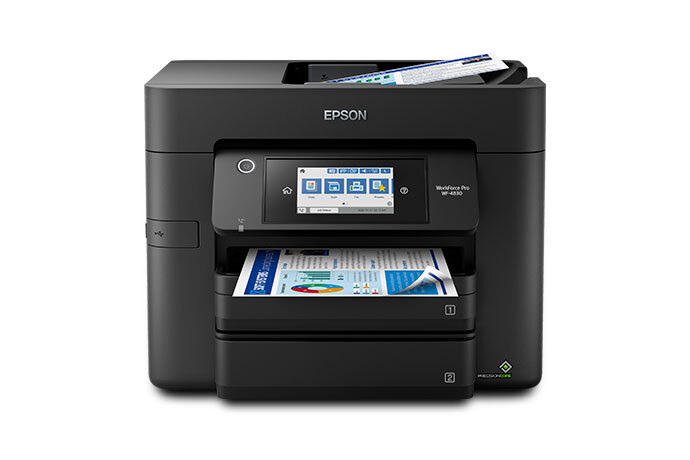
Epson WorkForce Pro WF-4830: Specs, Features, Pros & Cons
Epson sells two parallel ranges of office inkjet, and the choice between the ranges matters more than the choice between models within them. WorkForce machines take cartridges and cost little to buy. EcoTank machines take bottles and cost more. The WF-4830 sits near the top of the cartridge side, which makes it the most capable printer Epson offers that still expects you to keep buying cartridges.
What that buys is a full office feature set in a domestic-sized box. Print, copy, scan and fax, an automatic document feeder sitting over a flatbed, wired Ethernet alongside Wi-Fi, and a color touchscreen to drive all of it. Letter and Legal are both supported, and it will print borderless, though photographs are not what this machine is for.
The head technology shapes the experience more than the numbers suggest. Epson's PrecisionCore is a piezoelectric design that never heats the ink, so there is no warm-up cycle at all: the printer wakes and prints. Against a laser, which has to bring a fuser up to temperature first, the difference on a one-page job is obvious. Against another inkjet it is unremarkable.
The ink is pigment rather than dye, which is the right choice for paperwork and the wrong one for glossy output. Pigment sits on the surface of plain paper and dries on contact, so a highlighter will not drag it across the page. On photo paper that same property reads as flat and lifeless.
Where buyers get caught is the running cost, and it is not hidden so much as easy to ignore while comparing purchase prices. This is a machine designed to be bought cheaply and fed expensively, and whether that suits you depends entirely on how much you print.
Category strengths
Where the Epson WorkForce Pro WF-4830 beats the median
- A much higher input tray capacity ?500 sheets vs 150 sheets (median)
- A much higher print speed (black) ?25 ppm vs 16 ppm (median)
- A much higher monthly duty cycle ?33,000 pages vs 10,000 pages (median)
- Has duplex scanning ?
- Has touchscreen display ?
- A higher print speed (color) ?12 ppm vs 9 ppm (median)
- A higher ADF capacity ?50 sheets vs 35 sheets (median)
- Has fax ?
Where the Epson WorkForce Pro WF-4830 trails the median
- A much heavier build ?11.9 kg vs 7.98 kg (median)
How this VS Score was computed
Score 81: each known spec is measured against the median of all printers (65 products), then weighted; 50 means level with that median. In classes of six or more, a value beyond the class’s 10th–90th percentile range counts as that limit, so one extreme product cannot set the scale. 64% of the scoreable weight could be used; unknown values, features not applicable to this class and proxies (battery capacity where a rated life exists) add or remove nothing.
| Specification | This product | Cohort median | Score weight | Points moved |
|---|---|---|---|---|
| Print speed (black) | 25 | 16 | 2 | +56.0 |
| Automatic duplex printing | Yes | 73% of the class have it | 1 | +50.0 |
| Automatic document feeder | Yes | 55% of the class have it | 1 | +50.0 |
| Input tray capacity | 500 — capped at the class’s upper range (350) | 150 | 1 | +50.0 |
| Duplex scanning | Yes | 23% of the class have it | 0.5 | +25.0 |
| Ethernet | Yes | 54% of the class have it | 0.5 | +25.0 |
| Touchscreen display | Yes | 45% of the class have it | 0.5 | +25.0 |
| Supertank / refillable ink | No | 30% of the class have it | 0.5 | −24.0 |
| Print speed (color) | 12 | 9 | 1 | +17.0 |
| Monthly duty cycle | 33,000 | 10,000 | 0.3 | +15.0 |
| ADF capacity | 50 | 35 | 0.5 | +10.5 |
| Fax | Yes | 35% of the class have it | 0.2 | +10.0 |
| Weight | 11.9 | 7.98 | 0.3 | −4.8 |
| Print resolution | 4,800 | 4,800 | 0.5 | +0.0 |
Not scored: Color printing (standard for the class (88% have it)); All-in-one (standard for the class (85% have it)); Output tray capacity (unknown: not scored); Wi-Fi (standard for the class (97% have it)); Wi-Fi Direct (standard for the class (90% have it)); USB (standard for the class (100% have it)); Apple AirPrint (standard for the class (97% have it)); Mobile app printing (standard for the class (100% have it)).
Editor’s note
The WF-4830 is built around one idea: never make you turn a page over. It prints, copies, scans and faxes two-sided, and the 50-sheet automatic document feeder does duplex scanning in one pass. If your work involves paperwork rather than documents, that is the feature that saves real time.
Paper capacity backs it up. Two 250-sheet trays give you 500 sheets, which means you can keep letterhead in one and plain paper in the other, or refill half as often. At 25 ISO ppm black and 12 ISO ppm color it is quick for an inkjet, and the PrecisionCore Heat-Free head means it starts printing without warming up, so the gap between pressing print and the first page landing is noticeably shorter than a laser.
The DURABrite Ultra pigment ink is the right ink for this job. It is instant-dry and water-resistant on plain paper, so highlighters and damp fingers do not smear it. It is not a photo ink, and glossy prints from this printer will look flat next to a dye-based machine.
Here is the part to think about before buying. Epson rates the duty cycle at up to 33,000 pages but recommends no more than 1,600 pages a month, and that recommended figure is the one that matters. This is a cartridge printer, so the purchase price is low and the cost per page is not. Run it near that 1,600-page recommendation and ink will cost you more than the printer did, within the first year.
It suits a small office printing a few hundred pages a month that needs an ADF, Ethernet and fax without spending laser money. If your volume is high, the Epson EcoTank ET-4850 has the same all-in-one feature set with refillable tanks, and the higher sticker price pays for itself well inside two years.
Specifications
Quality bars show where each figure sits between the lowest and highest of the 65 printers this VS Score is measured against.
Printing
Scanning & copying
Paper handling
Connectivity
Design
Sources and verification
Where the specifications come from
- Official product pageepson.com
- Independent testingrtings.com
Verification
- First published
- Specifications last checked
- Sheet completeness
- 23 of 24 specifications verified; the rest show as Unknown and are never estimated or scored
- Page type
- Product specification page — Compiled from the manufacturer’s published specifications and the cited sources; this is not a hands-on test.
- Basis
- Research-based: specifications and editorial text were compiled from the documents listed here and the manufacturer’s published data. We have not tested this unit ourselves; where independent measurements are mentioned they belong to the linked publication.
Printers with similar specs to the Epson WorkForce Pro WF-4830

Ratings & reviews
No reviews yet. Be the first to share your experience.
The bottom line
The Epson WorkForce Pro WF-4830 earns a VS Score of 81, above the median of the 65 printers it is measured against (a score of 50 is level with that median).
- Who it’s for
- A small office pushing a few hundred pages a month that needs two-sided everything, a duplex ADF, Ethernet and fax without moving up to a color laser.
- Who should look elsewhere
- Photo printing. DURABrite Ultra is a pigment ink tuned for crisp, water-resistant text on plain paper, and glossy prints come out looking flat.
- The trade-off that matters
- Low purchase price, high cost per page. The 500-sheet capacity invites you to print more, and the cartridge economics punish you for accepting the invitation.
- The main alternative
- The Epson EcoTank ET-4850 gives you the same all-in-one feature set with refillable tanks. It costs meaningfully more up front and wins on total cost within about two years at this kind of volume.
The VS Score is calculated from the weighted specifications above, each measured against the median of comparable printers — a shortlisting guide, not a substitute for your own priorities. See how we score.




