Razer Basilisk V4 Pro: Specs, Price, Pros & Cons
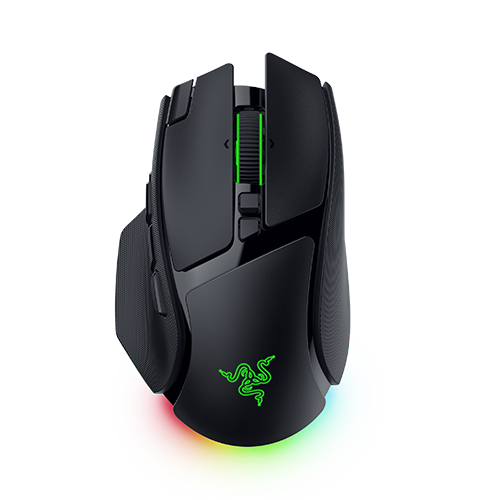
The Basilisk V4 Pro and the cheaper Basilisk V4 HyperSpeed share one shell. Razer lists the same length, width and height for both, to the tenth of a millimeter, and both have the thumb rest, the multi-function trigger and three side buttons. Everything the Pro adds is inside.
The Pro polls at 8,000 Hz without any extra hardware, over its own wireless dongle as well as over the cable, and its Focus Pro 50K Gen-3 sensor tracks to 930 IPS. That dongle is a 2-in-1 receiver, so a compatible Razer keyboard can share it. The Focus X 33K in the HyperSpeed stops at 540 IPS, and that mouse reaches the faster polling rate only with a dock or a dongle bought separately.
Only the Pro gets the HyperScroll Gen-2 wheel. Next to the 24-step notched mode and free spin, it has a 48-step Precision Tactile mode meant for menus and inventories. Its Smart-Reel setting switches between notches and free spin on its own, depending on how fast you scroll, and Synapse offers five levels for how much force that takes. The HyperSpeed's wheel changes mode only when you press its button.
The black Pro weighs 100 g, which is 12 g less than the Basilisk V3 Pro, and the HyperSpeed weighs 94 g. Razer's feature page counts 14 customizable controls, with scroll up and scroll down among them, while its spec table lists 12 programmable buttons (the HyperSpeed has 10). One side button ships mapped to a Synapse feature Razer calls AI Prompt Master, and it can be remapped like the others.
Category strengths
Where the Razer Basilisk V4 Pro beats the median
- A much higher polling rate ?8,000 Hz vs 1,000 Hz (median)
- A much higher wireless polling rate ?8,000 Hz vs 1,000 Hz (median)
- A much higher max sensitivity ?50,000 DPI vs 25,600 DPI (median)
- More buttons ?12 vs 6 (median)
- Much longer battery life ?200 h vs 130 h (median)
- More connection options ?
- A higher max tracking speed ?930 IPS vs 650 IPS (median)
- A much higher max acceleration ?90 G vs 50 G (median)
- Has horizontal scrolling ?
- Has free-spin scroll wheel ?
Where the Razer Basilisk V4 Pro trails the median
- A heavier build ?100 g vs 89 g (median)
How this VS Score was computed
Score 83: each known spec is measured against the median of all mice (83 products), then weighted; 50 means level with that median. In classes of six or more, a value beyond the class’s 10th–90th percentile range counts as that limit, so one extreme product cannot set the scale. 75% of the scoreable weight could be used; unknown values, features not applicable to this class and proxies (battery capacity where a rated life exists) add or remove nothing.
| Specification | This product | Cohort median | Score weight | Points moved |
|---|---|---|---|---|
| Polling rate | 8,000 | 1,000 | 0.8 | +40.0 |
| Max sensitivity | 50,000 — capped at the class’s upper range (44,000) | 25,600 | 1 | +36.0 |
| Buttons | 12 | 6 | 0.6 | +30.0 |
| Wireless polling rate | 8,000 | 1,000 | 0.5 | +25.0 |
| Battery life | 200 | 130 | 0.8 | +21.6 |
| Connection | 3 | 2 | 0.8 | +20.0 |
| Max acceleration | 90 — capped at the class’s upper range (88) | 50 | 0.4 | +15.2 |
| Adjustable lift-off distance | Yes | 65% of the class have it | 0.3 | +15.0 |
| USB-C charging | Yes | 68% of the class have it | 0.3 | +15.0 |
| Max tracking speed | 930 — capped at the class’s upper range (888) | 650 | 0.8 | +14.4 |
| Horizontal scrolling | Yes | 46% of the class have it | 0.2 | +10.0 |
| Free-spin scroll wheel | Yes | 36% of the class have it | 0.2 | +10.0 |
| Wireless charging | Yes | 18% of the class have it | 0.2 | +10.0 |
| RGB lighting | Yes | 48% of the class have it | 0.2 | +10.0 |
| Weight | 100 | 89 | 1 | −5.0 |
| Switch lifespan | 100 | 80 | 0.2 | +2.6 |
Not scored: Grip styles (unknown: not scored); Click latency (unknown: not scored); Debounce adjustment (unknown: not scored); Battery capacity (unknown: not scored); Quick charge (unknown: not scored); Onboard memory (standard for the class (88% have it)); Software customization (standard for the class (98% have it)); Adjustable weights (unknown: not scored).
Editor’s note
Razer rates the battery at 200 hours at 1,000 Hz. At 8,000 Hz the same spec table gives 54 hours, a little over a quarter of that, so four hours of play a day means a charge about every two weeks. Bluetooth stretches it to 275 hours and pairs with up to three devices, which lets a work laptop share the mouse with the gaming PC.
Charging on the desk needs Razer's charging puck swapped in for the mouse's cover puck. The puck comes with the Mouse Dock V2 Pro or works on the HyperFlux V2 mat, and both are sold separately. Razer's US store also sells the Pro and the dock together as a bundle. The same dock lifts the HyperSpeed to 8,000 Hz. At Razer's US list prices the cheaper mouse plus the dock costs about what the Pro costs on its own, and that pair charges wirelessly too.
Beyond the wheel, the Pro adds the faster sensor, two more programmable buttons and a battery rated 60 hours longer at the same polling rate. It also weighs 6 g more than its sibling. The click switches are not on that list, because both mice use Razer's Gen-4 optical switches with the same 100-million-click rating. Of those extras, only the wheel is something no accessory can add to the HyperSpeed later.
I would pay for the Pro if I spent most evenings scrolling through long inventories, skill menus or spreadsheets, because Precision Tactile and Smart-Reel are built for exactly that.
Specifications
Quality bars show where each figure sits between the lowest and highest of the 83 mice this VS Score is measured against.
Sensor & tracking
Design & handling
Switches & latency
Connectivity
Battery
Features
Sources and verification
Where the specifications come from
- Official product pagerazer.com
Verification
- First published
- Specifications last checked
- Sheet completeness
- 28 of 34 specifications verified; the rest show as Unknown and are never estimated or scored
- Page type
- Product specification page — Compiled from the manufacturer’s published specifications and the cited sources; this is not a hands-on test.
- Basis
- Research-based: specifications and editorial text were compiled from the documents listed here and the manufacturer’s published data. We have not tested this unit ourselves; where independent measurements are mentioned they belong to the linked publication.
Where to buy
Prices and availability may change. Check the retailer before buying. We may earn a commission on purchases.
Price history
Mice with similar specs to the Razer Basilisk V4 Pro


Ratings & reviews
No reviews yet. Be the first to share your experience.
The bottom line
The Razer Basilisk V4 Pro earns a VS Score of 83, above the median of the 83 mice it is measured against (a score of 50 is level with that median).
- Who it’s for
- A right-handed player with a lot of binds who wants 8,000 Hz without buying extras and scrolls through long menus often enough to use the wheel's extra modes.
- Who should look elsewhere
- Left-handed players, and anyone whose main interest is the fast polling rate with desk charging, since the cheaper V4 HyperSpeed gets both through Razer's dock.
- The trade-off that matters
- At the rate it is sold on, the battery runs down far sooner than the box rating suggests. The dock that would charge it on the desk is another purchase.
- The main alternative
- Logitech G502 X PLUS: thirteen programmable buttons, hybrid optical-mechanical switches and wireless charging on a POWERPLAY mat, for someone who already owns one.
The VS Score is calculated from the weighted specifications above, each measured against the median of comparable mice — a shortlisting guide, not a substitute for your own priorities. See how we score.