ELECOM HUGE M-HT1DRBK: Specs, Features, Pros & Cons
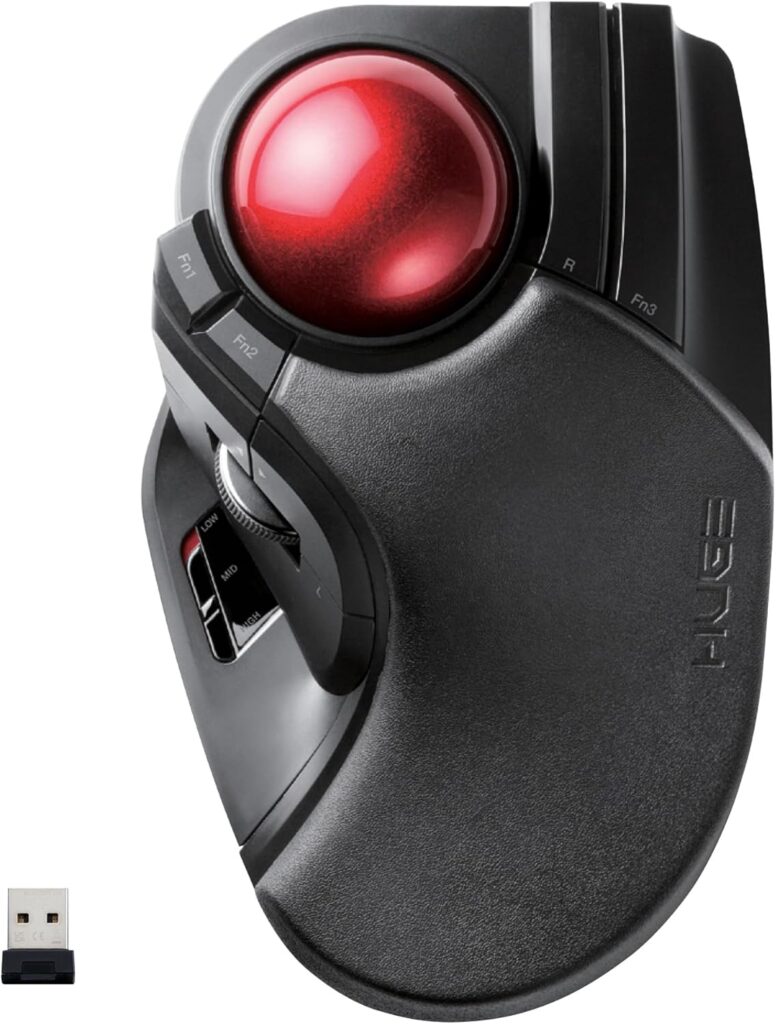
ELECOM built the HUGE around a 52 mm ball, larger than anything Logitech or Kensington ships, and then built a memory-foam palm rest behind it so the whole hand can lie on the trackball. It is a finger-operated trackball: the index and middle fingers roll the ball, the thumb gets the main clicks, the scroll wheel and the back and forward keys. The name is not marketing exaggeration. This is a big, planted object that does not move once it is on the desk.
The design decisions are the interesting part. The ball rides on three artificial ruby bearings that ELECOM deliberately made oversized so dust settles less readily in the seats, and the sensor underneath is a gaming-grade optical unit tuned to the ball's coating. A three-position slider on the body changes the tracking speed between low, mid and high without touching software, and there are eight buttons plus tilt scrolling, ten assignable functions in total through ELECOM's free Mouse Assistant utility.
Power comes from two AA cells, and the receiver is a micro dongle that stores inside the body when you carry it. This is the wireless version. ELECOM also sells a wired HUGE under a different code, and a lot of the confusion in reviews comes from mixing the two.
It suits someone with a large desk and a large hand who wants the wrist supported at all times, and who is happy to use a Japanese-market product with a Japanese manual. Anyone with small hands, anyone who wants Bluetooth, and left-handers should be careful, because the shape is firmly right-handed.
It is also cheaper than the big names, which is why it keeps turning up in recommendations despite the rough edges.
Category strengths
Where the ELECOM HUGE M-HT1DRBK beats the median
- Much longer battery life ?235 h vs 130 h (median)
- Has horizontal scrolling ?
- More buttons ?8 vs 6 (median)
Where the ELECOM HUGE M-HT1DRBK trails the median
- A much heavier build ?260 g vs 89 g (median)
- A much lower max sensitivity ?1,500 DPI vs 25,600 DPI (median)
- Fewer connection options ?
- No adjustable lift-off distance ?
- No USB-C charging ?
- No quick charge ?
How this VS Score was computed
Score 34: each known spec is measured against the median of all mice (83 products), then weighted; 50 means level with that median. In classes of six or more, a value beyond the class’s 10th–90th percentile range counts as that limit, so one extreme product cannot set the scale. 52% of the scoreable weight could be used; unknown values, features not applicable to this class and proxies (battery capacity where a rated life exists) add or remove nothing.
| Specification | This product | Cohort median | Score weight | Points moved |
|---|---|---|---|---|
| Max sensitivity | 1,500 — capped at the class’s lower range (4,000) | 25,600 | 1 | −42.0 |
| Battery life | 235 | 130 | 0.8 | +32.0 |
| Connection | 1 | 2 | 0.8 | −20.0 |
| Weight | 260 — capped at the class’s upper range (145) | 89 | 1 | −19.0 |
| Adjustable lift-off distance | No | 65% of the class have it | 0.3 | −14.4 |
| USB-C charging | No | 68% of the class have it | 0.3 | −14.4 |
| Quick charge | No | 55% of the class have it | 0.3 | −14.4 |
| Buttons | 8 | 6 | 0.6 | +10.2 |
| Horizontal scrolling | Yes | 46% of the class have it | 0.2 | +10.0 |
| Free-spin scroll wheel | No | 36% of the class have it | 0.2 | −9.6 |
| RGB lighting | No | 48% of the class have it | 0.2 | −9.6 |
Not scored: Max tracking speed (unknown: not scored); Max acceleration (unknown: not scored); Polling rate (unknown: not scored); Grip styles (unknown: not scored); Click latency (unknown: not scored); Switch lifespan (unknown: not scored); Debounce adjustment (not applicable: only 18% of this class have it); Wireless polling rate (unknown: not scored); Battery capacity (unknown: not scored); Wireless charging (not applicable: only 18% of this class have it); Onboard memory (unknown: not scored); Software customization (standard for the class (98% have it)); Adjustable weights (not applicable: only 2% of this class have it).
Editor’s note
What I like about the HUGE is that ELECOM solved the real problem with cheap trackballs, which is the bearings. The oversized ruby supports change how the ball feels compared with the small steel balls on budget units, and because they are large they need cleaning less often. Combined with a ball this size, small cursor moves feel controlled rather than twitchy, which is what a finger-operated design should deliver.
The palm rest is a love-it-or-leave-it feature. If you rest the whole hand while working, it is the most comfortable trackball I know of. Hover your wrist, and the rest only makes the trackball longer. Picture your own posture before buying.
The compromises are real. There is no Bluetooth on this variant, only the 2.4 GHz dongle, so it will not pair with a tablet or a locked-down work laptop without a free USB port. The AA cells last a long time in low-energy mode, but you give up the convenience of USB charging, and the mode switch for battery saving is on the underside. ELECOM's software is functional and dated, the documentation is Japanese-first, and warranty handling outside Japan goes through the importer.
Against the Kensington SlimBlade Pro, the obvious finger-ball rival, the HUGE wins on comfort and price and loses on connectivity, build polish and the option of using it left-handed. Against the Logitech MX ERGO it is a different kind of trackball: thumb versus fingers, and the HUGE needs a bigger footprint.
I would buy it for a fixed desk where wrist support matters more than portability, and where a spare USB port is not in short supply. I would skip it for laptops and shared or ambidextrous desks.
Specifications
Quality bars show where each figure sits between the lowest and highest of the 83 mice this VS Score is measured against.
Sensor & tracking
Design & handling
Switches & latency
Connectivity
Battery
Features
Sources and verification
Where the specifications come from
- Official product pageelecom.co.jp
Verification
- First published
- Specifications last checked
- Sheet completeness
- 25 of 34 specifications verified; the rest show as Unknown and are never estimated or scored
- Page type
- Product specification page — Compiled from the manufacturer’s published specifications and the cited sources; this is not a hands-on test.
- Basis
- Research-based: specifications and editorial text were compiled from the documents listed here and the manufacturer’s published data. We have not tested this unit ourselves; where independent measurements are mentioned they belong to the linked publication.
Mice with similar specs to the ELECOM HUGE M-HT1DRBK

Ratings & reviews
No reviews yet. Be the first to share your experience.
The bottom line
The ELECOM HUGE M-HT1DRBK earns a VS Score of 34, below the median of the 83 mice it is measured against (a score of 50 is level with that median).
- Who it’s for
- Right-handed desk workers with larger hands who want a finger-operated ball and a full palm rest, and who have a spare USB port for the receiver.
- Who should look elsewhere
- Laptop owners who need Bluetooth, left-handers, and anyone with small hands, since the body is long and the shape is fixed.
- The trade-off that matters
- You get the biggest ball and the most support in the category, but only on a wireless link that needs a dongle and batteries you replace.
- The main alternative
- Kensington SlimBlade Pro Trackball: ambidextrous, adds Bluetooth and wired modes with USB-C charging, at the cost of no palm rest and a higher price.
The VS Score is calculated from the weighted specifications above, each measured against the median of comparable mice — a shortlisting guide, not a substitute for your own priorities. See how we score.