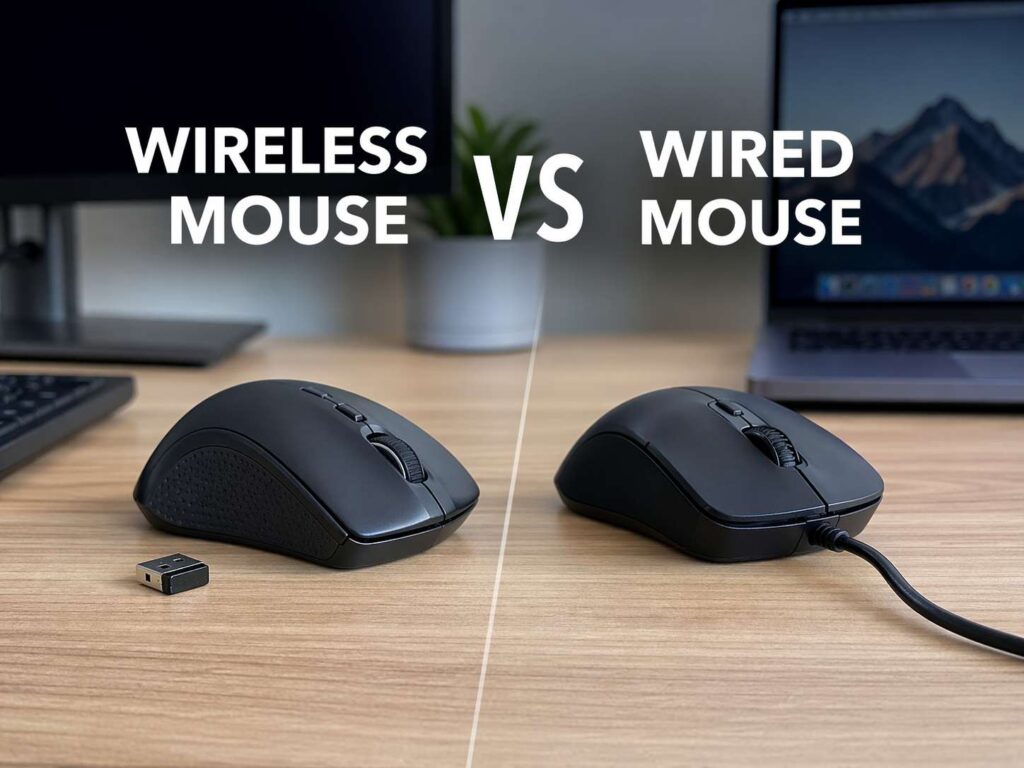
A mouse looks like a small purchase, yet it can change how your desk feels every day. The right one can make work smoother, gaming more precise, and travel far less annoying. The wrong one can leave you dealing with cable drag, battery stress, random lag, or a shape that never feels right in your hand.
That is why the wireless mouse vs wired mouse debate still matters in 2026.
Years ago, the answer felt simple. Wired mice felt faster, cheaper, and more reliable. Wireless mice looked cleaner, yet many people worried about lag, battery life, and connection dropouts. Today, that gap is much smaller. Modern wireless mice are faster, lighter, and easier to live with than older models. At the same time, wired mice still hold a clear place on many desks.
So which one should you buy?
For most people, a wireless mouse is the better fit now. It keeps the desk tidy, travels well, and pairs easily with laptops and tablets. A wired mouse still wins in a few areas. It is simple, direct, and ready the moment you plug it in. There is no battery to charge and no receiver to lose.
The better pick comes down to how you use your computer, how much you want to spend, and how much you care about cable-free comfort.
Why this choice still matters
People use a mouse for hours at a time. That alone makes this decision worth more thought than many buyers give it. A person who works in spreadsheets all day does not need the same mouse as someone who plays competitive shooters at night. A student with a slim laptop does not need the same mouse as someone with a full desktop setup at home.
A mouse affects comfort, speed, desk space, and even how often you need to think about small annoyances. A cable can catch on a notebook, a monitor stand, or the edge of a desk mat. A battery can run low at the worst time. A Bluetooth connection can feel convenient on the road. A wired USB connection can feel better on a fixed desk.
That is why this is not just a spec sheet question. It is a daily use question.
Wireless mouse pros and cons
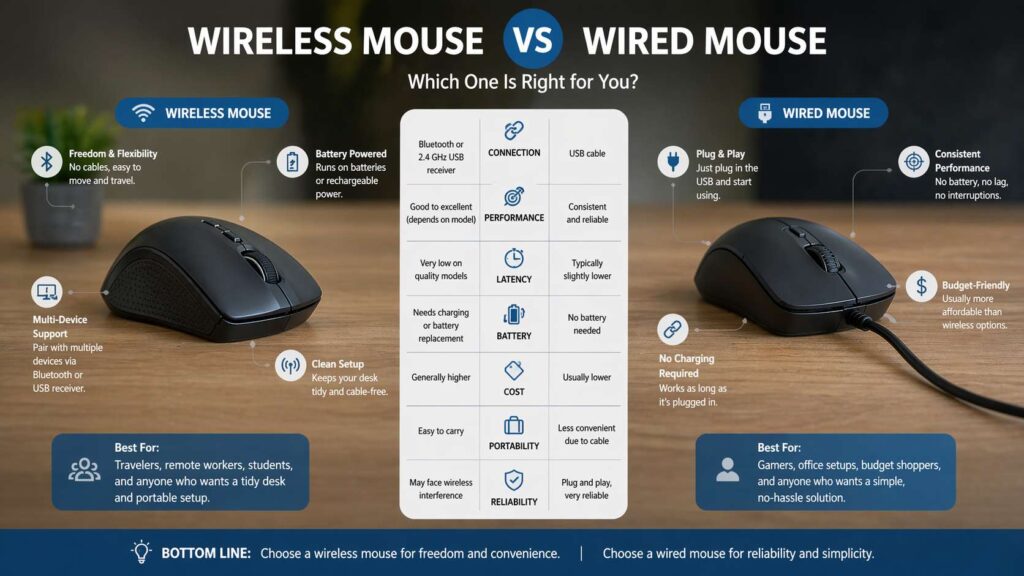
A wireless mouse gives you freedom. There is no cable pulling across the desk. There is no cord to pack in a bag. The overall setup feels cleaner, and that matters more than many people expect.
This is one reason wireless mice have become the default choice for office work, study, and travel. They pair nicely with laptops, especially thin models with few ports. They are easy to move from one room to another. They are easy to use in coffee shops, meeting rooms, and shared workspaces.
Many newer models offer two connection types. You can use Bluetooth for a clean setup with no dongle, or you can use a 2.4 GHz USB receiver for a more direct link. That gives buyers more flexibility than older wireless mice had.
Battery life is far better now too. Some wireless mice run for months on a single battery. Others use rechargeable batteries that last for weeks and charge quickly. That means battery life is no longer the automatic deal breaker it once was.
Still, wireless mice are not perfect.
You need to charge them or replace batteries. That is one more thing to manage. Some buyers hate that idea, even if charging only happens once in a long stretch. There is still a chance of connection issues on cheaper models. The best wireless performance often costs more than a basic wired mouse. A tiny USB receiver can get lost. Bluetooth can feel less ideal for fast gaming on low-end devices.
So the wireless mouse experience is great for many people, yet quality matters. A good wireless mouse can feel excellent. A bad one can feel annoying fast.
Wired mouse pros and cons
A wired mouse keeps things simple. You plug it in, and it works. There is no pairing step, no battery warning, and no need to stop and recharge. That is still the biggest reason many people stay with wired models.
Wired mice are often cheaper too. If you want a reliable mouse for a desktop PC, office rollout, school computer lab, or family setup, a wired model still makes a lot of sense. You can buy one, connect it in seconds, and forget about it.
This makes wired mice a smart pick for buyers who value ease and low cost over flexibility. They are still common in offices, libraries, classrooms, and front desk setups for good reason.
The downsides are easy to spot. The cable adds clutter. It can drag across the desk. It can get caught on objects. It makes travel less pleasant. It takes up a port all the time. On a small desk, the cable alone can make the setup feel messier than it needs to.
A wired mouse is simple, yet that simplicity comes with less freedom.
Wireless vs wired mouse for office work
Office users often gain the most from wireless. A cable-free desk feels cleaner and easier to manage. That becomes even more useful in hybrid work setups, where a person moves between rooms, desks, or devices during the day.
A wireless office mouse works especially well with laptops. You can slide it into a bag, pull it out in seconds, and start working without dragging a cable along with it. Many quiet wireless mice are built for shared spaces too, so they fit well in offices, coworking areas, and meeting rooms.
Multi-device support adds another plus. Some wireless mice let you switch between a laptop, desktop, and tablet with one button. That can save time every day.
A wired mouse still fits some office setups very well. Fixed desks are the best example. If the mouse never leaves the desk, the cable becomes less of a problem. A wired mouse is a strong pick for admin work, reception desks, libraries, and shared computers where simple plug-and-play use matters most.
For comfort at work, shape matters just as much as connection type. If wrist strain is part of the buying decision, it helps to read our guide on vertical mouse vs regular mouse. If you want the basics first, this quick explainer on what is a vertical mouse gives a good starting point.
Wireless vs wired mouse for gaming
Gaming used to favor wired mice almost by default. That old rule is no longer as clear.
High-end wireless gaming mice have improved a lot. Many now offer fast polling rates, strong sensors, low click delay, and connection quality that feels very close to wired in actual use. For many players, especially casual and mid-level competitive players, a premium wireless gaming mouse feels excellent.
The cable-free feel can be a real advantage. Fast swipes feel cleaner. The mouse moves with less resistance. The desk feels less crowded. For some players, that alone makes wireless more enjoyable.
Price still matters here. Cheap wireless gaming mice do not always deliver the same experience as premium models. That is where many buyers get disappointed. A low-cost wireless mouse can feel soft, inconsistent, or less responsive. A good wired gaming mouse often delivers stronger value at lower prices.
Wired gaming mice still win on one practical point. They never need charging. That matters during long sessions. It matters even more for people who hate interruptions. You sit down, plug in, and play.
So what is the best gaming choice? A premium wireless mouse is a great pick for players who want freedom and are ready to pay more. A wired gaming mouse is still a smart buy for people who want steady performance, lower cost, and no battery worries.
Bluetooth mouse vs 2.4 GHz wireless mouse
Many buyers search for wireless mouse vs Bluetooth mouse, yet that is not the full picture. Bluetooth is one type of wireless connection. A USB receiver is another.
Bluetooth mice are great for travel and laptop use. They do not need a dongle, which is a big plus on thin laptops with limited ports. They are neat, simple, and easy to carry around.
A 2.4 GHz wireless mouse with a USB receiver often feels more direct. Many buyers prefer that setup for desktop use. Gamers often lean this way too. The dedicated receiver can offer a steadier link, and it avoids some of the quirks that appear with Bluetooth on certain systems.
So the question is not just wired vs wireless. It is often Bluetooth vs receiver-based wireless, and that small detail matters.
Comfort, weight, and battery life
Comfort can outweigh every other factor. A mouse can have great specs and still feel wrong in your hand. Size, grip shape, button feel, and overall weight matter a lot.
Wireless mice often feel smoother on the desk since there is no cable drag. That can make everyday use feel lighter and more relaxed. Yet some wireless models weigh more than wired models. The battery adds weight, and sensitive users will notice that right away.
Wired mice can feel more consistent in hand if you like a steady, planted feel. Some people prefer that. Others want the freedom of a lighter cable-free glide. This part is personal, and it is one reason reviews alone are not enough.
Battery life is part of comfort too. A mouse that lasts months feels easy to live with. A mouse that needs frequent charging can get old fast. Rechargeable models are convenient for some people. Replaceable battery models suit others better. There is no single winner here. It comes down to which type feels less annoying in your routine.
Which mouse should you buy?
A wireless mouse is the better pick for most people in 2026. It suits laptops, home offices, travel bags, shared desks, and clean setups. It feels modern, practical, and easy to carry around. A good wireless mouse is now strong enough for everyday work, study, browsing, creative use, and a lot of gaming.
A wired mouse still makes more sense in a few clear cases. It is the better pick for tight budgets, school setups, shared computers, fixed desks, and buyers who want the least hassle possible. It is a strong pick for gaming too, especially if you want steady performance without paying more for premium wireless tech.
If your desk never changes and price matters most, wired is hard to beat.
If you move around, use a laptop often, or want a cleaner setup, wireless is usually the smarter buy.
Final verdict
The old gap between wireless and wired mice has shrunk a lot. Wireless is no longer the risky option it once felt like. For most buyers, it is now the better everyday choice. It gives you a cleaner desk, easier travel, and a more flexible setup.
Wired still has real value. It is simple, cheap, direct, and ready all the time. That makes it a great fit for many desks, even now.
The best mouse is not the one with the trendier label. It is the one that fits your day. Pick wireless for flexibility and a cleaner setup. Pick wired for low cost and zero battery hassle. Either choice can be right. The smart move is matching the mouse to the way you actually work and play.