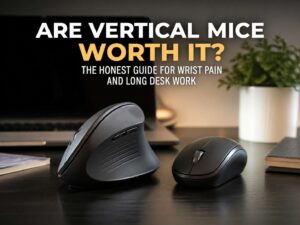
A mouse seems like a small thing. In real life, it shapes how your hand sits for hours each day. That affects your wrist, your forearm, your shoulder, and even how tense your grip feels by late afternoon.
That is the problem behind searches like ergonomic mouse, best mouse for wrist pain, vertical mouse for carpal tunnel, or mouse for RSI. Someone typing those words is not just shopping for a gadget. They want less strain and better comfort during real work.
A vertical mouse and a regular mouse do the same job, yet they do not place your hand in the same position. That difference changes the full feel of a desk setup. For some users, the change feels great on day one. For others, it takes a week or two before it starts to feel natural.
The short answer is simple. A vertical mouse usually wins for comfort and wrist position. A regular mouse usually wins for familiarity, fast precision, and lower cost. The better pick comes down to your hand, your tasks, and the number of hours you spend at your desk.
What a vertical mouse does differently
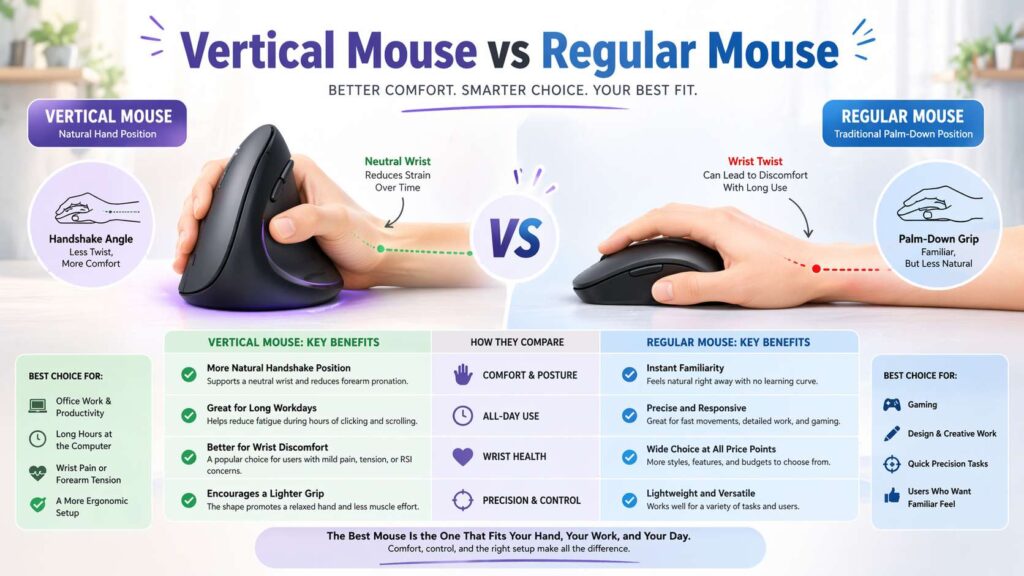
A regular mouse keeps your palm facing down. That position feels normal after years of use. Still, it can leave the forearm more twisted than some users like.
A vertical mouse rotates the hand into a handshake-like angle. That shift often feels more relaxed through the wrist and forearm. You may notice less pressure on the outside of the wrist and less tightness after long office sessions.
That is the main reason people try one. They want a more natural hand position, not a flashy shape.
The change sounds minor. It does not feel minor after a long day of email, spreadsheets, browser tabs, reports, and constant clicking. A vertical design can make that routine feel lighter.
Grip style changes too. With a regular mouse, the hand tends to flatten and drag from the wrist. With a vertical mouse, movement often comes more from the arm. That can reduce some of the strain that builds up during repetitive work.
Still, a vertical mouse is not magic. It will not fix a bad desk, a chair that sits too low, or a mouse placed too far from the keyboard. The shape helps, yet the full setup still matters.
Why a regular mouse still works so well
A regular mouse remains popular for a reason. It feels familiar. You can sit down, grab it, and work at full speed right away.
That instant comfort matters. A new mouse shape can be annoying during the first few days, and not every user wants that learning curve. A regular mouse keeps things simple.
Precision is another strong point. A traditional mouse can feel faster, especially for gaming, design work, detailed editing, or rapid cursor changes. Fast flicks and tiny corrections often feel easier with a shape your hand already knows well.
Price helps too. The regular mouse market is huge. You can find cheap office models, premium wireless models, gaming mice, lightweight mice, silent mice, and larger ergonomic shapes without moving to a full vertical design.
That wide range gives buyers more room to match their budget and work style.
A regular mouse can still be comfortable, too. A good shape, the right size, light buttons, and smooth tracking can feel far better than a poor vertical mouse. Shape alone does not decide comfort. Fit decides comfort.
Vertical mouse for wrist pain. Is it really better?
For many people, yes. For every person, no.
A vertical mouse often feels better for users with mild wrist strain, forearm tension, or end-of-day hand fatigue. The reason is straightforward. The hand sits at a different angle, so the arm does not stay as twisted during long stretches of use.
That can feel like real relief in daily office work.
Yet a vertical mouse is not a treatment. It is a tool. Anyone with ongoing numbness, tingling, burning pain, or weakness in the hand should treat the mouse as one part of the bigger picture. Desk height, arm support, keyboard placement, break habits, and grip tension matter just as much.
Searching for a vertical mouse for carpal tunnel makes sense. Wrist pain often pushes people toward ergonomic gear. Still, no mouse can promise a cure. What it can do is reduce strain and make the workday easier to get through.
That is a real benefit on its own.
For users with RSI concerns, the same idea applies. A better shape helps. Lighter clicks help. Short breaks help. Keyboard shortcuts help. Lower grip force helps. The best mouse for RSI is usually the one that lets your hand stay loose and your wrist stay straighter through the day.
Comfort over long workdays
Office work exposes the real difference between these two mouse types.
A regular mouse often feels fine for short sessions. Two hours of casual browsing or admin work will not tell you much. Eight hours of documents, dashboards, and clicks will tell you everything.
That is where a vertical mouse starts to make sense.
Long desk days reward comfort. They punish awkward angles, hard gripping, and repetitive wrist motion. Users who spend most of the day in Excel, Google Sheets, CRMs, email, Slack, browser tabs, or project tools often get more value from a vertical mouse than users who only touch a mouse here and there.
The same users often upgrade other parts of the desk at the same time. A mouse feels better on a better workstation. A chair matters a lot here, so this guide on the best affordable office chair for 2026 pairs well with any ergonomic mouse upgrade.
Comfort is cumulative. The mouse matters. The chair matters. Screen height matters. Elbow position matters. Small fixes stack up fast.
Precision, gaming, and creative work
A regular mouse usually keeps the lead here.
Fast cursor control feels more natural on a familiar shape. That makes a regular mouse a better fit for many gamers, photo editors, video editors, CAD users, and designers. These jobs demand quick reactions and tiny corrections. Familiarity helps.
A vertical mouse can still work for those tasks. It can win you over after the adjustment period. Still, expect to feel a bit slower at first. The angle changes the motion pattern, and the hand needs time to adapt.
That is not a flaw. It is just part of the switch.
For competitive gaming, a regular mouse stays the safer pick for most buyers. Sensor quality, weight, click feel, glide, and side button layout tend to matter more in that space than arm angle alone.
For office tasks, the story shifts. Precision still matters, yet comfort starts to matter more. That is where a vertical mouse often pulls ahead.
Hand size, grip style, and mouse fit
This part gets ignored too often.
A mouse can have great reviews and still fit your hand badly. That leads to finger stretch, palm drag, cramped buttons, or a grip that never feels settled.
Small hands often do better with compact shapes and easier-to-reach side buttons. Large hands usually need more support through the palm and a taller body. A mouse that is too small can force a pinched grip. A mouse that is too large can make every click feel like a reach.
Grip style matters too.
Palm grip users rest more of the hand on the mouse. They often like fuller shapes and more support. Claw grip users arch the fingers more and may prefer a tighter body. Fingertip grip users value light weight and quick movement.
Vertical mice usually suit palm-oriented users best. Regular mice cover every grip style under the sun. That is one reason the category remains so flexible.
Buyers who search for best ergonomic mouse for small hands, wireless vertical mouse, or vertical mouse for large hands are asking the right question. Fit is not a side detail. Fit is the main detail.
Desk setup matters too
A great mouse will still feel wrong on a poor setup.
Keep the mouse close to the keyboard. A wide reach pulls the shoulder out and adds tension fast. Set the desk so the forearm can stay relaxed. Let the elbow rest near your side. Try not to bend the wrist up, down, or sideways for long periods.
Your chair height matters here too. A desk that sits too high can ruin an ergonomic mouse. A chair that sits too low can do the same.
Screen placement plays a role as well. A setup built for comfort should work as one system, not a pile of random parts. Upgrading the mouse and forgetting the room around it leaves money on the table.
For users who are refreshing the whole setup, display choice can shape the desk just as much as the input gear. A screen guide like budget projector vs budget TV in 2026 can help if your workspace doubles as an entertainment area or home office.
Short breaks matter, too. Stand up. Drop your shoulders. Open the hand. Reset your grip. A mouse works better in a body that is not locked in one position all day.
Who should buy a vertical mouse
A vertical mouse is a strong fit for these users:
People with wrist soreness after office work.
Users who spend all day clicking through documents, spreadsheets, browsers, and admin tools.
Anyone who feels forearm tightness from a flat mouse.
Workers building a more ergonomic desk setup.
People who grip the mouse too hard and want a shape that encourages a looser hold.
That group often sees the biggest gain. The jump is not always dramatic in the first hour. It becomes clearer after a week of real use.
Who should stick with a regular mouse
A regular mouse makes more sense for these users:
Gamers who care most about speed and familiar control.
Designers and editors who need rapid, precise pointer movement.
Users with no wrist discomfort who already like their current shape.
Buyers on a tight budget.
Anyone who switches computers often and wants a mouse that feels instantly normal.
There is no prize for forcing a vertical mouse into the wrong workflow. Comfort matters. Control matters too.
Final verdict
A vertical mouse is usually the better pick for comfort, office work, and reducing wrist strain during long desk days. A regular mouse is usually the better pick for gaming, detailed creative work, and buyers who want instant familiarity.
That does not make one type good and the other bad. It means each shape solves a different problem.
For wrist pain, forearm tension, and repetitive office tasks, start with a vertical mouse. For speed, precision, and a zero-learning-curve setup, stick with a regular mouse.
The best choice is the one that keeps your hand relaxed at 10 a.m. and still feels good at 5 p.m. That is the test that matters most.