
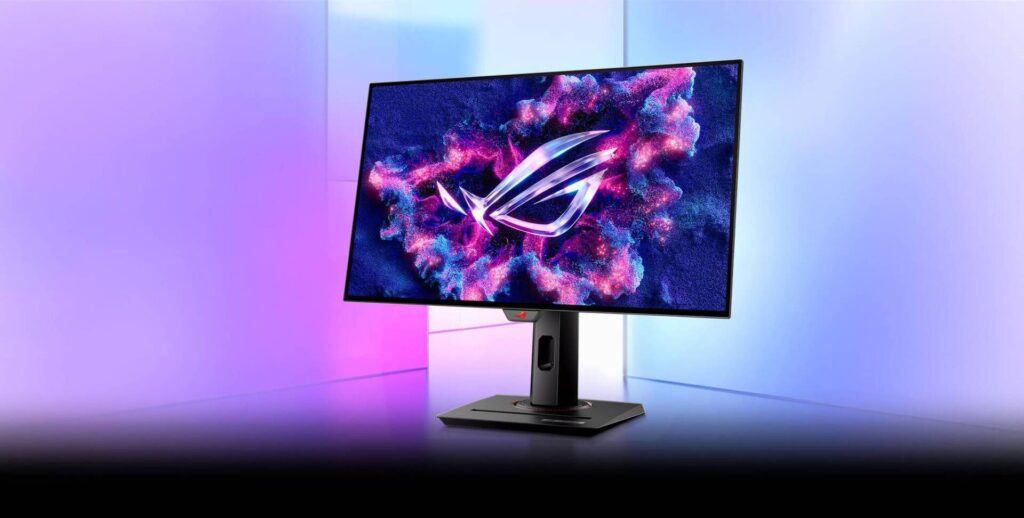
ASUS ROG Strix OLED XG27AQDMG: Specs, Price, Pros & Cons
This monitor makes an assumption about your room before you have plugged anything into it. The coating is glossy, which is the choice that produces the deepest-looking blacks and the most saturated color, and equally the choice that turns the screen into a mirror of whatever is lit behind you. Curtains and lamp placement will matter more here than any setting in the menu.
Assuming the room cooperates, the rest is a well-judged 27-inch gaming panel. This size and resolution remain the practical choice for anyone whose graphics card has to last a few years, because frame rates that stay theoretical at 4K are achievable here. Pixel density is the same as every other monitor of this shape, which is to say good for games and ordinary for text.
The connection panel is where this model needs care. Its three video inputs are not equivalent: the DisplayPort input carries the panel's full refresh rate and the two HDMI inputs do not, so a desktop and a games console will not get the same experience. That is a specification to read before buying rather than discover afterwards.
ASUS also fits its Extreme Low Motion Blur mode, a second route to clean motion at a fixed frame rate. The user guide says it locks the brightness setting and turns off variable refresh while it runs, so treat it as a tool for particular games rather than a setting to leave switched on.
The stand is the full-motion sort and there is a hub for peripherals, but nothing that lets a laptop arrive on a single cable.
Treat it as a desktop gaming display for a room you control, with one specification you must check against your own hardware first.
Category strengths
Where the ASUS ROG Strix OLED XG27AQDMG beats the median
- Has motion blur reduction ?
- Higher peak brightness ?1,300 nits vs 1,000 nits (median)
How this VS Score was computed
Score 51: each known spec is measured against the median of OLED gaming monitors, 27 to 31 inches (18 products), then weighted; 50 means level with that median. In classes of six or more, a value beyond the class’s 10th–90th percentile range counts as that limit, so one extreme product cannot set the scale. 69% of the scoreable weight could be used; unknown values, features not applicable to this class and proxies (battery capacity where a rated life exists) add or remove nothing.
| Specification | This product | Cohort median | Score weight | Points moved |
|---|---|---|---|---|
| USB-C | No | 41% of the class have it | 0.5 | −24.0 |
| Motion blur reduction | Yes | 33% of the class have it | 0.3 | +15.0 |
| Peak brightness | 1,300 | 1,000 | 0.8 | +12.0 |
| USB hub | Yes | 76% of the class have it | 0.05 | +2.3 |
| Pivot | Yes | 72% of the class have it | 0.02 | +1.0 |
| Screen size | 27 | 27 | 1.2 | +0.0 |
| Resolution | 1440p | 1440p | 1.2 | +0.0 |
| Panel type | OLED | OLED | 0.8 | +0.0 |
| Color depth | 10 | 10 | 0.3 | +0.0 |
| Response time | 0.03 | 0.03 | 0.8 | +0.0 |
| Contrast ratio | 1,500,000 | 1,500,000 | 0.6 | +0.0 |
| DCI-P3 coverage | 99 | 99 | 0.6 | +0.0 |
| HDR | True Black 400 | True Black 400 | 0.5 | +0.0 |
| Pixel density | 111 | 111 | 0.5 | +0.0 |
| Adaptive sync | G-Sync Compatible | G-Sync Compatible | 0.6 | +0.0 |
| Refresh rate | 240 | 240 | 1.2 | +0.0 |
| HDMI ports | 2 | 2 | 0.4 | +0.0 |
| DisplayPort inputs | 1 | 1 | 0.4 | +0.0 |
Not scored: Local dimming (unknown: not scored); Local dimming zones (unknown: not scored); Variable refresh rate (standard for the class (100% have it)); Input lag (unknown: not scored); Height adjustment (standard for the class (94% have it)); Tilt (standard for the class (100% have it)); Swivel (standard for the class (89% have it)); USB-C power delivery (unknown: not scored); Built-in speakers (not applicable: only 6% of this class have it); Headphone output (standard for the class (82% have it)); KVM switch (unknown: not scored); Webcam (unknown: not scored); Microphone (unknown: not scored); Ethernet (not applicable: only 0% of this class have it); Picture-by-picture (unknown: not scored).
Editor’s note
The XG27AQDMG is a bright glossy WOLED, and there is one port specification that decides how you should connect it.
HDMI here is version 2.0. The panel runs 240 Hz at 1440p, but HDMI 2.0 does not have the bandwidth to carry that, so the full refresh rate is available over DisplayPort 1.4 and not over HDMI. For a PC that is a non-issue: use DisplayPort. For a current console, which outputs over HDMI, it means you will not get the monitor's headline figure. Check that against how you intend to use it.
The panel itself is strong. 1,300 nits peak puts it among the brighter OLED monitors, with quoted contrast of 1,500,000:1, 99% DCI-P3 coverage and 0.03 ms response. It also lists Extreme Low Motion Blur, which ASUS runs at a fixed 120 Hz as an alternative route to motion clarity.
The coating is glossy, so blacks look their deepest and a lit room behind you will show. There is a USB hub but no USB-C, and the stand adjusts fully including pivot. Variable refresh runs from 40 Hz upward, a slightly wider window at the bottom end than the usual 48.
On DisplayPort, its brightness and motion handling are near the top for an OLED.
Specifications
Quality bars show where each figure sits between the lowest and highest of the 18 OLED gaming monitors, 27 to 31 inches this VS Score is measured against.
Picture
Gaming
Ergonomics & design
Connectivity
Features
Sources and verification
Where the specifications come from
- Official product pagerog.asus.com
Verification
- First published
- Specifications last checked
- Sheet completeness
- 32 of 42 specifications verified; the rest show as Unknown and are never estimated or scored
- Page type
- Product specification page — Compiled from the manufacturer’s published specifications and the cited sources; this is not a hands-on test.
- Basis
- Research-based: specifications and editorial text were compiled from the documents listed here and the manufacturer’s published data. We have not tested this unit ourselves; where independent measurements are mentioned they belong to the linked publication.
Where to buy
Prices and availability may change. Check the retailer before buying. We may earn a commission on purchases.
Price history
Monitors with similar specs to the ASUS ROG Strix OLED XG27AQDMG

Ratings & reviews
No reviews yet. Be the first to share your experience.
The bottom line
The ASUS ROG Strix OLED XG27AQDMG earns a VS Score of 51, above the median of the 18 OLED gaming monitors, 27 to 31 inches it is measured against (a score of 50 is level with that median).
- Who it’s for
- PC gaming over DisplayPort in a room that can be darkened, for someone who wants some of the brightest OLED highlights in this class and the option of ASUS's Extreme Low Motion Blur mode.
- Who should look elsewhere
- Setups where a current console is the main source. Both HDMI ports top out below the panel's full rate, so the headline refresh never reaches it.
- The trade-off that matters
- The glossy coating gives the deepest image but reflects lamps and windows, which decides where in the room it can live.
- The main alternative
- LG 27GX704A-B: a glossy OLED of the same size and resolution with two HDMI 2.1 inputs, for a desk where a console shares the screen.
The VS Score is calculated from the weighted specifications above, each measured against the median of comparable OLED gaming monitors, 27 to 31 inches — a shortlisting guide, not a substitute for your own priorities. See how we score.





