
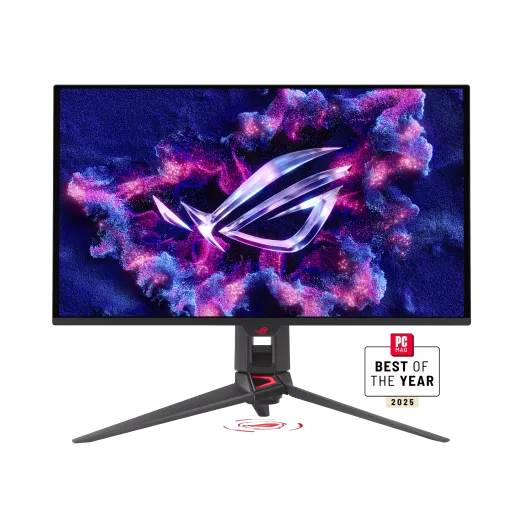
ASUS ROG Swift OLED PG27UCDM: Specs, Features, Pros & Cons
ASUS reserves the ROG Swift name for the top of its gaming range, one rung above the Strix models, and the OLED Swifts tend to come in pairs: the same flagship recipe offered at two screen sizes. This is the smaller of the pair. Its larger sibling and that model's third-generation successor are the alternatives, and the choice between them is less about quality than about the desk the monitor is going on.
A smaller screen at the same resolution suits a shallow desk, a setup where the monitor sits close to the eyes, or a display that has to share space with a second one. It also keeps the whole image within a comfortable field of view in games, where a larger panel at arm's length pushes the corners of the picture into peripheral vision and invites more head movement than some players like.
The monitor is also built for a desk shared between two computers, and that shapes who gets the most from it. Someone with a work laptop and a gaming PC side by side will use features that a pure gamer pays for and ignores, so the case for it is strongest where both machines live on the same desk.
Two cautions belong here. Running native resolution at high frame rates in current games asks a great deal of a graphics card, so a mid-range machine will be making compromises the monitor itself does not require. And this is a premium product priced accordingly. Buyers who only want a fast OLED for games can spend considerably less on a lower-resolution model and lose little in play.
For a mixed desk where screen area is not the priority, it is the most complete package ASUS sells.
Category strengths
Where the ASUS ROG Swift OLED PG27UCDM beats the median
- Has USB-C ?
- Has motion blur reduction ?
- A much higher pixel density ?166 ppi vs 111 ppi (median)
- Much faster USB-C charging ?90 W vs 54 W (median)
- Has KVM switch ?
How this VS Score was computed
Score 61: each known spec is measured against the median of OLED gaming monitors, 27 to 31 inches (18 products), then weighted; 50 means level with that median. In classes of six or more, a value beyond the class’s 10th–90th percentile range counts as that limit, so one extreme product cannot set the scale. 71% of the scoreable weight could be used; unknown values, features not applicable to this class and proxies (battery capacity where a rated life exists) add or remove nothing.
| Specification | This product | Cohort median | Score weight | Points moved |
|---|---|---|---|---|
| Resolution | 4K | 1440p | 1.2 | +60.0 |
| USB-C | Yes | 41% of the class have it | 0.5 | +25.0 |
| Motion blur reduction | Yes | 33% of the class have it | 0.3 | +15.0 |
| Pixel density | 166 — capped at the class’s upper range (140) | 111 | 0.5 | +6.5 |
| Picture-by-picture | Yes — held to half its range (fewer than six products in this class list it) | 75% of the class have it | 0.2 | +5.0 |
| USB hub | Yes | 76% of the class have it | 0.05 | +2.3 |
| USB-C power delivery | 90 | 54 | 0.05 | +1.5 |
| Pivot | Yes | 72% of the class have it | 0.02 | +1.0 |
| KVM switch | Yes | 50% of the class have it | 0.02 | +1.0 |
| Screen size | 27 | 27 | 1.2 | +0.0 |
| Panel type | OLED | OLED | 0.8 | +0.0 |
| Color depth | 10 | 10 | 0.3 | +0.0 |
| Response time | 0.03 | 0.03 | 0.8 | +0.0 |
| Peak brightness | 1,000 | 1,000 | 0.8 | +0.0 |
| Contrast ratio | 1,500,000 | 1,500,000 | 0.6 | +0.0 |
| DCI-P3 coverage | 99 | 99 | 0.6 | +0.0 |
| HDR | True Black 400 | True Black 400 | 0.5 | +0.0 |
| Adaptive sync | G-Sync Compatible | G-Sync Compatible | 0.6 | +0.0 |
| Refresh rate | 240 | 240 | 1.2 | +0.0 |
| HDMI ports | 2 | 2 | 0.4 | +0.0 |
| DisplayPort inputs | 1 | 1 | 0.4 | +0.0 |
Not scored: Local dimming (not applicable: only 0% of this class have it); Local dimming zones (unknown: not scored); Variable refresh rate (standard for the class (100% have it)); Input lag (unknown: not scored); Height adjustment (standard for the class (94% have it)); Tilt (standard for the class (100% have it)); Swivel (standard for the class (89% have it)); Built-in speakers (not applicable: only 6% of this class have it); Headphone output (standard for the class (82% have it)); Webcam (not applicable: only 0% of this class have it); Microphone (not applicable: only 0% of this class have it); Ethernet (not applicable: only 0% of this class have it).
Editor’s note
The PG27UCDM is one of the sharpest OLED monitors you can buy, and that single number explains who it is for.
At 27 inches and 4K it works out to 166 pixels per inch, against 140 on the 32-inch 4K OLEDs alongside it. Text is noticeably cleaner at normal desk distance, and on a QD-OLED that matters more than usual: the triangular subpixel layout can make small text look fringed, and higher density is the most effective counter to it.
Everything else is flagship specification: 240 Hz, 0.03 ms response, 99% DCI-P3, True Black 400 HDR at 1,000 nits peak, and quoted contrast of 1,500,000:1. It carries DisplayPort 2.1 rather than the 1.4 most rivals still ship, which means 4K at that refresh rate without compression, plus HDMI 2.1, USB-C with 90 W charging, a USB hub, a KVM switch and picture-by-picture. The stand tilts, swivels, pivots and adjusts for height.
The OLED conditions apply and are worth stating. There is no local dimming because none is needed (each pixel switches off), but static taskbars and toolbars carry a slow burn-in risk that a monitor faces far more than a television does. ASUS lists the surface only as anti-reflection, so a bright light source can still reflect off it.
Buy it if you want the sharpest, best-connected OLED for a desk that mixes work and high-refresh gaming. Buy a 32-inch if screen area matters more to you than pixel density, or a matte LCD if the monitor faces a window.
Specifications
Quality bars show where each figure sits between the lowest and highest of the 18 OLED gaming monitors, 27 to 31 inches this VS Score is measured against.
Picture
Gaming
Ergonomics & design
Connectivity
Features
Sources and verification
Where the specifications come from
- Official product pagerog.asus.com
Verification
- First published
- Specifications last checked
- Sheet completeness
- 37 of 42 specifications verified; the rest show as Unknown and are never estimated or scored
- Page type
- Product specification page — Compiled from the manufacturer’s published specifications and the cited sources; this is not a hands-on test.
- Basis
- Research-based: specifications and editorial text were compiled from the documents listed here and the manufacturer’s published data. We have not tested this unit ourselves; where independent measurements are mentioned they belong to the linked publication.
Monitors with similar specs to the ASUS ROG Swift OLED PG27UCDM

Ratings & reviews
No reviews yet. Be the first to share your experience.
The bottom line
The ASUS ROG Swift OLED PG27UCDM earns a VS Score of 61, above the median of the 18 OLED gaming monitors, 27 to 31 inches it is measured against (a score of 50 is level with that median).
- Who it’s for
- A desk shared between a work laptop and a gaming PC, where the cleanest OLED text available and one-cable docking both get used every day.
- Who should look elsewhere
- Rooms where the screen faces a window, anyone who keeps static toolbars up for long hours and would rather not think about burn-in, and buyers who want more screen area rather than more sharpness.
- The trade-off that matters
- Density over size: the smaller panel is the reason text looks so clean, but the same resolution on a larger screen gives more room for windows and a bigger picture for films.
- The main alternative
- ASUS ROG Swift OLED PG32UCDM: the same flagship recipe on a larger screen, if immersion and working space outrank pixel density for you.
The VS Score is calculated from the weighted specifications above, each measured against the median of comparable OLED gaming monitors, 27 to 31 inches — a shortlisting guide, not a substitute for your own priorities. See how we score.





