
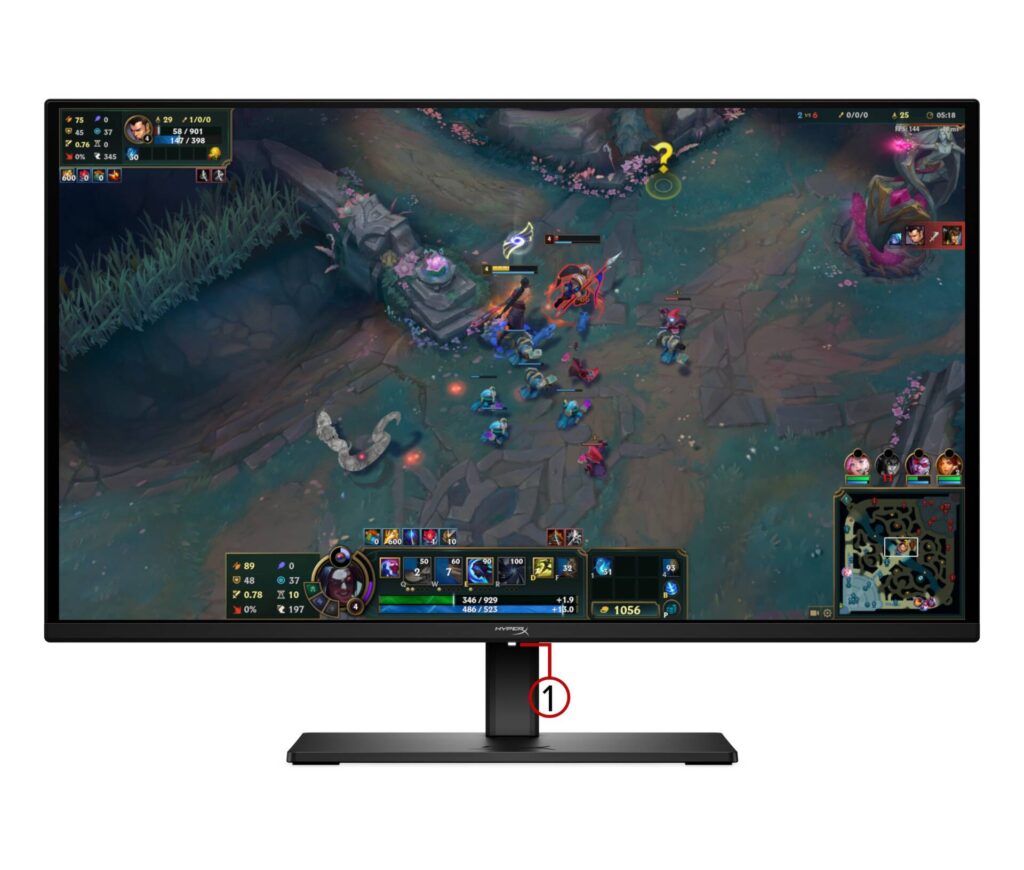
HyperX OMEN OLED 27q: Specs, Features, Pros & Cons
The question with an OLED at this price is no longer whether the picture is good. It is whether the way you use a computer suits a panel that lights every pixel individually.
That sounds abstract until you look at your own screen. A taskbar that never moves, a game interface parked in the same corner for hundreds of hours, a spreadsheet open on the left half of the display every working day: emissive panels age with use, and static bright elements age faster than everything around them. Makers manage this with pixel shifting and brightness limiters running quietly in the background, and HyperX is no exception. For evening gaming and video the risk is remote. For eight hours a day of the same application, it is a real consideration that an LCD does not carry.
Get past that and what you are buying is a gaming monitor from the moment OLED stopped being exotic. The panel class is shared with displays costing considerably more, the matte finish stops a lit room washing the image out, and the stand moves in every direction that matters.
Where the budget shows is behind the screen rather than on it. This is a display to plug a desktop into: no video from a laptop over one cable, nothing to plug peripherals into, nothing to switch two computers with. If your setup is a tower, a keyboard and a mouse, none of that is a loss. If it is a work laptop that lands on the desk each morning, the saving disappears into the dock you now have to buy instead.
It suits someone whose screen time is mostly play. A day of work with play at the end of it is the wrong fit.
Category strengths
Where the HyperX OMEN OLED 27q trails the median
- No USB hub ?
How this VS Score was computed
Score 46: each known spec is measured against the median of OLED gaming monitors, 27 to 31 inches (16 products), then weighted; 50 means level with that median. In classes of six or more, a value beyond the class’s 10th–90th percentile range counts as that limit, so one extreme product cannot set the scale. 56% of the scoreable weight could be used; unknown values, features not applicable to this class and proxies (battery capacity where a rated life exists) add or remove nothing.
| Specification | This product | Cohort median | Score weight | Points moved |
|---|---|---|---|---|
| USB-C | No | 33% of the class have it | 0.5 | −24.0 |
| Motion blur reduction | No | 22% of the class have it | 0.3 | −14.4 |
| Headphone output | Yes | 75% of the class have it | 0.2 | +10.0 |
| USB hub | No | 73% of the class have it | 0.05 | −2.2 |
| KVM switch | No | 33% of the class have it | 0.02 | −1.0 |
| Screen size | 27 | 27 | 1.2 | +0.0 |
| Resolution | 1440p | 1440p | 1.2 | +0.0 |
| Panel type | OLED | OLED | 0.8 | +0.0 |
| Refresh rate | 240 | 240 | 1.2 | +0.0 |
| Response time | 0.03 | 0.03 | 0.8 | +0.0 |
| Contrast ratio | 1,500,000 | 1,500,000 | 0.6 | +0.0 |
| DCI-P3 coverage | 99 | 99 | 0.6 | +0.0 |
| Pixel density | 110 | 111 | 0.5 | +0.0 |
| HDMI ports | 2 | 2 | 0.4 | +0.0 |
| DisplayPort inputs | 1 | 1 | 0.4 | +0.0 |
Not scored: Color depth (unknown: not scored); Peak brightness (unknown: not scored); HDR (unknown: not scored); Local dimming (not applicable: only 0% of this class have it); Local dimming zones (unknown: not scored); Adaptive sync (unknown: not scored); Variable refresh rate (standard for the class (100% have it)); Input lag (unknown: not scored); Height adjustment (standard for the class (94% have it)); Tilt (standard for the class (100% have it)); Swivel (standard for the class (88% have it)); Pivot (standard for the class (81% have it)); USB-C power delivery (unknown: not scored); Built-in speakers (not applicable: only 0% of this class have it); Webcam (not applicable: only 0% of this class have it); Microphone (not applicable: only 0% of this class have it); Ethernet (not applicable: only 0% of this class have it); Picture-by-picture (unknown: not scored).
Editor’s note
The HyperX OMEN OLED 27q is one of the clearest signs that QD-OLED has stopped being a luxury. It is a 27-inch 2560×1440 panel running at 240 Hz with a quoted 0.03 ms response time, roughly 1,500,000:1 contrast and 99% DCI-P3 coverage, and it launched at just under five hundred dollars, with frequent discounts since.
In practice that combination does what OLED always does well. Blacks are black, so dim game scenes and letterboxed film hold their depth, and the near-instant pixel response means fast motion stays clean without the smearing that troubles VA panels. The matte finish keeps reflections under control, and HP ships it factory-calibrated with a color report in the box.
The savings show up in the connectivity. There are two HDMI 2.1 inputs, one DisplayPort 1.4 and a 3.5 mm headphone jack, and that is the whole list. There is no USB-C input, so a laptop cannot drive and charge over a single cable. No downstream USB ports means no hub, there is no KVM for switching between two machines, and there are no speakers. The stand is the redeeming part, offering height, tilt, swivel and pivot plus a 100x100mm VESA mount.
There is also the usual OLED caveat: static taskbars and HUDs left on screen for hours carry a burn-in risk, which HyperX's panel-care routines reduce without eliminating.
Buy the 27q if you play games or watch a lot of video, want OLED contrast, and connect a desktop by DisplayPort. Skip it if you work from a laptop and wanted one-cable docking, need a USB hub or KVM, or leave static productivity windows open all day. A good IPS panel is the calmer long-term choice there.
Specifications
Quality bars show where each figure sits between the lowest and highest of the 16 OLED gaming monitors, 27 to 31 inches this VS Score is measured against.
Picture
Gaming
Ergonomics & design
Connectivity
Features
Sources and verification
Where the specifications come from
- Official product pagehyperx.com
- Independent testingrtings.com
Verification
- First published
- Specifications last checked
- Sheet completeness
- 32 of 42 specifications verified; the rest show as Unknown and are never estimated or scored
- Page type
- Product specification page — Compiled from the manufacturer’s published specifications and the cited sources; this is not a hands-on test.
- Basis
- Research-based: specifications and editorial text were compiled from the documents listed here and the manufacturer’s published data. We have not tested this unit ourselves; where independent measurements are mentioned they belong to the linked publication.
Monitors with similar specs to the HyperX OMEN OLED 27q


Ratings & reviews
No reviews yet. Be the first to share your experience.
The bottom line
The HyperX OMEN OLED 27q earns a VS Score of 46, below the median of the 16 OLED gaming monitors, 27 to 31 inches it is measured against (a score of 50 is level with that median).
- Who it’s for
- A desktop gamer who also watches a lot of video, wants OLED contrast in a lit room and plugs in a tower PC.
- Who should look elsewhere
- A work-from-laptop desk, and anyone who keeps the same windows open all day. There is no one-cable docking, and static elements age the panel.
- The trade-off that matters
- The savings come out of the back panel. With no hub, no input switching and no video over a laptop cable, a laptop user ends up buying a separate dock.
- The main alternative
- ASUS ROG Strix OLED XG27ACDNG: a panel of the same class with one-cable laptop charging and a built-in switch for two computers, for a desk shared with a work laptop.
The VS Score is calculated from the weighted specifications above, each measured against the median of comparable OLED gaming monitors, 27 to 31 inches — a shortlisting guide, not a substitute for your own priorities. See how we score.




