
Razer Naga V2 Pro: Specs, Price, Pros & Cons
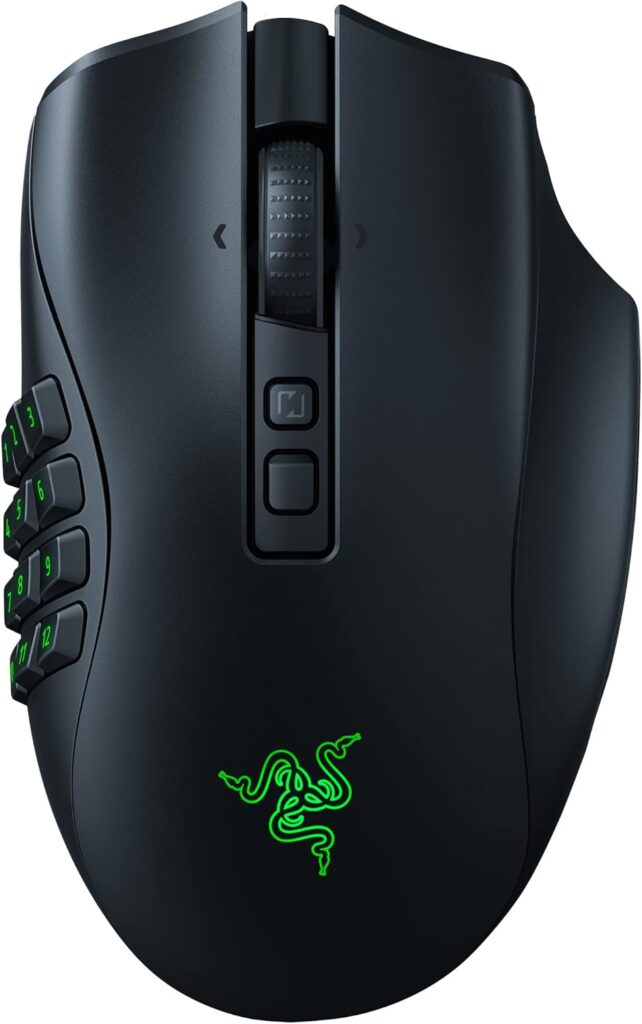
At 133 grams this is the heaviest gaming mouse on the site, and the number is not an oversight. Everything the Naga V2 Pro does needs mass: three interchangeable side panels, a dual-mode scroll wheel, a wireless charging coil and a battery large enough to feed all of it. A mouse built to sit still under a resting palm can afford weight in a way a mouse built to be flicked cannot.
The side panels are the real product. One is a twelve-button grid, one a six-button pad, one a two-button plate, and they swap magnetically, so the same hardware can be an MMO controller during the week and an ordinary gaming mouse at the weekend. Most high-button mice commit you permanently to a layout you either learn or resent.
The wheel is the other unusual part. It switches between free-spinning, for traveling through inventories and long documents at speed, and a tactile mode for counted clicks, and it tilts for horizontal scrolling. Between the wheel and the side grid there is very little that still needs the keyboard.
Underneath, the specification is high-end: a Focus Pro sensor reading to 30,000 DPI, tracking to 750 IPS, optical switches, tri-mode connection and a quoted 150 hours of battery. It also charges wirelessly on a compatible pad, which few other mice in this category can do.
Polling is 1,000 Hz rather than the 8,000 Hz Razer fits to its competitive models, and that is the right decision for the games this was designed around. It is worth being blunt about who those buyers are, because the qualities this mouse is best at are entirely irrelevant to someone playing a shooter.
Category strengths
Where the Razer Naga V2 Pro beats the median
- More buttons ?20 vs 6 (median)
- More connection options ?
- Has horizontal scrolling ?
- Has free-spin scroll wheel ?
- Has wireless charging ?
- Has RGB lighting ?
- A higher max sensitivity ?30,000 DPI vs 25,600 DPI (median)
- A higher max acceleration ?70 G vs 50 G (median)
- A higher max tracking speed ?750 IPS vs 650 IPS (median)
- A higher switch lifespan ?90 million clicks vs 80 million clicks (median)
Where the Razer Naga V2 Pro trails the median
- A much heavier build ?133.1 g vs 89 g (median)
How this VS Score was computed
Score 64: each known spec is measured against the median of all mice (81 products), then weighted; 50 means level with that median. In classes of six or more, a value beyond the class’s 10th–90th percentile range counts as that limit, so one extreme product cannot set the scale. 72% of the scoreable weight could be used; unknown values, features not applicable to this class and proxies (battery capacity where a rated life exists) add or remove nothing.
| Specification | This product | Cohort median | Score weight | Points moved |
|---|---|---|---|---|
| Buttons | 20 — capped at the class’s upper range (13) | 6 | 0.6 | +30.0 |
| Connection | 3 | 2 | 0.8 | +20.0 |
| Weight | 133.1 | 89 | 1 | −17.0 |
| USB-C charging | Yes | 67% of the class have it | 0.3 | +15.0 |
| Horizontal scrolling | Yes | 45% of the class have it | 0.2 | +10.0 |
| Free-spin scroll wheel | Yes | 34% of the class have it | 0.2 | +10.0 |
| Wireless charging | Yes | 14% of the class have it | 0.2 | +10.0 |
| RGB lighting | Yes | 46% of the class have it | 0.2 | +10.0 |
| Max sensitivity | 30,000 | 25,600 | 1 | +9.0 |
| Max acceleration | 70 | 50 | 0.4 | +8.0 |
| Max tracking speed | 750 | 650 | 0.8 | +6.4 |
| Switch lifespan | 90 | 80 | 0.2 | +1.2 |
| Polling rate | 1,000 | 1,000 | 0.8 | +0.0 |
| Grip styles | 2 | 2 | 0.4 | +0.0 |
| Battery life | 150 | 150 | 0.8 | +0.0 |
Not scored: Adjustable lift-off distance (unknown: not scored); Click latency (unknown: not scored); Debounce adjustment (unknown: not scored); Wireless polling rate (unknown: not scored); Battery capacity (unknown: not scored); Quick charge (unknown: not scored); Onboard memory (standard for the class (86% have it)); Software customization (standard for the class (97% have it)); Adjustable weights (not applicable: only 2% of this class have it).
Editor’s note
The Naga V2 Pro has 20 buttons, and like Razer's other swappable-plate Nagas it lets you change how many of them there are.
That flexibility is what you are paying for. The dense grid suits raid nights and hotbar-heavy MMOs, the six-button pad is a middle ground for MOBAs and editing shortcuts, and the two-button plate turns it back into an ordinary right-handed gaming mouse. One mouse can follow you between genres, which is the argument against buying a fixed-grid MMO mouse and a separate shooter mouse.
The dual-mode, tilting wheel is the other reason to choose it over a cheaper MMO mouse with a fixed grid. For spreadsheets and long documents it earns its place as much as it does in games.
Underneath, the hardware matches Razer's competitive mice in almost everything: the sensor is strong, the optical switches are rated to 90 million clicks, the connection is tri-mode, and wireless charging means it need never be plugged in.
The cost is heft. It is heavy for a gaming mouse, and polling stays at the standard rate instead of the much faster one on Razer's competitive models. Neither matters for the games this is designed around.
Buy it if you play MMOs or use many shortcuts and want to tune the button layout to suit. Buy a six-button mouse if that sounds like clutter, since the weight alone rules it out for twitch shooters.
Specifications
Quality bars show where each figure sits between the lowest and highest of the 81 mice this VS Score is measured against.
Sensor & tracking
Design & handling
Switches & latency
Connectivity
Battery
Features
Sources and verification
Where the specifications come from
- Datasheet or manualmysupport.razer.com
- Independent testingrtings.com
Verification
- First published
- Specifications last checked
- Sheet completeness
- 28 of 34 specifications verified; the rest show as Unknown and are never estimated or scored
- Page type
- Product specification page — Compiled from the manufacturer’s published specifications and the cited sources; this is not a hands-on test.
- Basis
- Research-based: specifications and editorial text were compiled from the documents listed here and the manufacturer’s published data. We have not tested this unit ourselves; where independent measurements are mentioned they belong to the linked publication.
Where to buy
Prices and availability may change. Check the retailer before buying. We may earn a commission on purchases.
Price history
Mice with similar specs to the Razer Naga V2 Pro

Ratings & reviews
No reviews yet. Be the first to share your experience.
The bottom line
The Razer Naga V2 Pro earns a VS Score of 64, above the median of the 81 mice it is measured against (a score of 50 is level with that median).
- Who it’s for
- An MMO or MOBA player, or anyone who runs a lot of shortcuts, who wants to change the side layout by game and likes the idea of a mouse that never needs a cable.
- Who should look elsewhere
- Players of fast shooters and anyone who lifts and flicks the mouse. The weight rules it out for twitch play, and there is no left-handed version.
- The trade-off that matters
- Every extra function adds mass. Resting under a palm the weight hardly matters, and it becomes obvious the moment the mouse has to move fast.
- The main alternative
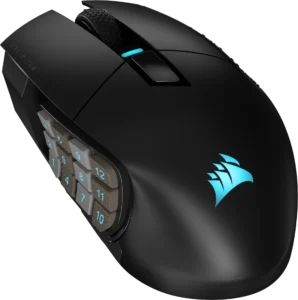
- Corsair SCIMITAR ELITE WIRELESS, a lighter MMO mouse with a sliding twelve-key side panel, for players who want one fixed grid positioned exactly under the thumb.
The VS Score is calculated from the weighted specifications above, each measured against the median of comparable mice — a shortlisting guide, not a substitute for your own priorities. See how we score.




