
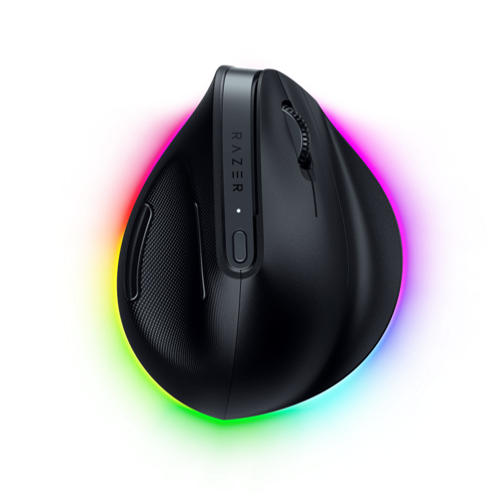
Razer Pro Click V2 Vertical: Specs, Features, Pros & Cons
Razer spent two decades selling to people who play games and has more recently been trying to sell to those same people at work, which is where the Pro Click line comes from. The Vertical Edition is the oddest thing to emerge from that effort: gaming-grade internals wrapped in a body designed around a physiotherapy argument.
The result is a well-equipped mouse. It connects over a cable, a dedicated receiver or Bluetooth, stores profiles onboard, carries a full set of programmable buttons, and uses a sensor from the company's gaming range, where ergonomic mice usually get a modest optical part. If you have used a vertical mouse before and found the tracking sluggish or the software crude, this answers that complaint directly.
Whether any of it is the reason to buy is a different question. People who need a vertical mouse need it for their wrist, and a sensor with headroom to spare does nothing for a spreadsheet. Much of the specification is aimed at a buyer who is hard to find: someone wanting competitive performance while holding the mouse in a position that makes competitive play awkward.
Two practical points shape who it suits. It is heavy, which matters more than usual because the vertical grip moves the whole arm more than the wrist. And there is one clear omission compared with the flat version of the same mouse, discussed below, which anyone who works in wide documents should read before ordering.
As an ergonomic mouse with unusually capable hardware and a price to match, it makes sense for someone whose hand hurts and who also wants the connectivity and the configurability. As a general upgrade for someone already comfortable, it solves a problem you do not have.
Category strengths
Where the Razer Pro Click V2 Vertical beats the median
- More connection options ?
- Has RGB lighting ?
- More buttons ?8 vs 6 (median)
- A higher max sensitivity ?30,000 DPI vs 25,600 DPI (median)
Where the Razer Pro Click V2 Vertical trails the median
- A much heavier build ?150 g vs 89 g (median)
- A lower max tracking speed ?550 IPS vs 650 IPS (median)
- A lower max acceleration ?40 G vs 50 G (median)
- A lower switch lifespan ?60 million clicks vs 80 million clicks (median)
How this VS Score was computed
Score 54: each known spec is measured against the median of all mice (81 products), then weighted; 50 means level with that median. In classes of six or more, a value beyond the class’s 10th–90th percentile range counts as that limit, so one extreme product cannot set the scale. 50% of the scoreable weight could be used; unknown values, features not applicable to this class and proxies (battery capacity where a rated life exists) add or remove nothing.
| Specification | This product | Cohort median | Score weight | Points moved |
|---|---|---|---|---|
| Connection | 3 | 2 | 0.8 | +20.0 |
| Weight | 150 — capped at the class’s upper range (145) | 89 | 1 | −19.0 |
| USB-C charging | Yes | 67% of the class have it | 0.3 | +15.0 |
| Buttons | 8 | 6 | 0.6 | +10.2 |
| RGB lighting | Yes | 46% of the class have it | 0.2 | +10.0 |
| Horizontal scrolling | No | 45% of the class have it | 0.2 | −9.6 |
| Max sensitivity | 30,000 | 25,600 | 1 | +9.0 |
| Max tracking speed | 550 | 650 | 0.8 | −6.4 |
| Max acceleration | 40 | 50 | 0.4 | −4.0 |
| Switch lifespan | 60 | 80 | 0.2 | −2.4 |
Not scored: Polling rate (unknown: not scored); Adjustable lift-off distance (unknown: not scored); Grip styles (unknown: not scored); Free-spin scroll wheel (unknown: not scored); Click latency (unknown: not scored); Debounce adjustment (unknown: not scored); Wireless polling rate (unknown: not scored); Battery life (unknown: not scored); Battery capacity (unknown: not scored); Quick charge (unknown: not scored); Wireless charging (unknown: not scored); Onboard memory (standard for the class (86% have it)); Software customization (standard for the class (97% have it)); Adjustable weights (unknown: not scored).
Editor’s note
The Pro Click V2 Vertical Edition answers a medical question rather than a performance one. Its body is angled at 71.7 degrees, which puts the forearm in a near-neutral handshake position instead of the pronated twist a flat mouse forces. If you have wrist or forearm pain from mouse use, that angle is the entire reason to consider it.
Adjusting takes about a week. Vertical mice feel strange initially and precise movements are harder at first, which is normal. The tall shape also means you move the mouse from the elbow more than the wrist, so a larger desk area helps.
The specification is otherwise the same class as the standard Pro Click V2: the Focus Pro sensor at 30,000 DPI, 550 IPS and 40G, tri-mode connectivity with Bluetooth to three hosts, mechanical switches rated at 60 million clicks, and eight programmable buttons. Battery life is quoted as up to six months, a typical-use estimate.
Two practical points. At 150 g this is a heavy mouse, though the vertical grip means you notice it less than the number suggests. And unlike the standard Pro Click V2 there is no tilt scroll wheel here, so no horizontal scrolling. That is a real loss if you work in wide spreadsheets, and the main reason to choose the flat version if your wrist does not need the angle.
Buy it if mouse use hurts, or you want to prevent that. Skip it if you are comfortable as you are: a vertical mouse fixes one specific problem.
Specifications
Quality bars show where each figure sits between the lowest and highest of the 81 mice this VS Score is measured against.
Sensor & tracking
Design & handling
Switches & latency
Connectivity
Battery
Features
Sources and verification
Where the specifications come from
- Official product pagerazer.com
- Independent testingrtings.com
Verification
- First published
- Specifications last checked
- Sheet completeness
- 22 of 34 specifications verified; the rest show as Unknown and are never estimated or scored
- Page type
- Product specification page — Compiled from the manufacturer’s published specifications and the cited sources; this is not a hands-on test.
- Basis
- Research-based: specifications and editorial text were compiled from the documents listed here and the manufacturer’s published data. We have not tested this unit ourselves; where independent measurements are mentioned they belong to the linked publication.
Mice with similar specs to the Razer Pro Click V2 Vertical
Ratings & reviews
No reviews yet. Be the first to share your experience.
The bottom line
The Razer Pro Click V2 Vertical earns a VS Score of 54, above the median of the 81 mice it is measured against (a score of 50 is level with that median).
- Who it’s for
- Someone with wrist or forearm pain who also wants multi-host Bluetooth, onboard profiles and a sensor that tracks on almost anything.
- Who should look elsewhere
- Comfortable users gain nothing from it, and people who live in wide spreadsheets will miss sideways scrolling.
- The trade-off that matters
- No tilt wheel. The vertical body gives up the horizontal scrolling of the flat model, and you feel that every time a sheet runs off the screen.
- The main alternative
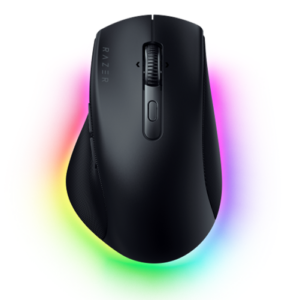
- Razer Pro Click V2: the flat model, with its tilt wheel, for a wrist that does not need the angle
The VS Score is calculated from the weighted specifications above, each measured against the median of comparable mice — a shortlisting guide, not a substitute for your own priorities. See how we score.





