
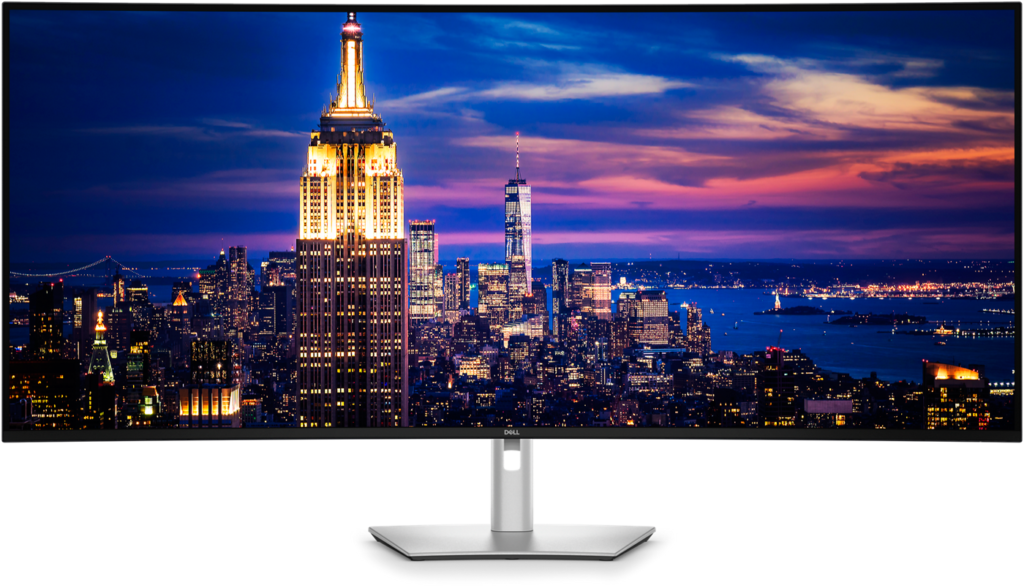
Dell U5226KW: Specs, Features, Pros & Cons
This is the largest screen in Dell's current UltraSharp range, and its size is easier to grasp in desk terms than in inches. It spans roughly the width of two large monitors placed side by side, and it is taller than a typical ultrawide too, so it reads less like a letterbox and more like a wall of workspace. The curve is gentle, enough to angle the far ends toward you without bending the straight lines of documents and timelines.
Dell aims it at people who currently run two or three screens and a dock: traders, developers, video editors with long timelines, and anyone who keeps several computers on one desk. The built-in keyboard-and-mouse switching, wired networking and single-cable laptop connection are what justify the price for them, because each replaces a box that would otherwise sit under the desk.
The physical side deserves thought before the spec sheet does. A screen this wide needs a deep desk, a sturdy mount if it does not sit on its own stand, and a chair centered on it, because the far edges fall well outside a comfortable glance. Windows have to be arranged with some discipline too, or the extra area turns into clutter. Buyers who already tile windows across two monitors will adapt fastest.
Gaming is outside its brief, despite a refresh rate that is high for an office panel, and its response is typical of the category. It is too large to share a desk comfortably with a second display, and anyone with a single laptop and modest needs pays for switching and networking they never touch. For the multi-machine desk it was designed around, it replaces several purchases at once.
Category strengths
Where the Dell U5226KW beats the median
- A much bigger screen ?51.5" (130.81 cm) vs 27" (68.58 cm) (median)
- More HDMI ports ?2 vs 1 (median)
- More DisplayPort inputs ?2 vs 1 (median)
- Has built-in speakers ?
- Has ethernet ?
- Slightly higher peak brightness ?400 nits vs 375 nits (median)
Where the Dell U5226KW trails the median
- A slightly lower pixel density ?129 ppi vs 140 ppi (median)
How this VS Score was computed
Score 66: each known spec is measured against the median of IPS office monitors (14 products), then weighted; 50 means level with that median. In classes of six or more, a value beyond the class’s 10th–90th percentile range counts as that limit, so one extreme product cannot set the scale. 56% of the scoreable weight could be used; unknown values, features not applicable to this class and proxies (battery capacity where a rated life exists) add or remove nothing.
| Specification | This product | Cohort median | Score weight | Points moved |
|---|---|---|---|---|
| Resolution | 8K | 4K | 1.2 | +30.0 |
| USB-C | Yes | 64% of the class have it | 0.5 | +25.0 |
| HDMI ports | 2 | 1 | 0.4 | +20.0 |
| DisplayPort inputs | 2 | 1 | 0.4 | +20.0 |
| Screen size | 51.5 — capped at the class’s upper range (34.14) | 27 | 1.2 | +15.6 |
| Built-in speakers | Yes | 33% of the class have it | 0.2 | +10.0 |
| KVM switch | Yes | 58% of the class have it | 0.2 | +10.0 |
| Ethernet | Yes | 42% of the class have it | 0.2 | +10.0 |
| Peak brightness | 400 | 375 | 0.8 | +2.4 |
| Pixel density | 129 | 140 | 0.5 | −2.0 |
| Panel type | IPS | IPS | 0.8 | +0.0 |
| Refresh rate | 120 | 120 | 0.6 | +0.0 |
| Response time | 5 | 5 | 0.24 | +0.0 |
| Contrast ratio | 2,000 | 2,000 | 0.6 | +0.0 |
| DCI-P3 coverage | 99 | 99 | 0.6 | +0.0 |
| USB-C power delivery | 140 | 140 | 0.3 | +0.0 |
Not scored: Color depth (unknown: not scored); HDR (unknown: not scored); Local dimming (unknown: not scored); Local dimming zones (unknown: not scored); Adaptive sync (unknown: not scored); Variable refresh rate (unknown: not scored); Motion blur reduction (unknown: not scored); Input lag (unknown: not scored); Height adjustment (standard for the class (93% have it)); Tilt (standard for the class (100% have it)); Swivel (standard for the class (86% have it)); Pivot (unknown: not scored); USB hub (standard for the class (86% have it)); Headphone output (unknown: not scored); Webcam (unknown: not scored); Microphone (not applicable: only 11% of this class have it); Picture-by-picture (standard for the class (82% have it)).
Editor’s note
The U5226KW is less a monitor purchase than a decision to replace two or three monitors with one panel. At 51.5 inches with a 6144 x 2560 resolution and a gentle 4200R curve, it occupies the desk space of a dual setup without the bezel down the middle.
Dell uses its IPS Black technology here, which roughly doubles the contrast of conventional IPS to 2000:1 while keeping the wide viewing angles that matter on a panel this wide. On an ordinary IPS the far edges would visibly shift in color. Brightness is 400 cd/m2, color coverage 99% DCI-P3, and the refresh rate is 120 Hz, which is unusually high for a productivity display.
The connectivity is the real story. Thunderbolt 4 carries display, data and 140 W of charging over one cable, there is a 2.5 GbE Ethernet port, a KVM switch for driving two computers from one keyboard and mouse, picture-by-picture, a full USB hub and 2 x 9 W speakers.
The obvious caveats are size, price and desk. This is an expensive monitor that needs a deep desk and a strong mount, and with a 5 ms response it is not a gaming panel despite that refresh rate.
Buy it if you run several machines or many windows, and would otherwise buy two high-end monitors and a dock. Bought that way, the price reads very differently.
Skip it if you have a single laptop and modest needs, or if you game seriously. A 4K 240 Hz panel serves that far better.
Specifications
Quality bars show where each figure sits between the lowest and highest of the 14 IPS office monitors this VS Score is measured against.
Picture
Gaming
Ergonomics & design
Connectivity
Features
Sources and verification
Where the specifications come from
- Datasheet or manualdell.com
- Independent testingrtings.com
Verification
- First published
- Specifications last checked
- Sheet completeness
- 28 of 42 specifications verified; the rest show as Unknown and are never estimated or scored
- Page type
- Product specification page — Compiled from the manufacturer’s published specifications and the cited sources; this is not a hands-on test.
- Basis
- Research-based: specifications and editorial text were compiled from the documents listed here and the manufacturer’s published data. We have not tested this unit ourselves; where independent measurements are mentioned they belong to the linked publication.
Monitors with similar specs to the Dell U5226KW


Ratings & reviews
No reviews yet. Be the first to share your experience.
The bottom line
The Dell U5226KW earns a VS Score of 66, above the median of the 14 IPS office monitors it is measured against (a score of 50 is level with that median).
- Who it’s for
- Someone running two or three screens and a dock today, especially with more than one computer on the desk, who wants a single panel with switching and laptop charging built in.
- Who should look elsewhere
- Anyone with one laptop and modest needs, anyone with a shallow desk, and serious gamers. The size and the price only make sense when the hub and switching replace other hardware.
- The trade-off that matters
- It consolidates a whole desk into one expensive object. That is efficient until it fails or has to move, when everything goes with it.
- The main alternative
- Dell U3425WE, a smaller curved UltraSharp with a similar Thunderbolt hub, for a desk that has room for a wide screen but not for this one.
The VS Score is calculated from the weighted specifications above, each measured against the median of comparable IPS office monitors — a shortlisting guide, not a substitute for your own priorities. See how we score.




