
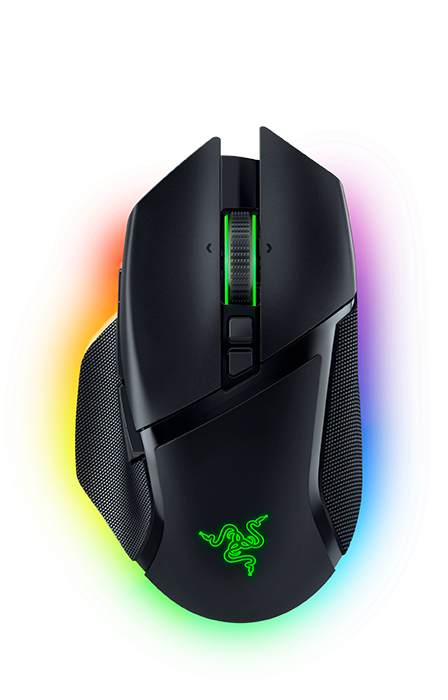
Razer Basilisk V3 Pro: Specs, Price, Pros & Cons
Most flagship mice of the last few years have been chasing lightness, and the Basilisk V3 Pro is a deliberate refusal to join in. It is heavy by current standards. It has a thumb rest, it carries a shelf of buttons, and none of that is an oversight. Razer builds one line for players counting grams and another for players who want their hand supported and their binds under their fingers. This is the second one, and judging it by the first one's rules misses the point entirely.
The shape suits palm grip and larger hands. It is emphatically right-handed, with a pronounced thumb shelf, and it wants to sit still under a resting hand. For games built on managing abilities and inventory, that is the correct trade, and for shooters where the mouse travels it is the wrong one.
The feature that justifies the price is the scroll wheel, which switches between notched and free-spinning and also tilts sideways. That is rare, and it is the thing that makes this mouse work outside games too. Long documents and wide spreadsheets are exactly where it earns back the weight.
Lighting is extensive, which will either appeal or annoy, and it is the first thing to turn off if battery life matters to you.
The honest limitation is that this is a lot of mouse. Buttons you do not bind are buttons you press by accident, and weight you did not want is weight you notice by the end of a long evening. It rewards people who use what it offers.
Category strengths
Where the Razer Basilisk V3 Pro beats the median
- More buttons ?11 vs 6 (median)
- More connection options ?
- Has horizontal scrolling ?
- Has free-spin scroll wheel ?
- Has wireless charging ?
- Has RGB lighting ?
- A higher max sensitivity ?30,000 DPI vs 25,600 DPI (median)
- A higher max acceleration ?70 G vs 50 G (median)
- A higher max tracking speed ?750 IPS vs 650 IPS (median)
- A higher switch lifespan ?90 million clicks vs 80 million clicks (median)
Where the Razer Basilisk V3 Pro trails the median
- A heavier build ?112 g vs 89 g (median)
- Shorter battery life ?110 h vs 150 h (median)
How this VS Score was computed
Score 65: each known spec is measured against the median of all mice (81 products), then weighted; 50 means level with that median. In classes of six or more, a value beyond the class’s 10th–90th percentile range counts as that limit, so one extreme product cannot set the scale. 65% of the scoreable weight could be used; unknown values, features not applicable to this class and proxies (battery capacity where a rated life exists) add or remove nothing.
| Specification | This product | Cohort median | Score weight | Points moved |
|---|---|---|---|---|
| Buttons | 11 | 6 | 0.6 | +25.2 |
| Connection | 3 | 2 | 0.8 | +20.0 |
| USB-C charging | Yes | 67% of the class have it | 0.3 | +15.0 |
| Battery life | 110 | 150 | 0.8 | −10.4 |
| Weight | 112 | 89 | 1 | −10.0 |
| Horizontal scrolling | Yes | 45% of the class have it | 0.2 | +10.0 |
| Free-spin scroll wheel | Yes | 34% of the class have it | 0.2 | +10.0 |
| Wireless charging | Yes | 14% of the class have it | 0.2 | +10.0 |
| RGB lighting | Yes | 46% of the class have it | 0.2 | +10.0 |
| Max sensitivity | 30,000 | 25,600 | 1 | +9.0 |
| Max acceleration | 70 | 50 | 0.4 | +8.0 |
| Max tracking speed | 750 | 650 | 0.8 | +6.4 |
| Switch lifespan | 90 | 80 | 0.2 | +1.2 |
| Wireless polling rate | 1,000 | 1,000 | 0.5 | +0.0 |
Not scored: Polling rate (unknown: not scored); Adjustable lift-off distance (unknown: not scored); Grip styles (unknown: not scored); Click latency (unknown: not scored); Debounce adjustment (unknown: not scored); Battery capacity (unknown: not scored); Quick charge (unknown: not scored); Onboard memory (standard for the class (86% have it)); Software customization (standard for the class (97% have it)); Adjustable weights (unknown: not scored).
Editor’s note
The Basilisk V3 Pro is the fully-equipped version of Razer's ergonomic shape, and the feature that justifies it is the HyperScroll wheel. It tilts four ways and switches electronically between notched and free-spinning modes, so the same wheel does precise weapon-switching and then spins freely down a long document. Most mice make you choose one behavior permanently.
The rest is flagship specification. The Focus Pro 30K sensor tracks to 750 IPS and 70G, the Gen-3 optical switches are rated for 90 million clicks, and there are 11 programmable buttons with five onboard profiles. Connectivity is tri-mode (HyperSpeed 2.4 GHz, Bluetooth and USB-C wired), with 110 hours of battery at 1,000 Hz.
At 112 g it is not a lightweight, and that is deliberate. This is a mouse for palm grip and for people who want a thumb rest and a shelf of buttons under the fingers, not for someone chasing the lowest possible mass for aim training.
Two things to know before buying. The wireless charging everyone mentions requires the Mouse Dock Pro and Charging Puck, both sold separately and not cheap, so treat it as an upgrade path. And the 11-zone Chroma lighting is a real drain, and the battery figure assumes you are not running it at full brightness.
Buy it if you want one mouse that handles gaming and long work sessions, and the scroll wheel appeals. Skip it if you play competitive shooters where weight matters, or if you would never use eleven buttons.
Specifications
Quality bars show where each figure sits between the lowest and highest of the 81 mice this VS Score is measured against.
Sensor & tracking
Design & handling
Switches & latency
Connectivity
Battery
Features
Sources and verification
Where the specifications come from
- Official product pagerazer.com
- Independent testingrtings.com
Verification
- First published
- Specifications last checked
- Sheet completeness
- 26 of 34 specifications verified; the rest show as Unknown and are never estimated or scored
- Page type
- Product specification page — Compiled from the manufacturer’s published specifications and the cited sources; this is not a hands-on test.
- Basis
- Research-based: specifications and editorial text were compiled from the documents listed here and the manufacturer’s published data. We have not tested this unit ourselves; where independent measurements are mentioned they belong to the linked publication.
Where to buy
Prices and availability may change. Check the retailer before buying. We may earn a commission on purchases.
Price history
Mice with similar specs to the Razer Basilisk V3 Pro


Ratings & reviews
No reviews yet. Be the first to share your experience.
The bottom line
The Razer Basilisk V3 Pro earns a VS Score of 65, above the median of the 81 mice it is measured against (a score of 50 is level with that median).
- Who it’s for
- A palm-grip player with a larger right hand who wants one wireless mouse for long work sessions and ability-heavy games.
- Who should look elsewhere
- Competitive shooter players, and anyone who will leave most of the buttons unbound.
- The trade-off that matters
- Running the lighting at full brightness drains the battery noticeably faster, so you will likely end up dimming a feature you paid for.
- The main alternative
- Razer Basilisk V3: the wired version with the same wheel and button count, for less
The VS Score is calculated from the weighted specifications above, each measured against the median of comparable mice — a shortlisting guide, not a substitute for your own priorities. See how we score.



