
Razer Naga Trinity: Specs, Features, Pros & Cons
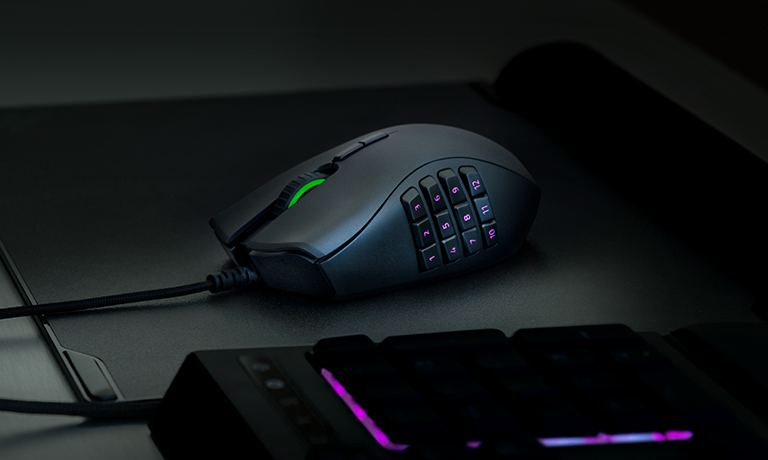
Most mice make you choose a button layout at the checkout. The Naga Trinity lets you change your mind afterwards: the right side panel lifts off magnetically and swaps for one of three, taking the mouse from a plain two-button shape to a modest cluster to a full twelve-key grid.
That modularity is a genuine purchasing argument rather than a novelty. Someone who plays a shooter on weeknights and something ability-heavy at weekends would otherwise buy two mice or accept the wrong one half the time. Profiles live in onboard memory, so changing the plate and changing the layout is a few seconds of work.
What buyers should understand first is that this is an older design still being sold alongside much newer ones. It is wired, and the lead is fixed and ends in a full-size plug, with no detachable USB-C cable, so there is no upgrade path and no wireless version of this exact shell. It is also a large, heavy, unapologetically right-handed mouse, designed when that was normal and now noticeably more substantial than the things it competes with.
The twelve-button plate is the main draw, and it asks the same commitment any MMO mouse does: expect a couple of weeks of mispresses before the grid turns into muscle memory. If you are not going to put that time in, the seven-button plate is the honest choice, and a simpler mouse would serve you as well.
It still suits someone who wants one shell to cover several genres and does not mind a cable. Anyone building a modern setup around low weight and wireless will find it feels like what it is.
Category strengths
Where the Razer Naga Trinity beats the median
- More buttons ?19 vs 6 (median)
- Has horizontal scrolling ?
- Has RGB lighting ?
Where the Razer Naga Trinity trails the median
- Fewer connection options ?
- A lower max sensitivity ?16,000 DPI vs 25,600 DPI (median)
- A heavier build ?120 g vs 89 g (median)
- No USB-C charging ?
- A lower max tracking speed ?450 IPS vs 650 IPS (median)
- A lower switch lifespan ?50 million clicks vs 80 million clicks (median)
How this VS Score was computed
Score 44: each known spec is measured against the median of all mice (81 products), then weighted; 50 means level with that median. In classes of six or more, a value beyond the class’s 10th–90th percentile range counts as that limit, so one extreme product cannot set the scale. 63% of the scoreable weight could be used; unknown values, features not applicable to this class and proxies (battery capacity where a rated life exists) add or remove nothing.
| Specification | This product | Cohort median | Score weight | Points moved |
|---|---|---|---|---|
| Buttons | 19 — capped at the class’s upper range (13) | 6 | 0.6 | +30.0 |
| Connection | 1 | 2 | 0.8 | −20.0 |
| Max sensitivity | 16,000 | 25,600 | 1 | −19.0 |
| USB-C charging | No | 67% of the class have it | 0.3 | −14.4 |
| Weight | 120 | 89 | 1 | −13.0 |
| Max tracking speed | 450 | 650 | 0.8 | −12.0 |
| Horizontal scrolling | Yes | 45% of the class have it | 0.2 | +10.0 |
| RGB lighting | Yes | 46% of the class have it | 0.2 | +10.0 |
| Free-spin scroll wheel | No | 34% of the class have it | 0.2 | −9.6 |
| Switch lifespan | 50 | 80 | 0.2 | −3.8 |
| Max acceleration | 50 | 50 | 0.4 | +0.0 |
| Polling rate | 1,000 | 1,000 | 0.8 | +0.0 |
| Grip styles | 2 | 2 | 0.4 | +0.0 |
Not scored: Adjustable lift-off distance (unknown: not scored); Click latency (unknown: not scored); Debounce adjustment (unknown: not scored); Wireless polling rate (unknown: not scored); Battery life (unknown: not scored); Battery capacity (unknown: not scored); Quick charge (unknown: not scored); Wireless charging (not applicable: only 14% of this class have it); Onboard memory (standard for the class (86% have it)); Software customization (standard for the class (97% have it)); Adjustable weights (not applicable: only 2% of this class have it).
Editor’s note
The Naga Trinity remains distinctive because its three interchangeable side plates change the mouse from a conventional two-button layout to seven-button and twelve-button arrangements. That flexibility is useful for players who move between shooters, MOBAs, MMOs, and productivity shortcuts. Razer Synapse can assign profiles and macros, while onboard memory reduces the need to rebuild a layout on every compatible PC.
At about 120 grams before accounting for cable drag, this is a substantial mouse by modern standards. The broad right-handed shell favors palm grip and medium-to-large hands, and small hands or fingertip grips may find the button grid and front reach tiring. Learning twelve side buttons takes time, and accidental presses are possible until muscle memory develops. The mechanical switches are rated for 50 million clicks, but the Naga Trinity is now an older design.
Its 16,000-DPI optical sensor, 1,000 Hz polling, and wired connection remain fully adequate for MMO and general gaming. The cable avoids battery maintenance but does not provide the unrestricted movement of newer wireless Nagas. The tilt wheel supplies horizontal commands, and Chroma lighting is customizable, though neither feature should outweigh comfort and button placement.
Choose the Naga Trinity if one mouse must cover several genres or if a large shortcut grid would improve MMO, editing, or spreadsheet workflows. Avoid it for lightweight competitive FPS play, left-handed use, or very small hands. Used buyers should confirm all three plates are included and attach securely, since replacing a missing plate can erase the value advantage. Also distinguish this exact wired model from the Naga Pro and Naga V2 Pro, which have different sensors, wireless systems, and pricing.
Specifications
Quality bars show where each figure sits between the lowest and highest of the 81 mice this VS Score is measured against.
Sensor & tracking
Design & handling
Switches & latency
Connectivity
Battery
Features
Sources and verification
Where the specifications come from
- Official product pagerazer.com
- Independent testingrtings.com
Verification
- First published
- Specifications last checked
- Sheet completeness
- 26 of 34 specifications verified; the rest show as Unknown and are never estimated or scored
- Page type
- Product specification page — Compiled from the manufacturer’s published specifications and the cited sources; this is not a hands-on test.
- Basis
- Research-based: specifications and editorial text were compiled from the documents listed here and the manufacturer’s published data. We have not tested this unit ourselves; where independent measurements are mentioned they belong to the linked publication.
Mice with similar specs to the Razer Naga Trinity

Ratings & reviews
No reviews yet. Be the first to share your experience.
The bottom line
The Razer Naga Trinity earns a VS Score of 44, below the median of the 81 mice it is measured against (a score of 50 is level with that median).
- Who it’s for
- A player who switches between shooters and MMOs, or runs big shortcut sets in editing software, and wants one wired mouse to cover them all.
- Who should look elsewhere
- Lightweight FPS players, left-handers and small hands should look elsewhere.
- The trade-off that matters
- It is an older wired design, heavy by current standards, with no wireless version of this exact shell to move to later.
- The main alternative
- Razer Naga V2 Pro: a newer wireless Naga for players who want to drop the cable
The VS Score is calculated from the weighted specifications above, each measured against the median of comparable mice — a shortlisting guide, not a substitute for your own priorities. See how we score.





