
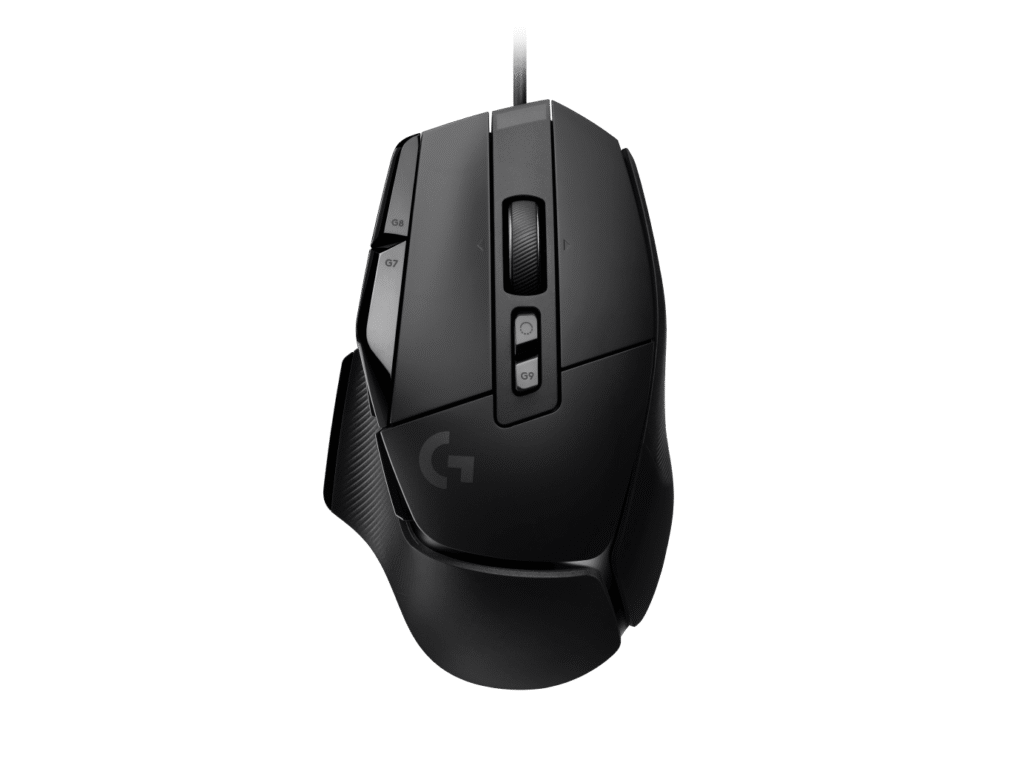
Logitech G502 X: Specs, Price, Pros & Cons
Of the two G502 X models, this is the one with a cable, and that choice keeps it lighter than its wireless twin. The X PLUS adds a battery, a radio and lighting on top of the same thirteen-button layout, and the plain X leaves all three out.
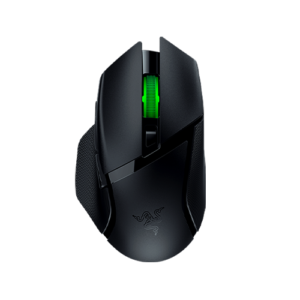
It is the modern version of Logitech's G502 shape. The body is large and right-handed, sized for a palm or claw grip, with a long control list around the thumb and the main buttons. The wheel switches between free spin and ratchet and tilts sideways, a pairing more often found on office mice than on gaming ones. LIGHTFORCE switches pair a mechanical feel with an optical trigger, so the click keeps working after the point where worn contacts would start to fail. The HERO 25K sensor is rated for 40 G of acceleration and polls at 1,000 Hz, and its tracking speed trails newer sensors.
Staying wired means no USB-C charging and nothing to charge. The cable is the only connection, so the mouse stays on one desk, and there is no Bluetooth for a laptop. Onboard memory keeps profiles in the mouse, so moving it to another computer brings the bindings along. Palm and claw are the grips it is shaped for, and a fingertip grip will find it long.
The G502 X suits a player or an editor with a large right hand and a long list of shortcuts, who works at one desk and does not want to think about a battery. Players who prefer a small, simple shape will find it busy, and players who want no cable should look at the X PLUS, which trades a little weight for freedom from the wire.
Category strengths
Where the Logitech G502 X beats the median
- More buttons ?13 vs 6 (median)
- Has horizontal scrolling ?
- Has free-spin scroll wheel ?
Where the Logitech G502 X trails the median
- Fewer connection options ?
- A lower max tracking speed ?400 IPS vs 650 IPS (median)
- No USB-C charging ?
- A lower max acceleration ?40 G vs 50 G (median)
How this VS Score was computed
Score 48: each known spec is measured against the median of all mice (81 products), then weighted; 50 means level with that median. In classes of six or more, a value beyond the class’s 10th–90th percentile range counts as that limit, so one extreme product cannot set the scale. 61% of the scoreable weight could be used; unknown values, features not applicable to this class and proxies (battery capacity where a rated life exists) add or remove nothing.
| Specification | This product | Cohort median | Score weight | Points moved |
|---|---|---|---|---|
| Buttons | 13 | 6 | 0.6 | +30.0 |
| Connection | 1 | 2 | 0.8 | −20.0 |
| Max tracking speed | 400 | 650 | 0.8 | −15.2 |
| USB-C charging | No | 67% of the class have it | 0.3 | −14.4 |
| Horizontal scrolling | Yes | 45% of the class have it | 0.2 | +10.0 |
| Free-spin scroll wheel | Yes | 34% of the class have it | 0.2 | +10.0 |
| RGB lighting | No | 46% of the class have it | 0.2 | −9.6 |
| Max acceleration | 40 | 50 | 0.4 | −4.0 |
| Max sensitivity | 25,600 | 25,600 | 1 | +0.0 |
| Polling rate | 1,000 | 1,000 | 0.8 | +0.0 |
| Weight | 89 | 89 | 1 | +0.0 |
| Grip styles | 2 | 2 | 0.4 | +0.0 |
Not scored: Adjustable lift-off distance (unknown: not scored); Click latency (unknown: not scored); Switch lifespan (unknown: not scored); Debounce adjustment (unknown: not scored); Wireless polling rate (unknown: not scored); Battery life (unknown: not scored); Battery capacity (unknown: not scored); Quick charge (unknown: not scored); Wireless charging (not applicable: only 14% of this class have it); Onboard memory (standard for the class (86% have it)); Software customization (standard for the class (97% have it)); Adjustable weights (not applicable: only 2% of this class have it).
Editor’s note
The G502 X has 13 buttons, and that number is the entire reason to buy or avoid it.
Most mice give you five or six. Thirteen means every one of your common actions can live under a thumb or a finger, which is transformative in games with deep control schemes and in editing software where the alternative is a keyboard shortcut you have to look for. It is also, unavoidably, a lot of buttons to learn, and a mouse that is bigger and busier than a simple shape.
Two other details stand out. The scroll wheel free-spins, releasing to fly through a long document or weapon list and locking again for precise clicks. That is useful, and rare outside productivity mice. And the LIGHTFORCE switches are hybrid optical-mechanical: the tactile feel of a mechanical click with an optical actuation that cannot develop the double-click fault worn contacts eventually produce.
The sensor is Logitech's HERO 25K at 25,600 DPI, weight is 83.7 g in a right-handed shape at 131.4 mm long, and it is wired only with PTFE feet and onboard memory.
Tracking speed is quoted at 400 IPS, lower than the 650 to 750 IPS of the newer sensors here, which is only relevant at very low sensitivity with fast, wide swipes.
Buy it if you want every command under your hand, and a large right-handed shape suits you. Buy a simple six-button mouse if thirteen sounds like clutter rather than capability.
Specifications
Quality bars show where each figure sits between the lowest and highest of the 81 mice this VS Score is measured against.
Sensor & tracking
Design & handling
Switches & latency
Connectivity
Battery
Features
Sources and verification
Where the specifications come from
- Official product pagelogitechg.com
- Independent testingrtings.com
Verification
- First published
- Specifications last checked
- Sheet completeness
- 24 of 34 specifications verified; the rest show as Unknown and are never estimated or scored
- Page type
- Product specification page — Compiled from the manufacturer’s published specifications and the cited sources; this is not a hands-on test.
- Basis
- Research-based: specifications and editorial text were compiled from the documents listed here and the manufacturer’s published data. We have not tested this unit ourselves; where independent measurements are mentioned they belong to the linked publication.
Where to buy
Prices and availability may change. Check the retailer before buying. We may earn a commission on purchases.
Price history
Mice with similar specs to the Logitech G502 X
Ratings & reviews
No reviews yet. Be the first to share your experience.
The bottom line
The Logitech G502 X earns a VS Score of 48, below the median of the 81 mice it is measured against (a score of 50 is level with that median).
- Who it’s for
- Someone with a deep keybind list in games or editing software who wants every command under a finger and has a large right hand.
- Who should look elsewhere
- People who want a small, simple mouse or a cable-free desk will be happier with something else.
- The trade-off that matters
- The learning curve. Thirteen controls pay off only once they are bound and memorized, and until then a few are easy to press by accident.
- The main alternative
- Logitech G502 X PLUS: the same layout wireless, with lighting and wireless charging, at a heavier weight
The VS Score is calculated from the weighted specifications above, each measured against the median of comparable mice — a shortlisting guide, not a substitute for your own priorities. See how we score.





