
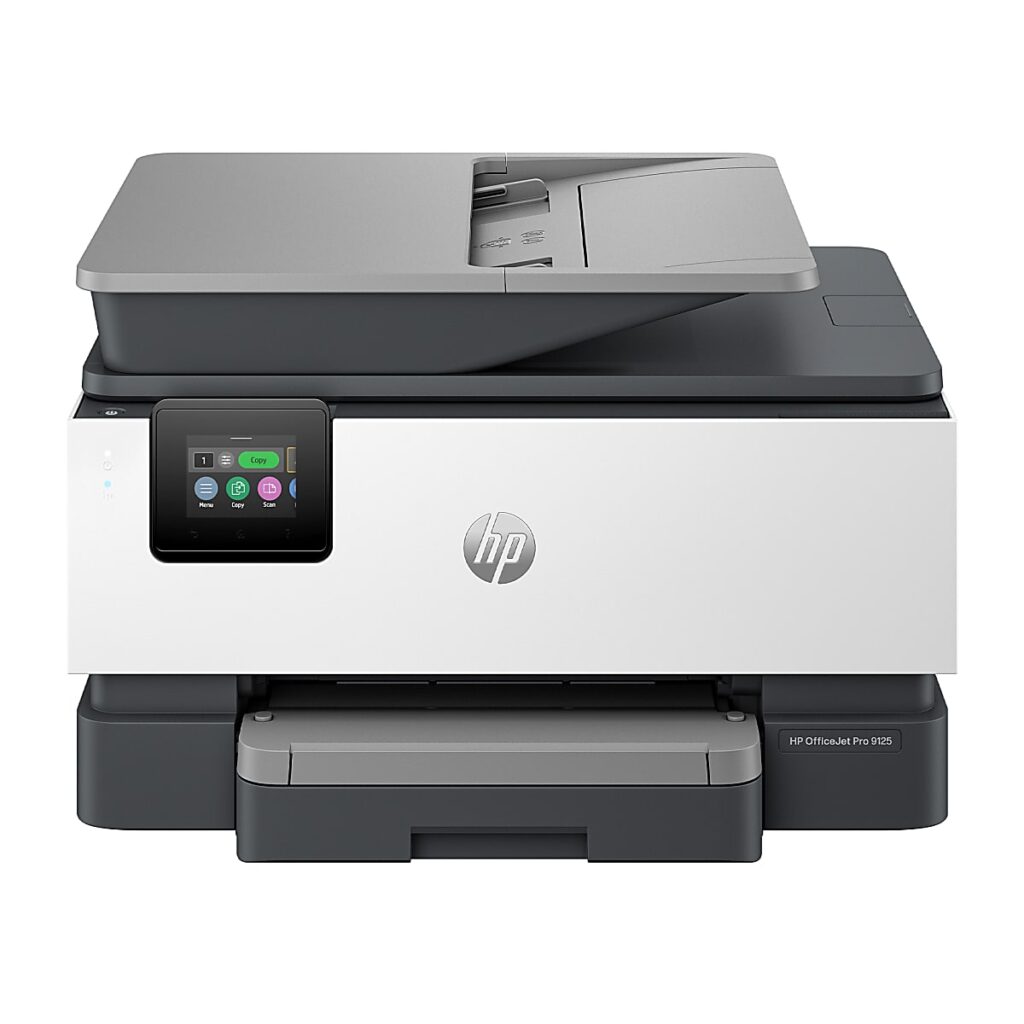
HP OfficeJet Pro 9125e: Specs, Price, Pros & Cons
HP's OfficeJet Pro 9125e reads both sides of a page in one trip through its document feeder, a feature that puts it on the shortlist for any small office that scans double-sided paperwork. Around that scanner sits a full color office inkjet, built for a room where several people print, copy and send documents every day.
It prints color quickly for an inkjet, turns pages over automatically, sends and receives faxes, and runs from a touchscreen. It joins the network over Ethernet or Wi-Fi, prints from iPhones through AirPrint, and its main tray takes half a ream. The spec sheet gives a maximum resolution of 4,800 dpi, which suits flyers and color handouts as well as letters.
Its name is in flux. HP now sells the same formula as the plain 9125, and both versions turn up in shops at once, often at different prices. The letter at the end of this one marks enrollment in HP+, with an HP account and original cartridges as the terms. Check which of the two a listing describes before comparing prices, because the pair can look identical in a photo.
It suits a small office that prints color documents most days and wants a single machine for printing, copying, scanning and fax, with the network cable plugged in and a few people sending jobs. What it gives up is the economy of refillable ink, since this is a cartridge printer, and some desk space: it is a bulky, heavy printer that needs a solid surface. The cartridge arithmetic belongs in the decision from the start, before the clearance price does the persuading.
Category strengths
Where the HP OfficeJet Pro 9125e beats the median
- A much higher print speed (color) ?18 ppm vs 9 ppm (median)
- A higher print speed (black) ?22 ppm vs 16 ppm (median)
- A much higher input tray capacity ?250 sheets vs 150 sheets (median)
- Has duplex scanning ?
- Has touchscreen display ?
- A much higher monthly duty cycle ?25,000 pages vs 10,000 pages (median)
- Has fax ?
Where the HP OfficeJet Pro 9125e trails the median
- A heavier build ?9.3 kg vs 7.98 kg (median)
- A lower output tray capacity ?60 sheets vs 67.5 sheets (median)
How this VS Score was computed
Score 79: each known spec is measured against the median of all printers (65 products), then weighted; 50 means level with that median. In classes of six or more, a value beyond the class’s 10th–90th percentile range counts as that limit, so one extreme product cannot set the scale. 66% of the scoreable weight could be used; unknown values, features not applicable to this class and proxies (battery capacity where a rated life exists) add or remove nothing.
| Specification | This product | Cohort median | Score weight | Points moved |
|---|---|---|---|---|
| Print speed (color) | 18 | 9 | 1 | +50.0 |
| Automatic duplex printing | Yes | 73% of the class have it | 1 | +50.0 |
| Automatic document feeder | Yes | 55% of the class have it | 1 | +50.0 |
| Print speed (black) | 22 | 16 | 2 | +38.0 |
| Input tray capacity | 250 | 150 | 1 | +33.0 |
| Duplex scanning | Yes | 23% of the class have it | 0.5 | +25.0 |
| Ethernet | Yes | 54% of the class have it | 0.5 | +25.0 |
| Touchscreen display | Yes | 45% of the class have it | 0.5 | +25.0 |
| Supertank / refillable ink | No | 30% of the class have it | 0.5 | −24.0 |
| Monthly duty cycle | 25,000 | 10,000 | 0.3 | +15.0 |
| Fax | Yes | 35% of the class have it | 0.2 | +10.0 |
| Weight | 9.3 | 7.98 | 0.3 | −2.1 |
| Output tray capacity | 60 | 67.5 | 0.3 | −1.8 |
| Print resolution | 4,800 | 4,800 | 0.5 | +0.0 |
| ADF capacity | 35 | 35 | 0.5 | +0.0 |
Not scored: Color printing (standard for the class (88% have it)); All-in-one (standard for the class (85% have it)); Wi-Fi (standard for the class (97% have it)); Wi-Fi Direct (standard for the class (90% have it)); USB (standard for the class (100% have it)); Apple AirPrint (standard for the class (97% have it)); Mobile app printing (standard for the class (100% have it)).
Editor’s note
The OfficeJet Pro 9125e is HP's classic small-office inkjet formula in its most refined form, and a machine in a strange retail moment: HP has folded it into the plain '9125' as part of the AI-capable rebrand, which means the 9125e sells alongside its own renaming at whatever price the channel happens to hold. That churn is the buyer's opportunity.
The feature set is the full office stack: 22/18 ISO ppm, automatic duplex printing, a 35-sheet document feeder that scans both sides, fax, a 2.7-inch touchscreen HP models on a phone interface, Ethernet plus dual-band Wi-Fi, a 250-sheet tray and a 25,000-page monthly duty cycle. Duplex scanning at this price is what sets it apart (the same feature that headlines the Brother J5010DW), and the 9125e matches it while adding HP's polished app.
The structural caveat is ink. This is a cartridge machine competing with supertank printers at similar prices: HP's 936-series cartridges cost real money per page, and HP's answer (an Instant Ink subscription, with a three-month trial bundled) suits some households and irritates others. Do that arithmetic honestly before choosing this over a tank.
The 'e' suffix also matters: it denotes HP+, which requires an HP account and original cartridges in exchange for the bundled benefits. Buyers who want a printer with no strings should know that going in.
Against the field: the Smart Tank 7303 wins on running costs but lacks duplex scanning and fax. The Brother J5010DW is its most direct rival and undercuts it on ink economics. The 9125e's case is HP's software, print quality on marketing materials, and street prices that discontinuation keeps pushing down.
Specifications
Quality bars show where each figure sits between the lowest and highest of the 65 printers this VS Score is measured against.
Printing
Scanning & copying
Paper handling
Connectivity
Design
Sources and verification
Where the specifications come from
- Official product pagehp.com
- Independent testingrtings.com
Verification
- First published
- Specifications last checked
- Sheet completeness
- 24 of 24 specifications verified; the rest show as Unknown and are never estimated or scored
- Page type
- Product specification page — Compiled from the manufacturer’s published specifications and the cited sources; this is not a hands-on test.
- Basis
- Research-based: specifications and editorial text were compiled from the documents listed here and the manufacturer’s published data. We have not tested this unit ourselves; where independent measurements are mentioned they belong to the linked publication.
Where to buy
Prices and availability may change. Check the retailer before buying. We may earn a commission on purchases.
Price history
Printers with similar specs to the HP OfficeJet Pro 9125e

Ratings & reviews
No reviews yet. Be the first to share your experience.
The bottom line
The HP OfficeJet Pro 9125e earns a VS Score of 79, above the median of the 65 printers it is measured against (a score of 50 is level with that median).
- Who it’s for
- Small offices wanting the complete HP stack (duplex-scan ADF, fax, touchscreen, Ethernet) at the discounts the 9125-rebrand keeps generating.
- Who should look elsewhere
- High-volume printers who haven't priced the 936-series cartridges against a supertank, or anyone who objects to HP+ account requirements.
- The trade-off that matters
- Polished hardware and software bought with cartridge economics and account strings. This is the classic OfficeJet bargain, sharpened by clearance pricing.
- The main alternative
- Brother's MFC-J5010DW matches the duplex-scan ADF with better ink maths. HP's Smart Tank 7303 wins running costs but drops fax and duplex scanning.
The VS Score is calculated from the weighted specifications above, each measured against the median of comparable printers — a shortlisting guide, not a substitute for your own priorities. See how we score.




