
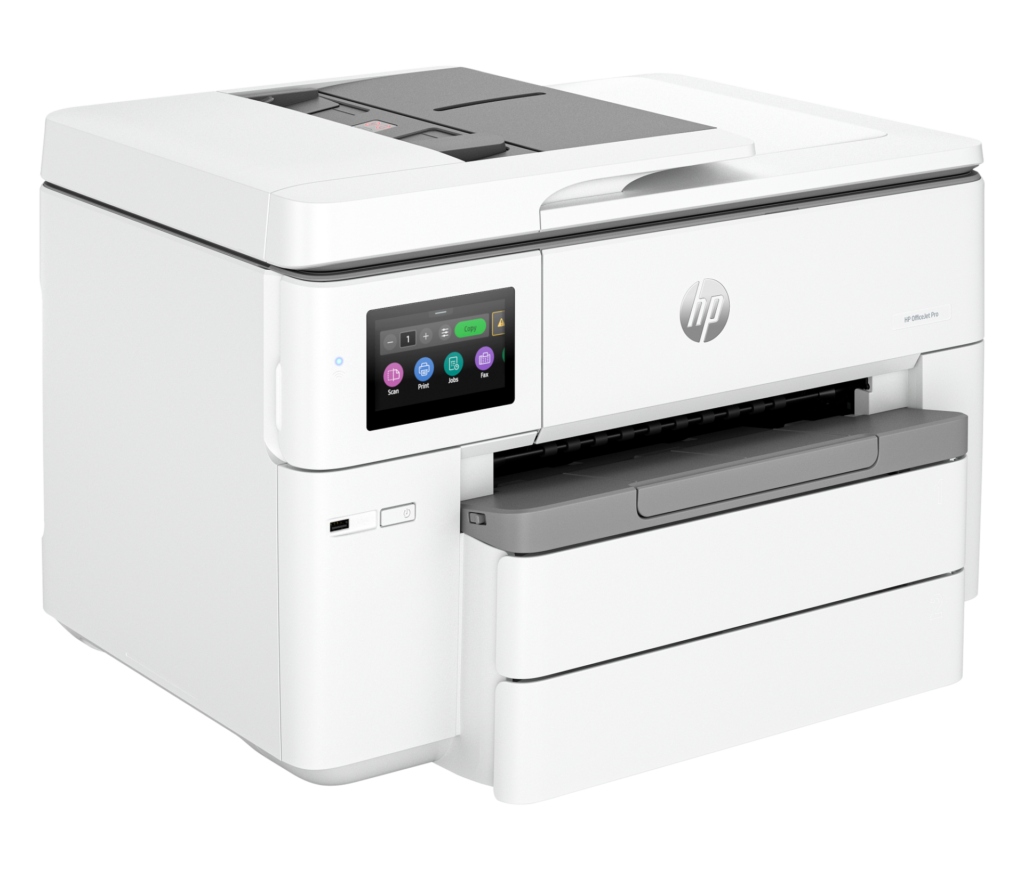
HP OfficeJet Pro 9730e: Specs, Features, Pros & Cons
The tabloid all-in-one occupies an awkward middle of the office market. Most workplaces never print anything wider than Legal, and the ones that live on large-format output buy a dedicated plotter or send the job out. What is left is a narrow band of offices that need an oversized sheet occasionally (a spreadsheet that will not fit legibly on a smaller page, a drawing, a menu, a proof) and cannot justify a second machine to do it.
HP's answer was not to design a new printer but to widen an existing one. This model takes the print engine, document feeder and control interface from the company's standard business all-in-one and puts them behind a larger flatbed and a wider paper path. The consequence is worth understanding before buying: you get the same speed and the same paper capacity as the narrower machine, with a bigger bed. It is a size upgrade rather than a performance one, and nothing about it is built for volume.
That framing also explains the shape of the thing. Widening the scanner glass widens the entire chassis, and the result is a large, heavy device that will dominate a shelf or a side table. Anyone replacing a compact desktop unit should measure the space first, because the footprint is the price of the feature and it cannot be designed away.
There is also one significant omission on this model, unusual for the badge it wears, which is set out further down the page. It is the likeliest single reason a small office would send one back, so it is worth reading before ordering.
For an office that meets an oversized job every week or two and otherwise prints ordinary documents, this is a sensible and relatively cheap way to cover both jobs with one machine. For anyone printing large formats daily, it is the wrong class of device entirely.
Category strengths
Where the HP OfficeJet Pro 9730e beats the median
- A much higher print speed (color) ?18 ppm vs 9 ppm (median)
- A higher print speed (black) ?22 ppm vs 16 ppm (median)
- A much higher input tray capacity ?250 sheets vs 150 sheets (median)
- A much higher monthly duty cycle ?30,000 pages vs 10,000 pages (median)
- Has duplex scanning ?
- Has touchscreen display ?
- A higher output tray capacity ?75 sheets vs 67.5 sheets (median)
Where the HP OfficeJet Pro 9730e trails the median
- A much heavier build ?19.5 kg vs 7.98 kg (median)
How this VS Score was computed
Score 77: each known spec is measured against the median of all printers (65 products), then weighted; 50 means level with that median. In classes of six or more, a value beyond the class’s 10th–90th percentile range counts as that limit, so one extreme product cannot set the scale. 66% of the scoreable weight could be used; unknown values, features not applicable to this class and proxies (battery capacity where a rated life exists) add or remove nothing.
| Specification | This product | Cohort median | Score weight | Points moved |
|---|---|---|---|---|
| Print speed (color) | 18 | 9 | 1 | +50.0 |
| Automatic duplex printing | Yes | 73% of the class have it | 1 | +50.0 |
| Automatic document feeder | Yes | 55% of the class have it | 1 | +50.0 |
| Print speed (black) | 22 | 16 | 2 | +38.0 |
| Input tray capacity | 250 | 150 | 1 | +33.0 |
| Duplex scanning | Yes | 23% of the class have it | 0.5 | +25.0 |
| Ethernet | Yes | 54% of the class have it | 0.5 | +25.0 |
| Touchscreen display | Yes | 45% of the class have it | 0.5 | +25.0 |
| Supertank / refillable ink | No | 30% of the class have it | 0.5 | −24.0 |
| Monthly duty cycle | 30,000 | 10,000 | 0.3 | +15.0 |
| Fax | No | 35% of the class have it | 0.2 | −9.6 |
| Weight | 19.5 | 7.98 | 0.3 | −9.0 |
| Output tray capacity | 75 | 67.5 | 0.3 | +1.8 |
| Print resolution | 4,800 | 4,800 | 0.5 | +0.0 |
| ADF capacity | 35 | 35 | 0.5 | +0.0 |
Not scored: Color printing (standard for the class (88% have it)); All-in-one (standard for the class (85% have it)); Wi-Fi (standard for the class (97% have it)); Wi-Fi Direct (standard for the class (90% have it)); USB (standard for the class (100% have it)); Apple AirPrint (standard for the class (97% have it)); Mobile app printing (standard for the class (100% have it)).
Editor’s note
The 9730e exists for one reason: it prints, copies and scans up to 11 x 17 inches. Put it beside HP's own OfficeJet Pro 9125e and the print engine is the same: 22 ppm black and 18 ppm color by ISO measurement, the same 35-sheet automatic document feeder, the same 4.3-inch touchscreen. But the 9125e stops at Legal. If your work occasionally needs a tabloid sheet, a spreadsheet printed wide, a drawing, a menu, this is the inexpensive way to get it without moving up to a true wide-format machine.
HP rates it for up to 30,000 pages a month, which is a durability rating that no office should aim for. The 250-sheet input tray and 75-sheet output bin are the real limits on how long you can leave it alone. The document feeder scans both sides, quoted at 14 images per minute in black and 11 in color at 200 dpi.
One omission deserves a plain warning: there is no analog fax. HP's specification sheet states it outright. That is unusual for a machine wearing the OfficeJet Pro badge, and it is the likeliest reason a small office would send one back. HP has also quietly renamed the line: the 9730e is now sold as the OfficeJet Pro 9730, the 'e' suffix retired along with the HP+ branding push. The hardware is unchanged.
The rest is conventional: Ethernet, Wi-Fi with Wi-Fi Direct, AirPrint and HP's mobile app, automatic two-sided printing, a 4.3-inch color touchscreen. At 19.5 kg with a tabloid-width chassis it is a big machine by desktop standards. Measure the shelf before ordering, because the wide flatbed is exactly what makes it so.
Specifications
Quality bars show where each figure sits between the lowest and highest of the 65 printers this VS Score is measured against.
Printing
Scanning & copying
Paper handling
Connectivity
Design
Sources and verification
Where the specifications come from
- Official product pagehp.com
- Independent testingrtings.com
Verification
- First published
- Specifications last checked
- Sheet completeness
- 24 of 24 specifications verified; the rest show as Unknown and are never estimated or scored
- Page type
- Product specification page — Compiled from the manufacturer’s published specifications and the cited sources; this is not a hands-on test.
- Basis
- Research-based: specifications and editorial text were compiled from the documents listed here and the manufacturer’s published data. We have not tested this unit ourselves; where independent measurements are mentioned they belong to the linked publication.
Printers with similar specs to the HP OfficeJet Pro 9730e

Ratings & reviews
No reviews yet. Be the first to share your experience.
The bottom line
The HP OfficeJet Pro 9730e earns a VS Score of 77, above the median of the 65 printers it is measured against (a score of 50 is level with that median).
- Who it’s for
- Small offices that meet an oversized job every week or two (a wide spreadsheet, a drawing, a menu) and would rather own one machine that can handle it than buy and house a second one.
- Who should look elsewhere
- Anyone who still needs analog fax, which this model does not have. Also the wrong choice for sustained color volume, or for a cramped desk: it is a physically large machine that prints at ordinary desktop pace.
- The trade-off that matters
- The price of the upgrade is desk space. The oversized flatbed and paper path are the entire upgrade over HP's narrower model, and the engine behind them is unchanged.
- The main alternative
- HP OfficeJet Pro 9125e: the same engine and document feeder with analog fax included, if Legal is as wide as your work ever gets.
The VS Score is calculated from the weighted specifications above, each measured against the median of comparable printers — a shortlisting guide, not a substitute for your own priorities. See how we score.




