
HP OfficeJet Pro 9135e: Specs, Features, Pros & Cons
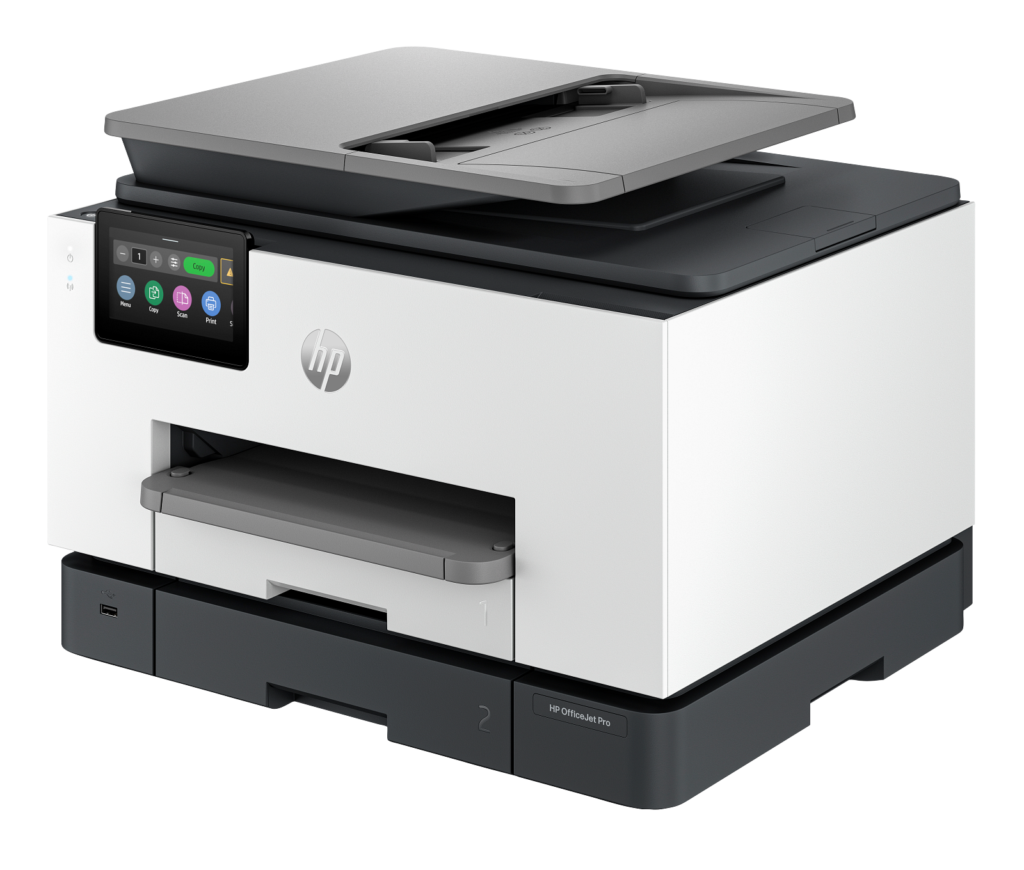
Several OfficeJet Pro models share this body and differ by a single character in the name. Some have a second paper tray and some do not, some are sold only through certain retailers, and the suffix tells you which service program the printer is tied to. The 9135e is the version with two trays and HP+ enrollment, so match the box to the model name before paying.
Once identified, it works like an office copier scaled down to fit a desk. Two trays let letterhead and plain paper live side by side, the feeder reads both sides of an original in one pass, and the fax runs through a real modem. It prints color about twice as fast as a typical home inkjet, connects over Ethernet and Wi-Fi, and the spec sheet gives a maximum resolution of 4,800 dpi. Its monthly duty rating is high enough to put it closer to shared office equipment than to a home printer.
It fits an office that prints on headed paper, scans signed contracts and still exchanges the odd fax with a bank or a clinic. Two or three people can send jobs to it through the day without anyone needing to swap paper between them.
What it gives up is cheap ink and a small footprint. It runs on cartridges, and the HP+ program it is sold under can bind it to HP's own supplies at setup. It is also deep and heavy enough to count as furniture, so a tape measure is the right first purchase. As office hardware it is strong for the money, and the running costs are the part to read twice.
Category strengths
Where the HP OfficeJet Pro 9135e beats the median
- A much higher input tray capacity ?500 sheets vs 150 sheets (median)
- A much higher print speed (color) ?20 ppm vs 9 ppm (median)
- A much higher print speed (black) ?25 ppm vs 16 ppm (median)
- A much higher monthly duty cycle ?30,000 pages vs 10,000 pages (median)
- Has duplex scanning ?
- Has touchscreen display ?
- Has fax ?
- A much higher output tray capacity ?100 sheets vs 67.5 sheets (median)
Where the HP OfficeJet Pro 9135e trails the median
- A much heavier build ?11.84 kg vs 7.98 kg (median)
How this VS Score was computed
Score 83: each known spec is measured against the median of all printers (65 products), then weighted; 50 means level with that median. In classes of six or more, a value beyond the class’s 10th–90th percentile range counts as that limit, so one extreme product cannot set the scale. 66% of the scoreable weight could be used; unknown values, features not applicable to this class and proxies (battery capacity where a rated life exists) add or remove nothing.
| Specification | This product | Cohort median | Score weight | Points moved |
|---|---|---|---|---|
| Print speed (black) | 25 | 16 | 2 | +56.0 |
| Print speed (color) | 20 | 9 | 1 | +50.0 |
| Automatic duplex printing | Yes | 73% of the class have it | 1 | +50.0 |
| Automatic document feeder | Yes | 55% of the class have it | 1 | +50.0 |
| Input tray capacity | 500 — capped at the class’s upper range (350) | 150 | 1 | +50.0 |
| Duplex scanning | Yes | 23% of the class have it | 0.5 | +25.0 |
| Ethernet | Yes | 54% of the class have it | 0.5 | +25.0 |
| Touchscreen display | Yes | 45% of the class have it | 0.5 | +25.0 |
| Supertank / refillable ink | No | 30% of the class have it | 0.5 | −24.0 |
| Monthly duty cycle | 30,000 | 10,000 | 0.3 | +15.0 |
| Fax | Yes | 35% of the class have it | 0.2 | +10.0 |
| Output tray capacity | 100 | 67.5 | 0.3 | +7.2 |
| Weight | 11.84 | 7.98 | 0.3 | −4.8 |
| Print resolution | 4,800 | 4,800 | 0.5 | +0.0 |
| ADF capacity | 35 | 35 | 0.5 | +0.0 |
Not scored: Color printing (standard for the class (88% have it)); All-in-one (standard for the class (85% have it)); Wi-Fi (standard for the class (97% have it)); Wi-Fi Direct (standard for the class (90% have it)); USB (standard for the class (100% have it)); Apple AirPrint (standard for the class (97% have it)); Mobile app printing (standard for the class (100% have it)).
Editor’s note
The OfficeJet Pro 9135e is HP's answer to the small office that has outgrown a home printer but has no interest in a laser. Two 250-sheet trays are the headline, and they matter more than the speed figures: being able to keep letterhead in one tray and plain paper in the other, or going 500 sheets between refills, changes how often you think about the machine at all. The 35-sheet single-pass duplex ADF is the other useful piece: it scans both sides in one pass, which is the difference between a two-minute job and a five-minute one when you are digitizing a stack of contracts.
The 25 and 20 ISO ppm ratings are respectable for an inkjet, and the 4.3-inch touchscreen is large enough that you are not fighting it to change a setting. Fax here is a proper hardware modem rather than the app-based "mobile fax" HP puts on its home models, which still matters in medical, legal and insurance offices.
The part that would make me hesitate is HP+. Accepting it at setup buys extra warranty and Instant Ink months, but it permanently commits the printer to Original HP cartridges and an always-on internet connection, and HP's dynamic security firmware actively blocks third-party chips. If you were planning to feed it cheap compatibles, this is the wrong printer, and the decision cannot be undone afterwards. At 11.84 kg it is also bulky, so measure the shelf before you order.
Against an Epson EcoTank Pro ET-5850 the HP is cheaper to buy and considerably more expensive to run. Against its own single-tray sibling, the 9125e, the second tray and the faster engine are most of what the extra money buys. Take it if you print a few hundred pages a month and value paper handling over per-page cost. At thousands, buy a tank machine or a color laser.
Specifications
Quality bars show where each figure sits between the lowest and highest of the 65 printers this VS Score is measured against.
Printing
Scanning & copying
Paper handling
Connectivity
Design
Sources and verification
Where the specifications come from
- Official product pagehp.com
- Independent testingrtings.com
Verification
- First published
- Specifications last checked
- Sheet completeness
- 24 of 24 specifications verified; the rest show as Unknown and are never estimated or scored
- Page type
- Product specification page — Compiled from the manufacturer’s published specifications and the cited sources; this is not a hands-on test.
- Basis
- Research-based: specifications and editorial text were compiled from the documents listed here and the manufacturer’s published data. We have not tested this unit ourselves; where independent measurements are mentioned they belong to the linked publication.
Printers with similar specs to the HP OfficeJet Pro 9135e

Ratings & reviews
No reviews yet. Be the first to share your experience.
The bottom line
The HP OfficeJet Pro 9135e earns a VS Score of 83, above the median of the 65 printers it is measured against (a score of 50 is level with that median).
- Who it’s for
- Small offices printing a few hundred pages a month that need real paper handling: two full-size trays, single-pass duplex scanning and a working hardware fax modem in one box.
- Who should look elsewhere
- Anyone planning to run third-party cartridges, or anyone whose volume justifies a tank printer or a color laser. HP+ closes the first door permanently at setup.
- The trade-off that matters
- You trade long-term consumable cost for a low purchase price and unusually good office features. The hardware is better than the ink economics behind it.
- The main alternative
- The Epson EcoTank Pro ET-5850 costs noticeably more up front but swaps cartridges for refillable tanks, which pays back quickly at this sort of volume and leaves you free of any ink subscription.
The VS Score is calculated from the weighted specifications above, each measured against the median of comparable printers — a shortlisting guide, not a substitute for your own priorities. See how we score.




