ELECOM IST PLUS Trackball (M-IT11MRS): Specs, Pros & Cons
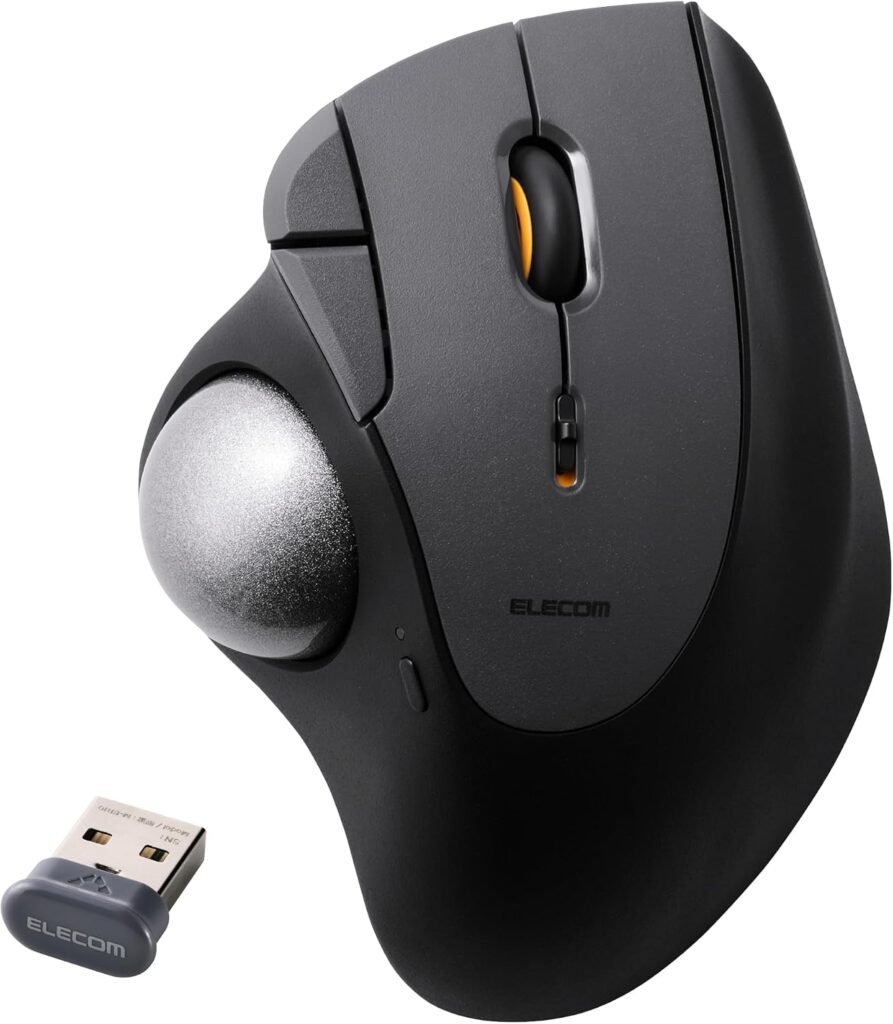
ELECOM sells more trackballs than anyone, and the IST PLUS is the current thumb-operated one that sits between its cheap M-XT models and the flagship IST PRO. The model number on the box matters: M-IT11MRS is this version with a bearing ball support, M-IT10MRS is the identical trackball with ELECOM's ball-transfer support, and the support is a small part you can swap yourself with the tool in the box.
Everything else is shared. A 36 mm ball sits under the thumb, read by an infrared LED sensor that defaults to 500 dpi and can be set anywhere from 100 to 4,000 in ELECOM's Mouse Assistant software. There are five buttons including the wheel click, all on silent switches, and the wheel is a single plain wheel with no tilt. Three profiles of button assignments and DPI live on the trackball itself, so they follow it between computers.
Connectivity is the reason to pick it over an older ELECOM: it pairs over Bluetooth Low Energy and over a 2.4 GHz USB-A receiver, registers three devices at once, and switches between them with a side button and an LED channel indicator. The receiver stows in the base when it is not in use.
Power is one AA cell (alkaline, manganese or rechargeable NiMH), which ELECOM rates at about two years and one month. There is no built-in battery and no USB-C. The body is 96 by 126 by 52 millimeters and 120 grams without the cell, sculpted for the right hand only.
The buyer it suits is someone moving to a thumb trackball for wrist comfort or desk space who wants quiet clicks and multi-device switching, and is happy to keep a AA in the drawer. It is not for left-handers, for anyone who wants a tilt wheel, or for a gamer who needs a stated polling rate.
Category strengths
Where the ELECOM IST PLUS Trackball (M-IT11MRS) trails the median
- A much lower max sensitivity ?4,000 DPI vs 25,600 DPI (median)
- A heavier build ?120 g vs 89 g (median)
- No USB-C charging ?
- No quick charge ?
- Fewer buttons ?5 vs 6 (median)
How this VS Score was computed
Score 27: each known spec is measured against the median of all mice (83 products), then weighted; 50 means level with that median. In classes of six or more, a value beyond the class’s 10th–90th percentile range counts as that limit, so one extreme product cannot set the scale. 38% of the scoreable weight could be used; unknown values, features not applicable to this class and proxies (battery capacity where a rated life exists) add or remove nothing.
| Specification | This product | Cohort median | Score weight | Points moved |
|---|---|---|---|---|
| Max sensitivity | 4,000 | 25,600 | 1 | −42.0 |
| USB-C charging | No | 68% of the class have it | 0.3 | −14.4 |
| Quick charge | No | 55% of the class have it | 0.3 | −14.4 |
| Weight | 120 | 89 | 1 | −13.0 |
| Free-spin scroll wheel | No | 36% of the class have it | 0.2 | −9.6 |
| Buttons | 5 | 6 | 0.6 | −4.8 |
| Connection | 2 | 2 | 0.8 | +0.0 |
Not scored: Max tracking speed (unknown: not scored); Max acceleration (unknown: not scored); Polling rate (unknown: not scored); Adjustable lift-off distance (unknown: not scored); Grip styles (unknown: not scored); Horizontal scrolling (unknown: not scored); Click latency (unknown: not scored); Switch lifespan (unknown: not scored); Debounce adjustment (unknown: not scored); Wireless polling rate (unknown: not scored); Battery life (unknown: not scored); Battery capacity (unknown: not scored); Wireless charging (not applicable: only 18% of this class have it); Onboard memory (standard for the class (88% have it)); Software customization (standard for the class (98% have it)); Adjustable weights (unknown: not scored); RGB lighting (unknown: not scored).
Editor’s note
The thing to understand about the IST PLUS is that ELECOM has finally built the thumb trackball people asked it to build for years, and then made it confusing to buy. The two part numbers are the same trackball with a different support piece under the ball (bearings on this one, ELECOM's ruby-style ball-transfer on the other), and since the part swaps out with a supplied tool, the choice is a preference, not a specification. Buy whichever is in stock and swap later if you care.
What ELECOM got right is the everyday stuff. Silent switches on every button matter more on a trackball than a mouse, because a trackball tends to live on a shared or quiet desk. Three-device switching over Bluetooth and a stowable receiver make it a proper laptop-and-tablet trackball, which Logitech's thumb trackballs only manage at a higher price. Onboard profiles mean the DPI and button map survive a machine change without reinstalling anything.
Two years on a AA cell is the other argument, and it cuts both ways: no charging cable ever, but no battery gauge you can trust until the LED complains, and no USB-C if you had hoped to standardize.
What would make me hesitate is the plain wheel. No tilt, no free-spin, one wheel: for spreadsheets and timelines that is a real limitation, and the ELECOM way around it is a button assignment, which is not the same. ELECOM also publishes no polling rate or latency, so anyone who wants to game on a trackball is buying blind.
I would buy it for an office or home desk where quiet, comfort and switching between two or three machines matter. I would pay more for Logitech's MX Ergo S if a tilt wheel or a rechargeable battery is a must, and choose a fingertip trackball instead if thumb operation has ever bothered a thumb joint.
Specifications
Quality bars show where each figure sits between the lowest and highest of the 83 mice this VS Score is measured against.
Sensor & tracking
Design & handling
Switches & latency
Connectivity
Battery
Features
Sources and verification
Where the specifications come from
- Datasheet or manualelecom.co.jp
Verification
- First published
- Specifications last checked
- Sheet completeness
- 20 of 34 specifications verified; the rest show as Unknown and are never estimated or scored
- Page type
- Product specification page — Compiled from the manufacturer’s published specifications and the cited sources; this is not a hands-on test.
- Basis
- Research-based: specifications and editorial text were compiled from the documents listed here and the manufacturer’s published data. We have not tested this unit ourselves; where independent measurements are mentioned they belong to the linked publication.
Where to buy
Prices and availability may change. Check the retailer before buying. We may earn a commission on purchases.
Price history
Mice with similar specs to the ELECOM IST PLUS Trackball (M-IT11MRS)



Ratings & reviews
No reviews yet. Be the first to share your experience.
The bottom line
The ELECOM IST PLUS Trackball (M-IT11MRS) earns a VS Score of 27 on the 38% of specifications we could compare like for like — an indication, not a ranking.
- Who it’s for
- Someone moving to a thumb trackball for wrist comfort or desk space who uses two or three machines, wants quiet clicks in a shared room, and would rather change a AA cell every couple of years than charge anything.
- Who should look elsewhere
- Left-handers (it is sculpted for the right hand only), anyone who needs a tilt or free-spin wheel for wide spreadsheets, and gamers, since ELECOM publishes no polling rate or latency.
- The trade-off that matters
- You get multi-device switching, silent switches and onboard profiles at a price where Logitech offers none of them, but the wheel is a plain single wheel and the power comes from a AA cell.
- The main alternative
- Logitech MX Ergo S: the thumb trackball with a tilt wheel, a rechargeable battery and an adjustable-angle base, for buyers who want those three things and will pay the premium.
The VS Score is calculated from the weighted specifications above, each measured against the median of comparable mice — a shortlisting guide, not a substitute for your own priorities. See how we score.