
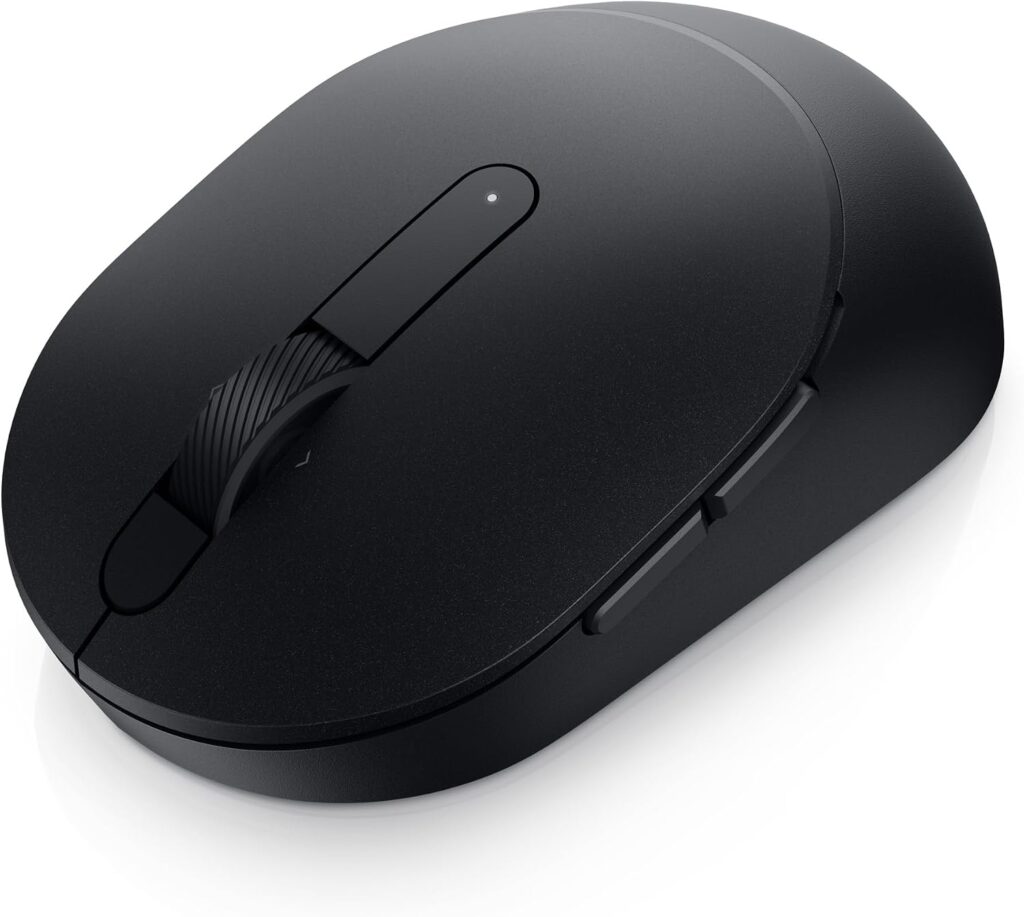
Dell Advanced Wireless Compact Mouse MS510: Specs & Verdict
A small wireless office mouse that takes one AA cell and never needs a charging cable, the MS510 is a newer name for a mouse Dell has sold for years. It sits in Dell's Advanced line and shares its shell with the Pro Plus MS5120W, the version Dell sells directly with a longer warranty.
The layout is conventional and slightly generous. It has seven buttons, with the extras on one flank for the thumb. Two radios are built in, Dell's Universal nano receiver for a desktop and Bluetooth for a laptop, and the receiver stows in the shell when the mouse goes into a bag. Tracking is a plain optical sensor with a modest ceiling, well below any gaming mouse and ample for documents, browsing and spreadsheets.
Dell's companion software is the other reason this mouse gets picked. It lets the buttons do different jobs in different programs, which turns a basic pointer into a shortcut tool. That software runs on Windows only, and macOS is missing from Dell's list of supported systems, so the customization depends on the computer it plugs into. The trade-offs follow from the brief. There is no USB-C port and no quick charge because there is nothing to charge, and a fresh cell runs for years, where a rechargeable mouse would have needed its cable dozens of times. The sensor will never suit games, and left-handed buyers should treat the side buttons as right-handed.
The buyer in view is an IT department, or a commuter who wants the same small mouse at home and in the office without learning a new one. Everything about it is built to be forgotten once it is paired.
Category strengths
Where the Dell Advanced Wireless Compact Mouse MS510 beats the median
- Much longer battery life ?26,280 h vs 150 h (median)
- More buttons ?7 vs 6 (median)
Where the Dell Advanced Wireless Compact Mouse MS510 trails the median
- A much lower max sensitivity ?4,000 DPI vs 25,600 DPI (median)
- No adjustable lift-off distance ?
- No USB-C charging ?
- No quick charge ?
- A heavier build ?102 g vs 89 g (median)
How this VS Score was computed
Score 39: each known spec is measured against the median of all mice (81 products), then weighted; 50 means level with that median. In classes of six or more, a value beyond the class’s 10th–90th percentile range counts as that limit, so one extreme product cannot set the scale. 48% of the scoreable weight could be used; unknown values, features not applicable to this class and proxies (battery capacity where a rated life exists) add or remove nothing.
| Specification | This product | Cohort median | Score weight | Points moved |
|---|---|---|---|---|
| Max sensitivity | 4,000 | 25,600 | 1 | −42.0 |
| Battery life | 26,280 — capped at the class’s upper range (2,920) | 150 | 0.8 | +40.0 |
| Adjustable lift-off distance | No | 61% of the class have it | 0.3 | −14.4 |
| USB-C charging | No | 67% of the class have it | 0.3 | −14.4 |
| Quick charge | No | 55% of the class have it | 0.3 | −14.4 |
| RGB lighting | No | 46% of the class have it | 0.2 | −9.6 |
| Weight | 102 | 89 | 1 | −6.0 |
| Buttons | 7 | 6 | 0.6 | +4.8 |
| Connection | 2 | 2 | 0.8 | +0.0 |
Not scored: Max tracking speed (unknown: not scored); Max acceleration (unknown: not scored); Polling rate (unknown: not scored); Grip styles (unknown: not scored); Horizontal scrolling (unknown: not scored); Free-spin scroll wheel (unknown: not scored); Click latency (unknown: not scored); Switch lifespan (unknown: not scored); Debounce adjustment (not applicable: only 20% of this class have it); Wireless polling rate (unknown: not scored); Battery capacity (unknown: not scored); Wireless charging (not applicable: only 14% of this class have it); Onboard memory (unknown: not scored); Software customization (standard for the class (97% have it)); Adjustable weights (not applicable: only 2% of this class have it).
Editor’s note
This is Dell's long-serving MS5120W office mouse, re-released under the newer Advanced naming at roughly half the price, and everything good about it is deliberately unexciting.
It runs on a single AA cell for about three years, so charging never enters your life. It carries two wireless channels (a 2.4 GHz Dell Universal nano receiver that stows inside the shell, plus Bluetooth 5.0 LE), so it moves between a docked desktop and a laptop without re-pairing. At 102 g with the battery in and 104.5 mm long, it fits a laptop sleeve. And unusually at this price, Dell Display and Peripheral Manager gives per-app button remapping and DPI selection, which is the one feature here that changes day-to-day use: reassigning the side buttons to copy and paste, or to a meeting mute, is worth more than any sensor number.
Three things to know before buying. macOS is absent from Dell's supported operating systems entirely (Windows, Chrome, Linux, Android and even Free-DOS are listed), and the manager software is Windows-only, so on a Mac you get a plain Bluetooth mouse with no customization. The warranty is one year, where the near-identical MS5120W carries three years of Advanced Exchange. And Dell does not sell this on its own US site, so it exists through third-party Amazon sellers at volatile prices.
The side buttons also sit on one flank only, so despite listings describing it as ambidextrous, left-handers should assume otherwise.
For the money it is a lot of competent, boring mouse. For a warranty you can claim, the pricier MS5120W is the wiser spend.
Specifications
Quality bars show where each figure sits between the lowest and highest of the 81 mice this VS Score is measured against.
Sensor & tracking
Design & handling
Switches & latency
Connectivity
Battery
Features
Sources and verification
Where the specifications come from
- Official product pagedell.com
- Retailer listing (cross-check)amazon.com
Verification
- First published
- Specifications last checked
- Sheet completeness
- 21 of 34 specifications verified; the rest show as Unknown and are never estimated or scored
- Page type
- Product specification page — Compiled from the manufacturer’s published specifications and the cited sources; this is not a hands-on test.
- Basis
- Research-based: specifications and editorial text were compiled from the documents listed here and the manufacturer’s published data. We have not tested this unit ourselves; where independent measurements are mentioned they belong to the linked publication.
Where to buy
Prices and availability may change. Check the retailer before buying. We may earn a commission on purchases.
Price history
Mice with similar specs to the Dell Advanced Wireless Compact Mouse MS510


Ratings & reviews
No reviews yet. Be the first to share your experience.
The bottom line
The Dell Advanced Wireless Compact Mouse MS510 earns a VS Score of 39, below the median of the 81 mice it is measured against (a score of 50 is level with that median).
- Who it’s for
- Laptop commuters and hot-deskers who want a small, reliable travel mouse they never have to charge, and Dell fleet buyers standardizing on one Universal receiver. Linux and Chromebooks are explicitly supported.
- Who should look elsewhere
- Mac owners, who fall outside Dell's supported-OS list and get no customization software at all. Also wrong for left-handers, large-handed palm grippers, and anyone who cares about sensor grade or polling rate.
- The trade-off that matters
- Half the price of its own sibling, and a third of the warranty. It is the same chassis as the MS5120W with one year of cover instead of three years of Advanced Exchange.
- The main alternative
- Dell Pro Plus Compact Mouse MS5120W: the identical mouse from Dell directly, with a three-year Advanced Exchange warranty.
The VS Score is calculated from the weighted specifications above, each measured against the median of comparable mice — a shortlisting guide, not a substitute for your own priorities. See how we score.



