Razer Basilisk V3 X HyperSpeed: Specs, Features, Pros & Cons
A gaming mouse that takes a single AA battery is an increasingly rare thing, and on the Basilisk V3 X HyperSpeed it is the decision everything else follows from. There is no charging port, no dock and no battery percentage to manage. When it stops, you swap a cell. Razer quotes battery life in hundreds of hours, and the practical effect is a mouse you stop thinking about.
The rest of the sheet is deliberately unambitious. The optical sensor tracks to eighteen thousand DPI, well past what anyone uses, but the polling rate is a conventional 1000 Hz at a time when Razer's own flagships advertise eight times that. Seven programmable buttons, mechanical switches rated to sixty million clicks and PTFE feet are all solid, ordinary specifications.
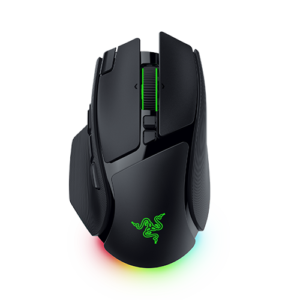
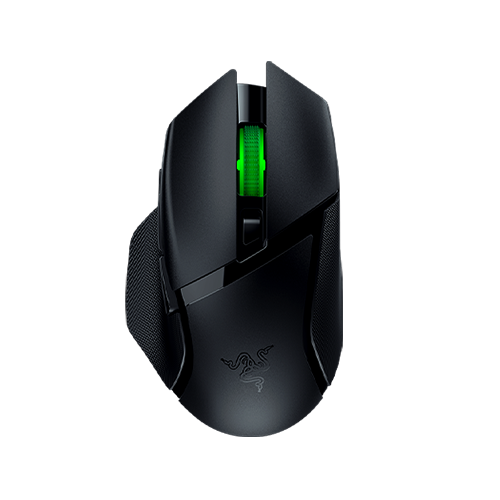
Where it does not economize is shape. This is the full Basilisk body (a right-handed ergonomic shell with a pronounced thumb rest), carried down from far more expensive models, and for palm-grip players with larger hands that inheritance is the main reason to consider it.
Two omissions are worth knowing about. Onboard memory holds a single profile, so if you move between machines you get one configuration. And Chroma lighting is present on a mouse whose battery you are paying for in AA cells, which is a curious priority. The lighting is the first thing to turn off if those quoted hours matter to you.
At the price Razer positions this at, the competition is fierce and mostly rechargeable. The AA battery is either the reason you buy it or the reason you do not, and that is a cleaner decision than most mice in this bracket offer.
Category strengths
Where the Razer Basilisk V3 X HyperSpeed beats the median
- Much longer battery life ?285 h vs 130 h (median)
- Has RGB lighting ?
- More buttons ?7 vs 6 (median)
Where the Razer Basilisk V3 X HyperSpeed trails the median
- No USB-C charging ?
- No quick charge ?
- A lower max sensitivity ?18,000 DPI vs 25,600 DPI (median)
- A lower max tracking speed ?450 IPS vs 650 IPS (median)
- A heavier build ?110 g vs 89 g (median)
- A lower max acceleration ?40 G vs 50 G (median)
- A lower switch lifespan ?60 million clicks vs 80 million clicks (median)
How this VS Score was computed
Score 48: each known spec is measured against the median of all mice (83 products), then weighted; 50 means level with that median. In classes of six or more, a value beyond the class’s 10th–90th percentile range counts as that limit, so one extreme product cannot set the scale. 70% of the scoreable weight could be used; unknown values, features not applicable to this class and proxies (battery capacity where a rated life exists) add or remove nothing.
| Specification | This product | Cohort median | Score weight | Points moved |
|---|---|---|---|---|
| Battery life | 285 | 130 | 0.8 | +40.0 |
| Max sensitivity | 18,000 | 25,600 | 1 | −15.0 |
| USB-C charging | No | 68% of the class have it | 0.3 | −14.4 |
| Quick charge | No | 55% of the class have it | 0.3 | −14.4 |
| Max tracking speed | 450 | 650 | 0.8 | −12.0 |
| Weight | 110 | 89 | 1 | −10.0 |
| RGB lighting | Yes | 48% of the class have it | 0.2 | +10.0 |
| Buttons | 7 | 6 | 0.6 | +4.8 |
| Max acceleration | 40 | 50 | 0.4 | −4.0 |
| Switch lifespan | 60 | 80 | 0.2 | −2.4 |
| Polling rate | 1,000 | 1,000 | 0.8 | +0.0 |
| Connection | 2 | 2 | 0.8 | +0.0 |
| Wireless polling rate | 1,000 | 1,000 | 0.5 | +0.0 |
Not scored: Adjustable lift-off distance (unknown: not scored); Grip styles (unknown: not scored); Horizontal scrolling (unknown: not scored); Free-spin scroll wheel (unknown: not scored); Click latency (unknown: not scored); Debounce adjustment (unknown: not scored); Battery capacity (unknown: not scored); Wireless charging (not applicable: only 18% of this class have it); Onboard memory (standard for the class (88% have it)); Software customization (standard for the class (98% have it)); Adjustable weights (not applicable: only 2% of this class have it).
Editor’s note
I would frame this one around a single question: do you want to charge a mouse? If the answer is no (if you have ever been annoyed by a dead rechargeable at an inconvenient moment), then the AA cell is worth more than any spec on the sheet, and the Basilisk V3 X HyperSpeed is one of very few current options that offers it in a proper ergonomic gaming shape.
For anyone indifferent to charging, the calculation gets harder. A thousand hertz polling and a 110 gram weight are both unremarkable now. Competitive players have moved toward much lighter shells, and this mouse is heavier than most of what gets recommended for fast-twitch shooters, partly because it is carrying a AA battery. For anything slower (RPGs, strategy, long sessions of general work), that weight reads as stability rather than sluggishness, and the thumb rest helps over long periods.
The single onboard profile is the limitation I would think hardest about. On one computer, it is invisible. Carry the mouse between a desktop and a laptop with different bindings on each, and you will be running Synapse on both machines, because the mouse remembers only one set.
Value is where it does best. You are getting the Basilisk shape, decent mechanical switches and dual-mode wireless with Bluetooth for a second device, at a point where rivals usually drop to a smaller or cheaper shell.
Against Logitech's G305 Lightspeed, which also runs on AA and costs less, the Razer wins on shape, button count and Bluetooth, and loses on weight. For large hands, that shape difference is worth the gap.
Specifications
Quality bars show where each figure sits between the lowest and highest of the 83 mice this VS Score is measured against.
Sensor & tracking
Design & handling
Switches & latency
Connectivity
Battery
Features
Sources and verification
Where the specifications come from
- Official product pagerazer.com
Verification
- First published
- Specifications last checked
- Sheet completeness
- 26 of 34 specifications verified; the rest show as Unknown and are never estimated or scored
- Page type
- Product specification page — Compiled from the manufacturer’s published specifications and the cited sources; this is not a hands-on test.
- Basis
- Research-based: specifications and editorial text were compiled from the documents listed here and the manufacturer’s published data. We have not tested this unit ourselves; where independent measurements are mentioned they belong to the linked publication.
Mice with similar specs to the Razer Basilisk V3 X HyperSpeed



Ratings & reviews
No reviews yet. Be the first to share your experience.
The bottom line
The Razer Basilisk V3 X HyperSpeed earns a VS Score of 48, below the median of the 83 mice it is measured against (a score of 50 is level with that median).
- Who it’s for
- A palm-grip player with larger hands who wants the full Basilisk shape and would rather swap a battery once in a while than remember to charge anything.
- Who should look elsewhere
- Competitive shooter players chasing low weight and high polling rates. At 110 grams and a conventional polling rate it is mid-pack on both, and lighter rechargeable rivals cost about the same.
- The trade-off that matters
- The AA cell that removes charging from your life is also part of why the mouse is heavier than its competition. Whether that is a bargain depends entirely on what you play.
- The main alternative
- Logitech G305 Lightspeed: also AA-powered and cheaper, worth taking instead if you want less weight and do not need the larger shell or Bluetooth.
The VS Score is calculated from the weighted specifications above, each measured against the median of comparable mice — a shortlisting guide, not a substitute for your own priorities. See how we score.