
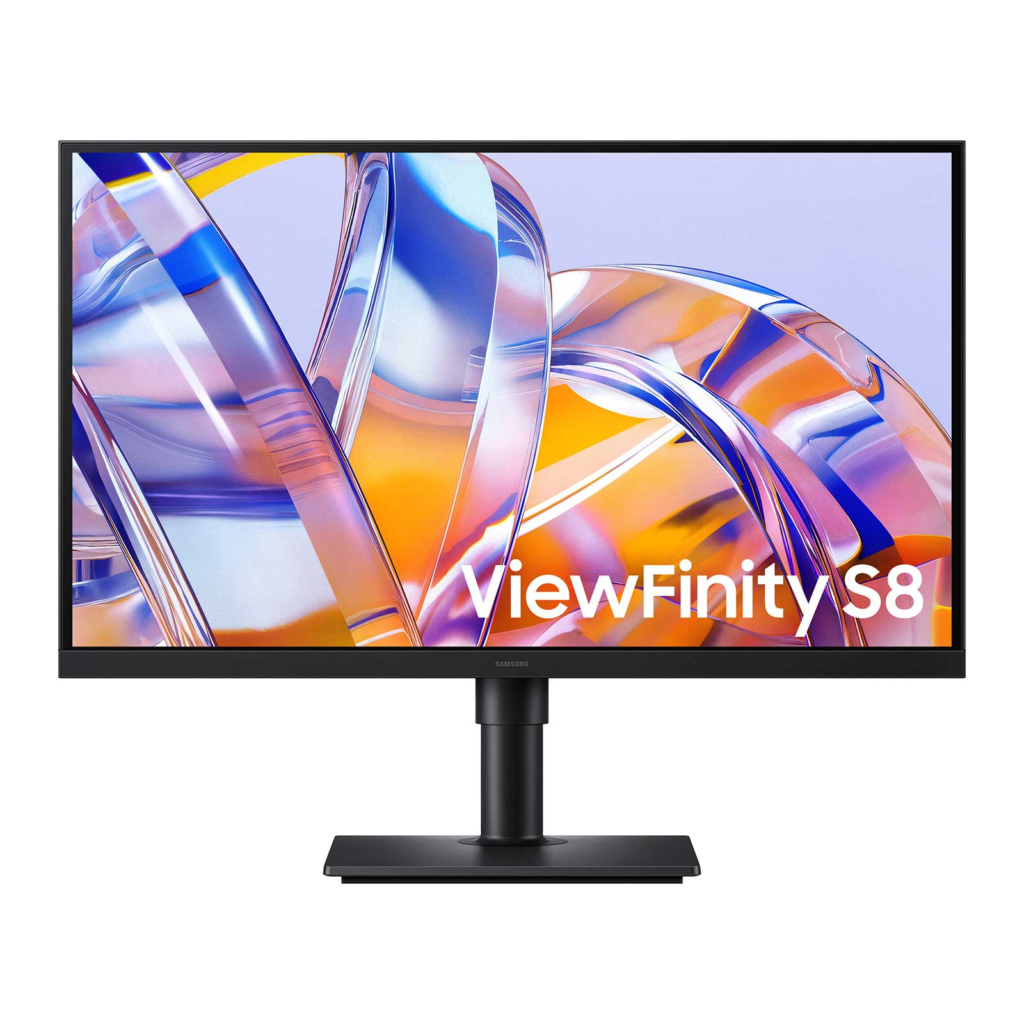
Samsung ViewFinity S8 S80UH 32-inch: Specs, Pros & Cons
Samsung's ViewFinity S8 line is where the company puts the office monitors meant to replace a docking station, and this is the version built to a price. The idea is the one Dell's UltraSharp hub models established: a single cable to the laptop that carries the picture, charges the machine, and brings the network and the peripherals along with it.
Where Samsung saved money is the panel. This is a VA screen rather than one of the IPS variants that dominate the premium end of the category, and that single decision shapes most of the experience. VA holds deep blacks well, which flatters text on a dark background and video in a dim room. It also shifts color and brightness more than IPS as you move off-center, which is a real consideration on a screen this wide if anyone ever looks at it from beside you.
The hub is more generous than the price suggests, and it is the reason to buy the monitor over a cheaper panel of the same size: a KVM that hands one keyboard and mouse between two machines, a wired network jack, and enough downstream ports to rebuild a desk around. Picture-by-picture is supported, which is more useful here than on smaller screens because each half remains a workable window. The stand moves in every direction that matters, including round into portrait.
Read it as a docking station with a large, sharp screen attached and it is coherent and good value for a laptop-first desk. Read it as a display chosen for its image and the compromises start to surface. Samsung is clear enough in its own specifications about what this panel is and is not aimed at, and the detail of that is worth reading below.
Category strengths
Where the Samsung ViewFinity S8 S80UH 32-inch beats the median
- Has USB-C ?
- Has height adjustment ?
- Has pivot adjustment ?
- Has KVM switch ?
- Has ethernet ?
- Higher peak brightness ?350 nits vs 300 nits (median)
- Has swivel adjustment ?
How this VS Score was computed
Score 56: each known spec is measured against the median of VA office monitors (4 products), then weighted; 50 means level with that median. In classes of six or more, a value beyond the class’s 10th–90th percentile range counts as that limit, so one extreme product cannot set the scale. 61% of the scoreable weight could be used; unknown values, features not applicable to this class and proxies (battery capacity where a rated life exists) add or remove nothing.
| Specification | This product | Cohort median | Score weight | Points moved |
|---|---|---|---|---|
| USB-C | Yes — held to half its range (fewer than six products in this class list it) | 33% of the class have it | 0.5 | +12.5 |
| Height adjustment | Yes — held to half its range (fewer than six products in this class list it) | 25% of the class have it | 0.4 | +10.0 |
| Peak brightness | 350 | 300 | 0.8 | +6.4 |
| Swivel | Yes — held to half its range (fewer than six products in this class list it) | 50% of the class have it | 0.2 | +5.0 |
| Pivot | Yes — held to half its range (fewer than six products in this class list it) | 25% of the class have it | 0.2 | +5.0 |
| Headphone output | Yes — held to half its range (fewer than six products in this class list it) | 75% of the class have it | 0.2 | +5.0 |
| KVM switch | Yes — held to half its range (fewer than six products in this class list it) | 33% of the class have it | 0.2 | +5.0 |
| Ethernet | Yes — held to half its range (fewer than six products in this class list it) | 33% of the class have it | 0.2 | +5.0 |
| Screen size | 32 | 32 | 1.2 | +0.0 |
| Resolution | 4K | 4K | 1.2 | +0.0 |
| Panel type | VA | VA | 0.8 | +0.0 |
| Color depth | 10 | 10 | 0.3 | +0.0 |
| Response time | 5 | 5 | 0.24 | +0.0 |
| Contrast ratio | 3,000 | 3,000 | 0.6 | +0.0 |
| HDR | HDR10 | HDR10 | 0.5 | +0.0 |
| Pixel density | 138 | 138 | 0.5 | +0.0 |
| Refresh rate | 60 | 60 | 0.6 | +0.0 |
| HDMI ports | 1 | 1 | 0.4 | +0.0 |
| DisplayPort inputs | 1 | 1 | 0.4 | +0.0 |
Not scored: DCI-P3 coverage (unknown: not scored); Local dimming (unknown: not scored); Local dimming zones (unknown: not scored); Adaptive sync (unknown: not scored); Variable refresh rate (unknown: not scored); Motion blur reduction (unknown: not scored); Input lag (unknown: not scored); Tilt (standard for the class (100% have it)); USB-C power delivery (too few comparable peers (1, need 3)); USB hub (too few comparable peers (2, need 3)); Built-in speakers (unknown: not scored); Webcam (unknown: not scored); Microphone (unknown: not scored); Picture-by-picture (standard for the class (100% have it)).
Editor’s note
Judge this as a docking station with a screen attached and it looks like good value. The USB-C port delivers 90 W, enough for almost any laptop short of a large gaming or workstation model, and it carries the display signal, the USB hub and the Ethernet connection at the same time. Samsung does not publish the speed of that LAN port, so assume gigabit until proven otherwise. The KVM lets you share one keyboard and mouse between the laptop on USB-C and a desktop on DisplayPort or HDMI, and picture-by-picture puts both on screen at once, which on a panel this sharp leaves each with a usable window.
As a display, the verdict is more mixed. VA gives contrast, and for spreadsheets, code and documents in a normally lit office the image is crisp and comfortable. Sit off-axis or share the screen with a colleague and you will see the color and brightness shift that IPS avoids. Samsung publishes only an sRGB coverage figure, which tells you it is not aimed at color-critical work. The refresh rate is fixed at 60 Hz with no adaptive sync. That is fine for work and a real limit for anyone who also games.
Two smaller things to know before buying. The Amazon listing advertises HDR10+ while Samsung's own specification page says HDR10. Either way, with office-level brightness and no dimming zones the HDR label changes nothing in practice. And no speakers appear on Samsung's sheet, so plan on headphones or desktop speakers.
If your laptop needs more power than the USB-C port can give, or you want IPS viewing angles and a faster panel, the Dell UltraSharp U3226QER does everything this does at a much higher price. For a desk that needs no USB-C, Ethernet or KVM, the Samsung ViewFinity S7 S70H gives you the same size and resolution for less. Between those two, the S80UH is the sensible middle for a laptop-first desk.
Specifications
Quality bars show where each figure sits between the lowest and highest of the 4 VA office monitors this VS Score is measured against.
Picture
Gaming
Ergonomics & design
Connectivity
Features
Sources and verification
Where the specifications come from
- Official product pagesamsung.com
- Retailer listing (cross-check)amazon.com
Verification
- First published
- Specifications last checked
- Sheet completeness
- 29 of 42 specifications verified; the rest show as Unknown and are never estimated or scored
- Page type
- Product specification page — Compiled from the manufacturer’s published specifications and the cited sources; this is not a hands-on test.
- Basis
- Research-based: specifications and editorial text were compiled from the documents listed here and the manufacturer’s published data. We have not tested this unit ourselves; where independent measurements are mentioned they belong to the linked publication.
Where to buy
Prices and availability may change. Check the retailer before buying. We may earn a commission on purchases.
Price history
Monitors with similar specs to the Samsung ViewFinity S8 S80UH 32-inch


Ratings & reviews
No reviews yet. Be the first to share your experience.
The bottom line
The Samsung ViewFinity S8 S80UH 32-inch earns a VS Score of 56, above the median of the 4 VA office monitors it is measured against (a score of 50 is level with that median).
- Who it’s for
- A laptop-first office user who wants a big 4K screen, one-cable charging and networking, and a KVM without paying Thunderbolt-hub prices.
- Who should look elsewhere
- Gamers and color-critical creatives: the refresh rate is fixed, there is no adaptive sync, and Samsung publishes no wide-gamut coverage figure.
- The trade-off that matters
- VA buys contrast for documents but gives up the viewing angles and color consistency of IPS, which matters as soon as two people look at the screen.
- The main alternative
- Samsung ViewFinity S7 S70H: the same size and resolution without the hub, for anyone who does not need USB-C, Ethernet or a KVM.
The VS Score is calculated from the weighted specifications above, each measured against the median of comparable VA office monitors — a shortlisting guide, not a substitute for your own priorities. See how we score.




