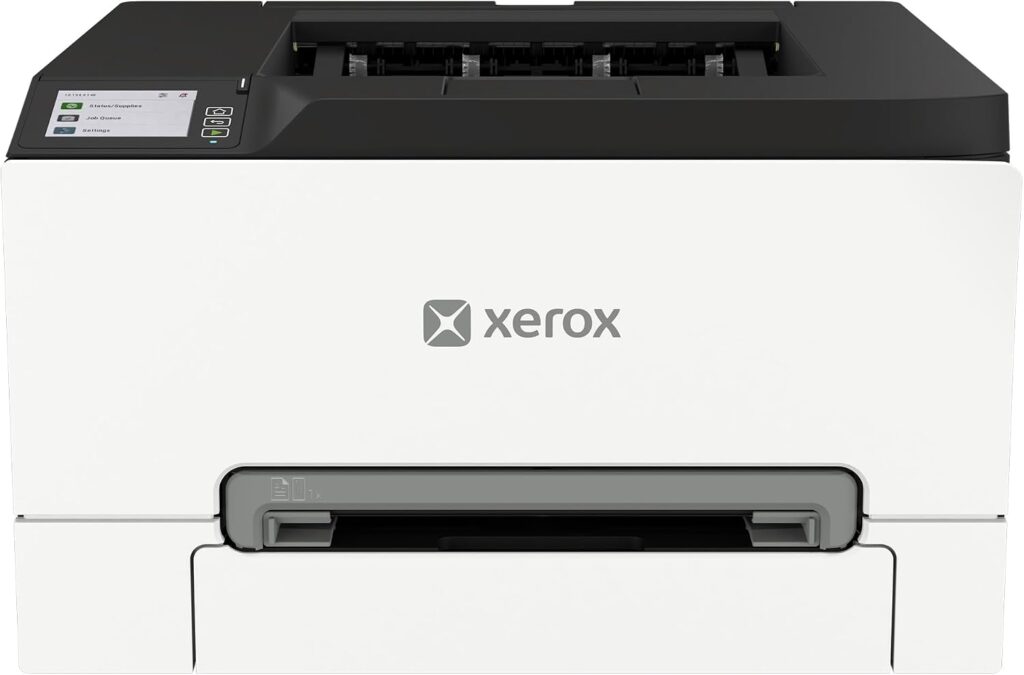
Xerox C300: Specs, Price, Pros & Cons
The Xerox C300 is a Lexmark engine wearing a Xerox badge, and that is the most useful thing to know about it. Xerox's current small-office color range is built by Lexmark, so this printer shares its mechanics, toner and firmware family with Lexmark's own compact color lasers, and its consumables market is deep because of it.
It is a single-function machine: it prints, in color, at the same rated speed for mono and color pages, and it does nothing else. There is no scanner, no copier and no fax. Xerox sells the same engine as the C303a and C305ae multifunction models for offices that need those, and the C240 sits below it as the cheaper, slower print-only option. Choosing between the four is mostly a question of speed, duty cycle and whether you scan.
What defines the C300 within that family is capacity for its size. Automatic two-sided printing is standard, the main tray takes a full ream, a second tray can be added, and Xerox rates it for a monthly volume that would satisfy a small team rather than a home office. Connectivity is complete for 2026: gigabit Ethernet, Wi-Fi with Wi-Fi Direct, USB, AirPrint and Mopria, all managed from a small color touch panel.
The buyer is a small business or a home worker who prints color documents in volume and either owns a scanner already or never needs one. Photo enthusiasts should look elsewhere. The resolution figure is a document-engine number, and glossy output is not what this class of laser is for.
Two things to check before buying: the starter cartridges in the box are low-yield, so factor a set of high-capacity toners into the real cost, and the machine is heavy enough that it wants a permanent spot.
Category strengths
Where the Xerox C300 beats the median
- A much higher print resolution ?2,400 dpi vs 1,200 dpi (median)
- Has touchscreen display ?
- A higher print speed (black) ?32 ppm vs 27 ppm (median)
- A much higher monthly duty cycle ?75,000 pages vs 40,000 pages (median)
- A higher print speed (color) ?32 ppm vs 27 ppm (median)
Where the Xerox C300 trails the median
- A slightly heavier build ?16.6 kg vs 15.4 kg (median)
How this VS Score was computed
Score 63: each known spec is measured against the median of laser printers (5 products), then weighted. 49% of the scoreable weight could be used. See how we score
| Specification | This product | Cohort median | Score weight | Points moved |
|---|---|---|---|---|
| Color printing | Yes — held to half its range (fewer than six products in this class list it) | 60% of the class have it | 1.5 | +37.5 |
| Print speed (black) | 32 | 27 | 2 | +18.0 |
| Print resolution | 2,400 — held to half its range (fewer than six products in this class list it) | 1,200 | 0.5 | +12.5 |
| Touchscreen display | Yes — held to half its range (fewer than six products in this class list it) | 40% of the class have it | 0.5 | +12.5 |
| Print speed (color) | 32 | 27 | 1 | +9.0 |
| Monthly duty cycle | 75,000 — held to half its range (fewer than six products in this class list it) | 40,000 | 0.3 | +7.5 |
| Weight | 16.6 | 15.4 | 0.3 | −1.2 |
| Input tray capacity | 250 | 250 | 1 | +0.0 |
| Output tray capacity | 100 | 100 | 0.3 | +0.0 |
Not scored: Automatic duplex printing (standard for the class (80% have it)); Supertank / refillable ink (not applicable: only 0% of this class have it); All-in-one (not scored for this class of product); Automatic document feeder (not scored for this class of product); ADF capacity (unknown: not scored); Duplex scanning (not scored for this class of product); Fax (not scored for this class of product); Wi-Fi (standard for the class (100% have it)); Wi-Fi Direct (standard for the class (100% have it)); Ethernet (standard for the class (80% have it)); USB (standard for the class (100% have it)); Apple AirPrint (standard for the class (80% have it)); Mobile app printing (standard for the class (100% have it)).
Editor’s note
I think the C300 is the right printer for a narrower group than its spec sheet suggests. It is excellent at one job (fast, duplexed, color documents from a network of laptops and phones), and the moment a buyer needs to scan a signed contract, the C303a next to it becomes the smarter purchase for very little more.
Within its own job it makes good decisions. Rated speed is identical in color and mono, so switching a job to color costs nothing in throughput. The duty cycle and recommended volume are small-office numbers, which means a home office will never stress it and a five-person office will not wear it out. The touch panel is small but it is a real color touchscreen, which the cheaper C240 does not offer, and it makes Wi-Fi setup and job management far less painful than button-and-LCD panels.
The economics are where I would hesitate. The included cartridges are starter yields, and the high-capacity replacements are where the running cost becomes reasonable, so the sticker price understates the first year. Because the engine is Lexmark's, third-party toner is plentiful, but Xerox's own cartridges are the ones covered by its warranty terms.
Against the C240, the C300 is faster, has a higher duty rating, adds the touchscreen and prints at a higher native resolution. At a few hundred pages a month, the C240 is the better value. Print that many in a week and the C300 pays for itself in time.
I would recommend it to a small office that already has a document scanner or a phone-scanning habit, prints a lot of color, and wants gigabit Ethernet. I would steer photo printers, occasional printers and anyone who needs copies toward another machine.
Specifications
Printing
Scanning & copying
Paper handling
Connectivity
Design
Sources and verification
Where the specifications come from
- Official product pagexerox.com
- Retailer listing (cross-check)amazon.com
Verification
- First published
- Specifications last checked
- Sheet completeness
- 23 of 24 specifications verified; the rest show as Unknown and are never estimated or scored
- Page type
- Product specification page — Compiled from the manufacturer’s published specifications and the cited sources; this is not a hands-on test.
- Basis
- Research-based: specifications and editorial text were compiled from the documents listed here and the manufacturer’s published data. We have not tested this unit ourselves; where independent measurements are mentioned they belong to the linked publication.
Where to buy
Prices and availability may change. Check the retailer before buying. We may earn a commission on purchases.
Price history
Printers with similar specs to the Xerox C300


Ratings & reviews
No reviews yet. Be the first to share your experience.
The bottom line
The Xerox C300 earns a VS Score of 63, above the median of the 5 laser printers it is measured against (a score of 50 is level with that median).
- Who it’s for
- A small office or home business that prints color documents in real volume, already scans elsewhere, and wants wired gigabit networking plus Wi-Fi.
- Who should look elsewhere
- Anyone who needs to copy, scan or fax (the C303a is the same engine with those added) and anyone printing photographs or a handful of pages a month.
- The trade-off that matters
- Small-office engine capacity in a desk-sized box, paid for by giving up everything but printing, and by starter toners that need replacing with high-yield cartridges early.
- The main alternative
- Xerox C240: the slower, cheaper sibling without the touchscreen, a better match if monthly volume is modest.
This page was created with the help of AI. How we work