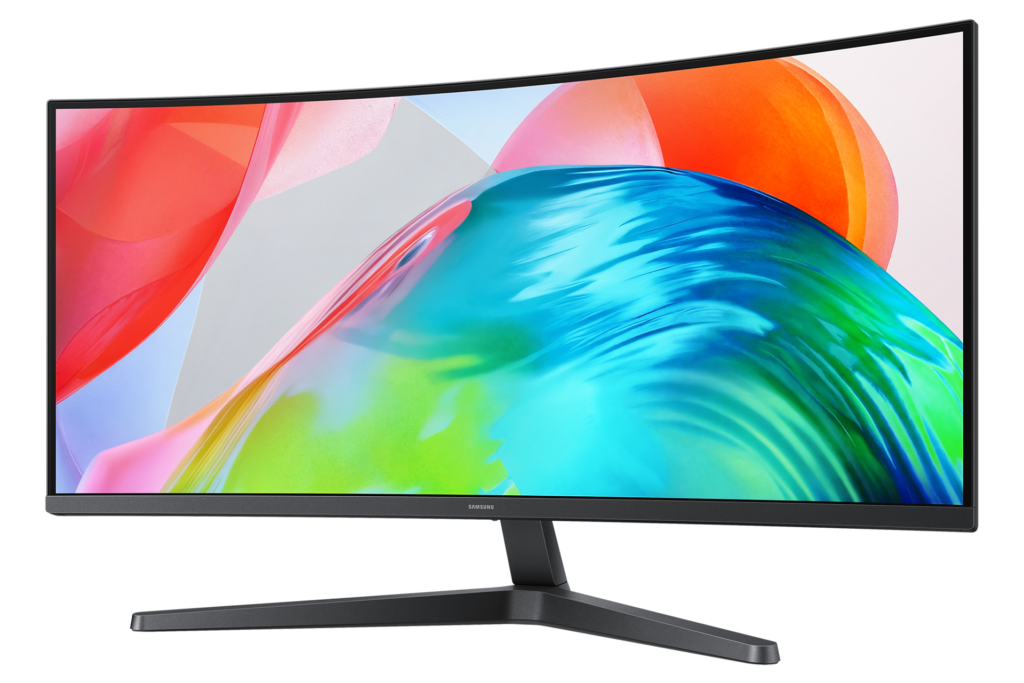
Samsung ViewFinity S5 S55GH (LS34H550GANXZA) Specs
Samsung's S55GH is an ultrawide for people who want the width, not the gaming badge. It pairs the familiar 34-inch 21:9 format with a VA panel, a moderate 1800R curve and a refresh rate high enough to feel smooth on the desktop, and it strips out nearly everything else to keep the price in budget territory.
ViewFinity is Samsung's line for work rather than play, and the S5 tier is its entry point. That placement explains most of the decisions here.
The format is the point. At 3440 by 1440, the screen holds two full documents or a long editing timeline side by side, and the curve keeps the edges at a comfortable angle from a normal desk distance. Picture-by-picture and picture-in-picture let two computers share the panel, which is genuinely useful for someone who switches between a work laptop and a home PC. The extra width also suits films: a widescreen release leaves far thinner black bars here than on a 16:9 screen.
VA is a deliberate choice. It gives deeper blacks and higher native contrast than a typical IPS panel, which suits films and dark-themed apps, at the cost of the slower pixel transitions VA panels are known for in fast motion. The screen coating is matte, which matters on a panel this wide: a glossy finish would almost always catch a window or a lamp somewhere along its length.
The limitations are all about connectivity and ergonomics. There is no USB of any kind, so a laptop owner hoping for a single cable to carry video, data and power will be disappointed, and the stand only tilts. As a large curved display for a desktop PC this makes sense; as a docking station it does not.
Category strengths
Where the Samsung ViewFinity S5 S55GH (LS34H550GANXZA) beats the average
- Has picture-by-picture ?
Where the Samsung ViewFinity S5 S55GH (LS34H550GANXZA) trails the average
- A much slower response time ?5 ms vs 1 ms (avg)
- A lower refresh rate ?120 Hz vs 165 Hz (avg)
- Fewer HDMI ports ?1 vs 2 (avg)
- A lower color depth ?8 bit vs 10 bit (avg)
How this VS Score was computed
Score 35: each known spec is measured against the median of VA gaming monitors, 32 inches and up (7 products, medians winsorised to the 10th–90th percentile), then weighted. 65% of the scoreable weight could be used; unknown values, features not applicable to this class and proxies (battery capacity where a rated life exists) add or remove nothing.
| Specification | This product | Cohort median | Score weight | Points moved |
|---|---|---|---|---|
| Resolution | 1 | 1 | 1.2 | −48.0 |
| Response time | 5 | 1 | 0.8 | −32.0 |
| Adaptive sync | 1 | 1 | 0.6 | −24.0 |
| Height adjustment | 0 | 0 | 0.4 | −19.2 |
| Refresh rate | 120 | 165 | 1.2 | −16.8 |
| HDMI ports | 1 | 2 | 0.4 | −10.0 |
| Picture-by-picture | 1 | 0.5 | 0.2 | +10.0 |
| Swivel | 0 | 0 | 0.2 | −9.6 |
| Color depth | 8 | 10 | 0.3 | −3.0 |
| HDR | 1 | 1 | 0.5 | +2.5 |
| USB hub | 0 | 0 | 0.05 | −2.2 |
| Pivot | 0 | 0 | 0.02 | −1.0 |
| Screen size | 34 | 34 | 1.2 | +0.0 |
| Panel type | 1 | 1 | 0.8 | +0.0 |
| Peak brightness | 300 | 300 | 0.8 | +0.0 |
| Contrast ratio | 3,000 | 3,000 | 0.6 | +0.0 |
| Pixel density | 110 | 110 | 0.5 | +0.0 |
| DisplayPort inputs | 1 | 1 | 0.4 | +0.0 |
Not scored: DCI-P3 coverage (unknown: not scored); Local dimming (unknown: not scored); Local dimming zones (unknown: not scored); Variable refresh rate (standard for the class (100% have it)); Motion blur reduction (unknown: not scored); Input lag (unknown: not scored); Tilt (standard for the class (100% have it)); USB-C (not applicable: only 0% of this class have it); USB-C power delivery (unknown: not scored); Built-in speakers (unknown: not scored); Headphone output (standard for the class (83% have it)); KVM switch (unknown: not scored); Webcam (unknown: not scored); Microphone (unknown: not scored); Ethernet (unknown: not scored).
Editor’s note
I think this monitor is best judged by what it leaves out rather than what it has. On paper it is a sensible spreadsheet-and-timeline screen: Samsung quotes 3,000:1 static contrast, near-complete sRGB coverage and factory calibration, which is a reasonable base for office work and light photo editing. The 120 Hz refresh rate with FreeSync Premium makes scrolling and casual games smoother than a basic office panel, without pretending to be an esports screen.
The compromise that decides it for most buyers is connectivity. One HDMI, one DisplayPort, a headphone jack and nothing else: no USB-C, no hub, no KVM, no speakers. For a desktop tower that is fine. For a laptop, the Dell U3425WE does everything this one does not – USB-C power delivery, a KVM switch, a height-adjustable stand – at a much higher price, and with an IPS panel that trades the Samsung's contrast for wider viewing angles.
The stand is the other giveaway of the price bracket. Tilt is all you get, and a wide monitor that cannot be raised often sits too low; the 75 x 75 mm VESA pattern means an inexpensive arm fixes that, but check the pattern before ordering, because it is the smaller of the two common sizes.
Samsung's figures also need careful reading. The HDR10 badge sits on a panel rated at 300 nits typical, and the 5 ms response time is a grey-to-grey best case; VA panels tend to show dark smearing in fast games, so gamers who care about motion should look at a faster VA or an OLED. Samsung's spec sheet lists 16.7 million colours, while the Amazon listing claims more than a billion, and I would trust the spec sheet.
For a home office with a desktop PC and a desk wide enough for it, I would happily recommend it. For a laptop-centred setup, I would spend more on something with a dock built in.
Specifications
Quality bars are generated automatically against 104 other monitors.
Picture
Gaming
Ergonomics & design
Connectivity
Features
Sources and verification
Where the specifications come from
- Official product pagesamsung.com
- Retailer listing (cross-check)amazon.com
Verification
- First published
- Specifications last checked
- Sheet completeness
- 29 of 42 specifications verified; the rest show as Unknown and are never estimated or scored
- Page type
- Product specification page — Compiled from the manufacturer’s published specifications and the cited sources; this is not a hands-on test.
- Basis
- Research-based: specifications and editorial text were compiled from the documents listed here and the manufacturer’s published data. We have not tested this unit ourselves; where independent measurements are mentioned they belong to the linked publication.
Price history
Monitors with similar specs to the Samsung ViewFinity S5 S55GH (LS34H550GANXZA)
Ratings & reviews
No reviews yet. Be the first to share your experience.
The bottom line
The Samsung ViewFinity S5 S55GH (LS34H550GANXZA) earns a VS Score of 35, trailing most of the 105 monitors we compare here, at least on the spec sheet.
- Who it’s for
- Desktop PC users who want a wide, curved workspace for spreadsheets, timelines or two side-by-side windows without paying for docking features or gaming extras.
- Who should look elsewhere
- Laptop users hoping for a single-cable setup, and anyone who needs height adjustment or built-in speakers – it has none of them.
- The trade-off that matters
- The budget price is bought by stripping connectivity and ergonomics back to the minimum, so the panel is better than the monitor built around it.
- The main alternative
- The MSI MAG 346CQDF E20 is another curved ultrawide of the same size with a much higher refresh rate, the better pick if gaming matters more than office work.
The VS Score is calculated from the weighted specifications above, compared with every other monitor we track — a shortlisting guide, not a substitute for your own priorities. See how we score.