
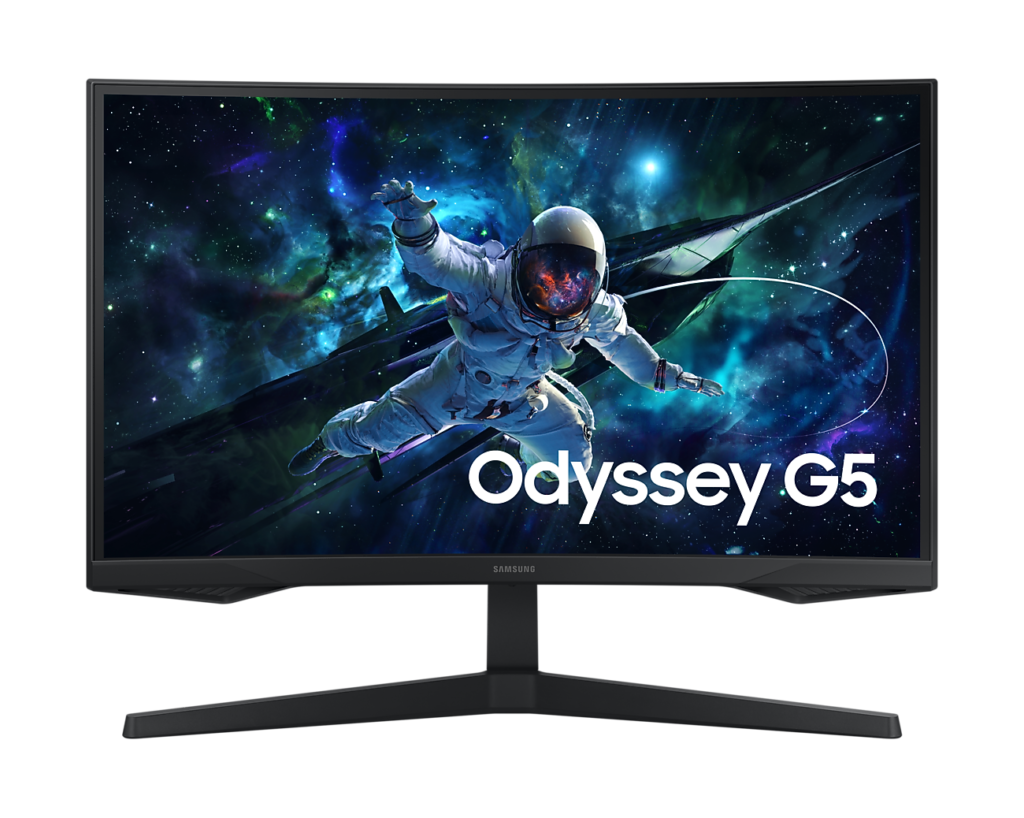
Samsung Odyssey G55C S27CG55: Specs, Features, Pros & Cons
Samsung built this Odyssey around one priority, image depth at a low price, and trimmed nearly everything else on the sheet to protect it. It is a curved QHD gaming monitor from the older C generation of the range, sold as the cheaper, curved counterpart to Samsung's flat models, and it makes no attempt to pass itself off as a high-end screen.
Three choices define it: a VA panel, a fairly tight curve and a high refresh rate with adaptive sync that works with graphics cards from either camp. That is where the money goes. The variable refresh is the feature that earns its place every day, removing tearing without any fiddling in settings, and the headphone jack is handy for anyone who runs a headset from the screen. The HDR label is the filler: the panel accepts the signal, but it lacks the brightness to make HDR look like more than a slightly different picture mode.
The natural owner games in the evening with the lights down and sits square in front of the display, which is exactly where VA contrast shows and its narrower viewing angles stop mattering. It is a poorer fit for a sunny room, where that contrast advantage fades into the glare, and for a sofa-style setup where people watch from the side.
Plan the desk before buying. The stand is basic enough that anyone who wants the screen higher or angled should budget for an arm from the start, and a desk with both a console and a PC will mean some cable swapping. At the bottom of the curved market those economies are fair, and the case for it stands or falls on how dark the room really is.
Category strengths
Where the Samsung Odyssey G55C S27CG55 beats the median
- A higher pixel density ?109 ppi vs 93 ppi (median)
- Slightly higher peak brightness ?330 nits vs 300 nits (median)
Where the Samsung Odyssey G55C S27CG55 trails the median
- Fewer HDMI ports ?1 vs 2 (median)
- A lower contrast ratio ?2500:1 vs 3500:1 (median)
- A slightly lower refresh rate ?165 Hz vs 180 Hz (median)
- A lower color depth ?8 bit vs 10 bit (median)
How this VS Score was computed
Score 47: each known spec is measured against the median of VA gaming monitors, 27 to 31 inches (11 products), then weighted; 50 means level with that median. In classes of six or more, a value beyond the class’s 10th–90th percentile range counts as that limit, so one extreme product cannot set the scale. 65% of the scoreable weight could be used; unknown values, features not applicable to this class and proxies (battery capacity where a rated life exists) add or remove nothing.
| Specification | This product | Cohort median | Score weight | Points moved |
|---|---|---|---|---|
| Adaptive sync | G-Sync Compatible | FreeSync | 0.6 | +30.0 |
| Height adjustment | No | 45% of the class have it | 0.4 | −19.2 |
| HDMI ports | 1 | 2 | 0.4 | −10.0 |
| Swivel | No | 36% of the class have it | 0.2 | −9.6 |
| Built-in speakers | No | 27% of the class have it | 0.2 | −9.6 |
| Contrast ratio | 2,500 | 3,500 | 0.6 | −8.4 |
| Refresh rate | 165 | 180 | 1.2 | −4.8 |
| Pixel density | 109 | 93 | 0.5 | +4.5 |
| Peak brightness | 330 | 300 | 0.8 | +4.0 |
| Color depth | 8 | 10 | 0.3 | −3.0 |
| Pivot | No | 36% of the class have it | 0.02 | −1.0 |
| Screen size | 27 | 27 | 1.2 | +0.0 |
| Resolution | 1440p | 1440p | 1.2 | +0.0 |
| Panel type | VA | VA | 0.8 | +0.0 |
| Response time | 1 | 1 | 0.8 | +0.0 |
| HDR | HDR10 | HDR10 | 0.5 | +0.0 |
| DisplayPort inputs | 1 | 1 | 0.4 | +0.0 |
Not scored: DCI-P3 coverage (unknown: not scored); Local dimming (unknown: not scored); Local dimming zones (unknown: not scored); Variable refresh rate (standard for the class (100% have it)); Motion blur reduction (unknown: not scored); Input lag (unknown: not scored); Tilt (standard for the class (100% have it)); USB-C (not applicable: only 0% of this class have it); USB-C power delivery (unknown: not scored); USB hub (not applicable: only 20% of this class have it); Headphone output (standard for the class (91% have it)); KVM switch (unknown: not scored); Webcam (unknown: not scored); Microphone (unknown: not scored); Ethernet (unknown: not scored); Picture-by-picture (unknown: not scored).
Editor’s note
The G55C is the cheapest sensible route into a curved 1440p gaming monitor, and its argument against the flat G50D sitting next to it is contrast. A VA panel gives 2,500 to 1 natively against IPS's 1,000 to 1, which in a dark room is the difference between black and dark gray.
What you give up for that is motion and angles. VA panels are slower in dark transitions, so shadowed scenes smear more than they would on IPS, and color shifts more as you move off-center. The quoted 1 ms figure is an MPRT number achieved with backlight strobing, not a gray-to-gray measurement, so treat it as marketing rather than a specification.
The 1000R curve is more comfortable at 27 inches than the same curve on a 32-inch screen, because your eyes are closer to equidistant from the edges. It still bends straight lines, so anyone doing design or CAD work should look elsewhere, but for games and general use it reads as natural within a day.
The compromises are concentrated in the chassis. The stand tilts and does nothing else, the VESA pattern is 75 by 75 rather than the more common 100 by 100, and there is one HDMI 2.0 and one DisplayPort 1.2 with a headphone jack and no speakers. Budget for an arm if you care about ergonomics.
Adaptive sync is covered properly, with FreeSync Premium certification and G-Sync compatibility, so tearing is handled whichever card you run.
Buy it if contrast and price are what you are optimizing for and the monitor will sit at a fixed height. Pay the difference for the G50D if you want a proper ergonomic stand, flat geometry and better motion clarity in dark scenes.
Specifications
Quality bars show where each figure sits between the lowest and highest of the 11 VA gaming monitors, 27 to 31 inches this VS Score is measured against.
Picture
Gaming
Ergonomics & design
Connectivity
Features
Sources and verification
Where the specifications come from
- Official product pagesamsung.com
- Independent testingrtings.com
Verification
- First published
- Specifications last checked
- Sheet completeness
- 28 of 42 specifications verified; the rest show as Unknown and are never estimated or scored
- Page type
- Product specification page — Compiled from the manufacturer’s published specifications and the cited sources; this is not a hands-on test.
- Basis
- Research-based: specifications and editorial text were compiled from the documents listed here and the manufacturer’s published data. We have not tested this unit ourselves; where independent measurements are mentioned they belong to the linked publication.
Monitors with similar specs to the Samsung Odyssey G55C S27CG55

Ratings & reviews
No reviews yet. Be the first to share your experience.
The bottom line
The Samsung Odyssey G55C S27CG55 earns a VS Score of 47, below the median of the 11 VA gaming monitors, 27 to 31 inches it is measured against (a score of 50 is level with that median).
- Who it’s for
- A budget player who games mostly after dark, sits centered in front of the screen and wants deeper blacks than a flat IPS panel gives at the same money.
- Who should look elsewhere
- Anyone who needs to raise, swivel or rotate the screen without buying an arm, or whose PC and console both want a permanent connection.
- The trade-off that matters
- Contrast is paid for in motion: dark, fast scenes leave faint trails an IPS panel would not, so its biggest strength and its biggest weakness appear in the same games.
- The main alternative
- Samsung Odyssey G50D S27DG50: Samsung's flat IPS model, the better buy if the screen also serves for work, where a proper stand and straight edges matter more than black depth.
The VS Score is calculated from the weighted specifications above, each measured against the median of comparable VA gaming monitors, 27 to 31 inches — a shortlisting guide, not a substitute for your own priorities. See how we score.




