
MSI PRO MP251W E14A: Specs, Price, Pros & Cons
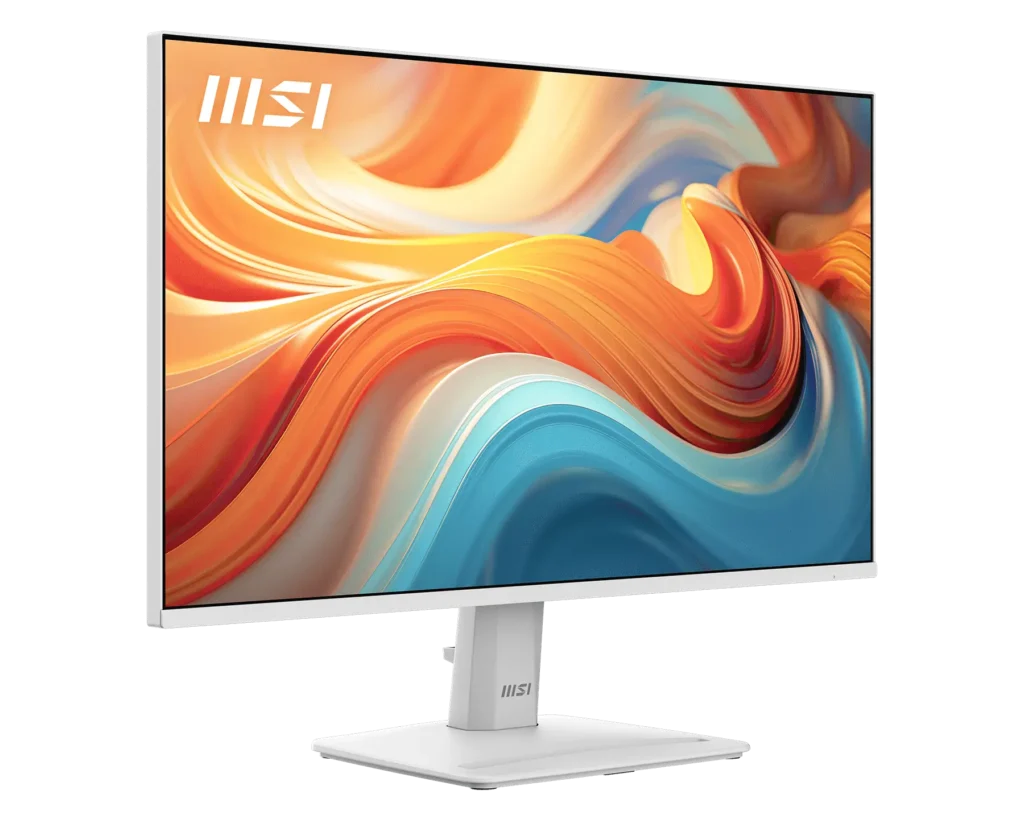
White monitors are a small but real market, and it is served badly. Most makers produce one pale model as an afterthought, typically by painting the back of an existing gaming chassis and leaving the stand black, so the thing meant to disappear into a light desk ends up drawing attention to itself instead. MSI's answer here is more thorough than most: the finish carries across the stand and the rear as well, which is the whole reason a buyer would choose this over a dozen otherwise equivalent black boxes.
The model sits in MSI's office-focused PRO line, and that placement is accurate. This is an office monitor first, built on an IPS panel at a size and resolution meant for spreadsheets, documents and browser windows, with a refresh rate high enough that playing something after hours does not feel like a compromise. It is not trying to be a gaming display that tolerates work.
The useful inclusions here are mundane ones. Built-in speakers and both audio jacks mean a laptop or a console can arrive on a single cable and still produce sound, and adaptive sync works without anyone opening a settings menu.
The limitations are the ones a low price buys. The stand tilts and does nothing else, so height has to come from a stack of books or an arm. HDR wording on the box carries no certification behind it and is best read as decoration. And the input selection was assembled with a desktop tower in mind.
It fits a home office built around appearance and everyday work, with gaming as an occasional extra. Anyone editing images, or hoping to dock a laptop down one cable, is shopping in the wrong place.
Category strengths
Where the MSI PRO MP251W E14A beats the median
- A much higher contrast ratio ?1500:1 vs 1000:1 (median)
- Has built-in speakers ?
- A slightly bigger screen ?24.5" (62.23 cm) vs 24" (60.96 cm) (median)
Where the MSI PRO MP251W E14A trails the median
- A much slower response time ?4 ms vs 1 ms (median)
- No height adjustment ?
- A lower refresh rate ?144 Hz vs 180 Hz (median)
- A slightly lower pixel density ?90 ppi vs 92 ppi (median)
How this VS Score was computed
Score 43: each known spec is measured against the median of IPS gaming monitors, under 27 inches (7 products), then weighted; 50 means level with that median. In classes of six or more, a value beyond the class’s 10th–90th percentile range counts as that limit, so one extreme product cannot set the scale. 65% of the scoreable weight could be used; unknown values, features not applicable to this class and proxies (battery capacity where a rated life exists) add or remove nothing.
| Specification | This product | Cohort median | Score weight | Points moved |
|---|---|---|---|---|
| Response time | 4 | 1 | 0.8 | −29.6 |
| Adaptive sync | FreeSync | G-Sync Compatible | 0.6 | −28.8 |
| Height adjustment | No | 71% of the class have it | 0.4 | −19.2 |
| Contrast ratio | 1,500 | 1,000 | 0.6 | +15.0 |
| Refresh rate | 144 | 180 | 1.2 | −12.0 |
| Built-in speakers | Yes | 29% of the class have it | 0.2 | +10.0 |
| Swivel | No | 43% of the class have it | 0.2 | −9.6 |
| Screen size | 24.5 | 24 | 1.2 | +1.2 |
| Pivot | No | 29% of the class have it | 0.02 | −1.0 |
| Pixel density | 90 | 92 | 0.5 | −0.5 |
| Resolution | 1080p | 1080p | 1.2 | +0.0 |
| Panel type | IPS | IPS | 0.8 | +0.0 |
| Color depth | 8 | 8 | 0.3 | +0.0 |
| Peak brightness | 300 | 300 | 0.8 | +0.0 |
| HDR | HDR10 | HDR10 | 0.5 | +0.0 |
| HDMI ports | 1 | 1 | 0.4 | +0.0 |
| DisplayPort inputs | 1 | 1 | 0.4 | +0.0 |
Not scored: DCI-P3 coverage (unknown: not scored); Local dimming (not applicable: only 0% of this class have it); Local dimming zones (unknown: not scored); Variable refresh rate (standard for the class (100% have it)); Motion blur reduction (unknown: not scored); Input lag (unknown: not scored); Tilt (standard for the class (100% have it)); USB-C (not applicable: only 14% of this class have it); USB-C power delivery (unknown: not scored); USB hub (not applicable: only 0% of this class have it); Headphone output (standard for the class (86% have it)); KVM switch (not applicable: only 0% of this class have it); Webcam (not applicable: only 0% of this class have it); Microphone (not applicable: only 0% of this class have it); Ethernet (not applicable: only 0% of this class have it); Picture-by-picture (not applicable: only 0% of this class have it).
Editor’s note
The MP251W is MSI's idea of an office monitor that does not embarrass itself after hours: a 24.5-inch 1080p IPS panel at 144 Hz, in a white chassis that is uncommon at its price. It is the best-selling monitor of this whole batch on Amazon, and the recipe (clean looks, decent speed, low price) explains why.
For the intended buyer it covers the bases well. 90 ppi text is acceptable at this size, 99% sRGB keeps colors honest for everyday work, there are small built-in speakers plus both line-in and headphone jacks, FreeSync smooths casual gaming, and MSI backs it for three years. The white finish extends to the stand and rear, which matters to exactly the audience this is aimed at.
The corners cut are real but mostly forgivable at the price. The panel is 6-bit with FRC behind the 16.7-million-color claim, which is fine for spreadsheets, not for grading photos. Brightness is 300 nits and the 'HDR Ready' badge carries no certification and means little. The stand only tilts. Response is 4 ms GtG, and the advertised 1 ms is an MPRT number. And the input trio is dated in a specific way: one HDMI 2.0, one DisplayPort 1.2a, and (a small time capsule) a VGA port, where a USB-C input would have served this desk-monitor brief far better in 2026.
No USB hub, no KVM, no picture-by-picture, external power brick.
As a home-office all-rounder with light gaming on the side, especially for a white setup, it is an easy recommendation at a budget price. Anyone editing images or wanting single-cable laptop docking has outgrown it before buying it.
Specifications
Quality bars show where each figure sits between the lowest and highest of the 7 IPS gaming monitors, under 27 inches this VS Score is measured against.
Picture
Gaming
Ergonomics & design
Connectivity
Features
Sources and verification
Where the specifications come from
- Official product pagemsi.com
- Retailer listing (cross-check)amazon.com
Verification
- First published
- Specifications last checked
- Sheet completeness
- 37 of 42 specifications verified; the rest show as Unknown and are never estimated or scored
- Page type
- Product specification page — Compiled from the manufacturer’s published specifications and the cited sources; this is not a hands-on test.
- Basis
- Research-based: specifications and editorial text were compiled from the documents listed here and the manufacturer’s published data. We have not tested this unit ourselves; where independent measurements are mentioned they belong to the linked publication.
Where to buy
Prices and availability may change. Check the retailer before buying. We may earn a commission on purchases.
Price history
Monitors with similar specs to the MSI PRO MP251W E14A
Ratings & reviews
No reviews yet. Be the first to share your experience.
The bottom line
The MSI PRO MP251W E14A earns a VS Score of 43, below the median of the 7 IPS gaming monitors, under 27 inches it is measured against (a score of 50 is level with that median).
- Who it’s for
- A clean white home-office desk with light gaming after hours: a fast IPS panel, speakers, audio jacks and a 3-year warranty at a budget price.
- Who should look elsewhere
- Photo or design work: the panel is 6-bit with FRC behind its color claim. And laptop owners: the third input is VGA, where this desk brief calls for USB-C.
- The trade-off that matters
- Looks and refresh at an office price, with a panel and port selection that quietly date it. It is honest for spreadsheets, out of its depth beyond them.
- The main alternative
- ASUS VA24DQF covers the same budget 1080p ground with an 8-bit panel, if color matters more than the white chassis.
The VS Score is calculated from the weighted specifications above, each measured against the median of comparable IPS gaming monitors, under 27 inches — a shortlisting guide, not a substitute for your own priorities. See how we score.





