
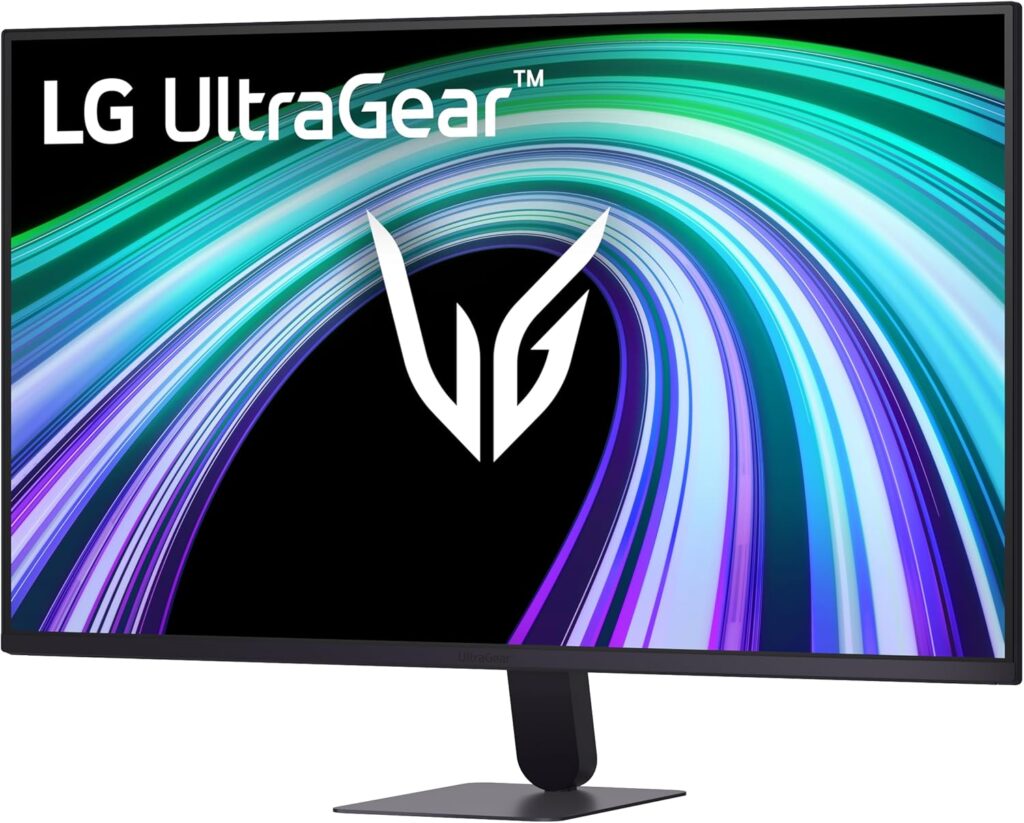
LG UltraGear 32G403B-B: Specs, Price, Pros & Cons
A 1080p panel stretched across 31.5 inches is the whole story here. At roughly 69 pixels per inch this is among the coarsest pixel structures in our monitor listing, and that one figure decides who should buy it long before refresh rates and color numbers come into it.
LG builds it around a VA panel, which brings much deeper native contrast than the IPS panels in its smaller UltraGear siblings, at the usual cost of narrower viewing angles and slower dark transitions. The panel is flat, at a size where curves are common, and color is 8-bit with near-complete sRGB coverage: ordinary, and enough for games and video. The refresh rate is 144 Hz, FreeSync handles tearing over both inputs, and a motion blur reduction mode is available in the menu.
Connectivity is minimal: one HDMI 2.0 input, one DisplayPort 1.4, a headphone jack and a pair of built-in speakers. There is no USB of any kind. The stand only tilts, though the VESA pattern on the back means a monitor arm fixes that cheaply. LG's on-screen tools include a crosshair, an FPS counter and a black stabilizer for dark scenes.
Where it sits in the market is simple: this is LG's entry point at this screen size, and every choice in the specification serves that. The buyer it suits wants a big picture for a console or a living-room PC and watches from across a room rather than from a desk chair. It is the wrong screen for productivity, for anyone who reads a lot of text, and for competitive players who would rather have a smaller, tighter, faster panel.
Category strengths
Where the LG UltraGear 32G403B-B beats the median
- Has built-in speakers ?
- A bigger screen ?31.5" (80.01 cm) vs 27" (68.58 cm) (median)
Where the LG UltraGear 32G403B-B trails the median
- A much slower response time ?5 ms vs 1 ms (median)
- A lower refresh rate ?144 Hz vs 180 Hz (median)
- Fewer HDMI ports ?1 vs 2 (median)
- Lower peak brightness ?250 nits vs 300 nits (median)
- A lower pixel density ?69 ppi vs 93 ppi (median)
- A lower color depth ?8 bit vs 10 bit (median)
How this VS Score was computed
Score 37: each known spec is measured against the median of VA gaming monitors, 27 to 31 inches (11 products), then weighted; 50 means level with that median. In classes of six or more, a value beyond the class’s 10th–90th percentile range counts as that limit, so one extreme product cannot set the scale. 66% of the scoreable weight could be used; unknown values, features not applicable to this class and proxies (battery capacity where a rated life exists) add or remove nothing.
| Specification | This product | Cohort median | Score weight | Points moved |
|---|---|---|---|---|
| Resolution | 1080p | 1440p | 1.2 | −57.6 |
| Response time | 5 | 1 | 0.8 | −32.0 |
| Height adjustment | No | 45% of the class have it | 0.4 | −19.2 |
| HDMI ports | 1 | 2 | 0.4 | −10.0 |
| Built-in speakers | Yes | 30% of the class have it | 0.2 | +10.0 |
| Swivel | No | 36% of the class have it | 0.2 | −9.6 |
| Picture-by-picture | No | 33% of the class have it | 0.2 | −9.6 |
| Screen size | 31.5 | 27 | 1.2 | +9.6 |
| Peak brightness | 250 | 300 | 0.8 | −6.4 |
| Refresh rate | 144 — capped at the class’s lower range (165) | 180 | 1.2 | −4.8 |
| Color depth | 8 | 10 | 0.3 | −3.0 |
| Pixel density | 69 — capped at the class’s lower range (82) | 93 | 0.5 | −3.0 |
| Pivot | No | 36% of the class have it | 0.02 | −1.0 |
| Panel type | VA | VA | 0.8 | +0.0 |
| Contrast ratio | 3,500 | 3,500 | 0.6 | +0.0 |
| HDR | HDR10 | HDR10 | 0.5 | +0.0 |
| Adaptive sync | FreeSync | FreeSync | 0.6 | +0.0 |
| DisplayPort inputs | 1 | 1 | 0.4 | +0.0 |
Not scored: DCI-P3 coverage (unknown: not scored); Local dimming (unknown: not scored); Local dimming zones (unknown: not scored); Variable refresh rate (standard for the class (100% have it)); Motion blur reduction (standard for the class (80% have it)); Input lag (unknown: not scored); Tilt (standard for the class (100% have it)); USB-C (not applicable: only 0% of this class have it); USB-C power delivery (unknown: not scored); USB hub (not applicable: only 20% of this class have it); Headphone output (standard for the class (91% have it)); KVM switch (not applicable: only 0% of this class have it); Webcam (not applicable: only 0% of this class have it); Microphone (unknown: not scored); Ethernet (not applicable: only 0% of this class have it).
Editor’s note
The question I would ask before buying is how far away you sit. At a normal desk distance the pixel structure of a Full HD panel this large is visible and small text has fuzzy edges. Move back to a meter or more, as you would with a console on a bedroom desk or in a TV-style setup, and it becomes a big, bright-enough, very affordable gaming screen. That single fact should settle it for most people.
Taken on its own terms the panel does what it claims. The VA contrast ratio of 3500:1 gives darker shadows than any IPS at this price, FreeSync over both inputs handles tearing from PCs and consoles, and the refresh rate is more than a Full HD console will ever use. Read the response time with care: the 1 ms in LG's marketing is the motion blur reduction mode, which strobes the backlight, dims the image and cannot run alongside FreeSync. The gray-to-gray figure LG publishes is 5 ms, and that is the figure listed on this page.
HDR10 on a screen rated at 250 nits with no local dimming is a compatibility tick, not a feature. Leave HDR off and enjoy the SDR contrast instead. The tilt-only stand is the other compromise, so budget for a cheap VESA arm if your desk is not already at the right height. The speakers are a convenience for a console setup and no substitute for headphones.
Value is where this monitor wins, because a QHD panel at 32 inches costs a lot more. But if you do sit close, our LG UltraGear 27G414B-B gives a noticeably tighter pixel density for similar money, and the LG UltraGear G6 32G620B-B is the step up if you want this size with a sharper picture. I would only choose the 32G403B-B for a couch-distance, console-first setup.
Specifications
Quality bars show where each figure sits between the lowest and highest of the 11 VA gaming monitors, 27 to 31 inches this VS Score is measured against.
Picture
Gaming
Ergonomics & design
Connectivity
Features
Sources and verification
Where the specifications come from
- Official product pagelg.com
- Retailer listing (cross-check)amazon.com
Verification
- First published
- Specifications last checked
- Sheet completeness
- 33 of 42 specifications verified; the rest show as Unknown and are never estimated or scored
- Page type
- Product specification page — Compiled from the manufacturer’s published specifications and the cited sources; this is not a hands-on test.
- Basis
- Research-based: specifications and editorial text were compiled from the documents listed here and the manufacturer’s published data. We have not tested this unit ourselves; where independent measurements are mentioned they belong to the linked publication.
Where to buy
Prices and availability may change. Check the retailer before buying. We may earn a commission on purchases.
Price history
Monitors with similar specs to the LG UltraGear 32G403B-B

Ratings & reviews
No reviews yet. Be the first to share your experience.
The bottom line
The LG UltraGear 32G403B-B earns a VS Score of 37, below the median of the 11 VA gaming monitors, 27 to 31 inches it is measured against (a score of 50 is level with that median).
- Who it’s for
- A console or living-room PC player who sits well back from the screen and wants the largest affordable display and cares less about sharpness.
- Who should look elsewhere
- Anyone who works or reads at arm's length: text is visibly soft at this pixel density, the stand only tilts and there is no USB at all.
- The trade-off that matters
- Size comes at the cost of sharpness. The same money buys a smaller screen with far tighter pixels, and only viewing distance makes this one look good.
- The main alternative
- LG UltraGear 27G414B-B: the same UltraGear budget line one size down, where Full HD is still comfortable to read.
The VS Score is calculated from the weighted specifications above, each measured against the median of comparable VA gaming monitors, 27 to 31 inches — a shortlisting guide, not a substitute for your own priorities. See how we score.




