
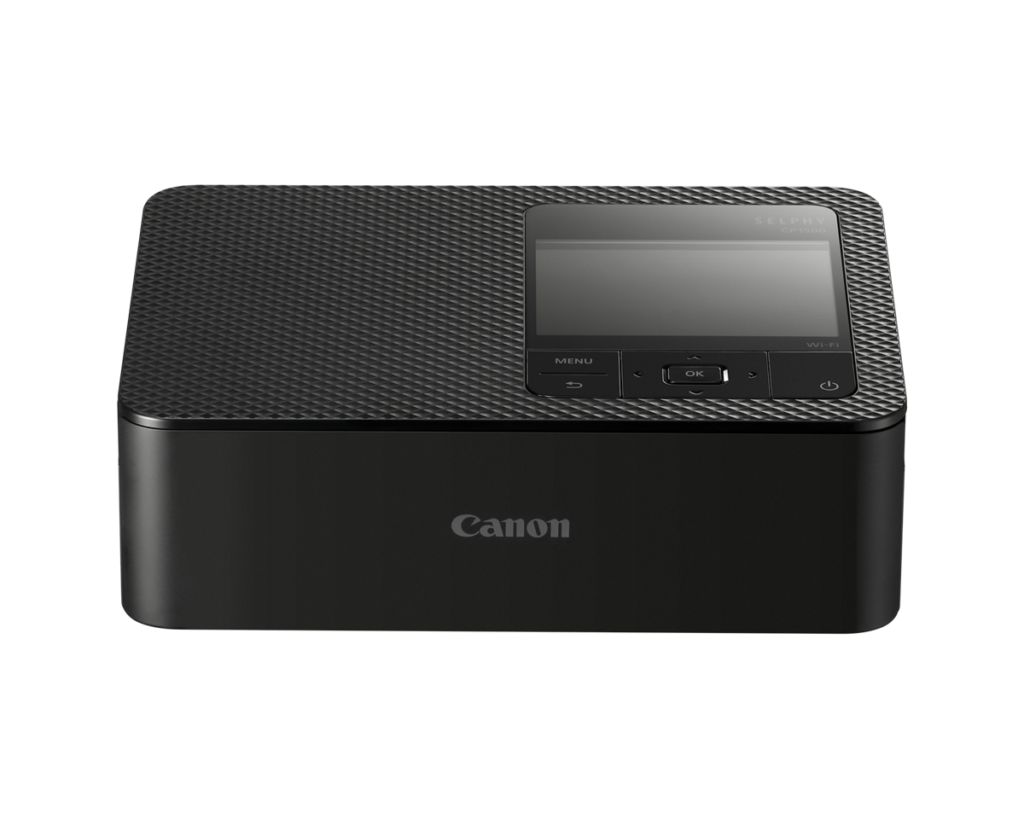
Canon SELPHY CP1500: Specs, Features, Pros & Cons
Nearly every office feature a printer can list is missing from the SELPHY CP1500, and none of them belongs on it. This is a compact Canon photo printer that makes one size of print, from a ribbon cassette and a matching paper pack, and it has no reason to scan, copy or print two-sided.
Dye sublimation prints from a ribbon, so a photo has continuous tone with no dot pattern, and every photo leaves the printer with a clear protective layer on top. The print resolution figure cannot be compared with inkjet numbers for that reason, and the low figure says nothing about how sharp the photos look.
The printer is light enough to carry to a party in one hand. Wi-Fi, AirPrint and Canon's app let a phone send photos directly, and memory cards and USB sticks work without a computer or a phone in the loop. The paper tray takes a small stack, sized for an evening of prints.
It gives up speed and range. Each print takes the better part of a minute, so a queue of guests waiting for photos moves slowly. The printer cannot make anything larger than its one print size, and it cannot print a document of any kind. A battery is optional, so the printer can also run away from a wall socket.
The owner it fits wants physical photos again, for albums, gifts and the fridge door, and prefers a printer that never clogs and costs the same per print every time. A home that also prints letters and forms will still need a second, ordinary printer beside it.
Category strengths
Where the Canon SELPHY CP1500 beats the median
- A much lighter build ?0.86 kg vs 7.98 kg (median)
Where the Canon SELPHY CP1500 trails the median
- A much lower print speed (black) ?1 ppm vs 16 ppm (median)
- No automatic duplex printing ?
- No all-in-one ?
- No automatic document feeder ?
- A much lower print speed (color) ?1 ppm vs 9 ppm (median)
- A much lower input tray capacity ?18 sheets vs 150 sheets (median)
- No ethernet ?
- A much lower print resolution ?300 dpi vs 4,800 dpi (median)
- A much lower output tray capacity ?18 sheets vs 67.5 sheets (median)
How this VS Score was computed
Score 15: each known spec is measured against the median of all printers (65 products), then weighted; 50 means level with that median. In classes of six or more, a value beyond the class’s 10th–90th percentile range counts as that limit, so one extreme product cannot set the scale. 68% of the scoreable weight could be used; unknown values, features not applicable to this class and proxies (battery capacity where a rated life exists) add or remove nothing.
| Specification | This product | Cohort median | Score weight | Points moved |
|---|---|---|---|---|
| Automatic duplex printing | No | 73% of the class have it | 1 | −48.0 |
| All-in-one | No | 85% of the class have it | 1 | −48.0 |
| Automatic document feeder | No | 55% of the class have it | 1 | −48.0 |
| Print speed (black) | 1 — capped at the class’s lower range (8.8) | 16 | 2 | −44.0 |
| Input tray capacity | 18 — capped at the class’s lower range (60) | 150 | 1 | −30.0 |
| Supertank / refillable ink | No | 30% of the class have it | 0.5 | −24.0 |
| Duplex scanning | No | 23% of the class have it | 0.5 | −24.0 |
| Ethernet | No | 54% of the class have it | 0.5 | −24.0 |
| Touchscreen display | No | 45% of the class have it | 0.5 | −24.0 |
| Print speed (color) | 1 — capped at the class’s lower range (5) | 9 | 1 | −22.0 |
| Print resolution | 300 — capped at the class’s lower range (1,200) | 4,800 | 0.5 | −18.5 |
| Weight | 0.86 — capped at the class’s lower range (4) | 7.98 | 0.3 | +15.0 |
| Fax | No | 35% of the class have it | 0.2 | −9.6 |
| Output tray capacity | 18 — capped at the class’s lower range (25) | 67.5 | 0.3 | −9.3 |
Not scored: Color printing (standard for the class (88% have it)); Monthly duty cycle (unknown: not scored); ADF capacity (unknown: not scored); Wi-Fi (standard for the class (97% have it)); Wi-Fi Direct (standard for the class (90% have it)); USB (standard for the class (100% have it)); Apple AirPrint (standard for the class (97% have it)); Mobile app printing (standard for the class (100% have it)).
Editor’s note
The SELPHY CP1500 needs one thing understood before anything else: it is not a printer in the office sense. No documents, no plain paper, no scanning: it produces 4×6-inch photographs and nothing larger, using dye-sublimation ribbon cassettes that come bundled with their own paper. Judge it as a small photo lab and it makes a great deal of sense. Judge it against inkjets and it makes none.
What dye-sub buys you is print quality of a different character: continuous tone with no dot pattern (its 300 dpi is not comparable to inkjet numbers), plus a laminated overcoat on every print that makes them waterproof, fingerprint-proof and, by Canon's claim, album-stable for a century. The economics are refreshingly fixed: an RP-108 kit works out to about 37 cents per print, every time, with nothing to dry out or clog between sessions. That's the killer feature for occasional photo printing.
It's portable too: 860 grams, an optional battery good for roughly 54 prints, and it accepts jobs from the app, AirPrint, SD cards, USB-C or a flash drive with no computer required. At a party or a family event it's a small photo booth.
The honest limits: each print takes about 41 seconds, so batch-printing an event queue tests patience. The paper cassette holds 18 sheets, the 3.5-inch screen is not touch, and Wi-Fi is 2.4 GHz only.
Buy it if you want physical photos to exist again (for albums, gifts, fridge doors) with zero maintenance anxiety. Skip it if you print documents at all (it cannot), or if you want big prints. For casual pocket-size fun, cheaper Instax and ZINK gadgets trade quality for novelty.
Specifications
Quality bars show where each figure sits between the lowest and highest of the 65 printers this VS Score is measured against.
Printing
Scanning & copying
Paper handling
Connectivity
Design
Sources and verification
Where the specifications come from
- Official product pagecanon.ca
- Retailer listing (cross-check)amazon.com
Verification
- First published
- Specifications last checked
- Sheet completeness
- 22 of 24 specifications verified; the rest show as Unknown and are never estimated or scored
- Page type
- Product specification page — Compiled from the manufacturer’s published specifications and the cited sources; this is not a hands-on test.
- Basis
- Research-based: specifications and editorial text were compiled from the documents listed here and the manufacturer’s published data. We have not tested this unit ourselves; where independent measurements are mentioned they belong to the linked publication.
Printers with similar specs to the Canon SELPHY CP1500

Ratings & reviews
No reviews yet. Be the first to share your experience.
The bottom line
The Canon SELPHY CP1500 earns a VS Score of 15, below the median of the 65 printers it is measured against (a score of 50 is level with that median).
- Who it’s for
- People who want physical 4×6 photos to exist again (albums, gifts, parties) from a portable, zero-maintenance box with fixed per-print costs and an optional battery.
- Who should look elsewhere
- Anyone who needs to print a document, ever (it physically cannot), wants prints larger than 4×6, or needs to batch-print fast, given how long each photo takes.
- The trade-off that matters
- Fixed quality and cost versus total inflexibility: dye-sub delivers laminated, decades-stable prints at a known price, in exchange for doing exactly one thing.
- The main alternative
- Kodak Dock Plus PD460: the cheaper dye-sub rival. The SELPHY answers with better software, SD and USB flexibility and Canon's own paper kits.
The VS Score is calculated from the weighted specifications above, each measured against the median of comparable printers — a shortlisting guide, not a substitute for your own priorities. See how we score.




