
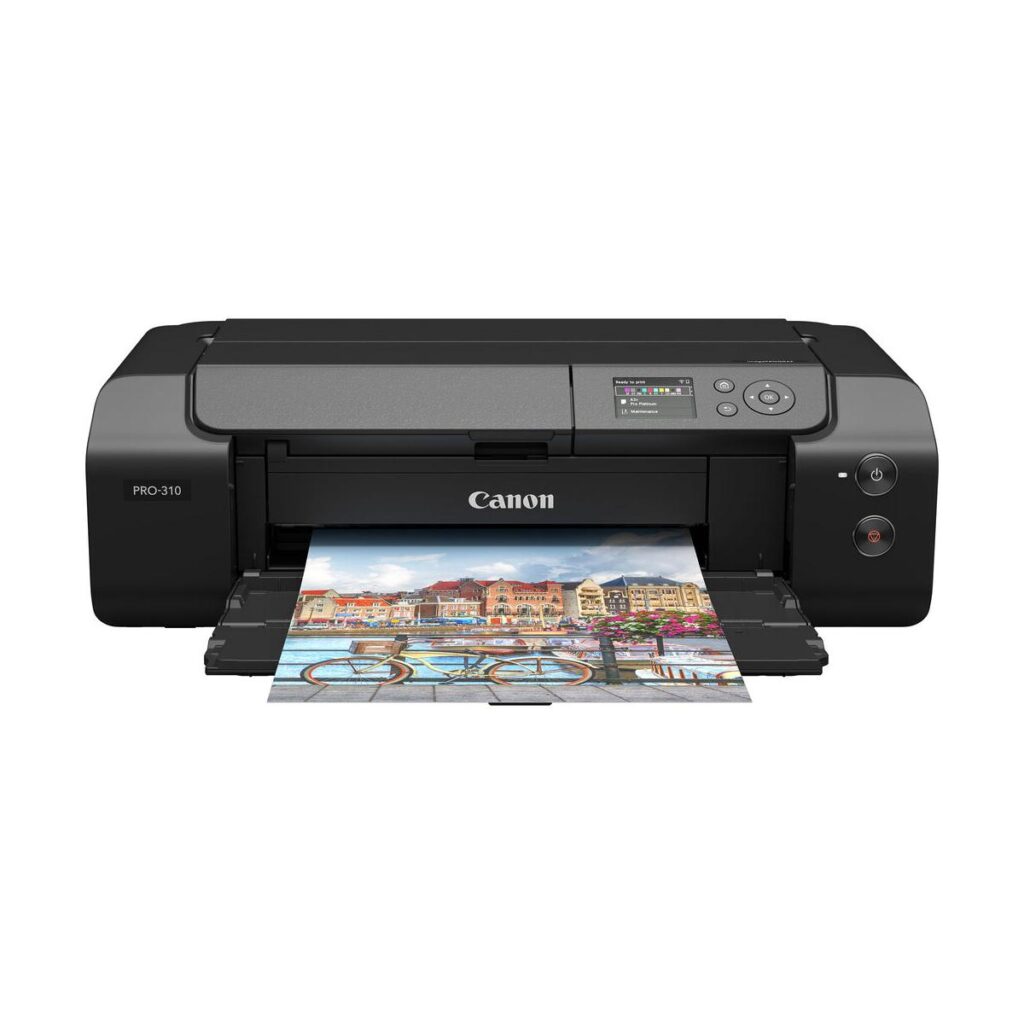
Canon imagePROGRAF PRO-310: Specs, Price, Pros & Cons
Pigment ink in nine colors, plus a clear coat that evens out the gloss, sets Canon's PRO-310 apart from the photo all-in-ones it tends to be compared with. It prints and does nothing else. The largest sheets it takes, borderless A3+ and panoramas longer than a meter, are sizes chosen for frames and print sales, and the whole machine is arranged around getting those sheets right.
On a desk it works like studio equipment on a network. It connects over Ethernet, Wi-Fi or USB, accepts jobs from a phone through AirPrint or Canon's app, and reports its status on a small screen run by buttons, with nothing to tap. The careful work happens on the computer, in Canon's own layout software, where an image can be soft-proofed: previewed on the monitor as it should look on a chosen paper before any ink goes down.
The person it suits already prints with a purpose. A portfolio, a wall at a local exhibition, a run of signed prints for a market stall. Canon built the ink set for that buyer, and the control it gives over color and black density is the reason to accept everything else about it.
Everything else is mostly absence. There is no scanner, no copier, no automatic two-sided printing and no document feeder, so a family that wants homework and holiday snaps from one box would need a second, cheaper printer beside it. Nine separate tanks also mean nine inks running down at their own pace, emptied fastest by whichever colors your pictures lean on. It is heavy as well, a printer to place once beside the computer that feeds it and leave there.
Category strengths
Where the Canon imagePROGRAF PRO-310 trails the median
- No automatic duplex printing ?
- No all-in-one ?
- No automatic document feeder ?
- A much heavier build ?14.33 kg vs 7.98 kg (median)
How this VS Score was computed
Score 15: each known spec is measured against the median of all printers (65 products), then weighted; 50 means level with that median. In classes of six or more, a value beyond the class’s 10th–90th percentile range counts as that limit, so one extreme product cannot set the scale. 39% of the scoreable weight could be used; unknown values, features not applicable to this class and proxies (battery capacity where a rated life exists) add or remove nothing.
| Specification | This product | Cohort median | Score weight | Points moved |
|---|---|---|---|---|
| Automatic duplex printing | No | 73% of the class have it | 1 | −48.0 |
| All-in-one | No | 85% of the class have it | 1 | −48.0 |
| Automatic document feeder | No | 55% of the class have it | 1 | −48.0 |
| Ethernet | Yes | 54% of the class have it | 0.5 | +25.0 |
| Supertank / refillable ink | No | 30% of the class have it | 0.5 | −24.0 |
| Duplex scanning | No | 23% of the class have it | 0.5 | −24.0 |
| Touchscreen display | No | 45% of the class have it | 0.5 | −24.0 |
| Fax | No | 35% of the class have it | 0.2 | −9.6 |
| Weight | 14.33 | 7.98 | 0.3 | −6.6 |
| Print resolution | 4,800 | 4,800 | 0.5 | +0.0 |
Not scored: Color printing (standard for the class (88% have it)); Print speed (black) (unknown: not scored); Print speed (color) (unknown: not scored); Monthly duty cycle (unknown: not scored); ADF capacity (unknown: not scored); Input tray capacity (unknown: not scored); Output tray capacity (unknown: not scored); Wi-Fi (standard for the class (97% have it)); Wi-Fi Direct (unknown: not scored); USB (standard for the class (100% have it)); Apple AirPrint (standard for the class (97% have it)); Mobile app printing (standard for the class (100% have it)).
Editor’s note
The imagePROGRAF PRO-310 is not an office printer that also does photos. It is a photographic instrument that happens to sit on a desk. Canon's 13-inch pigment machine runs a nine-color LUCIA PRO II ink set plus a Chroma Optimizer coat, prints borderless A3+ and panoramas up to 13 by 70 inches, and exists for exactly one buyer: the photographer who wants gallery prints at home.
What the nine pigments buy is the things dye printers compromise: deep, neutral blacks on matte papers, print permanence measured in decades, and the Chroma Optimizer's even gloss that eliminates bronzing on luster stocks. The 4800×2400 head, Ethernet, Wi-Fi and a 3-inch status LCD handle the practicalities, and Canon's Professional Print & Layout software handles soft-proofing.
Be equally clear about what this is not. There is no scanner, no copier, no duplex, no document feeder, and that is by design. At 14.3 kilograms it is a permanent resident, and nine individual ink tanks mean nine things to replace, at photo-ink prices. Running costs per A3+ print are real money, and small ink tanks empty faster than newcomers expect.
The comparison that matters is Epson's EcoTank Photo ET-8550: six dye-based tanks, dramatically cheaper per print, also 13-inch. The Epson wins on economics and versatility. This Canon wins on pigment permanence, black density and color control, the things exhibition and sale prints are judged on.
Buy the PRO-310 if prints are your product or your passion and the cost per sheet is part of the craft. If photo printing is a hobby line-item, the ET-8550 delivers most of the joy at a fraction of the feeding costs.
Specifications
Quality bars show where each figure sits between the lowest and highest of the 65 printers this VS Score is measured against.
Printing
Scanning & copying
Paper handling
Connectivity
Design
Sources and verification
Where the specifications come from
- Official product pagecanon.co.uk
- Independent testingrtings.com
Verification
- First published
- Specifications last checked
- Sheet completeness
- 17 of 24 specifications verified; the rest show as Unknown and are never estimated or scored
- Page type
- Product specification page — Compiled from the manufacturer’s published specifications and the cited sources; this is not a hands-on test.
- Basis
- Research-based: specifications and editorial text were compiled from the documents listed here and the manufacturer’s published data. We have not tested this unit ourselves; where independent measurements are mentioned they belong to the linked publication.
Where to buy
Prices and availability may change. Check the retailer before buying. We may earn a commission on purchases.
Price history
Printers with similar specs to the Canon imagePROGRAF PRO-310

Ratings & reviews
No reviews yet. Be the first to share your experience.
The bottom line
The Canon imagePROGRAF PRO-310 earns a VS Score of 15 on the 39% of specifications we could compare like for like — an indication, not a ranking.
- Who it’s for
- Photographers who sell or exhibit prints: nine LUCIA pigments, Chroma Optimizer gloss control, and 13×19 borderless output with decades-rated permanence.
- Who should look elsewhere
- Anyone wanting a household printer (no scanner, no duplex, no document handling) or anyone who will wince at nine tanks of photo-ink pricing.
- The trade-off that matters
- Gallery-grade pigment output at running costs that make every print a considered decision. The economics are part of the discipline.
- The main alternative
- Epson's EcoTank Photo ET-8550 prints the same sizes in dye at a fraction of the feeding cost, for photographers who print for joy rather than sale.
The VS Score is calculated from the weighted specifications above, each measured against the median of comparable printers — a shortlisting guide, not a substitute for your own priorities. See how we score.




