
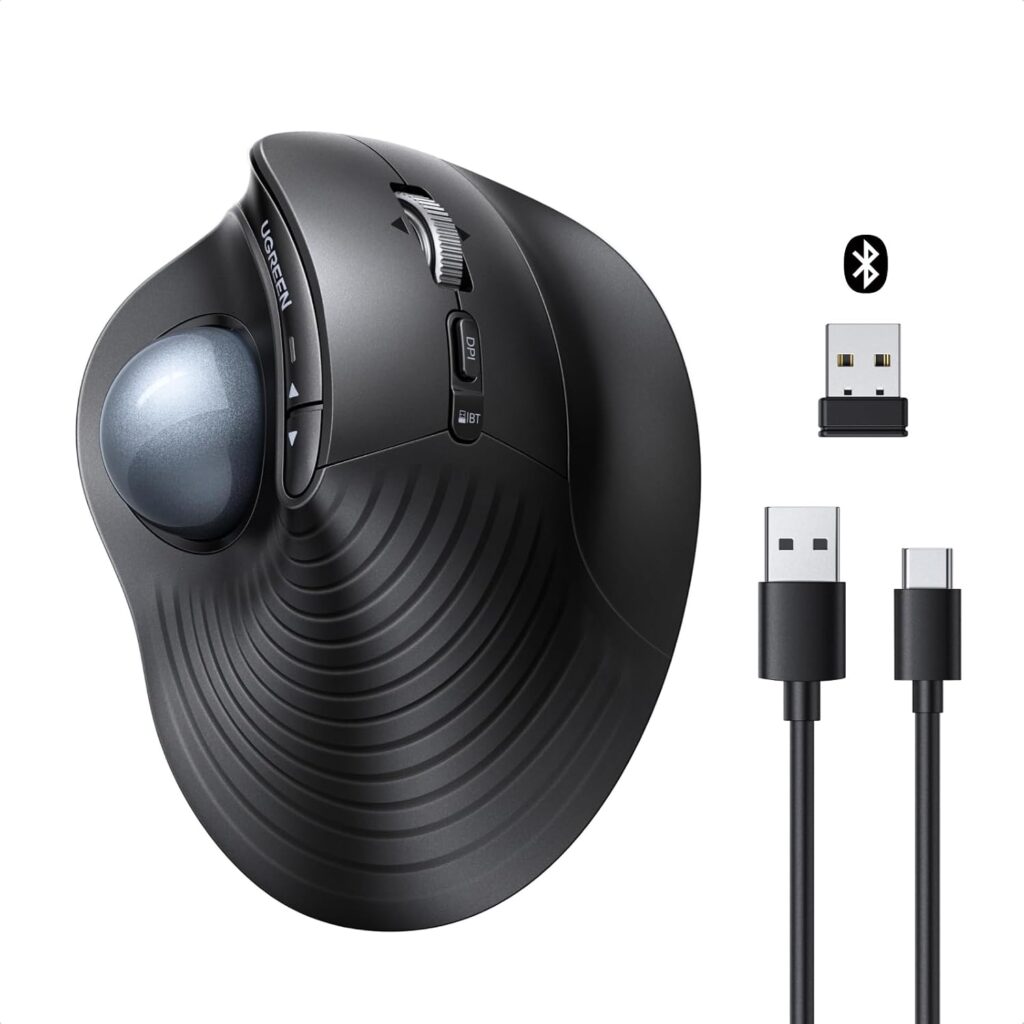
UGREEN M785DR Wireless Trackball Mouse: Specs, Pros & Cons
The defining fact about a thumb trackball is that it stays still. The cursor moves because your thumb moves, and the body never travels across the desk at all. That single difference is what makes it worth considering and what makes it an acquired taste, and it matters far more than anything inside the shell.
UGREEN is better known for chargers, cables and docks than for input devices, and the M785DR reads accordingly, as a competent, well-equipped office peripheral rather than an attempt to take on the specialist trackball makers. The body is right-handed and slightly raised, the ball sits under the thumb, and the emphasis throughout is on getting ordinary desk work done without moving your arm.
Two groups benefit most. The first is anyone short of desk space, where a device that never travels solves a real and immediate problem. The second is anyone whose shoulder or forearm objects to repeated reaching, since a trackball removes most of that motion. Neither is a performance argument, and the mouse should not be read as one.
The compromises are real and worth knowing in advance. It is right-handed only, which rules out a large group outright. There is a genuine learning period, during which fine cursor work is slower and more irritating than on the mouse you are replacing. Allow two weeks, and accept that a trackball may never suit you at all. And the sensor specification is modest in a way that interacts badly with very large or very detailed displays, which is set against the numbers further down this page.
As an inexpensive way to find out whether a trackball suits you, it is a sensible place to start. As a permanent replacement for a precise mouse, it depends entirely on the screen in front of you.
Category strengths
Where the UGREEN M785DR Wireless Trackball Mouse beats the median
- Much longer battery life ?287 h vs 150 h (median)
- Has horizontal scrolling ?
- More buttons ?8 vs 6 (median)
Where the UGREEN M785DR Wireless Trackball Mouse trails the median
- A much lower max sensitivity ?2,000 DPI vs 25,600 DPI (median)
- A much heavier build ?155 g vs 89 g (median)
- No adjustable lift-off distance ?
How this VS Score was computed
Score 48: each known spec is measured against the median of all mice (81 products), then weighted; 50 means level with that median. In classes of six or more, a value beyond the class’s 10th–90th percentile range counts as that limit, so one extreme product cannot set the scale. 47% of the scoreable weight could be used; unknown values, features not applicable to this class and proxies (battery capacity where a rated life exists) add or remove nothing.
| Specification | This product | Cohort median | Score weight | Points moved |
|---|---|---|---|---|
| Max sensitivity | 2,000 — capped at the class’s lower range (4,000) | 25,600 | 1 | −42.0 |
| Battery life | 287 | 150 | 0.8 | +36.8 |
| Weight | 155 — capped at the class’s upper range (145) | 89 | 1 | −19.0 |
| USB-C charging | Yes | 67% of the class have it | 0.3 | +15.0 |
| Adjustable lift-off distance | No | 61% of the class have it | 0.3 | −14.4 |
| Buttons | 8 | 6 | 0.6 | +10.2 |
| Horizontal scrolling | Yes | 45% of the class have it | 0.2 | +10.0 |
| RGB lighting | No | 46% of the class have it | 0.2 | −9.6 |
| Connection | 2 | 2 | 0.8 | +0.0 |
Not scored: Max tracking speed (unknown: not scored); Max acceleration (unknown: not scored); Polling rate (unknown: not scored); Grip styles (unknown: not scored); Free-spin scroll wheel (unknown: not scored); Click latency (unknown: not scored); Switch lifespan (unknown: not scored); Debounce adjustment (not applicable: only 20% of this class have it); Wireless polling rate (unknown: not scored); Battery capacity (capacity is a proxy; the rated battery life is scored instead); Quick charge (unknown: not scored); Wireless charging (not applicable: only 14% of this class have it); Onboard memory (unknown: not scored); Software customization (standard for the class (97% have it)); Adjustable weights (not applicable: only 2% of this class have it).
Editor’s note
The number that matters most here is 2000 DPI. That is the ceiling, and on a 1080p screen it is fine, but on a 27-inch 1440p or a 4K panel it means noticeably more thumb work to cross the screen. If you are shopping for a trackball because you sit in front of a large, high-resolution display, check that figure against what you are used to before ordering. It is the one specification on this mouse you cannot work around.
Everything else reads like a well-equipped office device. It is a thumb-operated ball on a vertical, right-handed body, with eight buttons, a scroll wheel that tilts for horizontal scrolling and has a speed-switch mode, and five DPI steps. Connectivity is Bluetooth or the bundled 2.4 GHz receiver, up to three paired devices with one-button switching, and UGREEN lists Windows, macOS, Linux, ChromeOS, Android and iPadOS support. The 500 mAh battery charges over USB-C, and the receiver stores inside the mouse, which is the sort of small detail that stops it getting lost in a drawer.
The real question with any trackball is not the spec sheet, it is whether you will stick with it. The whole appeal is that the device never moves (useful on a cramped desk, and it takes forearm travel out of the equation), but there is an adjustment period, and the shape is right-handed only. UGREEN also publishes no sensor model, polling rate or click latency, so if you want to compare responsiveness against a gaming mouse there is nothing here to compare. Treat it as a productivity device and that gap stops mattering.
For office and document work at 1080p, on a small desk, this is a lot of hardware for the money. Go in knowing the DPI ceiling, and knowing you are committing to learning a different input method.
Specifications
Quality bars show where each figure sits between the lowest and highest of the 81 mice this VS Score is measured against.
Sensor & tracking
Design & handling
Switches & latency
Connectivity
Battery
Features
Sources and verification
Where the specifications come from
- Retailer listing (cross-check)amazon.com
Verification
- First published
- Specifications last checked
- Sheet completeness
- 21 of 34 specifications verified; the rest show as Unknown and are never estimated or scored
- Page type
- Product specification page — Compiled from the manufacturer’s published specifications and the cited sources; this is not a hands-on test.
- Basis
- Research-based: specifications and editorial text were compiled from the documents listed here and the manufacturer’s published data. We have not tested this unit ourselves; where independent measurements are mentioned they belong to the linked publication.
Where to buy
Prices and availability may change. Check the retailer before buying. We may earn a commission on purchases.
Price history
Mice with similar specs to the UGREEN M785DR Wireless Trackball Mouse

Ratings & reviews
No reviews yet. Be the first to share your experience.
The bottom line
The UGREEN M785DR Wireless Trackball Mouse earns a VS Score of 48, below the median of the 81 mice it is measured against (a score of 50 is level with that median).
- Who it’s for
- People short on desk space, or who want to stop swinging a forearm around to move the cursor, working mostly in documents and browsers on a modest display. The button count and the three-device switching are generous for what it costs.
- Who should look elsewhere
- Left-handers, because the body is right-handed only. Also wrong for gamers, and for anyone on a large high-resolution panel who needs to cross the screen in a hurry, because the sensor's top setting is a hard ceiling with no step above it.
- The trade-off that matters
- A lot of hardware for the money set against one limit you cannot tune around. The sensor tops out low, the shell suits one hand only, and UGREEN publishes no sensor model, polling rate or latency figures at all.
- The main alternative
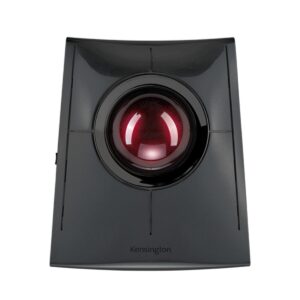
- Kensington SlimBlade Pro Trackball, if the thumb ball does not appeal. It uses a large finger-and-palm-operated ball rather than a thumb one, works for either hand, and costs considerably more. It is a different way of working rather than a better version of the same one.
The VS Score is calculated from the weighted specifications above, each measured against the median of comparable mice — a shortlisting guide, not a substitute for your own priorities. See how we score.




