
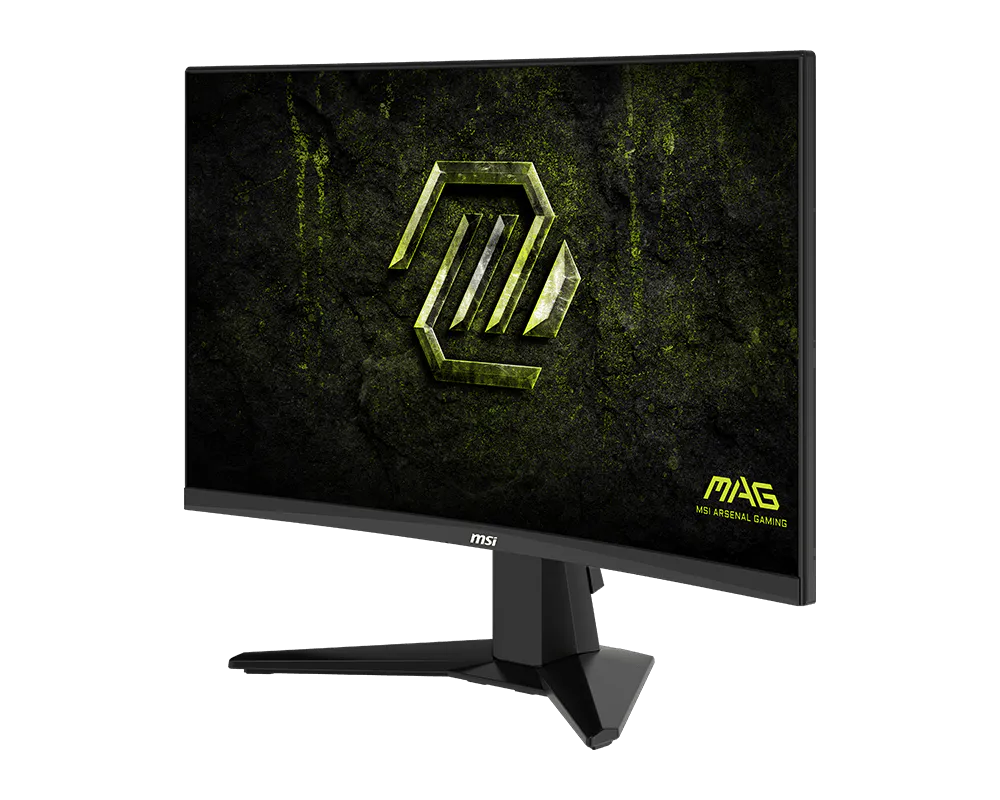
MSI MAG 245C X24: Specs, Price, Pros & Cons
The name says 24 and the panel measures a little under that. MSI is not alone in rounding (almost every monitor sold as a twenty-four is the same fraction short), but it is a useful reminder that on a screen this cheap, the marketing and the specification sometimes describe slightly different objects.
What arrives is the least complicated monitor MSI makes. A curved VA panel, a stand that tilts and does nothing else, a small set of video inputs, and no USB, no speakers, no height adjustment and no hub of any kind. The power supply is an external brick. There is nothing here to configure beyond a handful of picture presets.
The panel choice is the interesting decision. VA sits between the two better-known panel types: it holds far deeper blacks than a budget IPS, which is why dark game scenes read as scenes rather than gray fog, and it gives up viewing angles and color breadth in exchange. For a monitor bought by one person sitting square in front of it, that is a sensible trade.
Where it stops being sensible is anything involving color. This is a screen for playing games on, not for editing photographs, choosing paint or judging a print before it goes out. MSI does not pretend otherwise, and neither should any listing you read.
The last thing to consider before ordering is the curve. On a panel this small a curve is a subtle thing: you may stop noticing it within a day, or find it permanently distracting on straight lines and window edges. If you have never used a curved screen, that deserves a moment's thought, because it is not something you can switch off later.
Category strengths
Where the MSI MAG 245C X24 beats the median
- A higher refresh rate ?240 Hz vs 180 Hz (median)
Where the MSI MAG 245C X24 trails the median
- A smaller screen ?23.6" (59.94 cm) vs 29.25" (74.3 cm) (median)
- Narrower DCI-P3 colour coverage ?75 % vs 95 % (median)
- A lower pixel density ?93 ppi vs 109 ppi (median)
- A slightly lower contrast ratio ?3000:1 vs 3250:1 (median)
How this VS Score was computed
Score 42: each known spec is measured against the median of VA gaming monitors (18 products), then weighted; 50 means level with that median. In classes of six or more, a value beyond the class’s 10th–90th percentile range counts as that limit, so one extreme product cannot set the scale. 72% of the scoreable weight could be used; unknown values, features not applicable to this class and proxies (battery capacity where a rated life exists) add or remove nothing.
| Specification | This product | Cohort median | Score weight | Points moved |
|---|---|---|---|---|
| Resolution | 1080p | 1440p | 1.2 | −30.0 |
| Refresh rate | 240 | 180 | 1.2 | +20.4 |
| Local dimming | No | 31% of the class have it | 0.4 | −19.2 |
| Height adjustment | No | 44% of the class have it | 0.4 | −19.2 |
| Swivel | No | 39% of the class have it | 0.2 | −9.6 |
| Picture-by-picture | No | 30% of the class have it | 0.2 | −9.6 |
| DCI-P3 coverage | 75 | 95 | 0.6 | −6.6 |
| Screen size | 23.6 — capped at the class’s lower range (27) | 29.25 | 1.2 | −4.8 |
| Pixel density | 93 | 109 | 0.5 | −3.5 |
| Contrast ratio | 3,000 | 3,250 | 0.6 | −2.4 |
| USB hub | No | 29% of the class have it | 0.05 | −2.2 |
| Pivot | No | 33% of the class have it | 0.02 | −1.0 |
| Panel type | VA | VA | 0.8 | +0.0 |
| Color depth | 10 | 10 | 0.3 | +0.0 |
| Response time | 1 | 1 | 0.8 | +0.0 |
| Peak brightness | 300 | 300 | 0.8 | +0.0 |
| HDR | HDR10 | HDR10 | 0.5 | +0.0 |
| Adaptive sync | FreeSync | FreeSync | 0.6 | +0.0 |
| HDMI ports | 2 | 2 | 0.4 | +0.0 |
| DisplayPort inputs | 1 | 1 | 0.4 | +0.0 |
Not scored: Local dimming zones (unknown: not scored); Variable refresh rate (standard for the class (100% have it)); Motion blur reduction (unknown: not scored); Input lag (unknown: not scored); Tilt (standard for the class (100% have it)); USB-C (not applicable: only 0% of this class have it); USB-C power delivery (unknown: not scored); Built-in speakers (not applicable: only 19% of this class have it); Headphone output (standard for the class (88% have it)); KVM switch (not applicable: only 0% of this class have it); Webcam (not applicable: only 0% of this class have it); Microphone (not applicable: only 0% of this class have it); Ethernet (not applicable: only 0% of this class have it).
Editor’s note
The MAG 245C X24 is a one-trick monitor, and the trick is 240 Hz for around a hundred dollars. Nothing else at this price moves this fast, and for a competitive-shooter machine built on a budget, that single number is the entire purchase.
It is a 1500R curved VA panel with two HDMI 2.0b ports and FreeSync Premium, all per MSI's own table. The curve on a 23.6-inch 16:9 panel is subtle (some people never notice it, a few dislike it), but it is there.
The VA panel gives 3000:1 contrast, so dark scenes have depth that budget IPS rivals cannot match. The rest of the sheet is where the hundred dollars comes from. Color is narrow at about 75% DCI-P3. This is not a monitor for photo work, full stop. Brightness is 300 nits with an 'HDR Ready' badge that means nothing in practice. The stand only tilts, there is no USB, no speakers, and the 1 ms claim is an MPRT figure. VA smearing in dark fast scenes is the panel's known weakness, worth testing early.
One more pedantic correction: it is a 23.6-inch panel, whatever the '24-inch' listing says, and DisplayPort is 1.2a, which is sufficient for 1080p at that refresh rate, with nothing to spare.
Buy it as a pure speed play for esports titles where frame rate is everything and color accuracy is nothing. For anyone with broader use in mind, the extra money for a faster-color IPS is money well spent.
Specifications
Quality bars show where each figure sits between the lowest and highest of the 18 VA gaming monitors this VS Score is measured against.
Picture
Gaming
Ergonomics & design
Connectivity
Features
Sources and verification
Where the specifications come from
- Official product pagemsi.com
- Retailer listing (cross-check)amazon.com
Verification
- First published
- Specifications last checked
- Sheet completeness
- 37 of 42 specifications verified; the rest show as Unknown and are never estimated or scored
- Page type
- Product specification page — Compiled from the manufacturer’s published specifications and the cited sources; this is not a hands-on test.
- Basis
- Research-based: specifications and editorial text were compiled from the documents listed here and the manufacturer’s published data. We have not tested this unit ourselves; where independent measurements are mentioned they belong to the linked publication.
Where to buy
Prices and availability may change. Check the retailer before buying. We may earn a commission on purchases.
Price history
Monitors with similar specs to the MSI MAG 245C X24

Ratings & reviews
No reviews yet. Be the first to share your experience.
The bottom line
The MSI MAG 245C X24 earns a VS Score of 42, below the median of the 18 VA gaming monitors it is measured against (a score of 50 is level with that median).
- Who it’s for
- Esports on a strict budget. If frame rate is the only thing deciding whether you win a fight, this is one of the cheapest routes to it.
- Who should look elsewhere
- Anyone who cares about color. Photo work, design work and print proofing are out of the question here, and no amount of calibration fixes a gamut this narrow.
- The trade-off that matters
- Every dollar went into speed and none into anything else. You get responsiveness that costs several times as much elsewhere, paid for with a stand, a gamut and a brightness ceiling that all belong to the bottom of the market.
- The main alternative
- AOC's 24G4X plays the same high-refresh game on an IPS panel with better color, for a little more money.
The VS Score is calculated from the weighted specifications above, each measured against the median of comparable VA gaming monitors — a shortlisting guide, not a substitute for your own priorities. See how we score.




