
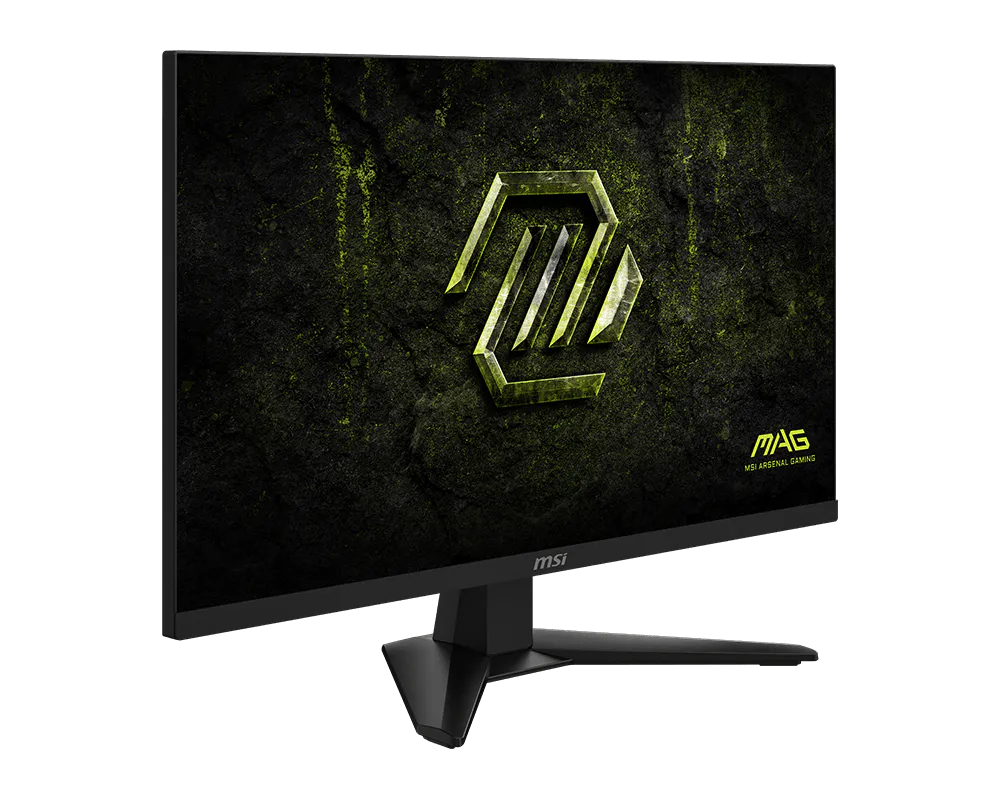
MSI MAG 274QF E20: Specs, Price, Pros & Cons
If there is a default gaming monitor right now, it looks a lot like this one: a mid-size QHD screen, a fast IPS panel and a refresh rate well beyond what a mid-range graphics card can always sustain. The MAG 274QF E20 is MSI's take on that formula, and its interest lies in where MSI chose to spend and where it chose to save.
The spending went into the panel and its certifications. Color coverage is wide for the class, the HDR badge is a genuine VESA tier rather than a vague HDR-ready label, and adaptive sync is certified for both major graphics vendors, so the monitor behaves properly whichever card sits in the PC. The flat panel also keeps viewing angles and color consistent in a way the curved models in the same MSI family do not.
The saving went into everything around it. The stand only tilts, there are no USB ports of any kind and no speakers, and only DisplayPort delivers the full refresh rate at native resolution. HDMI stops short, though it remains fine for consoles. A standard VESA mount means a cheap arm fixes the ergonomics, but that is an extra purchase to budget for.
It is worth keeping the HDR certification in perspective. The entry tier brightens highlights modestly and cannot produce the contrast of a panel with local dimming, so films in a dark room will still look like an ordinary LCD.
Where it fits best is a gaming desk with a monitor arm already in place and a PC that handles its own connections through the tower. Anyone who wants a hub, a height-adjustable stand in the box or convincing HDR should look further up the range, and should expect to pay for each of those.
Category strengths
Where the MSI MAG 274QF E20 beats the median
- A much faster response time ?0.5 ms vs 1 ms (median)
- Has picture-by-picture ?
- A higher refresh rate ?200 Hz vs 180 Hz (median)
- A higher contrast ratio ?1200:1 vs 1000:1 (median)
Where the MSI MAG 274QF E20 trails the median
- No height adjustment ?
- Lower peak brightness ?300 nits vs 400 nits (median)
- No swivel adjustment ?
- No USB hub ?
- No pivot adjustment ?
- Slightly narrower DCI-P3 colour coverage ?92 % vs 95 % (median)
How this VS Score was computed
Score 47: each known spec is measured against the median of IPS gaming monitors, 27 to 31 inches (30 products), then weighted; 50 means level with that median. In classes of six or more, a value beyond the class’s 10th–90th percentile range counts as that limit, so one extreme product cannot set the scale. 76% of the scoreable weight could be used; unknown values, features not applicable to this class and proxies (battery capacity where a rated life exists) add or remove nothing.
| Specification | This product | Cohort median | Score weight | Points moved |
|---|---|---|---|---|
| Response time | 0.5 | 1 | 0.8 | +40.0 |
| USB-C | No | 24% of the class have it | 0.5 | −24.0 |
| Local dimming | No | 21% of the class have it | 0.4 | −19.2 |
| Height adjustment | No | 80% of the class have it | 0.4 | −19.2 |
| Picture-by-picture | Yes | 20% of the class have it | 0.2 | +10.0 |
| Peak brightness | 300 | 400 | 0.8 | −9.6 |
| Swivel | No | 66% of the class have it | 0.2 | −9.6 |
| Built-in speakers | No | 30% of the class have it | 0.2 | −9.6 |
| Refresh rate | 200 | 180 | 1.2 | +7.2 |
| Contrast ratio | 1,200 | 1,000 | 0.6 | +6.0 |
| USB hub | No | 50% of the class have it | 0.05 | −2.2 |
| DCI-P3 coverage | 92 | 95 | 0.6 | −1.2 |
| Pivot | No | 76% of the class have it | 0.02 | −1.0 |
| Screen size | 27 | 27 | 1.2 | +0.0 |
| Resolution | 1440p | 1440p | 1.2 | +0.0 |
| Panel type | IPS | IPS | 0.8 | +0.0 |
| Color depth | 10 | 10 | 0.3 | +0.0 |
| HDR | DisplayHDR 400 | DisplayHDR 400 | 0.5 | +0.0 |
| Pixel density | 109 | 109 | 0.5 | +0.0 |
| Adaptive sync | G-Sync Compatible | G-Sync Compatible | 0.6 | +0.0 |
| HDMI ports | 2 | 2 | 0.4 | +0.0 |
| DisplayPort inputs | 1 | 1 | 0.4 | +0.0 |
Not scored: Local dimming zones (unknown: not scored); Variable refresh rate (standard for the class (100% have it)); Motion blur reduction (unknown: not scored); Input lag (unknown: not scored); Tilt (standard for the class (100% have it)); USB-C power delivery (unknown: not scored); Headphone output (standard for the class (87% have it)); KVM switch (not applicable: only 0% of this class have it); Webcam (not applicable: only 0% of this class have it); Microphone (not applicable: only 0% of this class have it); Ethernet (not applicable: only 0% of this class have it).
Editor’s note
The MSI MAG 274QF E20 is the flat-panel sibling of MSI's E20 refresh, and arguably the most broadly sensible monitor of the family. It pairs a 27-inch Rapid IPS panel at 2560 x 1440 with a 200 Hz refresh rate and a 0.5 ms GtG minimum response, which lands it squarely in the middle of the market: sharp enough for work at 109 pixels per inch, fast enough for competitive play, and IPS, so viewing angles and color stay consistent where the curved MAG models trade that for contrast.
The color numbers are strong for the price bracket (92 percent DCI-P3 and full sRGB coverage from a 10-bit panel), and this one carries a real VESA DisplayHDR 400 certification, where its curved stablemates carry only the vague HDR Ready badge. DisplayHDR 400 is the entry tier, so expect brighter highlights rather than a transformed image. The panel's native contrast is a typical-IPS 1200:1 and there is no local dimming. Both major adaptive-sync systems are covered, with NVIDIA G-Sync Compatible certification alongside AMD FreeSync Premium across a 48 to 240 Hz range.
Connectivity follows the budget MAG template: one DisplayPort 1.4a carries the full refresh rate, while the two HDMI 2.0b ports stop at 144 Hz at native resolution, which is still fine for consoles. There is a headphone jack, picture-in-picture and picture-by-picture support, and nothing else: no USB of any kind, no KVM, no speakers. The stand is tilt-only, though the panel is light at 4.9 kilograms and takes a standard 100 x 100 VESA mount.
For a first serious 1440p gaming monitor, or an upgrade from 1080p that keeps the budget in check, the 274QF E20 covers the fundamentals with certified extras where they matter. Ergonomics and connectivity are where the money went missing. An arm fixes the first.
Specifications
Quality bars show where each figure sits between the lowest and highest of the 30 IPS gaming monitors, 27 to 31 inches this VS Score is measured against.
Picture
Gaming
Ergonomics & design
Connectivity
Features
Sources and verification
Where the specifications come from
- Official product pagemsi.com
- Retailer listing (cross-check)amazon.com
Verification
- First published
- Specifications last checked
- Sheet completeness
- 38 of 42 specifications verified; the rest show as Unknown and are never estimated or scored
- Page type
- Product specification page — Compiled from the manufacturer’s published specifications and the cited sources; this is not a hands-on test.
- Basis
- Research-based: specifications and editorial text were compiled from the documents listed here and the manufacturer’s published data. We have not tested this unit ourselves; where independent measurements are mentioned they belong to the linked publication.
Where to buy
Prices and availability may change. Check the retailer before buying. We may earn a commission on purchases.
Price history
Monitors with similar specs to the MSI MAG 274QF E20

Ratings & reviews
No reviews yet. Be the first to share your experience.
The bottom line
The MSI MAG 274QF E20 earns a VS Score of 47, below the median of the 30 IPS gaming monitors, 27 to 31 inches it is measured against (a score of 50 is level with that median).
- Who it’s for
- Gamers who want a fast, color-accurate flat IPS panel with genuine entry-level HDR and dual adaptive-sync certification on a budget.
- Who should look elsewhere
- Anyone needing USB ports, speakers, height adjustment or meaningful HDR depth.
- The trade-off that matters
- Certified HDR and dual sync-vendor support at this price mean a tilt-only stand and no USB connectivity at all.
- The main alternative
- MSI MAG 275CQDF X24: a curved model from the same range that trades viewing angles for contrast, if dark scenes matter more than color consistency.
The VS Score is calculated from the weighted specifications above, each measured against the median of comparable IPS gaming monitors, 27 to 31 inches — a shortlisting guide, not a substitute for your own priorities. See how we score.




