
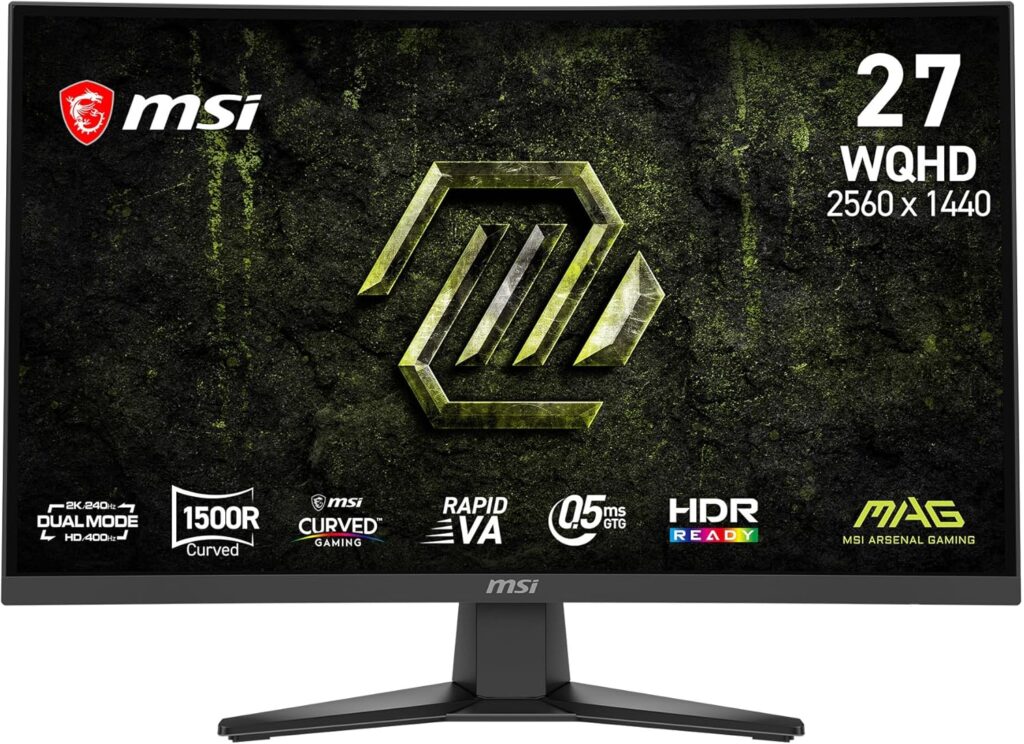
MSI MAG 275CQDF X24: Specs, Price, Pros & Cons
MAG is MSI's mainstream gaming range, below the MPG and MEG lines, and this curved monitor shows how far features from those upper tiers have traveled down. Refresh rates that once belonged to expensive screens now come on a monitor pitched at someone buying a first proper gaming display.
The panel is VA, the LCD type with the deepest native blacks, which is why dark games and films look richer on it than on the IPS panels most rivals at this level use. Its old weakness was sluggish pixel changes in dark scenes. MSI's faster version of the panel narrows that gap, though it does not close it.
At this size the QHD resolution is the practical middle ground. Text is clean at desk distance, and a mid-range graphics card can hold high frame rates in current games, so the fast refresh is something you will see in use. A dual-mode setting drops the resolution for an even higher refresh rate, a feature aimed at competitive players who put speed above detail.
The buyer it suits plays story games, horror and space sims in the evening with the lights down. A console can share the screen through one of its video inputs, which is handy when the monitor is the only screen in the room. Bright rooms suit it less, because glare lifts the dark tones that are its main strength.
It is built to a price, and the saving shows in the stand and the list of missing extras. The curve is moderate for a screen this wide and keeps the edges at a similar distance from your eyes, which helps more in games than in spreadsheets.
Category strengths
Where the MSI MAG 275CQDF X24 beats the median
- A much faster response time ?0.5 ms vs 1 ms (median)
- A higher refresh rate ?240 Hz vs 180 Hz (median)
- A higher contrast ratio ?5000:1 vs 3500:1 (median)
- A higher pixel density ?109 ppi vs 93 ppi (median)
- Slightly wider DCI-P3 colour coverage ?96 % vs 95 % (median)
How this VS Score was computed
Score 54: each known spec is measured against the median of VA gaming monitors, 27 to 31 inches (11 products), then weighted; 50 means level with that median. In classes of six or more, a value beyond the class’s 10th–90th percentile range counts as that limit, so one extreme product cannot set the scale. 69% of the scoreable weight could be used; unknown values, features not applicable to this class and proxies (battery capacity where a rated life exists) add or remove nothing.
| Specification | This product | Cohort median | Score weight | Points moved |
|---|---|---|---|---|
| Response time | 0.5 | 1 | 0.8 | +40.0 |
| Refresh rate | 240 | 180 | 1.2 | +20.4 |
| Height adjustment | No | 45% of the class have it | 0.4 | −19.2 |
| Contrast ratio | 5,000 | 3,500 | 0.6 | +12.6 |
| Swivel | No | 36% of the class have it | 0.2 | −9.6 |
| Built-in speakers | No | 30% of the class have it | 0.2 | −9.6 |
| Pixel density | 109 | 93 | 0.5 | +4.5 |
| Pivot | No | 36% of the class have it | 0.02 | −1.0 |
| DCI-P3 coverage | 96 | 95 | 0.6 | +0.6 |
| Screen size | 27 | 27 | 1.2 | +0.0 |
| Resolution | 1440p | 1440p | 1.2 | +0.0 |
| Panel type | VA | VA | 0.8 | +0.0 |
| Color depth | 10 | 10 | 0.3 | +0.0 |
| Peak brightness | 300 | 300 | 0.8 | +0.0 |
| HDR | HDR10 | HDR10 | 0.5 | +0.0 |
| Adaptive sync | FreeSync | FreeSync | 0.6 | +0.0 |
| HDMI ports | 2 | 2 | 0.4 | +0.0 |
| DisplayPort inputs | 1 | 1 | 0.4 | +0.0 |
Not scored: Local dimming (unknown: not scored); Local dimming zones (unknown: not scored); Variable refresh rate (standard for the class (100% have it)); Motion blur reduction (unknown: not scored); Input lag (unknown: not scored); Tilt (standard for the class (100% have it)); USB-C (unknown: not scored); USB-C power delivery (unknown: not scored); USB hub (unknown: not scored); Headphone output (standard for the class (91% have it)); KVM switch (unknown: not scored); Webcam (unknown: not scored); Microphone (unknown: not scored); Ethernet (unknown: not scored); Picture-by-picture (unknown: not scored).
Editor’s note
The MAG 275CQDF X24 is MSI stacking every current trend into one affordable curved panel: 27-inch WQHD Rapid VA at 240 Hz, a 1500R curve, and the new dual-mode trick that trades resolution for speed. Drop it to 1280×720 and the refresh climbs to 400 Hz. That last number is mostly marketing theater at this panel size, but the underlying machine is substantial.
Start with what the money buys. A 0.5 ms GtG response (MSI's Rapid VA is quick, addressing the smearing that made older VA gaming panels a compromise), plus 5000:1 native contrast that no IPS rival approaches, 96% DCI-P3 color, and the full refresh at 1440p over DisplayPort 1.4a. Two HDMI 2.0b ports handle consoles at their own limits, and a headphone jack rounds out the essentials.
Two marketing claims need translating. The hundred-million-to-one contrast figure is a dynamic ratio, and the native number to compare is the 5000:1 above. Brightness is rated at 300 nits in SDR, so 'HDR Ready' means only that the panel accepts HDR signals.
The practical compromises: a tilt-only stand at a price where rivals have begun including height adjustment, no USB of any kind, no speakers, and the usual VA caveat. Test dark-scene motion in your return window, because Rapid VA improves smearing without abolishing it.
Its closest rival is LG's flat IPS 27G61ZB-B at similar money: the LG wins on viewing angles and stand, this MSI wins decisively on contrast and immersion. For dark-room gaming (story titles, horror, space sims), the VA curve is the better evening.
Specifications
Quality bars show where each figure sits between the lowest and highest of the 11 VA gaming monitors, 27 to 31 inches this VS Score is measured against.
Picture
Gaming
Ergonomics & design
Connectivity
Features
Sources and verification
Where the specifications come from
- Official product pagemsi.com
- Retailer listing (cross-check)amazon.com
Verification
- First published
- Specifications last checked
- Sheet completeness
- 27 of 42 specifications verified; the rest show as Unknown and are never estimated or scored
- Page type
- Product specification page — Compiled from the manufacturer’s published specifications and the cited sources; this is not a hands-on test.
- Basis
- Research-based: specifications and editorial text were compiled from the documents listed here and the manufacturer’s published data. We have not tested this unit ourselves; where independent measurements are mentioned they belong to the linked publication.
Where to buy
Prices and availability may change. Check the retailer before buying. We may earn a commission on purchases.
Price history
Monitors with similar specs to the MSI MAG 275CQDF X24
Ratings & reviews
No reviews yet. Be the first to share your experience.
The bottom line
The MSI MAG 275CQDF X24 earns a VS Score of 54, above the median of the 11 VA gaming monitors, 27 to 31 inches it is measured against (a score of 50 is level with that median).
- Who it’s for
- Dark-room immersion gaming. The VA contrast here is far beyond what any IPS panel near this price can reach, and on story titles and space sims that is the difference you see.
- Who should look elsewhere
- Anyone who believed the HDR wording in the listing, or who needs a stand that moves. This panel accepts an HDR signal rather than delivering an HDR image, and the stand only tilts.
- The trade-off that matters
- Class-leading contrast and speed for the money, on a tilt-only stand with no USB at all. VA's dark-scene motion also deserves a test inside the return window.
- The main alternative
- LG UltraGear 27G61ZB-B is the flat IPS counterpart at similar money: better viewing angles and a proper stand, nowhere near the contrast.
The VS Score is calculated from the weighted specifications above, each measured against the median of comparable VA gaming monitors, 27 to 31 inches — a shortlisting guide, not a substitute for your own priorities. See how we score.





