
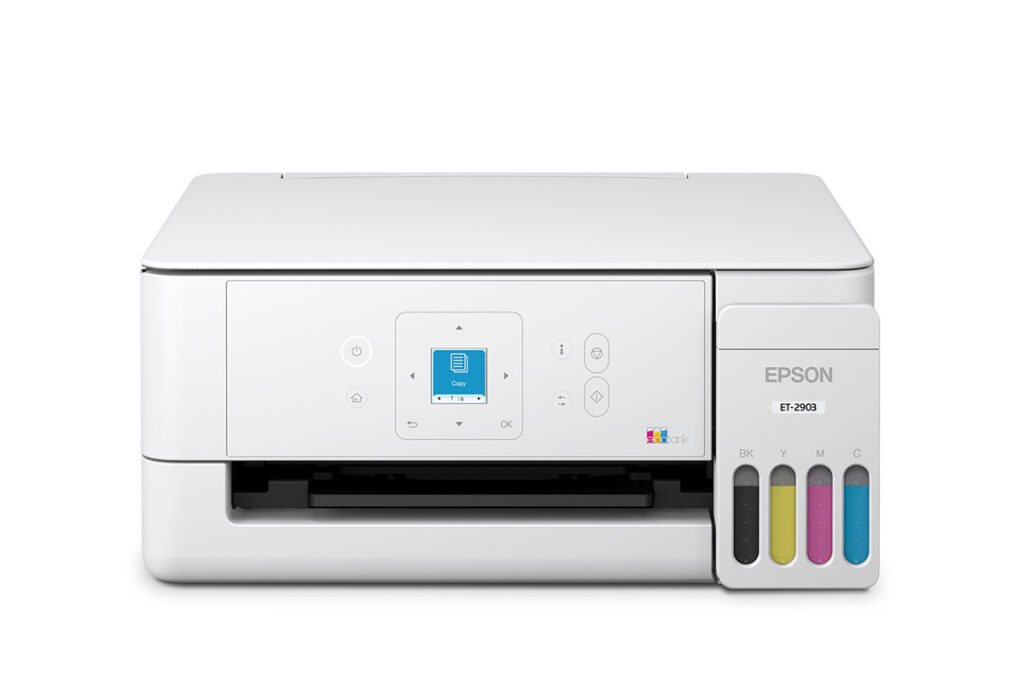
Epson EcoTank ET-2903: Specs, Price, Pros & Cons
Every EcoTank makes the same promise, which is that you stop buying cartridges, and the cheapest one in the range makes it while quietly removing almost everything else a printer normally has. That is the trade this page is about, and it is a sharper one than the small gap in price between models would suggest.
The ink argument is real and it is not close. Refillable tanks filled from bottles change the arithmetic of home printing so completely that comparing running costs against a cartridge inkjet is barely an exercise worth doing. If you print regularly, this is the category to buy in, and Epson is the brand that dragged it into the mainstream.
What the entry model gives up is the part people discover afterwards. There is no automatic duplex unit, so every double-sided page is a manual flip, and that is far and away the most common regret with this printer. Without a document feeder, copying anything longer than a single page means lifting the lid over and over. There is no wired network option, and the wireless is an older and slower standard than you would expect on something sold today. Color output is slow, although black text is respectable for the class.
One warning carried over from Epson's own documentation: the company states that non-genuine ink can affect warranty coverage. Third-party bottles are a large part of why people believe tank printers are cheap to run, and that route is not the consequence-free saving it appears to be.
Buy it if you print single-sided pages at home and want the ink problem to go away permanently. If you routinely print on both sides, the model above it in Epson's own range exists precisely for you.
Category strengths
Where the Epson EcoTank ET-2903 beats the median
- Has supertank / refillable ink ?
- A much lighter build ?4.2 kg vs 7.98 kg (median)
- A higher print resolution ?5,760 dpi vs 4,800 dpi (median)
Where the Epson EcoTank ET-2903 trails the median
- No automatic duplex printing ?
- No automatic document feeder ?
- A lower print speed (black) ?11 ppm vs 16 ppm (median)
- No ethernet ?
- A lower print speed (color) ?6 ppm vs 9 ppm (median)
- A lower input tray capacity ?100 sheets vs 150 sheets (median)
How this VS Score was computed
Score 28: each known spec is measured against the median of all printers (65 products), then weighted; 50 means level with that median. In classes of six or more, a value beyond the class’s 10th–90th percentile range counts as that limit, so one extreme product cannot set the scale. 59% of the scoreable weight could be used; unknown values, features not applicable to this class and proxies (battery capacity where a rated life exists) add or remove nothing.
| Specification | This product | Cohort median | Score weight | Points moved |
|---|---|---|---|---|
| Automatic duplex printing | No | 73% of the class have it | 1 | −48.0 |
| Automatic document feeder | No | 55% of the class have it | 1 | −48.0 |
| Print speed (black) | 11 | 16 | 2 | −32.0 |
| Supertank / refillable ink | Yes | 30% of the class have it | 0.5 | +25.0 |
| Duplex scanning | No | 23% of the class have it | 0.5 | −24.0 |
| Ethernet | No | 54% of the class have it | 0.5 | −24.0 |
| Touchscreen display | No | 45% of the class have it | 0.5 | −24.0 |
| Print speed (color) | 6 | 9 | 1 | −17.0 |
| Input tray capacity | 100 | 150 | 1 | −17.0 |
| Weight | 4.2 | 7.98 | 0.3 | +13.5 |
| Fax | No | 35% of the class have it | 0.2 | −9.6 |
| Print resolution | 5,760 | 4,800 | 0.5 | +5.0 |
Not scored: Color printing (standard for the class (88% have it)); Monthly duty cycle (unknown: not scored); All-in-one (standard for the class (85% have it)); ADF capacity (unknown: not scored); Output tray capacity (unknown: not scored); Wi-Fi (standard for the class (97% have it)); Wi-Fi Direct (unknown: not scored); USB (standard for the class (100% have it)); Apple AirPrint (standard for the class (97% have it)); Mobile app printing (standard for the class (100% have it)).
Editor’s note
The ET-2903 is Epson's cheapest current EcoTank, and it exists to make one argument: stop buying ink by the cartridge. Its four tanks are filled from 65 ml keyed bottles (a replacement black is rated at 4,700 ISO pages, each color at 7,500), and the bottles in the box are good for up to 3,600 black pages once the initial tank charging takes its share. Epson frames that as up to three years of ink, assuming about a hundred pages a month. Against the 160-page cartridges in a budget HP DeskJet, the arithmetic is not close: this wins by roughly a factor of ten on running cost.
The omissions match its ET-2800 predecessor. No automatic duplex, so every two-sided page is flipped by hand, an omission buyers routinely discover only after purchase. Without a document feeder, multi-page copying means lifting the lid one sheet at a time. No fax, no Ethernet, a small non-touch display, and, unusually for 2025, Wi-Fi 4 only. Color speed is a modest 6 ISO ppm, though the 11 ppm black figure is respectable for the class.
One more caveat worth passing on: Epson warns that non-genuine ink can void the warranty, so the third-party-bottle savings people associate with tank printers are not the risk-free play they look.
This is the right machine for a household that prints regularly, mostly single-sided documents, and wants to stop thinking about ink for years at a time. If two-sided printing is part of your life, the ET-2980 exists precisely to fix that, and is the better buy despite the gap in price.
Specifications
Quality bars show where each figure sits between the lowest and highest of the 65 printers this VS Score is measured against.
Printing
Scanning & copying
Paper handling
Connectivity
Design
Sources and verification
Where the specifications come from
- Official product pageepson.com
- Retailer listing (cross-check)amazon.com
Verification
- First published
- Specifications last checked
- Sheet completeness
- 20 of 24 specifications verified; the rest show as Unknown and are never estimated or scored
- Page type
- Product specification page — Compiled from the manufacturer’s published specifications and the cited sources; this is not a hands-on test.
- Basis
- Research-based: specifications and editorial text were compiled from the documents listed here and the manufacturer’s published data. We have not tested this unit ourselves; where independent measurements are mentioned they belong to the linked publication.
Where to buy
Prices and availability may change. Check the retailer before buying. We may earn a commission on purchases.
Price history
Printers with similar specs to the Epson EcoTank ET-2903

Ratings & reviews
No reviews yet. Be the first to share your experience.
The bottom line
The Epson EcoTank ET-2903 earns a VS Score of 28, below the median of the 65 printers it is measured against (a score of 50 is level with that median).
- Who it’s for
- Regular home printing, mostly single-sided, where years of included ink and 4,700-page bottles end the cartridge cycle.
- Who should look elsewhere
- Anyone who prints two-sided routinely (there is no duplex unit at all) or needs an ADF, Ethernet, or faster than Wi-Fi 4.
- The trade-off that matters
- Ten-times-cheaper pages bought by giving up every convenience feature. The missing auto-duplex is the omission buyers most often discover after the box is open.
- The main alternative
- Epson's own ET-2980 adds auto-duplex and a faster engine for the step up, and is the better fit the moment double-sided printing matters.
The VS Score is calculated from the weighted specifications above, each measured against the median of comparable printers — a shortlisting guide, not a substitute for your own priorities. See how we score.




