
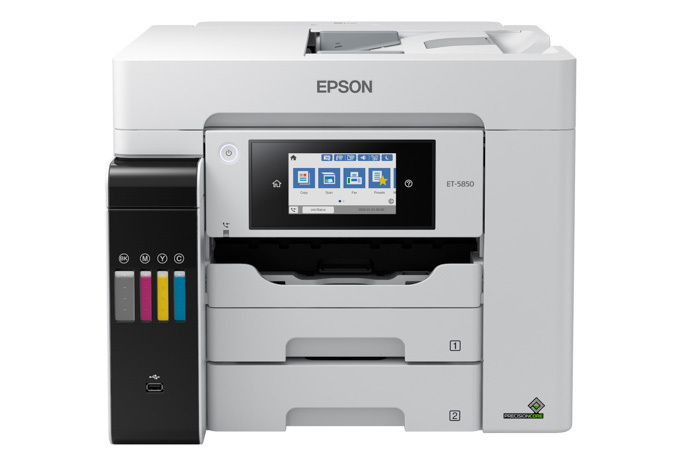
Epson EcoTank Pro ET-5850: Specs, Price, Pros & Cons
The word doing the work in this name is Pro. Epson's ordinary EcoTanks are household machines with a business veneer. The Pro models are the ones built to sit on a network in an office, and the distinction is structural.
Three things separate them. The Pro speaks PCL and PostScript, which is what corporate print servers and shared drivers expect, and without which a printer will not slot cleanly into a managed environment. It uses pigment ink throughout rather than dye, so output survives highlighters, damp hands and years in a filing cabinet. And it is built around a paper path with more than one source, so different stock can sit in the machine at the same time.
The trade for all of that is bulk. This is a heavy, wide unit with a real footprint, closer in presence to a small laser multifunction than to the tank printers people put on a shelf next to the router. It wants a desk or a stand of its own, and repositioning it is a two-person job.
It is also, despite the price and the business framing, a Letter and Legal machine. Anything wider belongs to a different Epson line altogether, which regularly surprises people who assume that spending this much must buy format flexibility somewhere.
The buyer it is shaped for is narrow but entirely real: an office that prints steadily in color, has previously been feeding a color laser with toner, and has sat down and worked out what that toner costs across a year. Outside that description, the cheaper EcoTanks do most of the same work for a great deal less money.
Category strengths
Where the Epson EcoTank Pro ET-5850 beats the median
- A much higher input tray capacity ?550 sheets vs 150 sheets (median)
- A much higher print speed (color) ?25 ppm vs 9 ppm (median)
- A much higher monthly duty cycle ?66,000 pages vs 10,000 pages (median)
- A much higher print speed (black) ?25 ppm vs 16 ppm (median)
- Has supertank / refillable ink ?
- Has duplex scanning ?
- Has touchscreen display ?
- A higher ADF capacity ?50 sheets vs 35 sheets (median)
- Has fax ?
Where the Epson EcoTank Pro ET-5850 trails the median
- A much heavier build ?17.8 kg vs 7.98 kg (median)
How this VS Score was computed
Score 89: each known spec is measured against the median of all printers (65 products), then weighted; 50 means level with that median. In classes of six or more, a value beyond the class’s 10th–90th percentile range counts as that limit, so one extreme product cannot set the scale. 64% of the scoreable weight could be used; unknown values, features not applicable to this class and proxies (battery capacity where a rated life exists) add or remove nothing.
| Specification | This product | Cohort median | Score weight | Points moved |
|---|---|---|---|---|
| Print speed (black) | 25 | 16 | 2 | +56.0 |
| Print speed (color) | 25 | 9 | 1 | +50.0 |
| Automatic duplex printing | Yes | 73% of the class have it | 1 | +50.0 |
| Automatic document feeder | Yes | 55% of the class have it | 1 | +50.0 |
| Input tray capacity | 550 — capped at the class’s upper range (350) | 150 | 1 | +50.0 |
| Supertank / refillable ink | Yes | 30% of the class have it | 0.5 | +25.0 |
| Duplex scanning | Yes | 23% of the class have it | 0.5 | +25.0 |
| Ethernet | Yes | 54% of the class have it | 0.5 | +25.0 |
| Touchscreen display | Yes | 45% of the class have it | 0.5 | +25.0 |
| Monthly duty cycle | 66,000 — capped at the class’s upper range (50,000) | 10,000 | 0.3 | +15.0 |
| ADF capacity | 50 | 35 | 0.5 | +10.5 |
| Fax | Yes | 35% of the class have it | 0.2 | +10.0 |
| Weight | 17.8 | 7.98 | 0.3 | −8.4 |
| Print resolution | 4,800 | 4,800 | 0.5 | +0.0 |
Not scored: Color printing (standard for the class (88% have it)); All-in-one (standard for the class (85% have it)); Output tray capacity (unknown: not scored); Wi-Fi (standard for the class (97% have it)); Wi-Fi Direct (standard for the class (90% have it)); USB (standard for the class (100% have it)); Apple AirPrint (standard for the class (97% have it)); Mobile app printing (standard for the class (100% have it)).
Editor’s note
The ET-5850 is Epson's case that a small office does not need a color laser. It prints 25 ISO ppm in both black and color with no warm-up, speaks PCL and PostScript so it drops into managed business environments, holds 550 sheets across two cassettes and a rear feed, and runs a genuine duplex workflow across print, copy, scan and fax. The ink is DURABrite pigment (crisp, instant-dry, highlighter-safe), fed from 542 bottles rated at 7,500 pages black. Epson claims about two cents per color page against roughly fourteen for laser toner, and sweetens it with a registration promo that reimburses replacement bottles for two years.
That is a strong offer, and the machine largely lives up to it. The reservations are about fit rather than function.
The price is the obvious one: it buys a lot of pages from a cheaper tank machine, and the payback maths only works if you print volume. Epson's own numbers hint at the mismatch: a 66,000-page maximum duty cycle in the marketing, but a recommended 200 to 3,300 pages a month in the fine print. If you are at the bottom of that range, the ET-4950 does the job for hundreds less.
Be aware, too, that this is pigment-only: Epson warns that dye inks cause damage the warranty does not cover. It is A4/Legal only despite the price. Wide-format needs the ET-16600 line. It is a big, heavy unit at nearly 18 kg. And the owner picture is mixed: 3.8 stars across 65 reviews on Epson's own store, well below the ratings of its cheap siblings.
I would buy it to replace a color laser in a busy small office. Below a few hundred pages a month, the economics that justify it never arrive.
Specifications
Quality bars show where each figure sits between the lowest and highest of the 65 printers this VS Score is measured against.
Printing
Scanning & copying
Paper handling
Connectivity
Design
Sources and verification
Where the specifications come from
- Official product pageepson.com
- Independent testingrtings.com
Verification
- First published
- Specifications last checked
- Sheet completeness
- 23 of 24 specifications verified; the rest show as Unknown and are never estimated or scored
- Page type
- Product specification page — Compiled from the manufacturer’s published specifications and the cited sources; this is not a hands-on test.
- Basis
- Research-based: specifications and editorial text were compiled from the documents listed here and the manufacturer’s published data. We have not tested this unit ourselves; where independent measurements are mentioned they belong to the linked publication.
Where to buy
Prices and availability may change. Check the retailer before buying. We may earn a commission on purchases.
Price history
Printers with similar specs to the Epson EcoTank Pro ET-5850

Ratings & reviews
No reviews yet. Be the first to share your experience.
The bottom line
The Epson EcoTank Pro ET-5850 earns a VS Score of 89, above the median of the 65 printers it is measured against (a score of 50 is level with that median).
- Who it’s for
- A busy small office replacing a color laser, that needs managed-network printing, a large paper supply and pigment output that survives a highlighter.
- Who should look elsewhere
- Low-volume buyers. At a light monthly page count the purchase price never pays itself back, and Epson's own recommended monthly volume sits far below the duty cycle it advertises.
- The trade-off that matters
- Laser-class speed and manageability at tank running costs, bought with a high entry price, a heavy footprint and a patchier owner record than Epson's cheaper tanks.
- The main alternative
- Epson EcoTank ET-4950 delivers the duplex-everything office workflow at a fraction of the price for offices whose volume does not justify Pro hardware.
The VS Score is calculated from the weighted specifications above, each measured against the median of comparable printers — a shortlisting guide, not a substitute for your own priorities. See how we score.




