
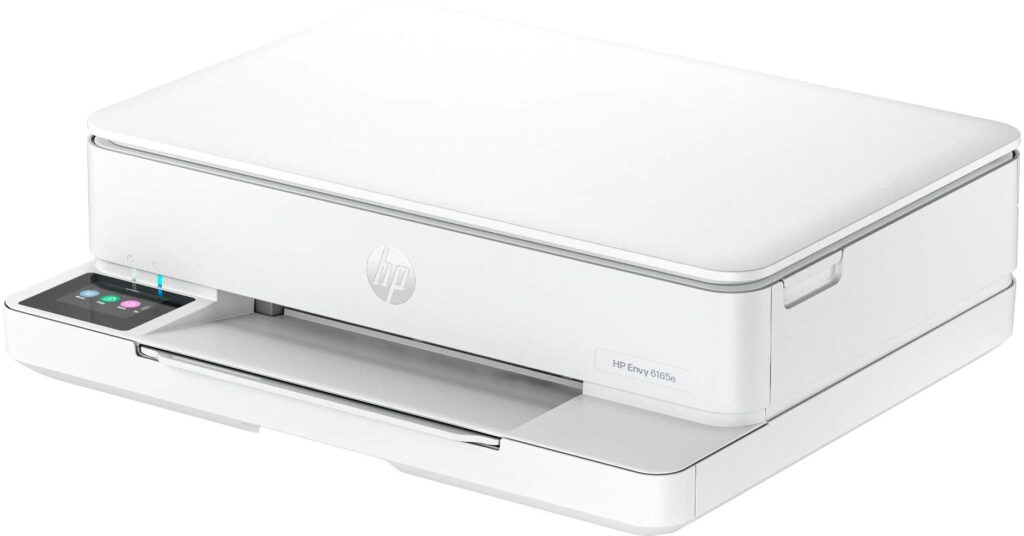
HP Envy 6165e: Specs, Features, Pros & Cons
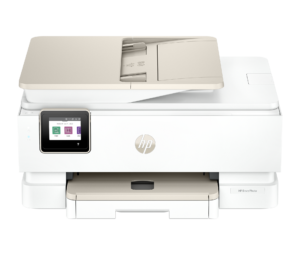
The scanner lid and paper path of HP's ENVY 6165e fold into an unusually flat, small body, so it covers less of a desk than most all-in-ones with a color touchscreen. HP markets it as a general household printer. The choices inside are a photo printer's, and they shape what it does well and badly.
The ink is dye-based, borderless prints run up to a full page, and it will print photographs on both sides of a sheet automatically, which very few printers at this price do. Documents inherit the weaknesses that come with those choices. Dye on plain paper looks a little softer than pigment and smudges more readily under a damp finger, and the print speeds turn a long report into something you start and walk away from.
The rest is a straightforward flatbed all-in-one on Wi-Fi, with AirPrint for iPhones and a maximum print resolution of 4,800 dpi on the spec sheet. There is no document feeder and no Ethernet port. The paper tray is domestic in size and the output tray fills quickly, which keeps it to jobs measured in pages instead of reams. It suits a small household of one or two people that prints photos and cards as often as forms, and wants the printer to take up little room on a shelf or a sideboard.
The name deserves more attention than the hardware. HP sells the same machine as the plain 6165, without the letter, and the letter marks the version sold under HP+ and its ink and connection terms. Decide which of the two you want before you order, because the choice made at setup is permanent.
Category strengths
Where the HP Envy 6165e beats the median
- Has touchscreen display ?
- A lighter build ?5.13 kg vs 7.98 kg (median)
Where the HP Envy 6165e trails the median
- No automatic document feeder ?
- A lower print speed (black) ?10 ppm vs 16 ppm (median)
- A much lower ADF capacity ?0 sheets vs 35 sheets (median)
- No ethernet ?
- A lower input tray capacity ?100 sheets vs 150 sheets (median)
- A much lower monthly duty cycle ?1,000 pages vs 10,000 pages (median)
- A lower print speed (color) ?7 ppm vs 9 ppm (median)
- A much lower output tray capacity ?25 sheets vs 67.5 sheets (median)
How this VS Score was computed
Score 36: each known spec is measured against the median of all printers (65 products), then weighted; 50 means level with that median. In classes of six or more, a value beyond the class’s 10th–90th percentile range counts as that limit, so one extreme product cannot set the scale. 66% of the scoreable weight could be used; unknown values, features not applicable to this class and proxies (battery capacity where a rated life exists) add or remove nothing.
| Specification | This product | Cohort median | Score weight | Points moved |
|---|---|---|---|---|
| Automatic duplex printing | Yes | 73% of the class have it | 1 | +50.0 |
| Automatic document feeder | No | 55% of the class have it | 1 | −48.0 |
| Print speed (black) | 10 | 16 | 2 | −38.0 |
| Touchscreen display | Yes | 45% of the class have it | 0.5 | +25.0 |
| Supertank / refillable ink | No | 30% of the class have it | 0.5 | −24.0 |
| Duplex scanning | No | 23% of the class have it | 0.5 | −24.0 |
| Ethernet | No | 54% of the class have it | 0.5 | −24.0 |
| Input tray capacity | 100 | 150 | 1 | −17.0 |
| Monthly duty cycle | 1,000 | 10,000 | 0.3 | −13.5 |
| Print speed (color) | 7 | 9 | 1 | −11.0 |
| ADF capacity | 0 — capped at the class’s lower range (20) | 35 | 0.5 | −10.5 |
| Fax | No | 35% of the class have it | 0.2 | −9.6 |
| Output tray capacity | 25 | 67.5 | 0.3 | −9.3 |
| Weight | 5.13 | 7.98 | 0.3 | +8.4 |
| Print resolution | 4,800 | 4,800 | 0.5 | +0.0 |
Not scored: Color printing (standard for the class (88% have it)); All-in-one (standard for the class (85% have it)); Wi-Fi (standard for the class (97% have it)); Wi-Fi Direct (standard for the class (90% have it)); USB (standard for the class (100% have it)); Apple AirPrint (standard for the class (97% have it)); Mobile app printing (standard for the class (100% have it)).
Editor’s note
The Envy 6165e is a well-equipped little all-in-one carrying one very large asterisk.
The hardware is nice for the size. A 2.4-inch color capacitive touchscreen, where most machines at this price give you a mono LCD and a row of buttons. Automatic two-sided printing as standard, and HP claims this series is the only one in its class doing automatic two-sided photo printing. Ten pages per minute black and seven color on HP's ISO figures, a 100-sheet tray, dual-band Wi-Fi.
The asterisk is HP+. Enrollment is optional (HP's own FAQ confirms you can skip it at setup), but accepting it is irreversible, and HP states what it commits you to: an HP account, a permanent internet connection, and exclusive use of Original HP ink for the life of the printer. HP's user guide goes further: an HP+ printer "must remain connected to the Internet in order to function", and that holds even over USB.
Then the awkward part. HP sells the near-identical Envy 6165 without the "e" and without HP+ for less. Same body, same engine. The price difference buys you six months of Instant Ink, which HP values at 4,200 pages, and the obligation that comes with it.
So the decision is simple, and it is not about the printer. For someone who wants Instant Ink anyway and will never buy third-party cartridges, the 6165e is fine and the free months have real value. If you would skip HP+ at setup, you are paying extra for nothing: buy the plain 6165.
There is no document feeder either, so multi-page scanning means the flatbed.
Specifications
Quality bars show where each figure sits between the lowest and highest of the 65 printers this VS Score is measured against.
Printing
Scanning & copying
Paper handling
Connectivity
Design
Sources and verification
Where the specifications come from
- Official product pagesupport.hp.com
- Independent testingrtings.com
Verification
- First published
- Specifications last checked
- Sheet completeness
- 24 of 24 specifications verified; the rest show as Unknown and are never estimated or scored
- Page type
- Product specification page — Compiled from the manufacturer’s published specifications and the cited sources; this is not a hands-on test.
- Basis
- Research-based: specifications and editorial text were compiled from the documents listed here and the manufacturer’s published data. We have not tested this unit ourselves; where independent measurements are mentioned they belong to the linked publication.
Printers with similar specs to the HP Envy 6165e
Ratings & reviews
No reviews yet. Be the first to share your experience.
The bottom line
The HP Envy 6165e earns a VS Score of 36, below the median of the 65 printers it is measured against (a score of 50 is level with that median).
- Who it’s for
- One or two person households on reliable always-on broadband, printing 100 to 400 pages a month, who actively want Instant Ink and will use the six free months.
- Who should look elsewhere
- Anyone who wants the option of third-party or refilled cartridges, which HP+ forecloses permanently. Also wrong with unreliable internet, since an HP+ printer must stay online to function, and for anyone scanning multi-page documents, as there is no feeder.
- The trade-off that matters
- Six free months of ink against permanent ink lock-in. HP+ is optional but irreversible, and the identical non-HP+ model costs less.
- The main alternative
- HP Envy 6165: the same machine without HP+ at a lower price, and the better buy unless you specifically want Instant Ink.
The VS Score is calculated from the weighted specifications above, each measured against the median of comparable printers — a shortlisting guide, not a substitute for your own priorities. See how we score.





