
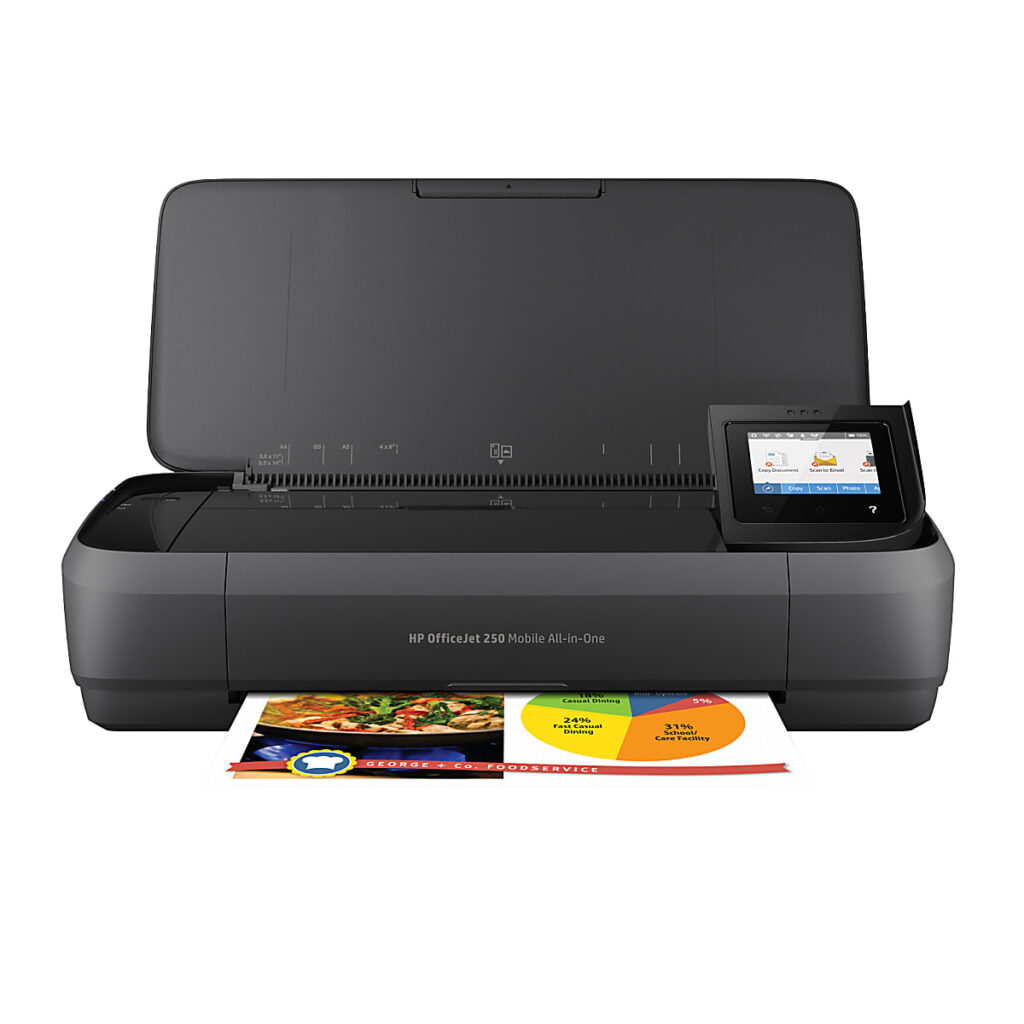
HP OfficeJet 250: Specs, Features, Pros & Cons
Portable printers are a small and odd corner of the market. Most of what fits in a bag is either a thermal document printer that cannot do color or a print-only inkjet with no way to capture a page. The OfficeJet 250 is the rare exception that also scans and copies, which is why it has outlived almost every product launched around the same time.
It is built around one scenario: paperwork that has to be produced and captured away from a desk. An internal battery, a document feeder and a small touchscreen let it work as a self-contained office on a job site, in a vehicle or at a client's table, with Wi-Fi Direct so a phone can send to it without any network nearby. Everything about the design follows from that, including the compromises.
Those compromises are the reason it should not be judged as a normal printer. Paper handling is minimal, there is no automatic duplex or wired networking, and the cartridges are small, so the cost of each page is high. It is a tool for documents that matter in the moment, and a buyer who mainly prints at home will find better value almost anywhere else.
Availability is worth checking before planning around it. HP's own US store no longer shows a product page for it, and a design this old is likely to be sold from leftover retailer stock. For a field technician, estate agent or mobile notary who needs to sign, copy and hand over a document on the spot, it still has very little direct competition. For anyone else, its age and running costs are hard to justify.
Category strengths
Where the HP OfficeJet 250 beats the median
- Has touchscreen display ?
- A much lighter build ?2.96 kg vs 7.98 kg (median)
Where the HP OfficeJet 250 trails the median
- No automatic duplex printing ?
- A lower print speed (black) ?10 ppm vs 16 ppm (median)
- A much lower input tray capacity ?50 sheets vs 150 sheets (median)
- No ethernet ?
- A much lower ADF capacity ?10 sheets vs 35 sheets (median)
- A much lower monthly duty cycle ?500 pages vs 10,000 pages (median)
- A lower print speed (color) ?7 ppm vs 9 ppm (median)
How this VS Score was computed
Score 35: each known spec is measured against the median of all printers (65 products), then weighted; 50 means level with that median. In classes of six or more, a value beyond the class’s 10th–90th percentile range counts as that limit, so one extreme product cannot set the scale. 64% of the scoreable weight could be used; unknown values, features not applicable to this class and proxies (battery capacity where a rated life exists) add or remove nothing.
| Specification | This product | Cohort median | Score weight | Points moved |
|---|---|---|---|---|
| Automatic document feeder | Yes | 55% of the class have it | 1 | +50.0 |
| Automatic duplex printing | No | 73% of the class have it | 1 | −48.0 |
| Print speed (black) | 10 | 16 | 2 | −38.0 |
| Input tray capacity | 50 — capped at the class’s lower range (60) | 150 | 1 | −30.0 |
| Touchscreen display | Yes | 45% of the class have it | 0.5 | +25.0 |
| Supertank / refillable ink | No | 30% of the class have it | 0.5 | −24.0 |
| Duplex scanning | No | 23% of the class have it | 0.5 | −24.0 |
| Ethernet | No | 54% of the class have it | 0.5 | −24.0 |
| Weight | 2.96 — capped at the class’s lower range (4) | 7.98 | 0.3 | +15.0 |
| Monthly duty cycle | 500 — capped at the class’s lower range (1,000) | 10,000 | 0.3 | −13.5 |
| Print speed (color) | 7 | 9 | 1 | −11.0 |
| ADF capacity | 10 — capped at the class’s lower range (20) | 35 | 0.5 | −10.5 |
| Fax | No | 35% of the class have it | 0.2 | −9.6 |
| Print resolution | 4,800 | 4,800 | 0.5 | +0.0 |
Not scored: Color printing (standard for the class (88% have it)); All-in-one (standard for the class (85% have it)); Output tray capacity (unknown: not scored); Wi-Fi (standard for the class (97% have it)); Wi-Fi Direct (standard for the class (90% have it)); USB (standard for the class (100% have it)); Apple AirPrint (standard for the class (97% have it)); Mobile app printing (standard for the class (100% have it)).
Editor’s note
The OfficeJet 250 answers a question almost no other printer addresses: what if the printer has to come with you? This is a portable all-in-one (15 inches wide, about three kilograms, with an internal rechargeable battery) that prints, scans and copies from a van, a job site, a client's kitchen table or the back seat of a car. Nearly a decade after launch, it still has no meaningful successor, which is why HP keeps selling it.
Judged as a mobile tool, it is quietly excellent. Ten ISO pages a minute in black on mains power, a 10-page document feeder for multi-page contracts (unique in the portable class), a 2.65-inch touchscreen, and Wi-Fi with Wi-Fi Direct so a phone can print to it in a field. HP quotes fast battery charging, and the 4800-dpi-class output is proper OfficeJet quality.
As a desk printer, it should be nobody's choice, and the spec sheet says so: a 50-sheet tray, no duplex, no Ethernet, and a 500-page monthly duty cycle, that last figure being the honest statement of intent. Ink comes in small HP 62-series cartridges with modest yields, so per-page costs are high, and volume printing is not its job.
It is also long-lived hardware at a price that never seems to fall much, because portability holds its value when there is no competition.
Buy the OfficeJet 250 if contracts get signed away from the office: field services, real estate, mobile notaries, delivery paperwork. For literally any stationary use, almost any other printer does more for less.
Specifications
Quality bars show where each figure sits between the lowest and highest of the 65 printers this VS Score is measured against.
Printing
Scanning & copying
Paper handling
Connectivity
Design
Sources and verification
Where the specifications come from
- Official product pagesupport.hp.com
- Independent testingrtings.com
Verification
- First published
- Specifications last checked
- Sheet completeness
- 23 of 24 specifications verified; the rest show as Unknown and are never estimated or scored
- Page type
- Product specification page — Compiled from the manufacturer’s published specifications and the cited sources; this is not a hands-on test.
- Basis
- Research-based: specifications and editorial text were compiled from the documents listed here and the manufacturer’s published data. We have not tested this unit ourselves; where independent measurements are mentioned they belong to the linked publication.
Printers with similar specs to the HP OfficeJet 250
Ratings & reviews
No reviews yet. Be the first to share your experience.
The bottom line
The HP OfficeJet 250 earns a VS Score of 35, below the median of the 65 printers it is measured against (a score of 50 is level with that median).
- Who it’s for
- Work that signs paperwork away from a desk: field services, real estate, mobile notaries. Battery power, a document feeder and real print quality, anywhere.
- Who should look elsewhere
- Any stationary use whatsoever, as the modest duty rating, small tray and small-cartridge ink costs make that explicit.
- The trade-off that matters
- You pay a persistent portability premium for capabilities no other machine offers. Parked on a desk, every dollar of it is wasted.
- The main alternative
- There is no true rival. If portability is optional, the Brother MFC-J5010DW does desk duty better for similar money.
The VS Score is calculated from the weighted specifications above, each measured against the median of comparable printers — a shortlisting guide, not a substitute for your own priorities. See how we score.





