
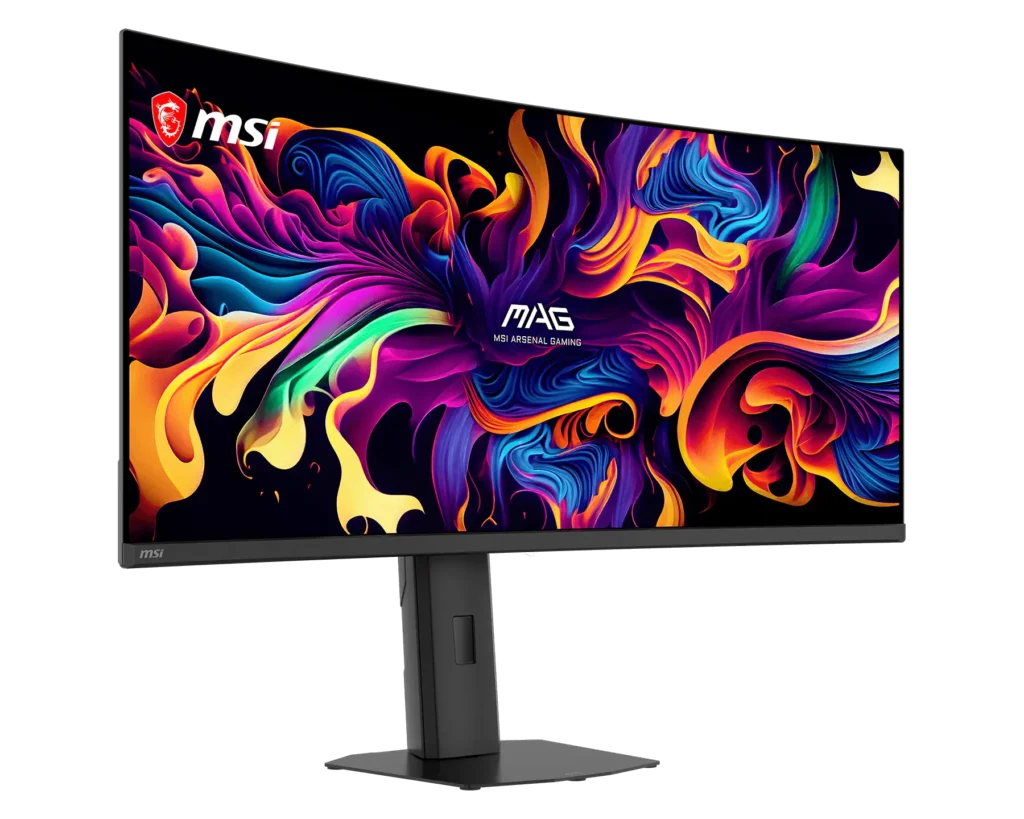
MSI MAG 341CQP QD-OLED X28: Specs, Price, Pros & Cons
This is the monitor in its class that needs the least selling: a 34-inch QD-OLED at 1800R with per-pixel blacks, 0.03 ms response, 240 Hz and DisplayHDR True Black 500 is a different order of image from every LCD around it.
What distinguishes MSI's take is the panel generation. The X28 revision uses a fourth-generation tandem QD-OLED with an RGB-stripe subpixel layout, and that sounds like trivia until you open a spreadsheet: the triangular subpixels of earlier QD-OLEDs produced color fringing on text that made them awkward office monitors, and the stripe layout largely fixes it. This is one of the first ultrawides where the OLED tax on text work is mostly gone.
The second decision worth calling out is the warranty. MSI's three years explicitly cover panel burn-in, and an onboard sensor suite handles the maintenance routines. Burn-in risk on OLED is real and permanent, and a written warranty is the only mitigation that counts.
The compromises are typical OLED and typical MSI. SDR brightness is around 300 nits (fine in a normal room, weak in a sunlit one), and the 1,300-nit figure is a small-window HDR peak. There are no speakers, no KVM, and the single USB-C is a video input with 15 W of power, so a laptop keeps its own charger. DisplayPort is 1.4a, and the missing 2.1 matters not at all at this resolution.
Category strengths
Where the MSI MAG 341CQP QD-OLED X28 beats the median
- A higher refresh rate ?280 Hz vs 240 Hz (median)
- A slightly bigger screen ?34.18" (86.82 cm) vs 32" (81.28 cm) (median)
Where the MSI MAG 341CQP QD-OLED X28 trails the median
- A lower pixel density ?110 ppi vs 140 ppi (median)
- No USB hub ?
- Much slower USB-C charging ?15 W vs 90 W (median)
- No KVM switch ?
How this VS Score was computed
Score 49: each known spec is measured against the median of OLED gaming monitors, 32 inches and up (11 products), then weighted; 50 means level with that median. In classes of six or more, a value beyond the class’s 10th–90th percentile range counts as that limit, so one extreme product cannot set the scale. 69% of the scoreable weight could be used; unknown values, features not applicable to this class and proxies (battery capacity where a rated life exists) add or remove nothing.
| Specification | This product | Cohort median | Score weight | Points moved |
|---|---|---|---|---|
| Resolution | 1440p | 4K | 1.2 | −30.0 |
| USB-C | Yes | 73% of the class have it | 0.5 | +25.0 |
| Built-in speakers | No | 33% of the class have it | 0.2 | −9.6 |
| Refresh rate | 280 | 240 | 1.2 | +9.6 |
| Pixel density | 110 | 140 | 0.5 | −5.5 |
| Screen size | 34.18 | 32 | 1.2 | +3.6 |
| USB hub | No | 82% of the class have it | 0.05 | −2.2 |
| USB-C power delivery | 15 | 90 | 0.05 | −1.9 |
| Pivot | Yes | 67% of the class have it | 0.02 | +1.0 |
| KVM switch | No — held to half its range (fewer than six products in this class list it) | 60% of the class have it | 0.02 | −0.5 |
| Panel type | OLED | OLED | 0.8 | +0.0 |
| Color depth | 10 | 10 | 0.3 | +0.0 |
| Response time | 0.03 | 0.03 | 0.8 | +0.0 |
| Peak brightness | 1,300 | 1,300 | 0.8 | +0.0 |
| Contrast ratio | 1,500,000 | 1,500,000 | 0.6 | +0.0 |
| DCI-P3 coverage | 99 | 99 | 0.6 | +0.0 |
| HDR | True Black 500 | True Black 500 | 0.5 | +0.0 |
| Adaptive sync | G-Sync Compatible | G-Sync Compatible | 0.6 | +0.0 |
| HDMI ports | 2 | 2 | 0.4 | +0.0 |
| DisplayPort inputs | 1 | 1 | 0.4 | +0.0 |
Not scored: Local dimming (not applicable: only 0% of this class have it); Local dimming zones (unknown: not scored); Variable refresh rate (standard for the class (100% have it)); Motion blur reduction (unknown: not scored); Input lag (unknown: not scored); Height adjustment (standard for the class (100% have it)); Tilt (standard for the class (100% have it)); Swivel (standard for the class (100% have it)); Headphone output (standard for the class (88% have it)); Webcam (not applicable: only 0% of this class have it); Microphone (not applicable: only 0% of this class have it); Ethernet (not applicable: only 0% of this class have it); Picture-by-picture (standard for the class (100% have it)).
Editor’s note
The 341CQP is the QD-OLED I would put on my own desk, and the reason is the subpixel layout rather than any headline figure. An ultrawide this good at games that can also hold a day of documents without fringing is the combination the category promised for years and rarely delivered.
In use, treat brightness as a room decision. With controlled light the panel is spectacular. Opposite a window, the raised-black complaint that follows QD-OLED around resurfaces, and no setting fixes physics.
The burn-in discipline is mild but real: hide the taskbar, let the maintenance routines run, avoid eight static hours of the same interface. The written warranty is the safety net, not a license to ignore the habits.
Plan the desk around the port list. The USB-C will not dock a laptop, there is no hub, and audio goes back to the PC. This is a display for a tower, and everything else needs its own cables.
Against the Alienware AW3425DW and LG's 34GS95QE it competes mostly on price and that text-friendly layout. Cross-shop on the day's price, because the panels are close cousins.
Specifications
Quality bars show where each figure sits between the lowest and highest of the 11 OLED gaming monitors, 32 inches and up this VS Score is measured against.
Picture
Gaming
Ergonomics & design
Connectivity
Features
Sources and verification
Where the specifications come from
- Official product pagemsi.com
- Retailer listing (cross-check)amazon.com
Verification
- First published
- Specifications last checked
- Sheet completeness
- 38 of 42 specifications verified; the rest show as Unknown and are never estimated or scored
- Page type
- Product specification page — Compiled from the manufacturer’s published specifications and the cited sources; this is not a hands-on test.
- Basis
- Research-based: specifications and editorial text were compiled from the documents listed here and the manufacturer’s published data. We have not tested this unit ourselves; where independent measurements are mentioned they belong to the linked publication.
Where to buy
Prices and availability may change. Check the retailer before buying. We may earn a commission on purchases.
Price history
Monitors with similar specs to the MSI MAG 341CQP QD-OLED X28
Ratings & reviews
No reviews yet. Be the first to share your experience.
The bottom line
The MSI MAG 341CQP QD-OLED X28 earns a VS Score of 49, below the median of the 11 OLED gaming monitors, 32 inches and up it is measured against (a score of 50 is level with that median).
- Who it’s for
- Someone who wants one screen for everything: QD-OLED image quality with an RGB-stripe panel that finally renders text cleanly enough for work.
- Who should look elsewhere
- Bright sunlit rooms (the SDR ceiling is OLED's enduring weakness) and laptop-dock setups, since the USB-C is video-only and there is no hub.
- The trade-off that matters
- You accept OLED's brightness ceiling and burn-in discipline in exchange for blacks and motion no LCD here approaches, with burn-in covered in writing for three years.
- The main alternative
- Alienware AW3425DW: the established QD-OLED ultrawide alternative. Cross-shop on the day's price, since the panels are close cousins.
The VS Score is calculated from the weighted specifications above, each measured against the median of comparable OLED gaming monitors, 32 inches and up — a shortlisting guide, not a substitute for your own priorities. See how we score.





