
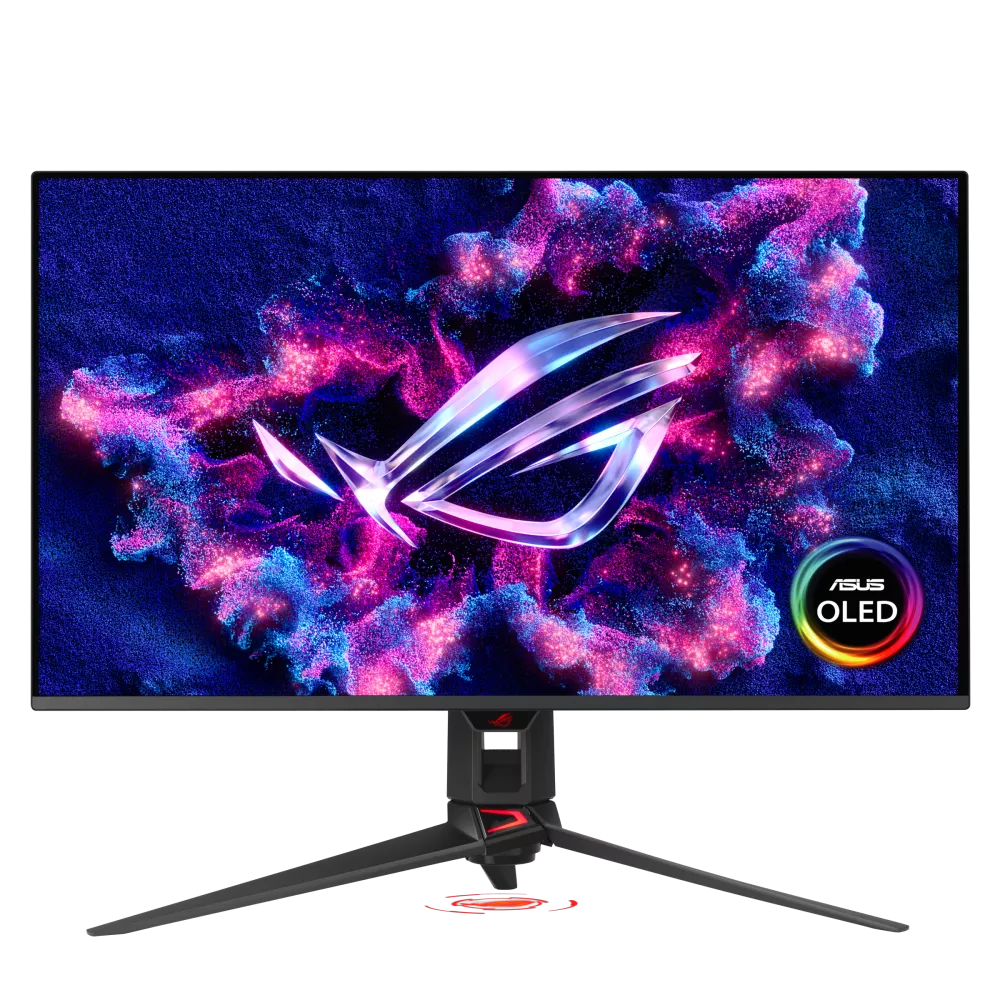
ASUS ROG Swift OLED PG32UCDM Gen3: Specs, Pros & Cons
Check the generation before anything else. ASUS has kept the same model name across more than one version of this monitor, and retail listings for the original and the third-generation model can appear side by side under almost identical titles. This page covers the Gen3, and the changes are not cosmetic: both the panel underneath and the video connection were revised.
In market terms it is a flagship gaming OLED at the top of the ROG Swift range, aimed at people who want high resolution and very high refresh in the same screen rather than choosing between them. What defines this version is a tandem panel built to hold its brightness better in a lit room, and a full-bandwidth video link that carries the signal without resorting to compression.
Beyond the panel, the practical extras are what make it more than a gaming screen. One cable can power and connect a work laptop, and a built-in switch lets a single keyboard and mouse move between that laptop and a desktop, which suits a desk that has to serve both office hours and evenings. A pair of modern HDMI inputs leaves room for a current console alongside the computer.
It makes most sense for a player whose graphics card can push high frame rates at this resolution, or for a console owner who wants one display for everything. For a screen that will spend most of its life showing documents it is the wrong tool at a flagship price. And where first-generation stock is still on sale, the question to ask is simple: are a brighter picture in daylight and a newer video link worth the gap?
Category strengths
Where the ASUS ROG Swift OLED PG32UCDM Gen3 trails the median
- Lower peak brightness ?1,000 nits vs 1,300 nits (median)
- No pivot adjustment ?
How this VS Score was computed
Score 49: each known spec is measured against the median of OLED gaming monitors, 32 inches and up (13 products), then weighted; 50 means level with that median. In classes of six or more, a value beyond the class’s 10th–90th percentile range counts as that limit, so one extreme product cannot set the scale. 68% of the scoreable weight could be used; unknown values, features not applicable to this class and proxies (battery capacity where a rated life exists) add or remove nothing.
| Specification | This product | Cohort median | Score weight | Points moved |
|---|---|---|---|---|
| USB-C | Yes | 77% of the class have it | 0.5 | +25.0 |
| HDR | HDR10 | True Black 400 | 0.5 | −20.0 |
| Peak brightness | 1,000 | 1,300 | 0.8 | −9.6 |
| Built-in speakers | No | 40% of the class have it | 0.2 | −9.6 |
| KVM switch | Yes | 67% of the class have it | 0.02 | +1.0 |
| Pivot | No | 64% of the class have it | 0.02 | −1.0 |
| Screen size | 32 | 32 | 1.2 | +0.0 |
| Resolution | 4K | 4K | 1.2 | +0.0 |
| Panel type | OLED | OLED | 0.8 | +0.0 |
| Color depth | 10 | 10 | 0.3 | +0.0 |
| Refresh rate | 240 | 240 | 1.2 | +0.0 |
| Response time | 0.03 | 0.03 | 0.8 | +0.0 |
| Contrast ratio | 1,500,000 | 1,500,000 | 0.6 | +0.0 |
| DCI-P3 coverage | 99 | 99 | 0.6 | +0.0 |
| Pixel density | 140 | 140 | 0.5 | +0.0 |
| Adaptive sync | G-Sync Compatible | G-Sync Compatible | 0.6 | +0.0 |
| HDMI ports | 2 | 2 | 0.4 | +0.0 |
| DisplayPort inputs | 1 | 1 | 0.4 | +0.0 |
| USB-C power delivery | 90 | 90 | 0.05 | +0.0 |
Not scored: Local dimming (unknown: not scored); Local dimming zones (unknown: not scored); Variable refresh rate (standard for the class (100% have it)); Motion blur reduction (unknown: not scored); Input lag (unknown: not scored); Height adjustment (standard for the class (100% have it)); Tilt (standard for the class (100% have it)); Swivel (standard for the class (100% have it)); USB hub (standard for the class (85% have it)); Headphone output (standard for the class (89% have it)); Webcam (not applicable: only 0% of this class have it); Microphone (not applicable: only 0% of this class have it); Ethernet (not applicable: only 0% of this class have it); Picture-by-picture (unknown: not scored).
Editor’s note
The PG32UCDM Gen3 is ASUS refreshing an already well-regarded 32-inch 4K OLED with the panel improvement that mattered most. The Tandem QD-OLED structure stacks emissive layers to push peak brightness to around 1000 nits, which addresses the main criticism of earlier QD-OLED monitors: they looked spectacular in a dim room and washed out in a bright one.
For gaming the numbers are close to the current ceiling. 4K at 240 Hz with a 0.03 ms response time means essentially no smearing, and DisplayPort 2.1a with UHBR20 carries that signal without leaning on compression. The 90 W USB-C input and built-in KVM are the quality-of-life features that make it plausible as a single monitor for both a desktop and a work laptop.
There are things to weigh carefully. Text rendering on QD-OLED still suffers from the triangular subpixel layout, and while 4K at 31.5 inches (about 140ppi) hides it far better than a 1440p QD-OLED would, anyone doing long document or code work will notice color fringing on thin fonts. There are no speakers, and the stand does not pivot to portrait.
Burn-in remains the honest caveat. ASUS ships a custom heatsink, BlackShield film and OLED Care Pro, and the warranty covers it, but a static taskbar or a permanent IDE sidebar is still a worse diet for this panel than for an IPS one.
Buy it if you want one screen that does high-refresh HDR gaming and console play properly, and your desk is bright enough that the extra brightness earns its money. Skip it if you spend most of your day in spreadsheets and text editors, if you need a portrait rotation, or if you would rather put the money towards a graphics card capable of driving 4K at 240 Hz.
Specifications
Quality bars show where each figure sits between the lowest and highest of the 13 OLED gaming monitors, 32 inches and up this VS Score is measured against.
Picture
Gaming
Ergonomics & design
Connectivity
Features
Sources and verification
Where the specifications come from
- Official product pagerog.asus.com
- Independent testingrtings.com
Verification
- First published
- Specifications last checked
- Sheet completeness
- 34 of 42 specifications verified; the rest show as Unknown and are never estimated or scored
- Page type
- Product specification page — Compiled from the manufacturer’s published specifications and the cited sources; this is not a hands-on test.
- Basis
- Research-based: specifications and editorial text were compiled from the documents listed here and the manufacturer’s published data. We have not tested this unit ourselves; where independent measurements are mentioned they belong to the linked publication.
Monitors with similar specs to the ASUS ROG Swift OLED PG32UCDM Gen3
Ratings & reviews
No reviews yet. Be the first to share your experience.
The bottom line
The ASUS ROG Swift OLED PG32UCDM Gen3 earns a VS Score of 49, below the median of the 13 OLED gaming monitors, 32 inches and up it is measured against (a score of 50 is level with that median).
- Who it’s for
- A player with one of the fastest graphics cards or a current console who wants one screen for high-refresh HDR gaming, and who also plugs a work laptop into the same desk.
- Who should look elsewhere
- People who spend most of the day on documents, code or spreadsheets, and anyone who needs a screen that rotates to portrait.
- The trade-off that matters
- The picture sits near the top of the category for games and films, but the same panel type asks for care with static content, so it suits play better than long workdays.
- The main alternative
- MSI MPG 321URX QD-OLED: a similar-size, same-resolution QD-OLED with the laptop cable and keyboard switching for less money, if a compressed video link does not bother you.
The VS Score is calculated from the weighted specifications above, each measured against the median of comparable OLED gaming monitors, 32 inches and up — a shortlisting guide, not a substitute for your own priorities. See how we score.





