Logitech MX Master 4: Specs, Price, Pros & Cons
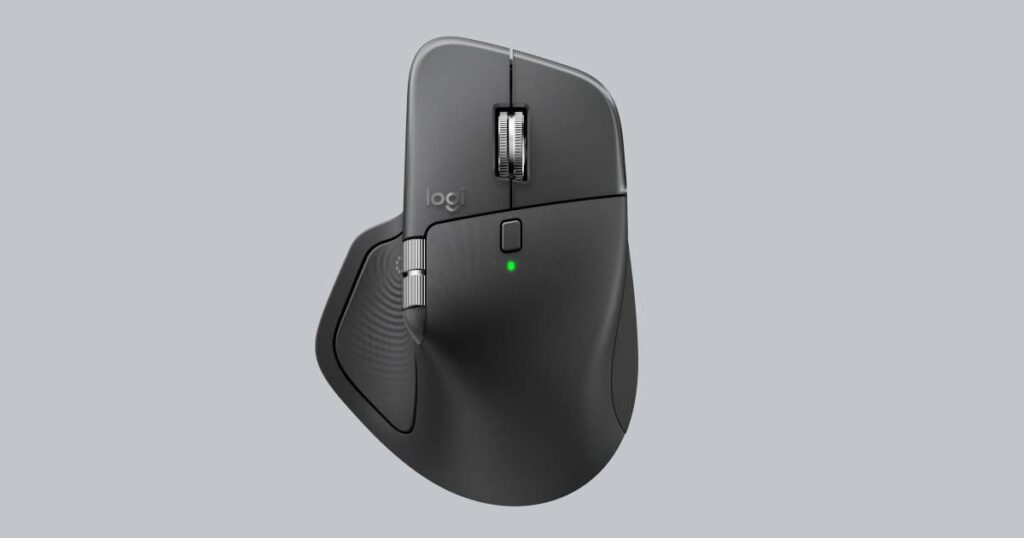
Under the thumb of the MX Master 4 sits a panel that taps back. Logitech calls it the Haptic Sense Panel, and it is the headline change from the MX Master 3S. A press brings up the Actions Ring, a menu of shortcuts that opens at the cursor, and in supported apps the mouse gives a small pulse when an image snaps to a grid or a slider moves. Windows 11 can drive the same feedback through its own haptics settings.
How much that is worth depends on the software you spend the day in. The feedback and the ring are configured in Logi Options+, and third-party programs join in through plugins, so the benefit grows with how much of your work runs in apps Logitech supports. Someone who lives in a browser and a mail client gets a very good mouse with a feature they may stop noticing after a week.
The rest continues the line it replaces. This is Logitech's top productivity mouse, above the smaller MX Anywhere models, shaped for a palm that rests on it for hours and loaded with controls for people who scroll long timelines or wide spreadsheets. Owners of a 3S should judge the upgrade almost entirely on the panel, since the wheel design and the tracking on glass carry over. Logitech also claims a stronger wireless connection than the 3S without saying how it measured it.
Gaming sits outside its brief, and its specification shows it. Every figure where it trails a gaming mouse is a measure that decides a firefight and means little to someone moving windows between two monitors, so read those figures as a statement of purpose.
Category strengths
Where the Logitech MX Master 4 beats the median
- Has horizontal scrolling ?
- Has free-spin scroll wheel ?
- More buttons ?8 vs 6 (median)
- A bigger battery ?650 mAh vs 500 mAh (median)
Where the Logitech MX Master 4 trails the median
- A much lower max sensitivity ?8,000 DPI vs 25,600 DPI (median)
- A much heavier build ?150 g vs 89 g (median)
How this VS Score was computed
Score 50: each known spec is measured against the median of all mice (83 products), then weighted; 50 means level with that median. In classes of six or more, a value beyond the class’s 10th–90th percentile range counts as that limit, so one extreme product cannot set the scale. 55% of the scoreable weight could be used; unknown values, features not applicable to this class and proxies (battery capacity where a rated life exists) add or remove nothing.
| Specification | This product | Cohort median | Score weight | Points moved |
|---|---|---|---|---|
| Max sensitivity | 8,000 | 25,600 | 1 | −34.0 |
| Weight | 150 — capped at the class’s upper range (145) | 89 | 1 | −19.0 |
| USB-C charging | Yes | 68% of the class have it | 0.3 | +15.0 |
| Quick charge | Yes | 55% of the class have it | 0.3 | +15.0 |
| Buttons | 8 | 6 | 0.6 | +10.2 |
| Horizontal scrolling | Yes | 46% of the class have it | 0.2 | +10.0 |
| Free-spin scroll wheel | Yes | 36% of the class have it | 0.2 | +10.0 |
| RGB lighting | No | 48% of the class have it | 0.2 | −9.6 |
| Battery capacity | 650 | 500 | 0.2 | +3.0 |
| Polling rate | 125 — capped at the class’s lower range (1,000) | 1,000 | 0.8 | +0.0 |
| Connection | 2 | 2 | 0.8 | +0.0 |
| Wireless polling rate | 125 — capped at the class’s lower range (1,000) | 1,000 | 0.5 | +0.0 |
Not scored: Max tracking speed (unknown: not scored); Max acceleration (unknown: not scored); Adjustable lift-off distance (unknown: not scored); Grip styles (unknown: not scored); Click latency (unknown: not scored); Switch lifespan (unknown: not scored); Debounce adjustment (unknown: not scored); Battery life (unknown: not scored); Wireless charging (unknown: not scored); Onboard memory (unknown: not scored); Software customization (standard for the class (98% have it)); Adjustable weights (not applicable: only 2% of this class have it).
Editor’s note
The MX Master 4 is a large, heavy mouse at 150 g, and its specification will look alarming next to gaming mice until you understand what it is doing.
Polling is 125 Hz. On a gaming mouse that would be a fault. Here it is the reason the battery lasts a quoted 70 days. An office mouse reports position eight times less often than a 1,000 Hz mouse and 64 times less often than an 8 kHz one, and for pointing at menus and dragging windows nobody can tell. The power saved is enormous.
The features are the ones that matter for work. A Darkfield sensor tracks on glass, where ordinary optical sensors fail. The main wheel free-spins under a hard flick to fly through long documents and ratchets for precision, and a separate thumb wheel handles horizontal scrolling. Quiet Click switches keep it unobtrusive in shared spaces, and it charges quickly over USB-C.
The size is aimed squarely at palm grips and larger hands. At 128.2 x 88.4 x 50.8 mm it is a substantial object, and it is right-handed only.
Custom settings and the haptic features run through Logi Options+, so a computer without the app gets only the basic functions.
I would still put it first for a long working day at one desk, and nowhere near a gaming setup.
Specifications
Quality bars show where each figure sits between the lowest and highest of the 83 mice this VS Score is measured against.
Sensor & tracking
Design & handling
Switches & latency
Connectivity
Battery
Features
Sources and verification
Where the specifications come from
- Official product pagelogitech.com
Verification
- First published
- Specifications last checked
- Sheet completeness
- 22 of 34 specifications verified; the rest show as Unknown and are never estimated or scored
- Page type
- Product specification page — Compiled from the manufacturer’s published specifications and the cited sources; this is not a hands-on test.
- Basis
- Research-based: specifications and editorial text were compiled from the documents listed here and the manufacturer’s published data. We have not tested this unit ourselves; where independent measurements are mentioned they belong to the linked publication.
Where to buy
Prices and availability may change. Check the retailer before buying. We may earn a commission on purchases.
Price history
Mice with similar specs to the Logitech MX Master 4
Ratings & reviews
No reviews yet. Be the first to share your experience.
The bottom line
The Logitech MX Master 4 earns a VS Score of 50, level with the median of the 83 mice it is measured against.
- Who it’s for
- A palm-grip user with large hands who works all day, flies through long documents and wants to charge about every couple of months.
- Who should look elsewhere
- Gamers and left-handers should look elsewhere, and anyone moving between computers without Logitech's software loses the custom features.
- The trade-off that matters
- It is big and heavy by design, which suits a palm resting on it all day and makes quick, precise flicks tiring.
- The main alternative
- Logitech MX Anywhere 3S: the small travel model with a MagSpeed wheel of the same kind, for smaller hands or a laptop bag.
The VS Score is calculated from the weighted specifications above, each measured against the median of comparable mice — a shortlisting guide, not a substitute for your own priorities. See how we score.
Latest Mice